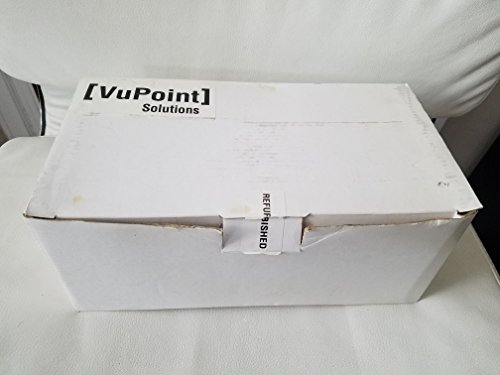
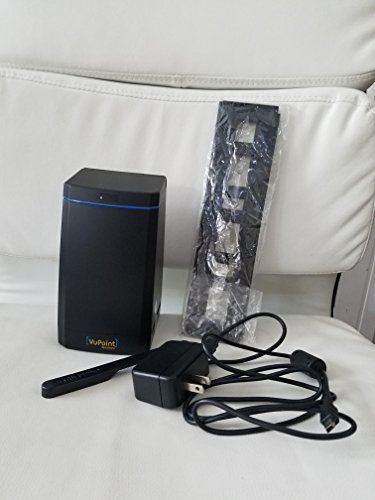
VuPoint Solutions Digital Film and Slide Converter (FC-C520-VP)


Key features
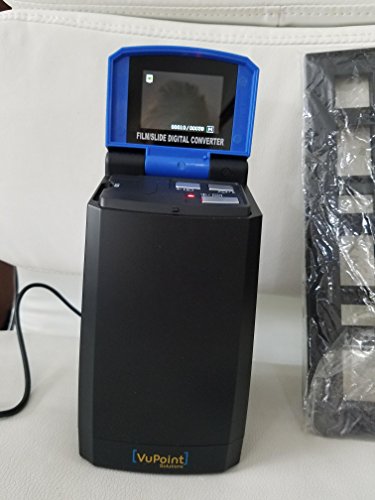
- •Scans and converts 35mm film and slide images to the host PC at the touch of a button; features automatic color balance and exposure controls
- •Converts photos and documents on transparency and film into high-resolution, 5-megapixel digital images on a PC or Mac, at resolutions of 2592 x 1680 DPI
- •Digital images are stored in either JPEG or TIFF format and can be easily viewed on the scanner's built-in 2.4-inch TFT LCD display; computer not required to convert images when stored on a memory card
- •This film/slide converter provides 32MB of built-in flash memory, and also has an SD card slot, which supports memory cards with sizes of up to 8GB, while the built-in USB interface allows it to easily connect to a computer
- •Compatible with Windows XP, Vista, 7 and Mac operating systems; can be connected to a TV (NTSC or PAL) for converting or viewing images (optional)
- •Interpolated Resolution: 2592 x 1680 dpi
VuPoint Solutions Digital Film and Slide Converter (FC-C520-VP)
List Price: $120.69$108.62DEALYou Save: $12.07 (10%)
Free shippingFree Returns – 30 daysFree Order CancellationSecure Payment2–3 Days DeliveryGet It October 25, 2026In Stock (2)No marketing spamNo account requiredFulfilment by FedEx / Amazon / UPS / ShipwirePayPal / Card Buyer Protection
Customer Reviews
Reviews sourced from verified Amazon purchasers3.7
out of 5
Based on 10 reviews
5★
30%
4★
20%
3★
20%
2★
20%
1★
10%
Decent (but not great) slide/negative slide scanner
Chris Higgins•September 5, 2016
Decent but low resolution slide/negative scanner.
Pros:
1. Simple to operate - it's easy for an unskilled user to line up images and press the SCAN button.
2. Uses SC Card - Accepts large SD Cards to allow for TONS of scanning before transferring to computer. This is easy and transparent to the user.
3. Decent (not great) image quality. The scans are cropped (missing the edges), and they are low resolution. Both of these factors make them less than ideal, but the main expectation you should have is that this scanner will gave you "snapshot" quality and nothing more. If you seek a serious film scan, look for a much higher-end scanner.
The main point here is that this slide scanner is decent but not great. If you want to scan a lot of slides or negatives at "decent" quality and call it a day, buy this. If you want archival quality, don't waste your time! Get something far better.
Pros:
1. Simple to operate - it's easy for an unskilled user to line up images and press the SCAN button.
2. Uses SC Card - Accepts large SD Cards to allow for TONS of scanning before transferring to computer. This is easy and transparent to the user.
3. Decent (not great) image quality. The scans are cropped (missing the edges), and they are low resolution. Both of these factors make them less than ideal, but the main expectation you should have is that this scanner will gave you "snapshot" quality and nothing more. If you seek a serious film scan, look for a much higher-end scanner.
The main point here is that this slide scanner is decent but not great. If you want to scan a lot of slides or negatives at "decent" quality and call it a day, buy this. If you want archival quality, don't waste your time! Get something far better.
Fair, but not Great!
Duane Blossom•January 11, 2016
What a great concept; to be able to capture memories from 35mm slides. But, alas not so easily done. I have a McBook/Pro which doesn't appear to be 100% compatible with this machine. It takes 3 or 4 attempts to transfer to the computer. I've been able to retrieve 4 images so far. And one is led to believe that you can transfer 4 slides at a time. What I've found is that you can transfer only one at a time; the other just sit there or disappear ; and for the ones that succeed it takes 2 to 3 attempts; totally frustrating to say the least. At this rate it's hit and miss; so I've given up on a wholesale project; selecting only the very most meaningful slides/photos to import to the computer.
Product was packaged nicely. Came on time
Two Cents•December 9, 2015
Product was packaged nicely. Came on time. You're able to see slides from your 35mm. That's it....yup, no saving to a computer. Product came with the wrong USB cable. No biggie - we got tons of USB cables lying around in the house. When attempting to save Windows 10 will NOT pickup this as a new device. Going to send back and get another brand. Don't need junk cluttering up the home.
If you don't heed my advice at minimum BUY AN SD CARD THAT YOURE WILLING TO FORMAT
If you don't heed my advice at minimum BUY AN SD CARD THAT YOURE WILLING TO FORMAT
Does a Great Job
Brian Lambert•August 8, 2015
This does a fine job of converting your old 35mm slides to JPEGs on your computer. You have to place the slides 3-at-a-time in a tray and then run them through the machine, one at a time. This work is slow and tedious, but the resulting images are very sharp if viewed on a computer screen or other device and they are JPEGs, so they can easily be emailed or burned on a DVD, with overall excellent results.
My advice is to set this up where you can leave it set up and you can go back to it off and on, over the course of the day and run a few slides through at a time. To sit there for hours and do it can get really tedious. If you can afford to do so, hire some little kid to do it for you. Any average ten-year-old can master this machine a ten minutes.
Be sure to buy a large-capacity "sd card", like the kind you use in your digital camera. Simply insert it into this device and you're good to go. It comes with a cord that allows you to send the images directly to a tv screen,so you can create an old-fashioned slide show, but I don't recommend doing it. At that size, the images are not very sharp and the process is much too slow and tedious. Your audience will fall asleep (or slip away in the dark....).
My advice is to set this up where you can leave it set up and you can go back to it off and on, over the course of the day and run a few slides through at a time. To sit there for hours and do it can get really tedious. If you can afford to do so, hire some little kid to do it for you. Any average ten-year-old can master this machine a ten minutes.
Be sure to buy a large-capacity "sd card", like the kind you use in your digital camera. Simply insert it into this device and you're good to go. It comes with a cord that allows you to send the images directly to a tv screen,so you can create an old-fashioned slide show, but I don't recommend doing it. At that size, the images are not very sharp and the process is much too slow and tedious. Your audience will fall asleep (or slip away in the dark....).
VuPoint FCC520VP Digital Film and Slide Converter.
Charles L.•May 13, 2014
While my slides were converted, it was far from an easy task. Not one of those things you can do by rote, assembly line movements. The effort required close attention to details, and the set up of the equipment was not easy. One problem is that the power cord is short, and doesn't allow any movement of the converter away from the electric socket. My primary complaint is that the unit stopped working after about a hundred conversions, and the unit was returnable to Amazon after only 30 days. I did not immediately try to use the converter after I received it, so the 30 days had nearly expired when the unit stopped working. I notified amazon of the problem and requested return instructions, but I never heard back from them.
VuPoint was very helpful in replacing my unit. I returned it to them with a $12.00 shipping and handling fee, and they replaced my unit and returned it to me without delay.
VuPoint was very helpful in replacing my unit. I returned it to them with a $12.00 shipping and handling fee, and they replaced my unit and returned it to me without delay.
Page 1 of 2