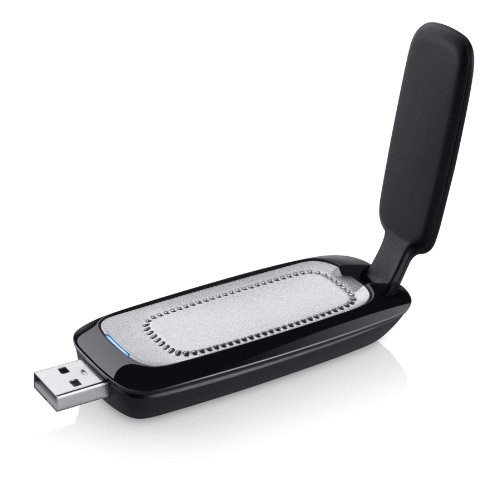
TiVo AN0100 Wireless N Network Adapter (Gray)


Key features
- •Less waiting: download HD movies and TV to your TiVo DVR faster
- •Quicker multi-room viewing: Transfer recordings from one TiVo DVR to another with greater efficiency
- •Faster TiVoToGo: Load shows onto portable devices sooner with quicker transfers to your computer
- •Speedier access to VOD: Get more rapid, reliable and efficient performance of streaming movies, web videos and music
TiVo AN0100 Wireless N Network Adapter (Gray)
List Price: $80.49$72.44DEALYou Save: $8.05 (10%)
Free shippingFree Returns – 30 daysFree Order CancellationSecure Payment2–3 Days DeliveryGet It October 24, 2026In Stock (2)No marketing spamNo account requiredFulfilment by FedEx / Amazon / UPS / ShipwirePayPal / Card Buyer Protection
Customer Reviews
Reviews sourced from verified Amazon purchasers4.0
out of 5
Based on 10 reviews
5★
40%
4★
20%
3★
20%
2★
20%
1★
0%
I was happy with performance out of the box
Bricketh•September 4, 2015
I was happy with performance out of the box, but after a year of use, where it sat idle only used for TiVo updates, it finally started acting up. It would drop the network connection, and then I'd have to restart it to get it to work. After a while that stopped working, and so I c,eared it and completely reconfigured it. That seemed to work enough to get me through another 4 or so months, but it ended up failing again. It wouldn't connect anymore at all, even though it was fully on the Internet... I called TiVo support, and while the product was out of warranty, they did ship me a moca adapter at no charge to replace it (since I had a moca-enabled Roamio in the other room, and this new moca adapter is now on my Premiere, it works even better). I am thankful to TiVo support for their assistance with this, and am much happier with the moca adapter over the wireless N adapter. The wireless G TiVo adapter in my kids' room is still going strong on their Series 3!
A rave and a rant
Watching and waiting•July 4, 2014
The wireless adapter works fine. When I hooked the TiVo to it it got on line quickly with a strong and fast connection, and enabled the updating of my TiVo software. My problem is with hooking the TiVo 2 up to my Cox Cable connection. I went to the Cox store to get the cable cards to put in the TiVo, like I had used successfully in my former house with Comcast Cable for years. It took an hour and the attention of three techs at the store to finally tell me that in order for the cable cards to work, I would have to have extra external boxes, the size of the cable box, hooked up to my system. Not one but two of those, one for each cable card. It was ridiculous, and I suspect probably the wrong information. When I have time I will follow up with TiVo and with Cox at some higher level and try to get a better answer. Meanwhile the TiVo box and the wireless adapter sit unused.
I have always known that the cable companies hate the cards, and provide them only because they are required by law to do so. They also would rather have you rent a DVR from them for $10 a month than use the TiVo, but I bought a lifetime subscription to the TiVo service when I bought the box, and I want to use it. This looks like an active attempt to sabotage the customer's ability to use a TiVo. If anyone reading this has useful information about this issue, I would appreciate seeing it.
I have always known that the cable companies hate the cards, and provide them only because they are required by law to do so. They also would rather have you rent a DVR from them for $10 a month than use the TiVo, but I bought a lifetime subscription to the TiVo service when I bought the box, and I want to use it. This looks like an active attempt to sabotage the customer's ability to use a TiVo. If anyone reading this has useful information about this issue, I would appreciate seeing it.
Your whole network must be perfect .....
J. Cheslin•May 24, 2014
I was using a Wireless-N bridge but the connection would drop while watching programs on different TiVos [I have three in different rooms]. I bought this for the furthest TiVo hoping it would connect faster than the bridge and in fact, it was considerably slower. I went back to the bridge and have since installed a Wireless Repeater. The bottom line [to me] is I prefer to use Cat-5 or Cat-6 direct connections for permanently connected devices like DVRs. There are too many variables required for wireless networks to support these effectively. Of course, I can't wire this house everywhere since it's on a slab and I'm not up to pulling wires through every wall --- so, I live with what I have. I think this device works fine if your network is in the direct line of sight for your router.
Buy two for a bridge if you have a spare router Ethernet port for one--FANTASTIC
Pamela R. Heath•August 23, 2013
I LOVE THESE!!! Note that these are not DVRs. What they are is a way of connecting your TiVo to the internet so you don't need a phone line for downloading information, connecting to your computer or watching internet content. You don't have to buy two, but I'd recommend it if you have a spare port on your wireless router because it is so fast and easy to set up as a bridge (i.e. the Tivo connected adapter talks to the Ethernet-connected adapter and gives you the kind of connection as if the TiVo was plugged directly to your router but without the cable strung between rooms).
The instructions for setting these up in various configurations is on the TiVo website support page. The beauty with a bridge is that there is no need for an N-class router to get N-class speed and no need to configure anything on the computer. The devices have little switches underneath for either client or bridge. Set the first for "client", use the short Ethernet cable to connect to the Ethernet port of your TiVo and plug it into a power outlet. Then set the other wireless adapter to "bridge" and plug its Ethernet into a free wireless router port and plug in its power cord. Next open the adapter up like you see in the picture of the item, and press and hold for several seconds the middle button on the inside until its light blinks. Run and do the same within a minute to the adapter connected to the TiVo. You're done! The connection was fast and seamless! I've been enjoying it ever since.
The instructions for setting these up in various configurations is on the TiVo website support page. The beauty with a bridge is that there is no need for an N-class router to get N-class speed and no need to configure anything on the computer. The devices have little switches underneath for either client or bridge. Set the first for "client", use the short Ethernet cable to connect to the Ethernet port of your TiVo and plug it into a power outlet. Then set the other wireless adapter to "bridge" and plug its Ethernet into a free wireless router port and plug in its power cord. Next open the adapter up like you see in the picture of the item, and press and hold for several seconds the middle button on the inside until its light blinks. Run and do the same within a minute to the adapter connected to the TiVo. You're done! The connection was fast and seamless! I've been enjoying it ever since.
Super fast, but setup can be hit-or-miss
Leilehua Maly•August 7, 2013
I ordered a new TiVo Premiere XL4 with this adapter, and the setup was super easy. I plugged in the cables, pushed the WPS button on my router, then dashed back to the TiVo to hit the corresponding WPS discovery button on the unit and all was good.
I already had a TiVo HD with the old Wireless G USB Adapter, and I noticed that transfering HD content between the two units things was unbearably slow. I bought a second "N" adapter for my old TiVo and expected setup to be just as smooth as with the XL4, but it absolutely was not. It took about 45 minutes of running between my router and TiVo trying to get things to work. Eventually the adapter got into a weird state and I had to grab a pen and push the hardware reset button. After the hardware reset it only took a single attempt to get the system up and running. I don't know what was wrong, but I'm just glad it ended well.
Anyway, once things were up and running I noticed significantly faster transfer speeds. I can almost watch HD content in real time, with just a few stutters. This is pretty impressive considering I have a large house and the two units are litterally at opposite corners of the home (even on different floors). Also, my router is in "A/B/G/N" compatibility mode (for some of my older wireless devices) so it's not even utilizing the maximum "N" potential. SD content streams with absolutely no problem, and the TiVo Desktop Plus software transfer times are roughly 3x faster.
IMPORTANT NOTE: There is a switch underneath the unit allowing you to flip between "Bridge" and "Client (Default)" networking. I imagine in most cases you'll want to select "Client", but both units I received came with that switch set to "Bridge" out-of-the-box. Be sure to check that beforehand to save yourself some potential grief.
In summary, I love this unit and am very happy with what it does. I took off one star simply because of the trouble I had setting up the second adapter.
I already had a TiVo HD with the old Wireless G USB Adapter, and I noticed that transfering HD content between the two units things was unbearably slow. I bought a second "N" adapter for my old TiVo and expected setup to be just as smooth as with the XL4, but it absolutely was not. It took about 45 minutes of running between my router and TiVo trying to get things to work. Eventually the adapter got into a weird state and I had to grab a pen and push the hardware reset button. After the hardware reset it only took a single attempt to get the system up and running. I don't know what was wrong, but I'm just glad it ended well.
Anyway, once things were up and running I noticed significantly faster transfer speeds. I can almost watch HD content in real time, with just a few stutters. This is pretty impressive considering I have a large house and the two units are litterally at opposite corners of the home (even on different floors). Also, my router is in "A/B/G/N" compatibility mode (for some of my older wireless devices) so it's not even utilizing the maximum "N" potential. SD content streams with absolutely no problem, and the TiVo Desktop Plus software transfer times are roughly 3x faster.
IMPORTANT NOTE: There is a switch underneath the unit allowing you to flip between "Bridge" and "Client (Default)" networking. I imagine in most cases you'll want to select "Client", but both units I received came with that switch set to "Bridge" out-of-the-box. Be sure to check that beforehand to save yourself some potential grief.
In summary, I love this unit and am very happy with what it does. I took off one star simply because of the trouble I had setting up the second adapter.
Page 1 of 2