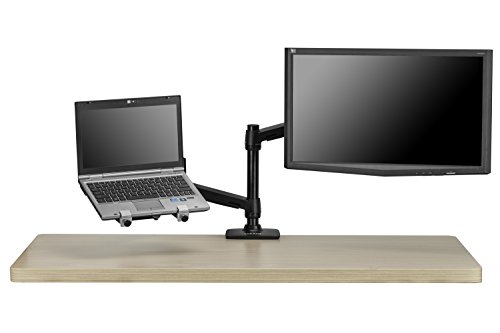
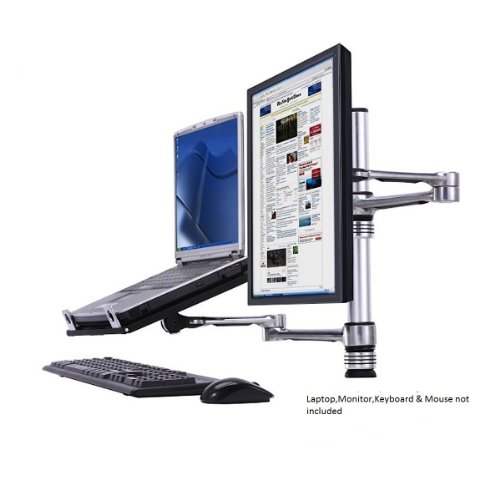
Atdec Visidec VF-AT-NBC Notebook Arm and Monitor Arm Pole Mount Combination
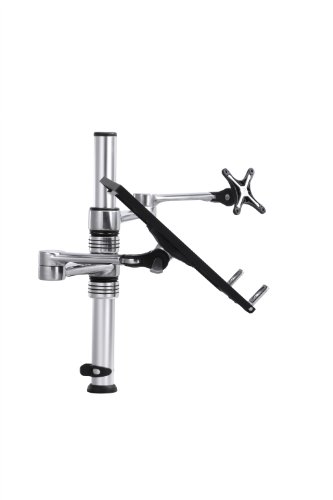
Key features
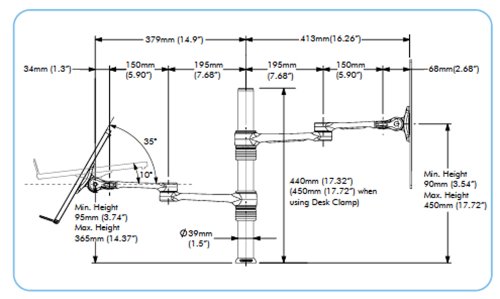
- •Non-Slip Ventilated Notebook Tray Supports Notebooks Up To 18.4", Monitor Arm Supports Up To 17.5lbs
- •Offers A Wide Range Of Movement Via Three Pivot Points
- •Tray Adjustable Tilt: From 15 degrees To 35 degrees Of Forward Tilt, Monitor Adjustable Pan: 90 degrees Left And Right, Total 180 degrees
- •Designed To Be Used In Conjunction With A Separate Keyboard And Mouse
- •Bolt Through And Desk Clamp Mounting Options Included
Atdec Visidec VF-AT-NBC Notebook Arm and Monitor Arm Pole Mount Combination
List Price: $202.23$182.01DEALYou Save: $20.22 (10%)
Free shippingFree Returns – 30 daysFree Order CancellationSecure Payment2–3 Days DeliveryGet It October 25, 2026In Stock (67)No marketing spamNo account requiredFulfilment by FedEx / Amazon / UPS / ShipwirePayPal / Card Buyer Protection
Customer Reviews
Reviews sourced from verified Amazon purchasers4.2
out of 5
Based on 10 reviews
5★
70%
4★
10%
3★
0%
2★
0%
1★
20%
Awesome looking and works great until you put a monitor ...
Ddfl✓ Verified Purchase•December 2, 2017
Awesome looking and works great until you put a monitor on it that is not evenly weighted from left to right. I have a NUC mounted on a VESA extender plate, and after about a year of use, the monitor will not stay level. It basically spins freely. Efforts to contact Atdec have failed. Going to end up replacing four of these. As an option, I'm going to disassemble one to see if I can drill a hole and put a bolt through it to keep it from rotating. Very frustrated.
... heavy gaming laptop( ASUS GW750 ) and needed a sturdy mount for it and a second monitor
Max Haller✓ Verified Purchase•December 7, 2015
I bought this clamp mounting system because I have a heavy gaming laptop( ASUS GW750 ) and needed a sturdy mount for it and a second monitor. The clamp is stable, but the laptop is just too heavy to comfortably be left on the mount as the arm bends down unless it is kept close to the center. That being said it works wonderfully for my 20-inch monitor and I want to buy a mount arm for another monitor and just leave my laptop on the desk. I got mine used for about 80 bucks if I remember right, I think I got a very nice looking and strong mounting system for what I paid for. If I paid the full price I would have wanted it to hold my laptop better, but I think it will hold the majority of laptops quite well.
Back Saver!
RKW442✓ Verified Purchase•November 16, 2015
I have been using an iPad with a Logitech keyboard at my desk at work as my work computer. I've had back issues for a while and several people commented on how hunched over I was with this set up. So, I started thinking of a standup desk option. But I also want to the option to spin everything around my desk and share my monitor with another person. Haven't tried use as a stand up desk yet. So far, I've only used the normal option "“ monitor in front of me, iPad in the middle and keyboard on the desk. I don't hunch over anymore and the iPad that I used to that I used to move the cursor around the screen is just below the monitor. The notebook support isn't designed to tilt as much as I wanted, but it was easy to position the notebook support below the monitor so that I can rest the top of the iPad in the lower part of the monitor. Hopeful the picture will make this all clear. Both arms swing around so I'm sure the sharing option will work.
Well designed and durable laptop/monitor mounting solution
worldblee✓ Verified Purchase•January 4, 2015
I recently purchased my second Visidec notebook/monitor stand after having the first one for a couple years. I currently have one set up with a 24" monitor and heavy 17" laptop while the new one has a 27" Acer monitor and a very heavy 17" ASUS ROG top of the line laptop. The Visidec can handle the weight although as one reviewer noted the laptop can lean a bit to the outside and there's no way to adjust this tilt on the notebook side.
The cable control solutions included with the stand are welcome but they're really only good for light cables IMO. A monitor power cord, for instance, will make the "pop in" fasteners pop right out, at least for me. It's not hard to adjust the notebook and monitor arms up and down but this is not designed to switch between a stand up and sit down desk (also, the pole isn't tall enough to give you enough height differentiation for this use). But all in all, I'm very satisfied with my Visidec mounts and the price is fair for what you get (and how long they hold up).
A few installation tips and notes:
* The package contains a clamp on mount and a bolt mount that requires drilling. If you have a flat side of a table or desk available the clamp works fine--I used that setup for a couple years with no issues. The disadvantage of the clamp is that it means the pole has to be right by the edge of the desk so your monitor may not end up centered on the center of the desk (or wherever you like to sit). Drilling a hole allows you to position the monitor exactly where you want.
* If you're drilling through a desk or table, a 5/16" bit works great for the bolt hole. The instructions say to use a 3/8" bit but this would make a hole that was very roomy. A 5/16" bit will give you a nice tight fight without having to force the bolt through.
* If you have a desk with vertical supports, you'll have plan how you want the arms to work around your vertical obstructions. My desks have vertical extensions so I had to decide if I wanted my notebook to sit behind or in front of the obstructions--not a huge problem for me but it's something to keep in mind.
* The monitor mount works great with VESA mounts. You may freak out when you look at the bolt arms and they're shorter than the bolt holes on your monitor. Take a deep breath and pull the bolt arms out; they have extensions that will reach a full size mount. All the screws you need to attach the monitor are included so don't worry if you no longer have the ones for your monitor.
* To the point above about the notebook arm leaning a bit with a heavy notebook--if you drill your hole a little off vertical (about 1/4" or 3/8" off of vertical at the top of the mounting pole) toward the inside of your desk or table, this will result in the notebook stand being level even with a heavy load. It's not an elegant solution but you might consider it.
The cable control solutions included with the stand are welcome but they're really only good for light cables IMO. A monitor power cord, for instance, will make the "pop in" fasteners pop right out, at least for me. It's not hard to adjust the notebook and monitor arms up and down but this is not designed to switch between a stand up and sit down desk (also, the pole isn't tall enough to give you enough height differentiation for this use). But all in all, I'm very satisfied with my Visidec mounts and the price is fair for what you get (and how long they hold up).
A few installation tips and notes:
* The package contains a clamp on mount and a bolt mount that requires drilling. If you have a flat side of a table or desk available the clamp works fine--I used that setup for a couple years with no issues. The disadvantage of the clamp is that it means the pole has to be right by the edge of the desk so your monitor may not end up centered on the center of the desk (or wherever you like to sit). Drilling a hole allows you to position the monitor exactly where you want.
* If you're drilling through a desk or table, a 5/16" bit works great for the bolt hole. The instructions say to use a 3/8" bit but this would make a hole that was very roomy. A 5/16" bit will give you a nice tight fight without having to force the bolt through.
* If you have a desk with vertical supports, you'll have plan how you want the arms to work around your vertical obstructions. My desks have vertical extensions so I had to decide if I wanted my notebook to sit behind or in front of the obstructions--not a huge problem for me but it's something to keep in mind.
* The monitor mount works great with VESA mounts. You may freak out when you look at the bolt arms and they're shorter than the bolt holes on your monitor. Take a deep breath and pull the bolt arms out; they have extensions that will reach a full size mount. All the screws you need to attach the monitor are included so don't worry if you no longer have the ones for your monitor.
* To the point above about the notebook arm leaning a bit with a heavy notebook--if you drill your hole a little off vertical (about 1/4" or 3/8" off of vertical at the top of the mounting pole) toward the inside of your desk or table, this will result in the notebook stand being level even with a heavy load. It's not an elegant solution but you might consider it.
Impressed
Benjamin N.✓ Verified Purchase•April 24, 2014
OK, so there are obviously a lot of reviews here on this product.
I was a little skeptical about this, even asked some questions above. But overall i'm satisfied with the purchase. Im using a 27" ACER touchscreen and a Lenovo Y580, both are faily substantial peices of equipment. I also used the 'bolt through' method to mount the mount, lol, to my desk.
For the monitor, as mentioned above, its a heavy 27" touchscreen and to be fair, when I use the touchsreen monitor it does jiggle a little, but its certainly usable, and I do use it fairly often.
My laptop is the Y580, fairly heavy as laptops go, and am having the same issue that a lot of others are having, the laptop dips on the right side quite a bit. I was able to straighten it out by putting a stack of 'sticky notes' between the laptop and the tray that holds it. I saw a response (I think from the company) that mentioned the way to adjust this, but I took everything apart and couldn't figure it out. The sticky note stack solution seem to work perfectly. But to give you an idea on how much it take to straighten the laptop out its about that thickness.
The bold through method was very easy, id recommend that as apposed to the clamp on if thats a possibility for you.
Happy to answer any other questions...
I was a little skeptical about this, even asked some questions above. But overall i'm satisfied with the purchase. Im using a 27" ACER touchscreen and a Lenovo Y580, both are faily substantial peices of equipment. I also used the 'bolt through' method to mount the mount, lol, to my desk.
For the monitor, as mentioned above, its a heavy 27" touchscreen and to be fair, when I use the touchsreen monitor it does jiggle a little, but its certainly usable, and I do use it fairly often.
My laptop is the Y580, fairly heavy as laptops go, and am having the same issue that a lot of others are having, the laptop dips on the right side quite a bit. I was able to straighten it out by putting a stack of 'sticky notes' between the laptop and the tray that holds it. I saw a response (I think from the company) that mentioned the way to adjust this, but I took everything apart and couldn't figure it out. The sticky note stack solution seem to work perfectly. But to give you an idea on how much it take to straighten the laptop out its about that thickness.
The bold through method was very easy, id recommend that as apposed to the clamp on if thats a possibility for you.
Happy to answer any other questions...
Page 1 of 2