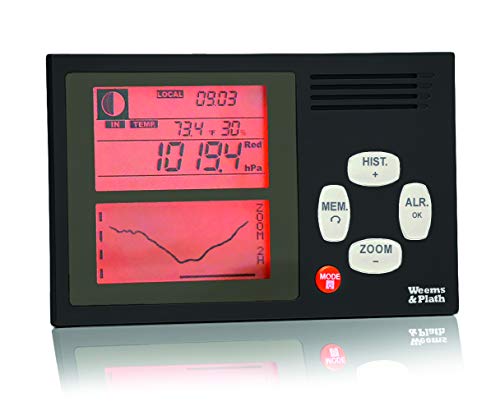
Weems & Plath Electronic Barometer
Key features
- •Accurately detects pressure changes to within +/- 0.5hPa.
- •Alarm signals abrupt changes in pressure & Gale warning system
- •Continuous display of current pressure, time or temperature
- •Backlighting for night use & Can be free standing or bulkhead mounted
- •Operates on 4 AA batteries (included), Also available: 4002A, AC/DC adaptor accessory
BrandWEEMS & PLATH
CategoryCategories
Weems & Plath Electronic Barometer
List Price: $362.30$326.07DEALYou Save: $36.23 (10%)
Free shippingFree Returns – 30 daysFree Order CancellationSecure Payment2–3 Days DeliveryGet It October 26, 2026In Stock (3)No marketing spamNo account requiredFulfilment by FedEx / Amazon / UPS / ShipwirePayPal / Card Buyer Protection
Customer Reviews
Reviews sourced from verified Amazon purchasers3.9
out of 5
Based on 4 reviews
5★
0%
4★
75%
3★
25%
2★
0%
1★
0%
The thing burnt through replaceaable batteries pretty quickly. Does not have much impact on my ...
Seychellois•October 22, 2017
I purchased my copy of this barometer from Starpath several years ago. Bought a small 12VDC dongle from starpath so I could connect directly into my sailboat's 12 VDC house bank. The thing burnt through replaceaable batteries pretty quickly. Does not have much impact on my 330 amp hour AGMs though. ha ha. I agree with previous poster , the unit has a lot of nonsensical functions, Plus its a PIA to set up which you have to do every time you power it up. However you have to remember a few things. First, it was built in France so it's going to be weird, that's just the way it is. Second, the French are crazy good long distance and short handed sailors on tiny boats like the Transat 650. My guess it the designer tried to cram as much utility into this thing as possible in order to minimize the number of instruments one has to carry aboard. I am not saying they were necessarily successful but I think that was the plan. It gives good, accurate barometric pressure and a trending graph and does that quite well. I am happy with my unit. Not crazy about the mounting. I had to macgyver something to get it mounted to a bulkhead but it worked out OK. Also, don't mount it anywhere wet. It is not water friendly.
switch info
PT•September 20, 2017
the side switch is the international symbology for on/off. nuff said
I would only like stronger labeling for the pressure graph for a faster ...
Allezsandro•July 14, 2017
It works. I would only like stronger labeling for the pressure graph for a faster read.
Not perfect, but very useful
Daniel A. Richman•July 18, 2009
The Weems & Plath Electronic Barometer 4002 is an excellent instrument with some design shortcomings. I was very excited about it when I first learned of it but could find little feedback about it from users. Overall, I recommend it as a barometer and barograph--not as a timepiece, moon phase indicator, yacht-race timer or anything else it purports to offer.
GENERAL:
On the unit's left side panel are three jacks and a switch. None of these are addressed in the manual. The top jack is labeled "DC 12/24V 0.5A." The second one down is a USB port. The third is labeled "DC 12V 0.3A." The two-position switch, below those three inputs, serves an unknown function (see photo.)
The unit's manual can be found online, as can helpful supplementary information on setting up the unit. Both are provided by Seattle's Starpath Institute ([...]), which also sells the unit and DC power cords custom-made for it. Starpath is a small, local teaching organization with prices similar to Amazon's. 'Nuff said . . . .
PROS:
-The barometer is extremely accurate. It remained within 0.2 mb of my nearest NOAA station during most of the five-day test period I gave it, and within its stated accuracy of 0.5 mb the entire time.
-In the lower window is displayed a line graph of pressures over your choice of six time periods: the past 2, 4, 6, 12, 24 or 48 hours. The pressure isn't reported numerically in this mode.
You can momentarily change among those time periods. Press "ZOOM/-." The symbol indicating the currently displayed time period -- for example, "4H" in the case of the 4-hour period -- will blink for about 10 seconds. While it's blinking, you can use the "ZOOM/-" and "HIST/+" keys to move among the time periods. When the blinking stops, the display reverts to the originally chosen time period.
You can also change the time period that remains on display. Press "ZOOM/-", then "HIST/+" or "ZOOM/-" to get to the desired time period, then "ALR/OK" to lock in that period.
I'm not sure which time period is most useful to keep on display permanently (i.e., until you change it). I suppose when change is occurring rapidly, you'd want the shorter periods. To track longer-term trends, obviously you'd use the longer periods. As I'm getting to know the unit, I find myself cycling through all six time periods each time I check it.
- You can review the pressures numerically over any time period you choose. To do this, first choose a time period to review, by pressing "ZOOM/-", then "HIST/+" or "ZOOM/-" until the time period you want is displayed, then "ALR/OK."
Then press "HIST/+", and then either "ZOOM/-" to move backwards in time or "HIST/+" to move closer to the current time. The clock halts its time-keeping function, instead indicating at what time each reading was current. The history reports readings taken every three minutes. To stop viewing history, press "ALR/OK".
CONS:
-The LCD screen is hard to read. The pressure readout is large and bold, readable from several feet away. But the graph of pressure changes is not as easy to see without using the backlight. I can't view it easily except close-up and from directly in front of it. Optimally, it would be much bigger and bolder, and viewable from wider angles both horizontally and vertically.
-The label for the time period currently on display -- "2H" for two hours, e.g. -- is tiny and hard to read. It should be large, since the graph and time-period indicator are the unit's main appeal.
-I wish this unit had a separate indicator as to whether the pressure was rising quickly, rising slowly, holding steady, sinking slowly or sinking quickly. (Another digital barometer, sold by Starpath Institute--with which I'm not affiliated--has that feature but lacks graphing.) Obviously change is as important as, or more important than, the exact pressure reading.
-There's no dedicated button that momentarily illuminates the backlighting. Not even the orange button with a light bulb faintly printed on -- the one you'd pretty much expect to illuminate the light. I found that pushing the "ZOOM/-" button causes time-period indicator to blink but produces no other changes aside from turning on the backlighting, so that's the workaround. But that illuminates the screens for about 20 seconds --longer than you might need, and a needless drain on the batteries.
-There's no single button to push to convert hPa (millibars) into inches of mercury or vice-versa. You have to bring up several menus to do that, and the change persists until you go through the procedure again.
-The unit has icons that are meaningless, or whose function is not apparent and not explained. For example, the word "IN" appears under the moon icon, as does the word "TEMP." Nothing I do causes them to go away. But something I did caused what appears to be a crossed-out, grayed-out laundry basket appear on the screen.
-There's an optional alarm warning of a user-selected pressure drop or increase over a user-selected period of hours. There's a gale warning, which the manual says sounds an alarm when there's a drop of 3 mb over a three-hour period. Is that a different alarm, or is it the same as the optional pressure-change alarm? If it's separate, can it be turned on and off? The manual offers no answers.
-I couldn't get the gale warning icon (a sharply heeled sailboat) to stop flashing for several hours after the unit arrived. At one point it stopped flashing and became steady. Then after about an hour it went away. Why?
-American users will find the display of the date -- which appears, alternating with the time, every five seconds -- to be reversed, with the month first, then the date. I have found no way to reverse these.
-It's loaded with useless features, including the moon phase and bizarre, hard-to-understand timers that have nothing to do with barometric pressure. If someone wants a regatta timer, they should buy one dedicated to the task, not built into a weather instrument. Sheesh!
-Setting the unit's clock accurately is almost impossible. I tried entering the proper minute, then pressing "ALR/OK" at the second it changed according to an accurate timepiece. But the unit displays the following minute instead! So you have to set the minute on the unit to one less than the actual minute that is about to begin. And you have to press "ALR/OK" about 10 seconds before the minute actually changes in order to have it change at the correct time on the unit.
- For all that effort, the unit keeps time poorly. Compared to an atomic clock, it gained 17 seconds over five days. It displays only the hour and minute, not seconds. (I judged its accuracy re seconds by noting the moment the minute changed.)
-The thermometer consistently disagrees by about one degree with another electronic thermometer I own. I don't have a way to determine which is correct.
-Apparently you can connect an external sensor (of what?) and a separate temperature sensor. But, yet again, there is nothing about those in the manual.
-The instruction manual is spotty and hard to understand.
-I emailed for help to Weems & Plath and have received no reply.
-Manually setting the pressure is a burden. It can't be done except by resetting the entire unit, which requires removing the batteries. That dumps all the accumulated data. Even then, pressure can't be adjusted by more than 10 mb, which for me didn't bring the pressure up to what my local NOAA station was reporting. I see no solution to this.
ADDENDUM 7/20/09: While reviewing the history of the most recent two-hour period, the unit froze. After it became apparent it would not recover spontaneously, I removed one battery for at most two seconds, then replaced it. All the settings and recorded data were lost, though the manual says they're retained for 30 seconds. Not encouraging.
ADDENDUM 7/12/10: The light won't turn off, and the batteries are running down to empty. It's the second time this has happened. After the first time, I sent it back to W&P. They said it was working perfectly and returned it. Now it's clear to me this barometer could not be relied on at sea. I am now testing the DBX1 electronic barograph from Aquatech Scientific Instruments.
GENERAL:
On the unit's left side panel are three jacks and a switch. None of these are addressed in the manual. The top jack is labeled "DC 12/24V 0.5A." The second one down is a USB port. The third is labeled "DC 12V 0.3A." The two-position switch, below those three inputs, serves an unknown function (see photo.)
The unit's manual can be found online, as can helpful supplementary information on setting up the unit. Both are provided by Seattle's Starpath Institute ([...]), which also sells the unit and DC power cords custom-made for it. Starpath is a small, local teaching organization with prices similar to Amazon's. 'Nuff said . . . .
PROS:
-The barometer is extremely accurate. It remained within 0.2 mb of my nearest NOAA station during most of the five-day test period I gave it, and within its stated accuracy of 0.5 mb the entire time.
-In the lower window is displayed a line graph of pressures over your choice of six time periods: the past 2, 4, 6, 12, 24 or 48 hours. The pressure isn't reported numerically in this mode.
You can momentarily change among those time periods. Press "ZOOM/-." The symbol indicating the currently displayed time period -- for example, "4H" in the case of the 4-hour period -- will blink for about 10 seconds. While it's blinking, you can use the "ZOOM/-" and "HIST/+" keys to move among the time periods. When the blinking stops, the display reverts to the originally chosen time period.
You can also change the time period that remains on display. Press "ZOOM/-", then "HIST/+" or "ZOOM/-" to get to the desired time period, then "ALR/OK" to lock in that period.
I'm not sure which time period is most useful to keep on display permanently (i.e., until you change it). I suppose when change is occurring rapidly, you'd want the shorter periods. To track longer-term trends, obviously you'd use the longer periods. As I'm getting to know the unit, I find myself cycling through all six time periods each time I check it.
- You can review the pressures numerically over any time period you choose. To do this, first choose a time period to review, by pressing "ZOOM/-", then "HIST/+" or "ZOOM/-" until the time period you want is displayed, then "ALR/OK."
Then press "HIST/+", and then either "ZOOM/-" to move backwards in time or "HIST/+" to move closer to the current time. The clock halts its time-keeping function, instead indicating at what time each reading was current. The history reports readings taken every three minutes. To stop viewing history, press "ALR/OK".
CONS:
-The LCD screen is hard to read. The pressure readout is large and bold, readable from several feet away. But the graph of pressure changes is not as easy to see without using the backlight. I can't view it easily except close-up and from directly in front of it. Optimally, it would be much bigger and bolder, and viewable from wider angles both horizontally and vertically.
-The label for the time period currently on display -- "2H" for two hours, e.g. -- is tiny and hard to read. It should be large, since the graph and time-period indicator are the unit's main appeal.
-I wish this unit had a separate indicator as to whether the pressure was rising quickly, rising slowly, holding steady, sinking slowly or sinking quickly. (Another digital barometer, sold by Starpath Institute--with which I'm not affiliated--has that feature but lacks graphing.) Obviously change is as important as, or more important than, the exact pressure reading.
-There's no dedicated button that momentarily illuminates the backlighting. Not even the orange button with a light bulb faintly printed on -- the one you'd pretty much expect to illuminate the light. I found that pushing the "ZOOM/-" button causes time-period indicator to blink but produces no other changes aside from turning on the backlighting, so that's the workaround. But that illuminates the screens for about 20 seconds --longer than you might need, and a needless drain on the batteries.
-There's no single button to push to convert hPa (millibars) into inches of mercury or vice-versa. You have to bring up several menus to do that, and the change persists until you go through the procedure again.
-The unit has icons that are meaningless, or whose function is not apparent and not explained. For example, the word "IN" appears under the moon icon, as does the word "TEMP." Nothing I do causes them to go away. But something I did caused what appears to be a crossed-out, grayed-out laundry basket appear on the screen.
-There's an optional alarm warning of a user-selected pressure drop or increase over a user-selected period of hours. There's a gale warning, which the manual says sounds an alarm when there's a drop of 3 mb over a three-hour period. Is that a different alarm, or is it the same as the optional pressure-change alarm? If it's separate, can it be turned on and off? The manual offers no answers.
-I couldn't get the gale warning icon (a sharply heeled sailboat) to stop flashing for several hours after the unit arrived. At one point it stopped flashing and became steady. Then after about an hour it went away. Why?
-American users will find the display of the date -- which appears, alternating with the time, every five seconds -- to be reversed, with the month first, then the date. I have found no way to reverse these.
-It's loaded with useless features, including the moon phase and bizarre, hard-to-understand timers that have nothing to do with barometric pressure. If someone wants a regatta timer, they should buy one dedicated to the task, not built into a weather instrument. Sheesh!
-Setting the unit's clock accurately is almost impossible. I tried entering the proper minute, then pressing "ALR/OK" at the second it changed according to an accurate timepiece. But the unit displays the following minute instead! So you have to set the minute on the unit to one less than the actual minute that is about to begin. And you have to press "ALR/OK" about 10 seconds before the minute actually changes in order to have it change at the correct time on the unit.
- For all that effort, the unit keeps time poorly. Compared to an atomic clock, it gained 17 seconds over five days. It displays only the hour and minute, not seconds. (I judged its accuracy re seconds by noting the moment the minute changed.)
-The thermometer consistently disagrees by about one degree with another electronic thermometer I own. I don't have a way to determine which is correct.
-Apparently you can connect an external sensor (of what?) and a separate temperature sensor. But, yet again, there is nothing about those in the manual.
-The instruction manual is spotty and hard to understand.
-I emailed for help to Weems & Plath and have received no reply.
-Manually setting the pressure is a burden. It can't be done except by resetting the entire unit, which requires removing the batteries. That dumps all the accumulated data. Even then, pressure can't be adjusted by more than 10 mb, which for me didn't bring the pressure up to what my local NOAA station was reporting. I see no solution to this.
ADDENDUM 7/20/09: While reviewing the history of the most recent two-hour period, the unit froze. After it became apparent it would not recover spontaneously, I removed one battery for at most two seconds, then replaced it. All the settings and recorded data were lost, though the manual says they're retained for 30 seconds. Not encouraging.
ADDENDUM 7/12/10: The light won't turn off, and the batteries are running down to empty. It's the second time this has happened. After the first time, I sent it back to W&P. They said it was working perfectly and returned it. Now it's clear to me this barometer could not be relied on at sea. I am now testing the DBX1 electronic barograph from Aquatech Scientific Instruments.