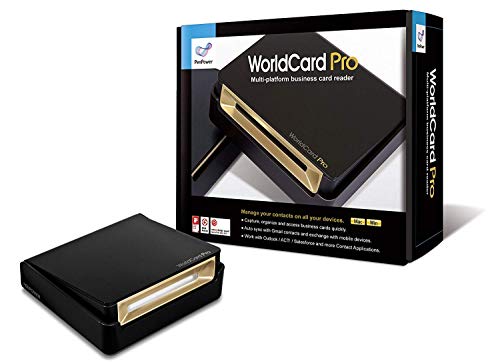
PenPower WorldCard Pro Business Card Scanner (Win/Mac)


Key features
- •Digitize business cards in seconds. Scan, recognize, and save contact information directly turn business cards into accurate digital format in a few seconds.
- •Support multiple languages. Recognize business cards in 24 different languages as well.
- •Data exchange. Export/ import contacts to/ from Address Book and then to iPhone/ iPod, Microsoft Entourage; and export to vCard, CSV. Text, HTML, image file format or import from vCard, CSV, WorldCard File.
- •Manage business cards efficiently. Complete set of management functions provided for editing of information, assigning multiple categories and also adding of individual information and photos.Search by keyword.
- •Quickly and efficiently find your contacts with "Text Search" and "Advanced Search" functions. Clicking on the address or website in card information fields will link to the map and contact's website directly.
PenPower WorldCard Pro Business Card Scanner (Win/Mac)
List Price: $261.83$235.65DEALYou Save: $26.18 (10%)
Free shippingFree Returns – 30 daysFree Order CancellationSecure Payment2–3 Days DeliveryGet It October 25, 2026In Stock (30)No marketing spamNo account requiredFulfilment by FedEx / Amazon / UPS / ShipwirePayPal / Card Buyer Protection
Customer Reviews
Reviews sourced from verified Amazon purchasers3.1
out of 5
Based on 10 reviews
5★
50%
4★
40%
3★
10%
2★
0%
1★
0%
Approx 5% Accuracy Rate !!
Jessi•December 18, 2017
Although it helped a great deal with my organization, (of many business cards) be prepared to review and correct EACH and EVERY card you scan. Let me repeat myself... be prepared to reveiw EACH and EVERY card you scan. There will be a correction on the majority of them.
I would say only 5 out of 100 cards scanned were read with 100% accuracy rate by the scanner. However, for me... still worth the buy for the orgainzation and other things you can do with your contacts once they are entered. Very time consuming.
I would say only 5 out of 100 cards scanned were read with 100% accuracy rate by the scanner. However, for me... still worth the buy for the orgainzation and other things you can do with your contacts once they are entered. Very time consuming.
The look on his face when he opened the box was awesome!.
Susan Torngren•January 7, 2017
The PenPower WorldCard Pro Business Card Scanner was a Christmas gift for my fiance....he loves it! The look on his face when he opened the box was awesome!....when he downloaded the software and started scanning his "hundreds" of business cards it was like watching a kid in a candy store!....he was so thrilled and absolutely loves this scanners abilities and ease of use. Thank you for such a wonderful item....I made some pretty great points with my better half.....he so deserves great tools for his business and this is truly one of them! Many thanks! : ) Susan ~
Perfect.
DianeS9•September 30, 2016
Just what I need for work. Helps me organize the numerous business cards I get. I also love that it copies the business card so I can always take a look at the card in case it copied the wrong number or letter. So far its been perfect.
Best Scanner Ever
Ellen Riener•June 28, 2016
Super nice scanner, worked great scanning a huge stack of business cards. Some entries I had to go in and correct/edit but so much faster (takes seconds) for it to scan/load the information (that's why the 4 stars). The clearer the business card without a lot of crazy graphics the easier the program picks up the information. I noticed that out of the stack I had to scan 7 of them had to be entered manually because the business cards were unusually thick paper. I was lucky our IT guy was here and he loaded the software and hooked up the cables for me. Overall I am very happy with this scanner (and my boss was too). :)
Works pretty well and is on par with today's OCR technology
Brock M•June 8, 2016
I was looking for a business card scanner to help digitize my collection of cards. Based on my background (see below) I knew that there wouldn't be a perfect scanner out there and would have to find the best one available. I have tried a couple out now and this one is the best so far. It was easy to setup, works as it should, and has minimal errors.
Setup:
The setup is pretty easy and straight forward. Install the provided software (and activate it), plug in the scanner, calibrate it, and start scanning your cards. No OCR technology is perfect so it's important to check the data after the scan to make sure it's accurate. I know that's not ideal, but there is not (and may never be) an OCR software that is 100% accurate.
Reason for 5 stars:
It's very rare that I give 5 stars to a product that doesn't work 100% of the time but here is why. I am very familiar with OCR technologies and the software that is available in the marketplace and not a single one will be perfect. It's not the software's fault, it's the images you're scanning. It would have to be the most crystal clear image with no pictures or fancy fonts to get a perfect read. After testing out several different business card readers, this one is by far the best and most reliable. It is the best of the best (even though it's not perfect) which gets it 5 stars (I'm open to comments with your thoughts on giving 5 stars to a product that isn't perfect but is the best of its kind).
My Background:
I am a data consultant and work with large volumes of vendor invoices (up to hundreds of thousands for some projects) and run Optical Character Recognition (OCR) to turn the images into text-searchable documents. I have spent countless days researching the best OCR software available to use at my company, and the best one still isn't all that great. It's not always the software's fault, more often than not, it's poor quality images that are difficult to interpret (O's and zeros often mixed up, etc.). It's crazy to think that in 2016 there still isn't a way to reliably convert images into text-searchable documents, but hey, we do the best we can. Because of this, I knew going into this purchase that unless the business card was white, contained no images, and used a very basic font that it would likely have some errors.
Overall I am very happy with this scanner. So far it is the best one I have tried and does a pretty good job. While I may have to make some corrections every now and then, it still saves me a significant amount of time versus inputting the business card manually. If you are looking to purchase a business card scanner then I would highly recommend this one. There are limitations with all OCR programs, but this one performs the best and will have the fewest errors.
Writing in-depth reviews to help other shoppers has become a hobby of mine. If you found this review helpful please mark as helpful below. Also, feel free to ask any questions and I will answer them for you!
Setup:
The setup is pretty easy and straight forward. Install the provided software (and activate it), plug in the scanner, calibrate it, and start scanning your cards. No OCR technology is perfect so it's important to check the data after the scan to make sure it's accurate. I know that's not ideal, but there is not (and may never be) an OCR software that is 100% accurate.
Reason for 5 stars:
It's very rare that I give 5 stars to a product that doesn't work 100% of the time but here is why. I am very familiar with OCR technologies and the software that is available in the marketplace and not a single one will be perfect. It's not the software's fault, it's the images you're scanning. It would have to be the most crystal clear image with no pictures or fancy fonts to get a perfect read. After testing out several different business card readers, this one is by far the best and most reliable. It is the best of the best (even though it's not perfect) which gets it 5 stars (I'm open to comments with your thoughts on giving 5 stars to a product that isn't perfect but is the best of its kind).
My Background:
I am a data consultant and work with large volumes of vendor invoices (up to hundreds of thousands for some projects) and run Optical Character Recognition (OCR) to turn the images into text-searchable documents. I have spent countless days researching the best OCR software available to use at my company, and the best one still isn't all that great. It's not always the software's fault, more often than not, it's poor quality images that are difficult to interpret (O's and zeros often mixed up, etc.). It's crazy to think that in 2016 there still isn't a way to reliably convert images into text-searchable documents, but hey, we do the best we can. Because of this, I knew going into this purchase that unless the business card was white, contained no images, and used a very basic font that it would likely have some errors.
Overall I am very happy with this scanner. So far it is the best one I have tried and does a pretty good job. While I may have to make some corrections every now and then, it still saves me a significant amount of time versus inputting the business card manually. If you are looking to purchase a business card scanner then I would highly recommend this one. There are limitations with all OCR programs, but this one performs the best and will have the fewest errors.
Writing in-depth reviews to help other shoppers has become a hobby of mine. If you found this review helpful please mark as helpful below. Also, feel free to ask any questions and I will answer them for you!
Page 1 of 2
Related products

Card Scanning Solutions ScanShell 800NR Card Scanner - Hardware only SS800NR
List: $314.12$282.71DEAL