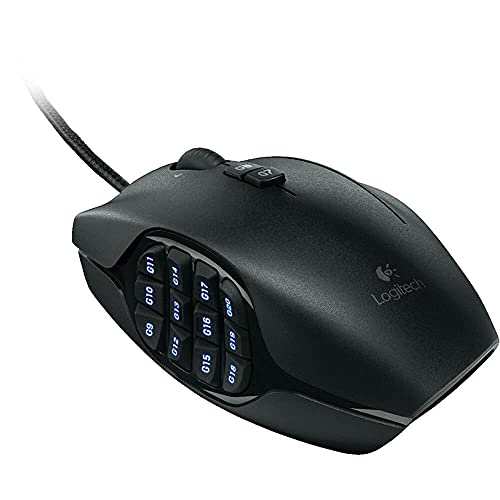
Logitech G600 MMO Gaming Mouse, RGB Backlit, 20 Programmable Buttons, Black



Key features
- •20 MMO tuned buttons: Includes unique 12 button thumb panel designed for quick, no look navigation; The low friction polytetrafluoroethylene feet eliminate friction on nearly any surface for smoother motions, precise cursor movements and improved accuracy
- •G shift ring finger button: Instantly double the number of actions you can perform with every button
- •Built for comfort: Sculpted shape and tuned buttons reduce click fatigue during marathon multiplayer sessions; G8 cycle modes
- •Total personalization: Set it up your way with customizable thumb panel lighting colors, DPI levels or button assignments; Do not use a USB hub
- •Made for PC gaming: Compatible with Windows Vista, Windows 7 and Windows 8
Logitech G600 MMO Gaming Mouse, RGB Backlit, 20 Programmable Buttons, Black
List Price: $421.94$379.75DEALYou Save: $42.19 (10%)
Free shippingFree Returns – 30 daysFree Order CancellationSecure Payment2–3 Days DeliveryGet It October 25, 2026In Stock (2)No marketing spamNo account requiredFulfilment by FedEx / Amazon / UPS / ShipwirePayPal / Card Buyer Protection
Customer Reviews
Reviews sourced from verified Amazon purchasers4.5
out of 5
Based on 10 reviews
5★
80%
4★
20%
3★
0%
2★
0%
1★
0%
Best MMO mouse I've tried, but room to improve
Channon J Wong✓ Verified Purchase•November 15, 2023
I've tried a lot of MMO mice. These are the ones with 12 buttons on the thumb. With all the features of the this mouse together, it's amazing. Individually, some things need improvement. This mouse was released in 2012, it needs an updated design. (please don't make it worse)
The Logitech G Hub software is bloaty. It doesn't let you bind any key to any button, only preset ones.
Build material quality is a 6/10. The rubber thumb buttons don't always work. This review is based on getting a mouse with all buttons working.
Left and right mouse wheel buttons are useful, and not available for all MMO mice.
I use the G-shift button as push to talk because it feels a little awkward to use with the thumb buttons and I just use my left hand to press modifier keys. Would be more useful if it was a real custom modifier key, not just another layer.
I can't go back to a regular mouse after using this. Using this mouse with combinations of shift, ctrl and alt pressed with my left hand, I have access to an insane amount of keys. I wish windows would allow me to use the windows modifier key as well.
12 - normal
12 + shift
12 + ctrl
12 + alt
12 + shift+ctrl
12 + shft+alt
12 + ctrl+alt
12+ shift+ctrl+alt
= 96 binds
I ran into problems with some key combinations that windows uses like ctrl+shift+0 which is a pain to unbind (some obscure language setting) and I think windows rebinds it sometimes.
The Logitech G Hub software is bloaty. It doesn't let you bind any key to any button, only preset ones.
Build material quality is a 6/10. The rubber thumb buttons don't always work. This review is based on getting a mouse with all buttons working.
Left and right mouse wheel buttons are useful, and not available for all MMO mice.
I use the G-shift button as push to talk because it feels a little awkward to use with the thumb buttons and I just use my left hand to press modifier keys. Would be more useful if it was a real custom modifier key, not just another layer.
I can't go back to a regular mouse after using this. Using this mouse with combinations of shift, ctrl and alt pressed with my left hand, I have access to an insane amount of keys. I wish windows would allow me to use the windows modifier key as well.
12 - normal
12 + shift
12 + ctrl
12 + alt
12 + shift+ctrl
12 + shft+alt
12 + ctrl+alt
12+ shift+ctrl+alt
= 96 binds
I ran into problems with some key combinations that windows uses like ctrl+shift+0 which is a pain to unbind (some obscure language setting) and I think windows rebinds it sometimes.
very nice ... comparison to G700
God is a refuge for us (Psalms 62:8)✓ Verified Purchase•October 23, 2023
The seller was Amazon. I paid 50 bucks.
I'm using the G600 on a PC with Windows XP Home SP3; the Logitech Gaming Software (LGS) version is 8.45.88. The firmware version is 77.02.17. I'm also using the G600 on a PC with Windows 10 Technical Preview with LGS version 8.57.145.
Several years ago, I switched from a regular 3-button mouse to a Logitech G700. It took some time to get used to the G700, but I liked the G700 very much. The same is true for the switch from G700 to G600. It takes a little time to get used to it, but it is worth it.
I do like lots of buttons on my mouse for flexibility in Windows applications, browser, and games. I don't always use every button, but I have the flexibility to do so.
WEIGHT
The G700 with battery (can't run it without the battery installed) weighs 6 ounces. The G600 weighs 5 ounces. I've heard some people complain about how heavy the G600 is, but I don't have any problem with the weight, because my prior mouse was a G700 (which is 1 ounce heavier).
SIZE
I measured both mice across the top over the scroll wheel area. The G700 measures 6 centimeters; and the G600 measures 7 cm. Not much difference, considering the G600 adds a third button along the right side.
SCROLL WHEEL
Both mice have a tilt scroll wheel with 3 buttons built in (middle click, left tilt, right tilt). I like the wheel tilt feature very much. The G700 wheel is metallic on its sides and rubber down its middle; you can set it to have smooth rolling or notched. The G600 is all rubber; you can not set it to smooth rolling...it's notched and that's it. I like notched, so it is not a problem for me.
BUTTON CLICKS
When clicked/pressed, the tactical feel of the G9-G20 buttons (the 12 buttons on the left side) on the G600 is like the G11 button on the G700. The G600 G7-G8 buttons sound/feel like the G700 G9 button. The left, middle, right, scroll tilt buttons on the G600 feel the same as their counterparts on the G700. I don't have to press G600 thumb buttons as hard (compared to G700), and the thumb buttons on the G600 take less pressure to actuate.
G-SHIFT BUTTON
I like this button a lot. It doubles the function of all mouse buttons except left click, right click, G8, and the G-Shift button itself. So, the mouse has 20 buttons, and with the G-Shift, the mouse now has 36 button options. Lots of flexibility. Very nice. If you reassign left click to another button, then you can use the left click button with G-Shift (same for right click). For G8, if you use it with the G-Shift, then you can assign 2 functions to it, but you lose the mode switching ability for that profile.
If you don't like the G-Shift button, then you can unassign it, and assign another function to that button. You can always get it back by dragging/dropping the G-Shift function from the commands list/menu to the button.
GRIP
With my fingers together, my hand measures about 8.25 inches around...just below the knuckles, which makes my glove size a medium. The G600 feels very nice to me. Because it glides so easily, and because of its shape, I find that I don't have to grip it as hard as the G700...and that's easier on my hand.
On the thumb side of the mouse...
The mouse glides very well. I can rest my thumb on the side buttons and move the mouse around easily without actually pressing the side buttons. Sometimes I rest my thumb just beyond or below the G9 button. Either works well for me...depends on what I am using the mouse for.
On the ring/pinky finger side of the mouse...
This took a little getting used to, but it works well. Again, two choices: If I am not using the G-shift button, then I can rest my ring finger along the side of the button. However, I do like the G-shift button, so I rest my ring finger on top of it. My pinky finger grips the mouse on the right side. Since the mouse is lighter (compared to the G700), using my pinky finger to grip and help with movement is not a problem for me. The bottom edge of this side of the mouse is rubber, which helps to grip it. Does your pinky hurt? Give it a chance. Your muscles will adjust.
Depends on how you use your mouse...
In games, instead of using the traditional W-S-A-D keys for movement, I use mouse buttons. I started doing this with the G700, using the wheel tilt for left/right, G7 forward, G6 back, G7 plus G5 forward sprint/run. This makes movement much more natural in my opinion. For the G600, it's similar: wheel tilt for left/right, G11 forward, G20 back, G11 plus G10 forward sprint/run. Since I am usually walking or running forward, I am gripping the mouse with my thumb most of the time. When not gripping the mouse in this way, I grip it with the area of my palm below my thumb (or just beyond the G9 button). This works well for me.
TRACKING, POLLING/REPORT RATE, DPI
For the G700, I used 1000 DPI and 250 for report rate. For the G600, I am using the same settings. The mouse tracks very well for me; this is probably a combination of mouse quality and PC configuration.
LOGITECH GAMING SOFTWARE (LGS)
I used this same software for my G700, so it is nothing new to me. Same software, except the screens are different in order to support the additional/different features of the G600. I recommend using "automatic game detection", not on-board memory (this setting is on the home page of the LGS; it's a toggle switch). While using the G700, I switched from Setpoint software to LGS, and I noticed that onboard memory did not work well (it was fine with Setpoint, just not LGS). For the G600, I didn't even try on-board memory, since "automatic game detection" works so well for me.
MODES VS. PROFILES
I use automatic game detection for both G700 and G600, which means unlimited profiles and no hassles with profile switching...works well for me. For the G600, there are also modes. So, for each profile, you can have up to 3 modes...each mode has its own button configuration. Here is how this is helpful to me... Game #1: The main character has two movement options: human, which is used most of the time; mechanized armor/tank, which is used occasionally. The controls are different for each. So, I have 1 profile for the game with 2 modes (one for the human, one for the armor/tank). Press the mode switch button (G8 or whatever you want to set it to) and I can easily switch between human and armor/tank settings. Very nice.
CORD
The G700 cord is rubber coated. The G600 cord is less thick and braided nylon. Both work fine. The G700 cord showed no signs of wear after 3+ years of use. Wait and see with the G600 cord.
LIGHTS
The G700 has 3 lights on the side to indicate what profile you are using (if you use onboard profiles, which I don't). The G600 is a regular Christmas tree...each of the G9-G20 buttons are backlit, and there are lots of color and lighting options. Very nice, if you're into that sort of thing. I'm not, so I disabled the lighting effect.
SOME GOTCHAS
GOTCHA #1
Converting profiles from the G700 to the G600. These 2 mice have different buttons, so don't expect to plug-and-play. Although you can see the G700 profiles in the LGS when the G600 is plugged in, you cannot use the G700 profile successfully unless you remap all keys to the G600. It's easy to do. All of the commands associated with a profile are listed in the commands menu area in LGS (on the left side of the screen). Drag and drop the commands from the commands menu to the G600 buttons and you're ready to go. If you are permanently switching from G700 to G600, remapping existing profiles is fine. If you plan to use both mice interchangeably, then rename the G700 profiles to have G700 in the name, and copy/save-as the G700 profiles to G600 profiles and do the remapping; so, you'll have 2 sets of profiles...one for G700 and one for G600.
GOTCHA #2
Setting or assigning commands to the normal and G-shift buttons. "Normal" means the normal use of a button without using the G-shift button. ALWAYS drag and drop commands from the command menu on the left side of the "customize buttons" screen to the mouse button on the right side of the screen. NEVER use the little drop down menu for each button to edit commands; it's okay to use the drop down menu to unassign, use generic, use default. If you don't follow this advice, then when you attempt to edit commands for G-shift buttons, you will overwrite the normal button assignment with the G-shift assignment. It's just a quirky software thing. To create new commands, use the plus sign next to the word "Commands".
GOTCHA #3
By default, the mouse wheel tilt buttons are assigned to back and forward; and this works great when working with Windows applications and browsers. However, some people like me had the problem of the G600 going back twice or going forward two times when only clicking the tilt button once (i.e., double click problem). In Windows XP, the solution is to go to Control Panel, System, Hardware tab, Device Manager button, expand Mouse, double-click each "HID-compatible mouse" device to find the one that says "on Logitech gaming Virtual Mouse", and then right click that device and disable it. This solved the problem.
keywords: gotchyas, bugs, buggy, problems, answers, fixes, solutions, G700s, hurts, painful
SUMMARY
I am very happy with the G600, but I haven't used it for very long. I hope to get many years of use out of it. I plan to update this review as needed, if I experience problems.
I'm using the G600 on a PC with Windows XP Home SP3; the Logitech Gaming Software (LGS) version is 8.45.88. The firmware version is 77.02.17. I'm also using the G600 on a PC with Windows 10 Technical Preview with LGS version 8.57.145.
Several years ago, I switched from a regular 3-button mouse to a Logitech G700. It took some time to get used to the G700, but I liked the G700 very much. The same is true for the switch from G700 to G600. It takes a little time to get used to it, but it is worth it.
I do like lots of buttons on my mouse for flexibility in Windows applications, browser, and games. I don't always use every button, but I have the flexibility to do so.
WEIGHT
The G700 with battery (can't run it without the battery installed) weighs 6 ounces. The G600 weighs 5 ounces. I've heard some people complain about how heavy the G600 is, but I don't have any problem with the weight, because my prior mouse was a G700 (which is 1 ounce heavier).
SIZE
I measured both mice across the top over the scroll wheel area. The G700 measures 6 centimeters; and the G600 measures 7 cm. Not much difference, considering the G600 adds a third button along the right side.
SCROLL WHEEL
Both mice have a tilt scroll wheel with 3 buttons built in (middle click, left tilt, right tilt). I like the wheel tilt feature very much. The G700 wheel is metallic on its sides and rubber down its middle; you can set it to have smooth rolling or notched. The G600 is all rubber; you can not set it to smooth rolling...it's notched and that's it. I like notched, so it is not a problem for me.
BUTTON CLICKS
When clicked/pressed, the tactical feel of the G9-G20 buttons (the 12 buttons on the left side) on the G600 is like the G11 button on the G700. The G600 G7-G8 buttons sound/feel like the G700 G9 button. The left, middle, right, scroll tilt buttons on the G600 feel the same as their counterparts on the G700. I don't have to press G600 thumb buttons as hard (compared to G700), and the thumb buttons on the G600 take less pressure to actuate.
G-SHIFT BUTTON
I like this button a lot. It doubles the function of all mouse buttons except left click, right click, G8, and the G-Shift button itself. So, the mouse has 20 buttons, and with the G-Shift, the mouse now has 36 button options. Lots of flexibility. Very nice. If you reassign left click to another button, then you can use the left click button with G-Shift (same for right click). For G8, if you use it with the G-Shift, then you can assign 2 functions to it, but you lose the mode switching ability for that profile.
If you don't like the G-Shift button, then you can unassign it, and assign another function to that button. You can always get it back by dragging/dropping the G-Shift function from the commands list/menu to the button.
GRIP
With my fingers together, my hand measures about 8.25 inches around...just below the knuckles, which makes my glove size a medium. The G600 feels very nice to me. Because it glides so easily, and because of its shape, I find that I don't have to grip it as hard as the G700...and that's easier on my hand.
On the thumb side of the mouse...
The mouse glides very well. I can rest my thumb on the side buttons and move the mouse around easily without actually pressing the side buttons. Sometimes I rest my thumb just beyond or below the G9 button. Either works well for me...depends on what I am using the mouse for.
On the ring/pinky finger side of the mouse...
This took a little getting used to, but it works well. Again, two choices: If I am not using the G-shift button, then I can rest my ring finger along the side of the button. However, I do like the G-shift button, so I rest my ring finger on top of it. My pinky finger grips the mouse on the right side. Since the mouse is lighter (compared to the G700), using my pinky finger to grip and help with movement is not a problem for me. The bottom edge of this side of the mouse is rubber, which helps to grip it. Does your pinky hurt? Give it a chance. Your muscles will adjust.
Depends on how you use your mouse...
In games, instead of using the traditional W-S-A-D keys for movement, I use mouse buttons. I started doing this with the G700, using the wheel tilt for left/right, G7 forward, G6 back, G7 plus G5 forward sprint/run. This makes movement much more natural in my opinion. For the G600, it's similar: wheel tilt for left/right, G11 forward, G20 back, G11 plus G10 forward sprint/run. Since I am usually walking or running forward, I am gripping the mouse with my thumb most of the time. When not gripping the mouse in this way, I grip it with the area of my palm below my thumb (or just beyond the G9 button). This works well for me.
TRACKING, POLLING/REPORT RATE, DPI
For the G700, I used 1000 DPI and 250 for report rate. For the G600, I am using the same settings. The mouse tracks very well for me; this is probably a combination of mouse quality and PC configuration.
LOGITECH GAMING SOFTWARE (LGS)
I used this same software for my G700, so it is nothing new to me. Same software, except the screens are different in order to support the additional/different features of the G600. I recommend using "automatic game detection", not on-board memory (this setting is on the home page of the LGS; it's a toggle switch). While using the G700, I switched from Setpoint software to LGS, and I noticed that onboard memory did not work well (it was fine with Setpoint, just not LGS). For the G600, I didn't even try on-board memory, since "automatic game detection" works so well for me.
MODES VS. PROFILES
I use automatic game detection for both G700 and G600, which means unlimited profiles and no hassles with profile switching...works well for me. For the G600, there are also modes. So, for each profile, you can have up to 3 modes...each mode has its own button configuration. Here is how this is helpful to me... Game #1: The main character has two movement options: human, which is used most of the time; mechanized armor/tank, which is used occasionally. The controls are different for each. So, I have 1 profile for the game with 2 modes (one for the human, one for the armor/tank). Press the mode switch button (G8 or whatever you want to set it to) and I can easily switch between human and armor/tank settings. Very nice.
CORD
The G700 cord is rubber coated. The G600 cord is less thick and braided nylon. Both work fine. The G700 cord showed no signs of wear after 3+ years of use. Wait and see with the G600 cord.
LIGHTS
The G700 has 3 lights on the side to indicate what profile you are using (if you use onboard profiles, which I don't). The G600 is a regular Christmas tree...each of the G9-G20 buttons are backlit, and there are lots of color and lighting options. Very nice, if you're into that sort of thing. I'm not, so I disabled the lighting effect.
SOME GOTCHAS
GOTCHA #1
Converting profiles from the G700 to the G600. These 2 mice have different buttons, so don't expect to plug-and-play. Although you can see the G700 profiles in the LGS when the G600 is plugged in, you cannot use the G700 profile successfully unless you remap all keys to the G600. It's easy to do. All of the commands associated with a profile are listed in the commands menu area in LGS (on the left side of the screen). Drag and drop the commands from the commands menu to the G600 buttons and you're ready to go. If you are permanently switching from G700 to G600, remapping existing profiles is fine. If you plan to use both mice interchangeably, then rename the G700 profiles to have G700 in the name, and copy/save-as the G700 profiles to G600 profiles and do the remapping; so, you'll have 2 sets of profiles...one for G700 and one for G600.
GOTCHA #2
Setting or assigning commands to the normal and G-shift buttons. "Normal" means the normal use of a button without using the G-shift button. ALWAYS drag and drop commands from the command menu on the left side of the "customize buttons" screen to the mouse button on the right side of the screen. NEVER use the little drop down menu for each button to edit commands; it's okay to use the drop down menu to unassign, use generic, use default. If you don't follow this advice, then when you attempt to edit commands for G-shift buttons, you will overwrite the normal button assignment with the G-shift assignment. It's just a quirky software thing. To create new commands, use the plus sign next to the word "Commands".
GOTCHA #3
By default, the mouse wheel tilt buttons are assigned to back and forward; and this works great when working with Windows applications and browsers. However, some people like me had the problem of the G600 going back twice or going forward two times when only clicking the tilt button once (i.e., double click problem). In Windows XP, the solution is to go to Control Panel, System, Hardware tab, Device Manager button, expand Mouse, double-click each "HID-compatible mouse" device to find the one that says "on Logitech gaming Virtual Mouse", and then right click that device and disable it. This solved the problem.
keywords: gotchyas, bugs, buggy, problems, answers, fixes, solutions, G700s, hurts, painful
SUMMARY
I am very happy with the G600, but I haven't used it for very long. I hope to get many years of use out of it. I plan to update this review as needed, if I experience problems.
An upgrade over the Naga.
Amazon Customer✓ Verified Purchase•October 8, 2023
I owned a Naga Trinity, which is the latest outing from Razers lineup of MMO mice prior to this. I've also used a Corsair Scimitar (which broke in 2 months).
--Positives
I find the grid button layouts grooves, angles, and guiding bump to be far better then both the Naga and Scimitar for knowing exactly where your finger is. I find it much easier to hit the furthest buttons with this layout more accurately since it requires you displace your thumb the most which can put it off balance.
MMB+Tilts are about the same. I find the tilt clicks on the logitech to be a bit better since the force required makes it harder to misclick. The G-Shift button(which can be re-mapped) doesn't get in the way for me, and if you are the type that normally uses 3 fingers (Index-LMB; Middle-MMB; Ring-RMB) you're already accustomed to gripping with your pinky and you wont have a bad time mis-clicking due to grip. It will take a couple of minutes to retrain your ring finger that its no longer in control of RMB. You will no longer be able to have a finger over MMB but due to the ergonomics it feels the same, if not more comfortable.
The buttons might not be the same mechanical quality of the Razer product, but they actually feel better to press. The actuation pressure of every button on this mouse feels perfectly tuned to allow easy press but make it hard to press when you don't want. They did a fine job at that, and if they ever update the design I hope they keep that same actuation tuning. Gushing over an insignificant feature might sound weird but at the end of the day its all about feel, and I definitely feel even more in control. Not that the other mice were misclick city but it will happen more often if you grip too hard or you hafta lift the mouse at all.
The ergonomics are great, whether you 2 fingered or 3 fingered this mouse feels like you're just laying your hand on a slightly inclined pillow. It feels very comfortable resting your hand on top of the mouse since your fingers are properly spread across the shell. No finger(s) are cramped against the side. I have relatively small hands, and while the mouse is big its still comfortable to lay my hands on.
-----Negatives
This mouse is heavy, and has an outdated laser sensor. While you could use it multipurpose, as you can any other mouse, I would not recommend it. First off, its heavy, like really heavy. When I play an MMO the weight and 800DPI makes it easy to make very deliberate presses on menus or if I decide to commit sacrilege and click on a hotkey button because I didn't have it bound. But for playing a fast paced game it would be terrible, it is way too heavy to make fast movements. Secondly it has a laser sensor, which is hit or miss depending on whether you feel the acceration or not. It is just not as accurate as an optical 3360 (like the one found in the Naga trinity, which while only slightly lighter at least comes with an FPS panel, not that i'd want to see one here). So TLDR: If you get this mouse and also play FPS, do yourself a favor and pick up a Model O or something similar to use when not MMORPG'ing.
You cannot rebind LMB or RMB, some software lets you do this as long as you bind it elsewhere. Since my ring finger normally handles RMB functions on these bulkier mice I wanted to use the g-switch for it, and then bind the original RMB to something different. But nope, couldn't do it. It is a fairly large disappointment on the software side.
---Conclusion
None of the negatives really matter if you are getting this mouse for its intended purpose which is reflected in my final score. This mouse has a better feel, and more function then even the latest Naga. The Corsair Scimitar on the other hand is beaten by both, worst implementation and even software.
The only Naga you can buy from Razer lacks easy to purchase mouse skates, so given the age of the G600 you can easily get 3rd party skates, or you can even buy them direct from Logitech which is not something Razer allows you to do. This is important if you have a hard pad, and it is also important if you ever need to tear down the mouse to clean out the switches if they start double clicking. This mouse makes it easier to maintain should you run into problems in the future or should your skates wear down you dont have to be at the mercy of your warranty or cutting out your own skates.
If I have durability issues in the future that cannot be fixed I will update.
--Positives
I find the grid button layouts grooves, angles, and guiding bump to be far better then both the Naga and Scimitar for knowing exactly where your finger is. I find it much easier to hit the furthest buttons with this layout more accurately since it requires you displace your thumb the most which can put it off balance.
MMB+Tilts are about the same. I find the tilt clicks on the logitech to be a bit better since the force required makes it harder to misclick. The G-Shift button(which can be re-mapped) doesn't get in the way for me, and if you are the type that normally uses 3 fingers (Index-LMB; Middle-MMB; Ring-RMB) you're already accustomed to gripping with your pinky and you wont have a bad time mis-clicking due to grip. It will take a couple of minutes to retrain your ring finger that its no longer in control of RMB. You will no longer be able to have a finger over MMB but due to the ergonomics it feels the same, if not more comfortable.
The buttons might not be the same mechanical quality of the Razer product, but they actually feel better to press. The actuation pressure of every button on this mouse feels perfectly tuned to allow easy press but make it hard to press when you don't want. They did a fine job at that, and if they ever update the design I hope they keep that same actuation tuning. Gushing over an insignificant feature might sound weird but at the end of the day its all about feel, and I definitely feel even more in control. Not that the other mice were misclick city but it will happen more often if you grip too hard or you hafta lift the mouse at all.
The ergonomics are great, whether you 2 fingered or 3 fingered this mouse feels like you're just laying your hand on a slightly inclined pillow. It feels very comfortable resting your hand on top of the mouse since your fingers are properly spread across the shell. No finger(s) are cramped against the side. I have relatively small hands, and while the mouse is big its still comfortable to lay my hands on.
-----Negatives
This mouse is heavy, and has an outdated laser sensor. While you could use it multipurpose, as you can any other mouse, I would not recommend it. First off, its heavy, like really heavy. When I play an MMO the weight and 800DPI makes it easy to make very deliberate presses on menus or if I decide to commit sacrilege and click on a hotkey button because I didn't have it bound. But for playing a fast paced game it would be terrible, it is way too heavy to make fast movements. Secondly it has a laser sensor, which is hit or miss depending on whether you feel the acceration or not. It is just not as accurate as an optical 3360 (like the one found in the Naga trinity, which while only slightly lighter at least comes with an FPS panel, not that i'd want to see one here). So TLDR: If you get this mouse and also play FPS, do yourself a favor and pick up a Model O or something similar to use when not MMORPG'ing.
You cannot rebind LMB or RMB, some software lets you do this as long as you bind it elsewhere. Since my ring finger normally handles RMB functions on these bulkier mice I wanted to use the g-switch for it, and then bind the original RMB to something different. But nope, couldn't do it. It is a fairly large disappointment on the software side.
---Conclusion
None of the negatives really matter if you are getting this mouse for its intended purpose which is reflected in my final score. This mouse has a better feel, and more function then even the latest Naga. The Corsair Scimitar on the other hand is beaten by both, worst implementation and even software.
The only Naga you can buy from Razer lacks easy to purchase mouse skates, so given the age of the G600 you can easily get 3rd party skates, or you can even buy them direct from Logitech which is not something Razer allows you to do. This is important if you have a hard pad, and it is also important if you ever need to tear down the mouse to clean out the switches if they start double clicking. This mouse makes it easier to maintain should you run into problems in the future or should your skates wear down you dont have to be at the mercy of your warranty or cutting out your own skates.
If I have durability issues in the future that cannot be fixed I will update.
This might actually be the best mouse on the market.
JDT✓ Verified Purchase•September 7, 2023
I don't mean the best MMO mouse for gaming, either. I mean this is, without a shadow of a doubt, the best mouse I have ever used for anything. The Logitech drivers are Logitech drivers, so pretty hit or miss. But the functionality is good and the buttons are easy to use without feeling intrusive. The mouse is a good solid weight without being too heavy and the dpi presets and customizeable side buttons make this one of the best peripherals I have ever used.
Best Mouse for any MMO
Centrifikal✓ Verified Purchase•September 1, 2023
I have used a G600 for many years now. You are not going to find a better mouse for binding macros, buttons and or attacks. I have used it for playing World of Warcraft. I can bind 36 different buttons and thats without even using the G shift button. This mouse is very durable and lasts a long time. The one I had lasted over 6 years and the only reason I bought a new one was for my son. I tried razor's version of this mouse and two different mice broke. The left-click button sheared off. So I totally recommend the G600.
Page 1 of 2