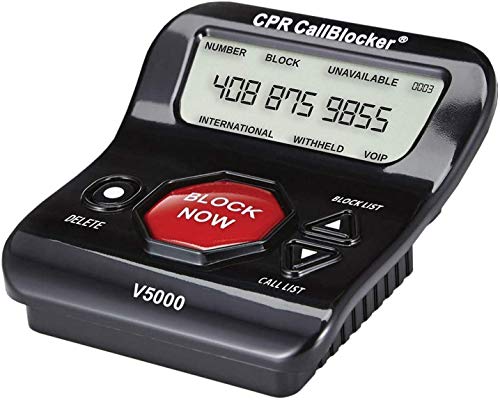
T-lock Incoming PRO Call Blocker with LCD Display and Blacklist



Key features
- •Blocks up to 1,500 incoming / outgoing telephone, fax numbers (up to 16 digits each), up to 10 area codes or prefixes.
- •Stores up to 100 telephone numbers as incoming calls, and 50 as outgoing calls. Line powered (no external power or batteries required).
- •Password protected Blacklist (prevents erasing blocked numbers).
BrandPro Call Block
CategoryCaller ID Displays
T-lock Incoming PRO Call Blocker with LCD Display and Blacklist
List Price: $88.42$79.58DEALYou Save: $8.84 (10%)
Free shippingFree Returns – 30 daysFree Order CancellationSecure Payment2–3 Days DeliveryGet It October 24, 2026In Stock (1)No marketing spamNo account requiredFulfilment by FedEx / Amazon / UPS / ShipwirePayPal / Card Buyer Protection
Customer Reviews
Reviews sourced from verified Amazon purchasers3.0
out of 5
Based on 10 reviews
5★
50%
4★
40%
3★
10%
2★
0%
1★
0%
recommended
Uncle Charlie•August 26, 2017
I have had this call blocker since 2013. It works....I got unwanted calls every day. It saves the number and keeps it from calling thru tho on some numbers I may get a one-ring, then it cuts off. It is very handy NOT to need batteries- and has worked well connected to my phone line all this time. Yes, the instructions are foggy....so I thank those users who added help comments to their review. NOTE: I do not use a fax machine or other high-tech addons to my phone. I have a main station with four satellite handsets, and the blocker is hooked to the main station. SO I do not know how it will work with your fax or other machines. But, it has been great for us.
works well once you get it set up
Irish Girl•March 24, 2013
As everyone else has said, the instructions that come with it are not detailed enough to use. I went online and found detailed instructions from the website of the manufacturer. I have since been in touch with the seller, and forwarded the detailed instructions on to them. (They just sell the product, and had no idea the instructions in the box were so poor)If you contact the seller he will provide you with better instructions. First thing you must know is that you need a CORDED phone to do some of the set up. If not, then you are supposed to be able to block a number after it comes in, but if you want to block any numbers before hand, you need a corded phone so you can use it's keypad.Once you get it set up to works great. When a blocked number calls, there is one ring and then nothing. You can scroll through numbers when you arrive home and see who called, and block a number from that list if you wish. No names appear on the box, and the numbers all run together (2234567786)so you have to get used to that.
It blocks calls
Orygun•February 17, 2013
I was hesitant to purchase this product based on other reviews. Not sure if they had older models or what but I have none of the problems they experienced. I have a Panasonic caller ID cordless phone base station with answering machine and 4 remote cordless phones; our phone service is through Comcast (cable, but phone is hooked up to the cable modem with traditional phone line).
Instructions are not great as others have mentioned, but this thing is very easy to operate without the instructions, and all the buttons are labeled so that the instructions are not necessary. 4 ways to block a call: 1) when the call in incoming press BLACKLIST (SAVE...SUCCEEDED will appear on the screen) 2) at the end of the day if you have received calls "NEW" will be flashing up in the left corner. Scroll through the list using the up/down scroll arrow buttons lower right. At each number you dont recognize, press BLACKLIST. 3)as another reviewer mentioned, you can call a number, hang up as soon as it rings, then press BLACKLIST (press the OUT button if the number is no longer on the screen and scroll if you have called more that one number). 4) This is the sweetest option since the unit is attached to my base station in a second floor office: if you are in another room at a remote phone and you can not get to the T-lock unit on the second floor in time, answer the phone, press *, and hang up within 3 seconds. The number is blocked. I tried it a couple times with my own cell phone to make sure it works. By the way, caller ID still shows up on all the remote phones. Some have complained about removing a number from the list... I do not understand this. Press BLACKLIST, scroll until you find the number, press REMOVE, and the screen says "del--" and the number is removed. To return to the main screen press SET, or it will return to the main screen after 10 seconds on its own. There really are no other insructions needed other than these (you have to set the date/time, etc but if you have ever done that on an electronic device its fairly intuitive).
This unit also suppresses the first ring! Again, maybe the other reviews were of an older model, but this one does not allow the phone to ring at all if it is a blacklisted number. No need to turn some phones off, as other reviewers have mentioned, to cut down on the annoyance factor.
I called my cable company to block calls that have no number provided due to the caller blocking their ID. It seems most phone companies will do this.
We were getting phone calls all hours of every day despite being on the national no call list. The no call list seemed to work up until about 2 years ago, then the phone calls started creeping back in. I checked to make sure we were still on it and we are. We started answering the calls to tell them not to call back, but a lot of them are automated calls. I tried using the telephone company to block call, but they only allow 15 numbers, and most of the companies that call have multiple numbers. I used up all 15 numbers with just 2 days worth of phone calls. If you are having these problems, this unit solves them!
Update 2/20/13: I went back and read all the one star reviews for this product since this is one of the best purchases I have made ever - interesting that they all sound like they were written by the same person, and seemed to be written soon after a good rating was given. This is only the fourth review I have every bothered to write, and I have been purchasing my home and business items on Amazon for 10 yrs.
Update 3/28/13: We have gone from multiple sales calls per day to almost none. Still get a few calls per week with the caller ID listing the number as --0-- that ring through... usually 3 rings then they are cut off by the call blocker. Not sure why the callblocker or phone company are unable to block these. Also, the caller ID does not always show up on the remote phone units. That makes it hard to block calls using the * button from the remote unit - not sure if it is friends/family calling. My routine now is to check the call blocker every few days for any unknown calls and blacklist them
Instructions are not great as others have mentioned, but this thing is very easy to operate without the instructions, and all the buttons are labeled so that the instructions are not necessary. 4 ways to block a call: 1) when the call in incoming press BLACKLIST (SAVE...SUCCEEDED will appear on the screen) 2) at the end of the day if you have received calls "NEW" will be flashing up in the left corner. Scroll through the list using the up/down scroll arrow buttons lower right. At each number you dont recognize, press BLACKLIST. 3)as another reviewer mentioned, you can call a number, hang up as soon as it rings, then press BLACKLIST (press the OUT button if the number is no longer on the screen and scroll if you have called more that one number). 4) This is the sweetest option since the unit is attached to my base station in a second floor office: if you are in another room at a remote phone and you can not get to the T-lock unit on the second floor in time, answer the phone, press *, and hang up within 3 seconds. The number is blocked. I tried it a couple times with my own cell phone to make sure it works. By the way, caller ID still shows up on all the remote phones. Some have complained about removing a number from the list... I do not understand this. Press BLACKLIST, scroll until you find the number, press REMOVE, and the screen says "del--" and the number is removed. To return to the main screen press SET, or it will return to the main screen after 10 seconds on its own. There really are no other insructions needed other than these (you have to set the date/time, etc but if you have ever done that on an electronic device its fairly intuitive).
This unit also suppresses the first ring! Again, maybe the other reviews were of an older model, but this one does not allow the phone to ring at all if it is a blacklisted number. No need to turn some phones off, as other reviewers have mentioned, to cut down on the annoyance factor.
I called my cable company to block calls that have no number provided due to the caller blocking their ID. It seems most phone companies will do this.
We were getting phone calls all hours of every day despite being on the national no call list. The no call list seemed to work up until about 2 years ago, then the phone calls started creeping back in. I checked to make sure we were still on it and we are. We started answering the calls to tell them not to call back, but a lot of them are automated calls. I tried using the telephone company to block call, but they only allow 15 numbers, and most of the companies that call have multiple numbers. I used up all 15 numbers with just 2 days worth of phone calls. If you are having these problems, this unit solves them!
Update 2/20/13: I went back and read all the one star reviews for this product since this is one of the best purchases I have made ever - interesting that they all sound like they were written by the same person, and seemed to be written soon after a good rating was given. This is only the fourth review I have every bothered to write, and I have been purchasing my home and business items on Amazon for 10 yrs.
Update 3/28/13: We have gone from multiple sales calls per day to almost none. Still get a few calls per week with the caller ID listing the number as --0-- that ring through... usually 3 rings then they are cut off by the call blocker. Not sure why the callblocker or phone company are unable to block these. Also, the caller ID does not always show up on the remote phone units. That makes it hard to block calls using the * button from the remote unit - not sure if it is friends/family calling. My routine now is to check the call blocker every few days for any unknown calls and blacklist them
lack of information
dwr•November 7, 2012
I think this device should get a 5 star rating because the device works really well on my phone.The problem is with the instruction booklet.The way to delete blocked numbers leaves alot to be desired.If you go to the list of numbers and hit remove it only takes the number out of the display.The number stays in the memory and will get blocked the next time that number calls.If you go to the blacklist button and it brings the numbers up you can scroll to the number and hit remove and del- save will be displayed, now the number is removed from the blacklist.I hope this may help someone who may experiance the same issue.Thanks to another amazon user for helping figure this out.There is a web site with somewhat better instruction and faqs.It [...].Hope this is helpful.
Works good but required parallel connection
R.B.•October 14, 2012
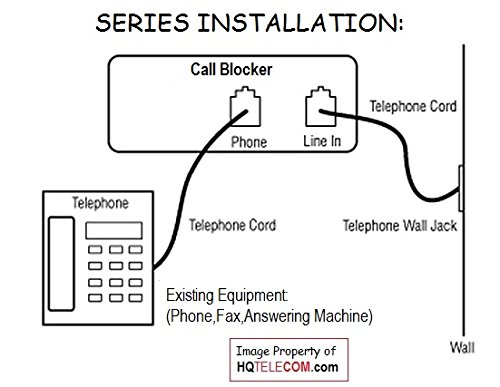
I have Verizon analog service and the blocker works well when hooked up in parallel. (as HQ Telecom recommends)
This way the phone will only ring once and unwanted callers are cut off. Then I tested connecting my corded phone directly to the port
on back of blocker.(series connection) The caller id did pass through to my phone and the first ring was suppressed. However when I
picked up the receiver to make a call the blocker would not release the line and give a dial tone. I called HQ Telecom about the issue.
They said they heard this before and the problem was my phone service and not a defective unit. Perhaps the phone port works better
with internet phone services. Overall I am satisfied with the blocker, but I believe for $72.95 it should have been fully functional.
This way the phone will only ring once and unwanted callers are cut off. Then I tested connecting my corded phone directly to the port
on back of blocker.(series connection) The caller id did pass through to my phone and the first ring was suppressed. However when I
picked up the receiver to make a call the blocker would not release the line and give a dial tone. I called HQ Telecom about the issue.
They said they heard this before and the problem was my phone service and not a defective unit. Perhaps the phone port works better
with internet phone services. Overall I am satisfied with the blocker, but I believe for $72.95 it should have been fully functional.
Page 1 of 2