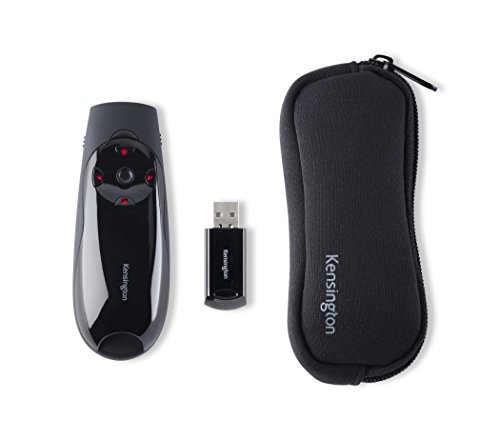
Kensington Expert Wireless Presenter with Red Laser Pointer and Cursor Control (K72425AM)




Key features
- •Red laser pointer
- •Two modes - switch instantly from presenter mode to cursor control mode
- •Controls keynote and PowerPoint
- •Compatible with windows 10, 8.1, 8, 7, Mac OS X
Kensington Expert Wireless Presenter with Red Laser Pointer and Cursor Control (K72425AM)
List Price: $80.49$72.44DEALYou Save: $8.05 (10%)
Free shippingFree Returns – 30 daysFree Order CancellationSecure Payment2–3 Days DeliveryGet It October 25, 2026In Stock (11)No marketing spamNo account requiredFulfilment by FedEx / Amazon / UPS / ShipwirePayPal / Card Buyer Protection
Customer Reviews
Reviews sourced from verified Amazon purchasers4.1
out of 5
Based on 10 reviews
5★
30%
4★
50%
3★
10%
2★
0%
1★
10%
Lives up to advertising
Paul Puckett✓ Verified Purchase•April 12, 2017
Performs as advertised. It took me longer to take it out of the box and put in the batteries than it did to set it up on my Windows 10 PC. Laser pointer is easy to see even under full lighting, controls are intuitive and require no training, and it fits perfectly in your hand. Highly recommend!
A good presenter but!
Tim✓ Verified Purchase•March 13, 2017
I have an earlier model of this presenter I really like. The battery leaked and I thought it was ruined. I took the battery our and flushed it with water. At first only the laser worked but then it came back strong. I bought this one to replace it but preferred to use the old one as it was working again. The mouse feature on the new one does not function well as the pointer is hard to place. It will be my spare. The other features work well and having the micro chip means you can operate from the chip or the computer.
Great for PowerPoint - Not Great for Cursor Control - 1 Year Life
This One Guy✓ Verified Purchase•November 2, 2016
Kensington Expert Wireless Presenter with Green Laser Pointer, Cursor Control, and 4GB Memory (K72427AM)
---SUMMARY---
-I am a high school teacher who uses PowerPoints presentations daily. (The curse of no textbooks.) I bought it in August of 2015, and it lasted until October of 2016. It is a great for changing slides of a presentation. It has a bright green laser essential for lit rooms. However the cursor joystick broke quickly, and the cursor function is aggravatingly difficult to use.
---PROS---
PowerPoint Navigation
-The remote navigates well through PowerPoint slides. It worked as expected for this use.
Green Laser
-The green laser is great for a lit room. The laser will drain the battery after frequent use, so it is necessary to have extra batteries on hand. If you find that the laser is dim, try changing the batteries.
USB Stick
-Plug in the USB stick and it will be ready for use. No hassle set up. The micro SD card functioned as a regular memory stick.
---CONS---
Range
I have found that it does not give 150 ft range as advertised, even with a new batteries. I find that it struggles at 25 to 30 ft.
Mouse and Cursor Function
-The mouse joystick is junk. The plastic joystick used for cursor control broke within a month of occasional use of that function. When it was working, the cursor moves so slowly and sluggishly that it was practically usable. Additionally, the joystick has to be pressed as a right-click command. The cursor migrates off target when trying to press it, so it is difficult to stay on the item you are trying to click. Do not anticipate using this option.
Buttons
-The buttons worked well, but they had a tendency to get caught underneath the housing about midlife. This happened within the beginning of the second semester of use.
---SUMMARY---
-I am a high school teacher who uses PowerPoints presentations daily. (The curse of no textbooks.) I bought it in August of 2015, and it lasted until October of 2016. It is a great for changing slides of a presentation. It has a bright green laser essential for lit rooms. However the cursor joystick broke quickly, and the cursor function is aggravatingly difficult to use.
---PROS---
PowerPoint Navigation
-The remote navigates well through PowerPoint slides. It worked as expected for this use.
Green Laser
-The green laser is great for a lit room. The laser will drain the battery after frequent use, so it is necessary to have extra batteries on hand. If you find that the laser is dim, try changing the batteries.
USB Stick
-Plug in the USB stick and it will be ready for use. No hassle set up. The micro SD card functioned as a regular memory stick.
---CONS---
Range
I have found that it does not give 150 ft range as advertised, even with a new batteries. I find that it struggles at 25 to 30 ft.
Mouse and Cursor Function
-The mouse joystick is junk. The plastic joystick used for cursor control broke within a month of occasional use of that function. When it was working, the cursor moves so slowly and sluggishly that it was practically usable. Additionally, the joystick has to be pressed as a right-click command. The cursor migrates off target when trying to press it, so it is difficult to stay on the item you are trying to click. Do not anticipate using this option.
Buttons
-The buttons worked well, but they had a tendency to get caught underneath the housing about midlife. This happened within the beginning of the second semester of use.
Many presenters out there, pick this one.
Tony✓ Verified Purchase•June 14, 2015
Ordinary presenters are limited to working with Powerpoint. I needed a presenter with mouse control for more flexibility. The Kensington product is the third mouse/presenter I purchased and the only one I can recommend.
First tried "OkBuyNow Wireless 2.4GHz Professional Wireless Presenter." Flimsy unit which worked for five minutes and then died. Returned as defective. Next, purchased the Keyspan by Tripp Lite PR-PRO3 which had many good reviews. It worked well, but, in my hands, needed line-of-site between USB transmitter and the unit for mouse response. It's sitting in my desk drawer.
The Kensington product proved itself with first use. It has good range even with laptop and transmitted behind podium. For mouse control, I find the joystick takes a little practice because it is loose to the touch. The mouse function is no substitute for an ordinary wired mouse, but works well to launch a video, etc., when giving a seminar. The microSD card is very convenient. One minor quirk is that the laser pointer works in presenter mode but not mouse mode.
First tried "OkBuyNow Wireless 2.4GHz Professional Wireless Presenter." Flimsy unit which worked for five minutes and then died. Returned as defective. Next, purchased the Keyspan by Tripp Lite PR-PRO3 which had many good reviews. It worked well, but, in my hands, needed line-of-site between USB transmitter and the unit for mouse response. It's sitting in my desk drawer.
The Kensington product proved itself with first use. It has good range even with laptop and transmitted behind podium. For mouse control, I find the joystick takes a little practice because it is loose to the touch. The mouse function is no substitute for an ordinary wired mouse, but works well to launch a video, etc., when giving a seminar. The microSD card is very convenient. One minor quirk is that the laser pointer works in presenter mode but not mouse mode.
Great, bright laser presenter.
Matt in Fort Worth✓ Verified Purchase•November 7, 2014
I got this beauty specifically for the green laser pointer. I teach and present quite a bit and I was impressed with how much easier it is to see a green pointer than the traditional red (even from the back of the room). I've only used it a few times so I haven't had a chance to try all of its nifty features, but so far it has performed very well.
I also like the small fabric carrying case that comes with it. I travel a lot in my job and my previous control (a Kensington red laser presenter) doesn't have a case. I'm always afraid I'm going to lose the USB plug that goes into the PC or the battery cover.. The case puts my mind at ease.
The only reason I didn't give it 5 stars is because it has a manual on/off switch. My prior Kensington turned on and off by simply removing the USB plug. That is a much more elegant idea in my mind. I feel sure I'm going to forget to turn off the power switch and find myself with a dead batteries at some point.
But other than that minor complaint. This is a great little controller. I'm very pleased with it.
I also like the small fabric carrying case that comes with it. I travel a lot in my job and my previous control (a Kensington red laser presenter) doesn't have a case. I'm always afraid I'm going to lose the USB plug that goes into the PC or the battery cover.. The case puts my mind at ease.
The only reason I didn't give it 5 stars is because it has a manual on/off switch. My prior Kensington turned on and off by simply removing the USB plug. That is a much more elegant idea in my mind. I feel sure I'm going to forget to turn off the power switch and find myself with a dead batteries at some point.
But other than that minor complaint. This is a great little controller. I'm very pleased with it.
Page 1 of 2


