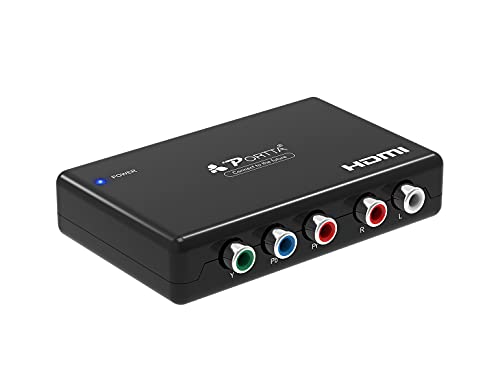
HDMI to Component Converter, PORTTA HDMI to YPbPr Adapter + R/L Audio Extractor, HDMI to 5 RCA RGB Video Converter, Support 1080P 60Hz for PS3 PS4 DVD


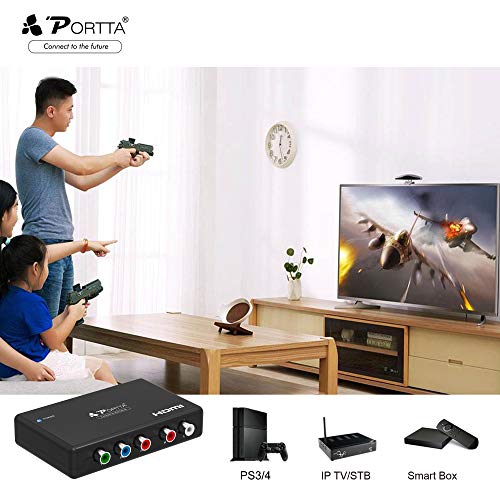


Key features
- •【Audio Output format】2 Channel LPCM, no distortion of audio or video, no delay in signal transmission. Ease to Use: instll in seconds no settings
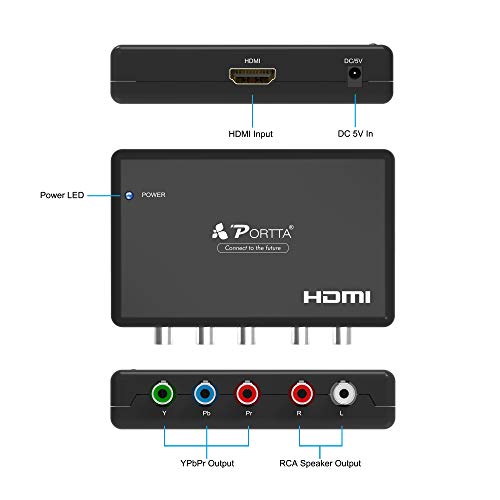
- •【1080P 60Hz HDMI Audio Extractor】 HDMI to YPbPr Component Plus R/L Audio Converter, Allows the HD Source Connected to Single HD Display and Adds Extra One Ypbpr ( Y+Pb+Pr) and L+R Audio Out Port.
- •【HDCP 1.3 Version, 1080P High HDMI Resolution】 HDMI to Achieve the Synchronization of Audio Signal Separation, Input Resolution up to 1080P (50/60Hz), Also Compatible with 480P@60Hz. 576P@50Hz 720P@50/60Hz 1080i@50/60Hz
- •【Support Video Color Format: 24bit/deep color 30bit,36bit】 Work well with Blu-ray DVD Player Wii Xbox One SKY HD box PS3 PS4 HDTV HDVD Player
- •【Package Contents】 Portta Video Converter x1, DC 5V Power Adapter x1, User Manual x1, Warranty Card x1(5 Years Worry-free Warranty),Please Feel Free to Contact us if You Have any Problems.
HDMI to Component Converter, PORTTA HDMI to YPbPr Adapter + R/L Audio Extractor, HDMI to 5 RCA RGB Video Converter, Support 1080P 60Hz for PS3 PS4 DVD
List Price: $41.89$37.70DEALYou Save: $4.19 (10%)
Free shippingFree Returns – 30 daysFree Order CancellationSecure Payment2–3 Days DeliveryGet It October 27, 2026In Stock (1)No marketing spamNo account requiredFulfilment by FedEx / Amazon / UPS / ShipwirePayPal / Card Buyer Protection
Customer Reviews
Reviews sourced from verified Amazon purchasers4.1
out of 5
Based on 10 reviews
5★
50%
4★
50%
3★
0%
2★
0%
1★
0%
Picture quality was just okay
Brian Webb✓ Verified Purchase•July 21, 2023
Picture quality was just okay. Occasionally it would drop off
This is only 1/3rd useful
Chris M✓ Verified Purchase•July 20, 2023
I am using a 7 year old computer as a HTPC, a NVIDIA Shield Pro, and a blu ray player as sources for my TV. This device works fine going from the computer, which is set for 1080P to the TV, but this screen image is not as sharp as the HDMI output. I just bought a NVIDIA Shield Pro and after a hard reboot, it recognized the converter as well. However, my LG BP-330 won't even talk to this unit. when I set the output of the blu ray player to 1080 or to 720, it will not hold those settings when I connect it to this device. I just get a blank screen. The blu ray player defaults to the "auto" screen resolution. The LG BP-330 remembers the setting when connected directly to the TV. I have no idea why, but there you have it.
Works as advertised
Peter Lundell✓ Verified Purchase•June 23, 2023
I use it to convert HDMI output from AV receiver to component video for input to older model TV at 1080i, 720p, or 480p, depending on the original sources. Likes: Simple installation - attach the cables, plug in power, and it simply works. Dislikes: On a couple of occasions when switching sources with different resolutions, it seems to fail to output correctly (e.g., unplugging the device and plugging it back in will fix the issue - so I guess for those situations I wish it had a power switch). Caveats: (1) It does not up- or down-convert resolutions (as clearly stated in the product info), (2) I have not ever used it to convert from HDMI to analog audio.
It works
Kindle Customer✓ Verified Purchase•June 14, 2023
I bought this for use with a Xbox 360 and a old Sony VPL-VW10HT Projector so I could use the HDMI over a long run and switch to the component that the projector used at the projector. it worked in the 480 range but there was a issue when I raised the Xbox out put to the 1080i the projector supported. and when i tried to use it with the Samsung galaxy 10 for HDMI to the same projector I could not manage to get it to do display correctly. this however is most likely an issue on my end not a fault of the device. worked as advertise though you may have issues with oher devices in the run.
Eureka! This HDMI-to-Component Converter Works for Roku!!
Steve Schneider✓ Verified Purchase•May 13, 2023
Our Guest Bedroom TV is a 2010 version of pre-HDMI audio & up-to-720p video inputs (DVI or Component inputs). Always has & still produces a great picture!!
This TV used to be hooked up from a Cable TV box. via Component cords. There was never an issue.
We just got rid of cable, and have gone Roku in the house (including a "live" TV subscription to get the channels).
Long story, shorter: I needed to output the video & audio from Roku Express (with HDMI input), to the TV, and bought a converter/extractor to go to the DVI TV input (for some reason, I wanted DVI to be the "input of choice"!!).
Result was: the HDMI to DVI cable couldn't pass the video signal from the extractor to the TV's DVI input. After I tried everything, I returned the extractor (and the DVI/HDMI cables), and then, began looking at more converters. I noticed this Portta HDMI-to-Component converter, bought it & hooked it up to the "Component 2" input on TV....got a picture, but NO sound (at least I got a picture this time!!). After playing around with a few settings, etc...still no luck!
FINALLY, last night after fiddling around a little more, I moved the Component cables to the "Component 1" setting on the TV...it worked!! Picture & sound! Who would ever know that the other Component setting was no good!
So, we're all set....this Portta converter did the trick - ROKU Express to Component TV inputs - still a great picture & sound!!
This TV used to be hooked up from a Cable TV box. via Component cords. There was never an issue.
We just got rid of cable, and have gone Roku in the house (including a "live" TV subscription to get the channels).
Long story, shorter: I needed to output the video & audio from Roku Express (with HDMI input), to the TV, and bought a converter/extractor to go to the DVI TV input (for some reason, I wanted DVI to be the "input of choice"!!).
Result was: the HDMI to DVI cable couldn't pass the video signal from the extractor to the TV's DVI input. After I tried everything, I returned the extractor (and the DVI/HDMI cables), and then, began looking at more converters. I noticed this Portta HDMI-to-Component converter, bought it & hooked it up to the "Component 2" input on TV....got a picture, but NO sound (at least I got a picture this time!!). After playing around with a few settings, etc...still no luck!
FINALLY, last night after fiddling around a little more, I moved the Component cables to the "Component 1" setting on the TV...it worked!! Picture & sound! Who would ever know that the other Component setting was no good!
So, we're all set....this Portta converter did the trick - ROKU Express to Component TV inputs - still a great picture & sound!!
Page 1 of 2