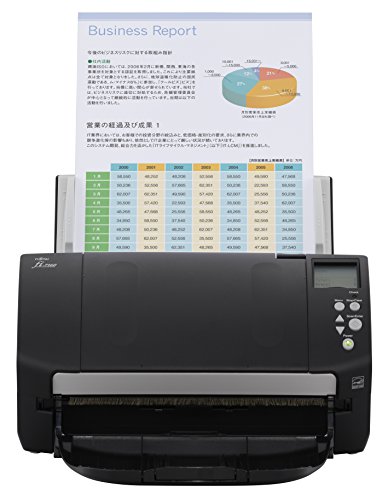
Fujitsu PA03656-B005 Image Scanner ScanSnap iX500


Key features
- •Achieving organization with the ScanSnap iX500 starts with the touch of a single button and ends with a host of productivity features that keep you ahead of the stack
BrandFujitsu
CategoryDocument Scanners
ColorBlack
Warranty1 year limited warranty. us and latin america only.
Fujitsu PA03656-B005 Image Scanner ScanSnap iX500
List Price: $1011.21$910.09DEALYou Save: $101.12 (10%)
Free shippingFree Returns – 30 daysFree Order CancellationSecure Payment2–3 Days DeliveryGet It October 24, 2026In Stock (6)No marketing spamNo account requiredFulfilment by FedEx / Amazon / UPS / ShipwirePayPal / Card Buyer Protection
Customer Reviews
Reviews sourced from verified Amazon purchasers4.7
out of 5
Based on 10 reviews
5★
80%
4★
10%
3★
10%
2★
0%
1★
0%
The Best for Paperless Office and Document Archiving
Helpi✓ Verified Purchase•November 5, 2015
Fujitsu ScanSnap iX500 - The Best for Paperless Office and Document Archiving
I have purchased the Scan Snap iX500 two weeks ago and since then got rid of a massive amount of paper documents, archived old family documents in the cloud, and scanned tons of old photos in shoe boxes.
As you can see from my feedback, I can only report positive experience working with this scanner:
1. Installation was easy with the USB connection, which I switched to my wireless network. The setup was self-explanatory and there were no hiccups in the process.
2. Automatic document feeder scanned both sides of the paper at once. A stack of 30 pages where processed without any issue.
3. I usually scan to Adobe Acrobat and make the PDF documents searchable with text recognition. See below how to get the latest Acrobat version.
Adobe Acrobat Standard included
"¢ The scanner came bundled with Adobe Acrobat XI Standard even Fujitsu states on their website to ship version DC (12) with the scanner (after April 2015).
"¢ Sure I wanted the new version instead of the three years old version 11: They explained that there is extensive inventory with dealers having the old version in the box and there is no problem to send me a free upgrade.
"¢ Anthony from Full Color Copier was very helpful and Michael from Fujitsu even topped the great customer experience. Within a few days, Fujitsu sent me an Adobe Redemption Code to download the brand-new Adobe Acrobat DC (12) version and I was even able to keep the old software.
"¢ So make sure you call Fujitsu (1-800-626-4686) and request the upgrade if purchased after April 2015. They are very helpful and you talk to someone in America. Big THANK YOU!!!
Document Storage - It's as easy as 1-2-3:
For document archiving I use Google Drive with its free 15GB of data storage and encrypt all files with Boxcryptor to avoid anyone snooping around. The last part is especially important if you like to keep your personal information safe.
1. After you install Google Drive on your PC you have a dedicated folder which is synchronized with the Google Cloud. When scanning directly into that folder, all scans are uploaded safe to the Cloud and also remain local on your PC in this dedicated folder.
2. Now the important part: Install Boxcryptor on your PC and tell it to encrypt the Google Drive folder. All files are automatically "scrambled" before upload to the Cloud and only you are able to read them.
3. Done! This way you always have two copies: One local copy on your PC and one in the Google Cloud. The best: All for free.
This is my take on the ScanSnap iX500 used in a home office. I am not affiliated with Fujitsu or any seller on Amazon.
If you like the review, please click "Yes" below. If you have questions, just add a comment and ask.
I have purchased the Scan Snap iX500 two weeks ago and since then got rid of a massive amount of paper documents, archived old family documents in the cloud, and scanned tons of old photos in shoe boxes.
As you can see from my feedback, I can only report positive experience working with this scanner:
1. Installation was easy with the USB connection, which I switched to my wireless network. The setup was self-explanatory and there were no hiccups in the process.
2. Automatic document feeder scanned both sides of the paper at once. A stack of 30 pages where processed without any issue.
3. I usually scan to Adobe Acrobat and make the PDF documents searchable with text recognition. See below how to get the latest Acrobat version.
Adobe Acrobat Standard included
"¢ The scanner came bundled with Adobe Acrobat XI Standard even Fujitsu states on their website to ship version DC (12) with the scanner (after April 2015).
"¢ Sure I wanted the new version instead of the three years old version 11: They explained that there is extensive inventory with dealers having the old version in the box and there is no problem to send me a free upgrade.
"¢ Anthony from Full Color Copier was very helpful and Michael from Fujitsu even topped the great customer experience. Within a few days, Fujitsu sent me an Adobe Redemption Code to download the brand-new Adobe Acrobat DC (12) version and I was even able to keep the old software.
"¢ So make sure you call Fujitsu (1-800-626-4686) and request the upgrade if purchased after April 2015. They are very helpful and you talk to someone in America. Big THANK YOU!!!
Document Storage - It's as easy as 1-2-3:
For document archiving I use Google Drive with its free 15GB of data storage and encrypt all files with Boxcryptor to avoid anyone snooping around. The last part is especially important if you like to keep your personal information safe.
1. After you install Google Drive on your PC you have a dedicated folder which is synchronized with the Google Cloud. When scanning directly into that folder, all scans are uploaded safe to the Cloud and also remain local on your PC in this dedicated folder.
2. Now the important part: Install Boxcryptor on your PC and tell it to encrypt the Google Drive folder. All files are automatically "scrambled" before upload to the Cloud and only you are able to read them.
3. Done! This way you always have two copies: One local copy on your PC and one in the Google Cloud. The best: All for free.
This is my take on the ScanSnap iX500 used in a home office. I am not affiliated with Fujitsu or any seller on Amazon.
If you like the review, please click "Yes" below. If you have questions, just add a comment and ask.
CIS Sucks
MysteryMan✓ Verified Purchase•September 4, 2015
The iX500 is fast and easy to use. The single pass duplex means less paper jams. The lack of a TWAIN driver means you won't be importing into Photoshop, but you can push it into Photoshop using the ScanSnap software, so not much is lost.
The biggest drawback is due to the kind of sensor used. CIS scanners have limited color abilities. My 12 year old CCD scanner is much better at color pickup (see photo). One is a flatbed and the others are document scanners, but the difference is in the sensor.
There are many color documents to be scanned and not everyone knows or admits just how bad a CIS scanner is at color pickup. There's a mass self-deception out there, like how everyone taught themselves to believe artificial sweeteners taste OK.
After years of searching, I can not find a form-feed CCD based scanner for any price. This means that any memorabilia-class material to be scanned still has to be done page-by-page on a flatbed. It would be great if anyone could point one out.
Pros:
- Scans quickly
- Single pass duplex eliminates messy jams compared to scanners that have to re-route paper to scan the other side
- Nice industrial design. (though it could use a separate button for single vs duplex mode - going back to the software each time isn't great).
- Wireless scan to mobile worked well and was fun to show off though not particularly useful for me.
Cons:
- Color detection is weak
The biggest drawback is due to the kind of sensor used. CIS scanners have limited color abilities. My 12 year old CCD scanner is much better at color pickup (see photo). One is a flatbed and the others are document scanners, but the difference is in the sensor.
There are many color documents to be scanned and not everyone knows or admits just how bad a CIS scanner is at color pickup. There's a mass self-deception out there, like how everyone taught themselves to believe artificial sweeteners taste OK.
After years of searching, I can not find a form-feed CCD based scanner for any price. This means that any memorabilia-class material to be scanned still has to be done page-by-page on a flatbed. It would be great if anyone could point one out.
Pros:
- Scans quickly
- Single pass duplex eliminates messy jams compared to scanners that have to re-route paper to scan the other side
- Nice industrial design. (though it could use a separate button for single vs duplex mode - going back to the software each time isn't great).
- Wireless scan to mobile worked well and was fun to show off though not particularly useful for me.
Cons:
- Color detection is weak
Five Stars
Chad Watts✓ Verified Purchase•February 17, 2015
it is a work horse, we use it in our paperless dental office and never have a problem
Detailed Review of the Fujitsu iX500 ADF Scanner -- The absolute best scanner on the market today!
Liberty Standard✓ Verified Purchase•October 24, 2014
I bought this ScanSnap iX500 almost a year ago in December of 2013 and have put in through its paces over the past year and I want to share my findings with you as I believe this is THE BEST automatic document feed (ADF) scanner on the market right now... not just because of how it functions, but the included software as well which makes sorting and organizing a breeze!
BACK STORY:
Suffering from a disability that causes me not to think clearly at times, having everything in paper format was an absolute mess. When my disability started in 2006, I started a company and worked for another company and the paper started piling up. It was a mess and I was completely disorganized. I accidentally threw away or shredded thousands of documents I needed... receipts, important paperwork, documentation, etc. It was a mess and I'm still trying to find those documents to this day.
After finally starting to get my disability under control in 2013, I made the decision to purchase this scanner and go paperless. The company I was working for needed a couple thousand documents scanned organized and this is the scanner I recommended and purchased. Now, towards the end of 2014, I have scanned at least 15,000 pages of documents with this scanner without a single problem whatsoever. Seem too good to be true? That's what I thought until I saw the end result. Files cabinets, empty. Stacks of papers, gone. In fact, any piece of mail, receipt, or document that made its way into my hands is immediately scanned and stored in digital format.
HOW IT HAS WORKED:
Well like I said, I've got about 15,000 documents through this thing and haven't had a single problem with it feeding documents, jamming, or anything. I've used scanners almost twice the price of the iX500 that had more problems.
The software is extremely user-friendly with a few quirks you'll have to get used to... nothing severe enough worth mentioning. What I like most about it is I use Google Drive to store my paperwork and with the ScanSnap software, when a document is sent through the scanner, I can have it automatically save to the Google Drive folder on my home computer which automatically syncs it with the cloud, making it available on all of my computers, my cell phone, my Chromebook, etc. I don't know of any other scanner that lets you do this right within the software. That feature alone pushes this scanner to the front of the line for me and many others.
It's built extremely durable and has a small footprint on your desk, folding up when not in use. It's also black in color versus the typical beige ADF scanner colors that stick out like a sore thumb.
You get what you pay for with this scanner, 100%. Fujitsu could probably charge a lot more money for this scanner if they wanted to because it works better than scanners twice its price.
SOFTWARE:
As I mentioned above, the ScanSnap software controls the scanner with ease. You can quickly change settings from single-sided scanning to double-sided, color scanning to black and white, grey scale, or even auto-detect where the scanner will be able to tell how it should scan the document. If the document is a black and white report, it'll scan it in black and white. If it notices grey-tone, it will scan it accordingly. If it sees color, it scans it in color. Absolutely amazing.
You can also change the resolution settings depending on how crisp you need the document. The higher the resolution, the higher the file size, although I've noticed, even at 150dpi, the images are crisp and easy to read. I can't see much difference between 150dpi and 300dpi besides the increased file size with 300dpi.
The software gives you the option to scan right to email, to a specific folder, to Google Drive, and several other services. This in itself is an amazing feature that has come in handy on numerous occasions. Also worth mentioning is the WiFi capability. I can scan a document and have it sent right to a folder on my cell phone simply by using the free Android or iPhone app. This has come in handy when I'm on the go and need to bring the document with me for a business trip, doctor's visit, etc.
Since we're mentioning software, keep in mind, this scanner comes with a full version of Adobe Acrobat, worth over $100. This lets you use all of the features Acrobat offers when scanning your documents. You can also tell the scanner to use OCR (optical character recognition) to make your documents fully searchable!
Now that we've gone over a brief history of the iX500, let's get down to the pros and cons:
PROS:
* Very quick and accurate scanning speed. Whether in simplex (one-sided) or duplex mode, the scanner is fast and accurate.
* Processing speed is very quick with very minor lag, if any at all.
* USB 3.0 connection. This is HUGE as it allows for a very fast file transfer speed from the scanner to your computer. Many ADF scanners still use a standard USB 2.0 connector and the speed difference is very noticeable. With USB 3.0, you're getting up to 5 GB/second compared to UISB 2.0's speed of only 480 MB/second. No comparison there... USB 3.0 wins.The provided USB cable is 6 feet long giving you plenty of length to set the scanner up on your desk where you want it, not necessarily right next to the computer.
* The paper handling mechanism is greatly improved over previous generations and light years beyond the current competition. Like I said, I've put at least 15,000 documents through this scanner in under a year and it continues to feed documents the same as the day I bought it. Go ahead and scan a tiny receipt or business card, throw in some odd shaped papers, legal sized sheets, or long receipts... it doesn't matter... the iX500 handles them all with ease.
* The rollers (consumables according to Fujitsu) last forever! I've heard some people going 4+ years of scanning file cabinet after file cabinet of documents with no problems. Just keep the rollers sticky cleand, vacuum and paper dust particles from inside the scanner and you should be good to go.
CONS:
* Recently brought to my attention is the sensors on the iX500 are CIS and not CCD like they are on the similar model, the S1500. Historically, people have preferred the CCD sensors as they have typically scanned color documents better, although the CIS sensors have historically scanned text and grey-scale documents better. Fast forward to 2014 and quite honestly, I've used both and they perform identically... I cannot notice a difference really... in fact, I think the CIS sensors have finally caught up and surpassed the CCD sensors. The thing to remember is this is an ADF scanner, not a flat-bed scanner. If you need to scan high-resolution photos, you're looking at the wrong scanner as this scanner is designed for low to high volume document scanning.
* The Acrobat software included is Version 10, not Version 11 which is the most current version. This isn't a huge deal but I felt it was worth mentioning. Also, the Acrobat software will only work with Windows based machines so you'll need to use the Preview software that comes standard on a Mac.
* No TWAIN support. This really isn't a huge deal anymore as nowadays we're mostly scanning right to PDF and storing our documents in local folder versus running them through separate proprietary software. If you absolutely need TWAIN support, unfortunately this scanner is not going to work for you in that regard.
SUMMARY:
I can't stress enough how much I recommend this product. I have written hundreds of reviews here on Amazon and out of all of them, this is probably the one I am the most passionate about because this scanner has changed my life and is changing the lives of others, too. If you want to go paperless and finally ditch those file cabinets full of paper, buy this scanner! Having papers in file cabinets isn't safe anymore as they can be lost or destroyed in a fire, through water damage, theft, misfiling, etc.
As I said earlier, I scan directly to the Google Drive folder on my computer. So far that process has been working great but I will keep you updated if I notice any glitches. Right now, it's an awesome method! Scanning some important documents in and being able to pull them up on my Chromebook months later while sitting in a coffee shop is amazing. This is the era of going paperless and I hope you take the plunge, buy this scanner and get scanning! :-)
*** If this review was helpful to you, please let me know! It means a lot to me when I know I've helped someone make a decision on whether or not to buy something. I either own or have tested EVERY product I review, and I appreciate reading other people's reviews because they always help me make an informed decision. These things are what make Amazon great: the prices and the reviews! If you have a specific question about a review, please contact me through my profile page. I'm more than happy to chat with you about it. Thanks! ***
BACK STORY:
Suffering from a disability that causes me not to think clearly at times, having everything in paper format was an absolute mess. When my disability started in 2006, I started a company and worked for another company and the paper started piling up. It was a mess and I was completely disorganized. I accidentally threw away or shredded thousands of documents I needed... receipts, important paperwork, documentation, etc. It was a mess and I'm still trying to find those documents to this day.
After finally starting to get my disability under control in 2013, I made the decision to purchase this scanner and go paperless. The company I was working for needed a couple thousand documents scanned organized and this is the scanner I recommended and purchased. Now, towards the end of 2014, I have scanned at least 15,000 pages of documents with this scanner without a single problem whatsoever. Seem too good to be true? That's what I thought until I saw the end result. Files cabinets, empty. Stacks of papers, gone. In fact, any piece of mail, receipt, or document that made its way into my hands is immediately scanned and stored in digital format.
HOW IT HAS WORKED:
Well like I said, I've got about 15,000 documents through this thing and haven't had a single problem with it feeding documents, jamming, or anything. I've used scanners almost twice the price of the iX500 that had more problems.
The software is extremely user-friendly with a few quirks you'll have to get used to... nothing severe enough worth mentioning. What I like most about it is I use Google Drive to store my paperwork and with the ScanSnap software, when a document is sent through the scanner, I can have it automatically save to the Google Drive folder on my home computer which automatically syncs it with the cloud, making it available on all of my computers, my cell phone, my Chromebook, etc. I don't know of any other scanner that lets you do this right within the software. That feature alone pushes this scanner to the front of the line for me and many others.
It's built extremely durable and has a small footprint on your desk, folding up when not in use. It's also black in color versus the typical beige ADF scanner colors that stick out like a sore thumb.
You get what you pay for with this scanner, 100%. Fujitsu could probably charge a lot more money for this scanner if they wanted to because it works better than scanners twice its price.
SOFTWARE:
As I mentioned above, the ScanSnap software controls the scanner with ease. You can quickly change settings from single-sided scanning to double-sided, color scanning to black and white, grey scale, or even auto-detect where the scanner will be able to tell how it should scan the document. If the document is a black and white report, it'll scan it in black and white. If it notices grey-tone, it will scan it accordingly. If it sees color, it scans it in color. Absolutely amazing.
You can also change the resolution settings depending on how crisp you need the document. The higher the resolution, the higher the file size, although I've noticed, even at 150dpi, the images are crisp and easy to read. I can't see much difference between 150dpi and 300dpi besides the increased file size with 300dpi.
The software gives you the option to scan right to email, to a specific folder, to Google Drive, and several other services. This in itself is an amazing feature that has come in handy on numerous occasions. Also worth mentioning is the WiFi capability. I can scan a document and have it sent right to a folder on my cell phone simply by using the free Android or iPhone app. This has come in handy when I'm on the go and need to bring the document with me for a business trip, doctor's visit, etc.
Since we're mentioning software, keep in mind, this scanner comes with a full version of Adobe Acrobat, worth over $100. This lets you use all of the features Acrobat offers when scanning your documents. You can also tell the scanner to use OCR (optical character recognition) to make your documents fully searchable!
Now that we've gone over a brief history of the iX500, let's get down to the pros and cons:
PROS:
* Very quick and accurate scanning speed. Whether in simplex (one-sided) or duplex mode, the scanner is fast and accurate.
* Processing speed is very quick with very minor lag, if any at all.
* USB 3.0 connection. This is HUGE as it allows for a very fast file transfer speed from the scanner to your computer. Many ADF scanners still use a standard USB 2.0 connector and the speed difference is very noticeable. With USB 3.0, you're getting up to 5 GB/second compared to UISB 2.0's speed of only 480 MB/second. No comparison there... USB 3.0 wins.The provided USB cable is 6 feet long giving you plenty of length to set the scanner up on your desk where you want it, not necessarily right next to the computer.
* The paper handling mechanism is greatly improved over previous generations and light years beyond the current competition. Like I said, I've put at least 15,000 documents through this scanner in under a year and it continues to feed documents the same as the day I bought it. Go ahead and scan a tiny receipt or business card, throw in some odd shaped papers, legal sized sheets, or long receipts... it doesn't matter... the iX500 handles them all with ease.
* The rollers (consumables according to Fujitsu) last forever! I've heard some people going 4+ years of scanning file cabinet after file cabinet of documents with no problems. Just keep the rollers sticky cleand, vacuum and paper dust particles from inside the scanner and you should be good to go.
CONS:
* Recently brought to my attention is the sensors on the iX500 are CIS and not CCD like they are on the similar model, the S1500. Historically, people have preferred the CCD sensors as they have typically scanned color documents better, although the CIS sensors have historically scanned text and grey-scale documents better. Fast forward to 2014 and quite honestly, I've used both and they perform identically... I cannot notice a difference really... in fact, I think the CIS sensors have finally caught up and surpassed the CCD sensors. The thing to remember is this is an ADF scanner, not a flat-bed scanner. If you need to scan high-resolution photos, you're looking at the wrong scanner as this scanner is designed for low to high volume document scanning.
* The Acrobat software included is Version 10, not Version 11 which is the most current version. This isn't a huge deal but I felt it was worth mentioning. Also, the Acrobat software will only work with Windows based machines so you'll need to use the Preview software that comes standard on a Mac.
* No TWAIN support. This really isn't a huge deal anymore as nowadays we're mostly scanning right to PDF and storing our documents in local folder versus running them through separate proprietary software. If you absolutely need TWAIN support, unfortunately this scanner is not going to work for you in that regard.
SUMMARY:
I can't stress enough how much I recommend this product. I have written hundreds of reviews here on Amazon and out of all of them, this is probably the one I am the most passionate about because this scanner has changed my life and is changing the lives of others, too. If you want to go paperless and finally ditch those file cabinets full of paper, buy this scanner! Having papers in file cabinets isn't safe anymore as they can be lost or destroyed in a fire, through water damage, theft, misfiling, etc.
As I said earlier, I scan directly to the Google Drive folder on my computer. So far that process has been working great but I will keep you updated if I notice any glitches. Right now, it's an awesome method! Scanning some important documents in and being able to pull them up on my Chromebook months later while sitting in a coffee shop is amazing. This is the era of going paperless and I hope you take the plunge, buy this scanner and get scanning! :-)
*** If this review was helpful to you, please let me know! It means a lot to me when I know I've helped someone make a decision on whether or not to buy something. I either own or have tested EVERY product I review, and I appreciate reading other people's reviews because they always help me make an informed decision. These things are what make Amazon great: the prices and the reviews! If you have a specific question about a review, please contact me through my profile page. I'm more than happy to chat with you about it. Thanks! ***
Excellent Design, Flawless Operation
TangoZulu✓ Verified Purchase•March 28, 2013
As a hardware/software engineer, I am a huge fan of things that "just work" and don't drive you nuts. This is one of those things. The software installed flawlessly on both my Mac and my PC (one of the few devices that will support both operating systems with the same hardware). The device itself is a solid, clean design. It is quiet, fast, and has been virtually trouble free. I have cleaned out a whole file cabinet of old files without a hiccup. I especially respect the fact that the software can be configured to leave you alone, and just let you do your work without a lot of messy pop-ups, unnecessary notifications, and overly complicated interfaces. This is an A+ in my opinion.
Page 1 of 2