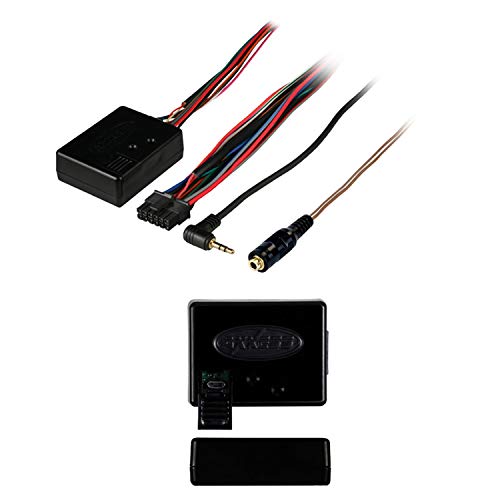
Axxess Metra ASWC-1 Steering Wheel Control Interface


Key features
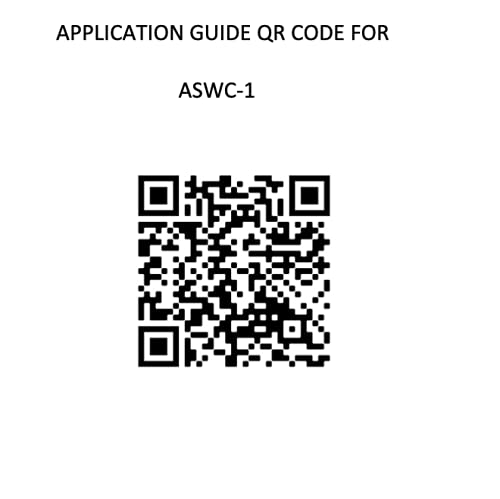
- •NOTE:Kindly refer to the user manual provided as a PDF manual in the product description section .
- •One interface does it all - No additional interface needed
- •Designed to be compatible with all major radio brands
- •Auto detects vehicle type, radio connection, and presets controls
- •Ability to dual assign steering wheel control buttons
- •Can be manually programmed for most vehicles. Provides Speed Dependent Volume Control on select CAN data vehicles
Axxess Metra ASWC-1 Steering Wheel Control Interface
List Price: $102.88$92.59DEALYou Save: $10.29 (10%)
Free shippingFree Returns – 30 daysFree Order CancellationSecure Payment2–3 Days DeliveryGet It October 25, 2026In Stock (1)No marketing spamNo account requiredFulfilment by FedEx / Amazon / UPS / ShipwirePayPal / Card Buyer Protection
Customer Reviews
Reviews sourced from verified Amazon purchasers3.9
out of 5
Based on 10 reviews
5★
50%
4★
20%
3★
10%
2★
0%
1★
20%
Almost like magic.
I can fix almost anything✓ Verified Purchase•November 3, 2017
This simplifies what I imagined to to be an incredibly complex problem; decoding and connecting my car's wiring harness steering wheel controls to a JVC KW-V130BT Double DIN Bluetooth In-Dash DVD/CD/AM/FM Car Stereo With 6.2" Clear Resistive Touchscreen.
I installed a Metra Axxess ASWC-1 Universal Steering Wheel Control Interface in a 2012 Nissan Sentra and a 2014 Toyota Corolla. In both installations the cars were automatically recognized and the steering wheel control buttons mapped flawlessly.
The product also supports the ability to remap (change) buttons from their factory settings to something more useful and add additional functions when a button is long-pressed. On our Sentra I changed the mode button to be "answer" and "end" for the radio's telephone function.
I installed a Metra Axxess ASWC-1 Universal Steering Wheel Control Interface in a 2012 Nissan Sentra and a 2014 Toyota Corolla. In both installations the cars were automatically recognized and the steering wheel control buttons mapped flawlessly.
The product also supports the ability to remap (change) buttons from their factory settings to something more useful and add additional functions when a button is long-pressed. On our Sentra I changed the mode button to be "answer" and "end" for the radio's telephone function.
Install can be an ordeal. Doesn't fully itegrate ALL steering wheel functions in all applications!
A. Lundwall✓ Verified Purchase•September 19, 2017
I installed this on a 2012 Nissan Titan. It took three calls to Metra to get it done, because their instructions do not even come close to accurately describing the wiring harness in my truck. But that was sort of expected...I'd read quite a bit about this on the web, and knew this would be the case.
They claim it will autodetect your stereo, and program itself accordingly, IF your stereo is one of the common brands. I didn't find this to be the case...I first installed it with a cheap Power Acoustic unit, which I knew it wouldn't autodetect. I eventually got it working, but only after they told me that I'd have to program it manually, going through each option sequentially until I found the one that worked with my stereo. This wasn't as big a PITA as it sounds...but there are 18 different options, and I think it worked with number 12! But, I soon changed out that unit for a new Pioneer, and I did expect that one to be auto-detected. It wasn't, and I had to do the same thing...settling on program number 6!
Still in all...I expected to have some install and programming problems...so that was OK. What I didn't know, and the reason for less than 4 or 5 stars, is that even though it's installed and "working" now, it doesn't control the bluetooth functions of my system. Volume up/down, fwd/bkwd, and mode switches work fine. But I can't initiate or answer a phone call using the 'talk' switch on my steering wheel. When I called Metra and inquired, they said 'In some Nissan models, you just won't be able to get the bluetooth functions to work. There is no solution for this!' While I appreciate being able to turn the volume up and down with the controls on the steering wheel, what I wanted MOST was to be able to answer an incoming call without taking my hands off the wheel or eyes off the road. So this was rather a big disappointment, and something I wish I'd known about before purchasing!
They claim it will autodetect your stereo, and program itself accordingly, IF your stereo is one of the common brands. I didn't find this to be the case...I first installed it with a cheap Power Acoustic unit, which I knew it wouldn't autodetect. I eventually got it working, but only after they told me that I'd have to program it manually, going through each option sequentially until I found the one that worked with my stereo. This wasn't as big a PITA as it sounds...but there are 18 different options, and I think it worked with number 12! But, I soon changed out that unit for a new Pioneer, and I did expect that one to be auto-detected. It wasn't, and I had to do the same thing...settling on program number 6!
Still in all...I expected to have some install and programming problems...so that was OK. What I didn't know, and the reason for less than 4 or 5 stars, is that even though it's installed and "working" now, it doesn't control the bluetooth functions of my system. Volume up/down, fwd/bkwd, and mode switches work fine. But I can't initiate or answer a phone call using the 'talk' switch on my steering wheel. When I called Metra and inquired, they said 'In some Nissan models, you just won't be able to get the bluetooth functions to work. There is no solution for this!' While I appreciate being able to turn the volume up and down with the controls on the steering wheel, what I wanted MOST was to be able to answer an incoming call without taking my hands off the wheel or eyes off the road. So this was rather a big disappointment, and something I wish I'd known about before purchasing!
Eventually worked adding Audi A4 steering wheel controls to an Android based Parrot Asteroid Smart radio
Preston's Automotive✓ Verified Purchase•September 4, 2017
Works adding steering wheel controls to an Audi A4 to a Parrot Asteroid Smart (with optional cable) Make sure you properly ground it, preferably a dedicated ground to the car body rather than through the ground wire in the factory harness. An improper ground will make micro controllers act a little weird and inconsistent. Programming was a little challenging and took multiple tries, once I re-grounded the harness and a few more tries, it suddenly started working. Volume controls (roller style) are pretty quick, although Seek function is a little on the slow side (about 1 second delay). Bluetooth and voice recognition button work great.
The right side is awesome so I can use the factory volume and source ...
Rich M.✓ Verified Purchase•May 15, 2017
This would have been a 5 star, but after 4 months, I still can't get one side of my steering wheel controls to work. The right side is awesome so I can use the factory volume and source buttons, but that is it. The instructions are cumbersome because they try to give you multiple applications. They should have a searchable installation application on the website or in print to offer vehicle specific applications. What they send you is unversal instructions with the title of your vehicle on them. I have been to two different professional installers and they can't figure out how one side works and one side doesn't. It is necessary for the instal of my aftermarket radio the brand isn't even a selection
"Recognized" 3 of 8 controls, but controls did nothing.
Dalegend27✓ Verified Purchase•April 18, 2017
Followed the instructions on the website and the radio manufacture's instructions. This was supposed to recognize my 2005 Chevy Silverado, but it didn't. Tried to manually program the radio, but only 3 of the 8 steering wheel controls were recognized, but nothing happened when trying to use those controls. Wasted way too much time trying to make this work. Very disappointing and frustrating.
Page 1 of 2


![Nero 11 Platinum [Old Version]](https://m.media-amazon.com/images/I/51FN826rLTL._SL500_.jpg)