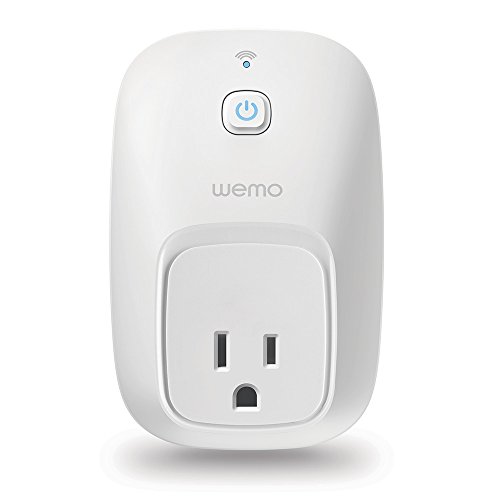
WeMo Switch Smart Plug, Works with Alexa


Key features
- •Works with Alexa for voice control (Alexa device sold separately)
- •Wemo is home automation the easy way: Plug in a Wemo Switch, download the free app, and start controlling your lights and appliances from anywhere in the world, right from your phone. No hub or subscription required
- •Why come home to a dark house? Why let the fan run if nobody's home? Set on and off times for your lights and small appliances
- •Sync lights to sunrise, sunset, and other external events automatically. Create schedules from your phone and change them easily, whenever the mood strikes
- •The Wemo Switch protects your home better than a mechanical timer. In "Away Mode", your lights will turn on and off randomly to confuse potential intruders and make it look like somebody is home
- •Works with Nest Thermostat so your lights and appliances "know" when you're home or away, and respond automatically. Works with any smartphone or tablet running Android 4.1 and higher or iOS 8 and higher. Electrical Rating120V/15A/60Hz/1800W
WeMo Switch Smart Plug, Works with Alexa
List Price: $52.36$47.12DEALYou Save: $5.24 (10%)
Free shippingFree Returns – 30 daysFree Order CancellationSecure Payment2–3 Days DeliveryGet It October 25, 2026In Stock (1)No marketing spamNo account requiredFulfilment by FedEx / Amazon / UPS / ShipwirePayPal / Card Buyer Protection
Customer Reviews
Reviews sourced from verified Amazon purchasers3.7
out of 5
Based on 10 reviews
5★
30%
4★
10%
3★
20%
2★
10%
1★
30%
Initial setup is hit or miss. When it's connected, it works well.
Scouting in VT✓ Verified Purchase•January 2, 2017
UPDATED 3/15/17: As the title said, my initial setup was tedious, taking a few tries to work. But now that I've replace the router (home WiFi was flaky), this plug works fine 99% of the time.
Original review: I have 3 WeMo devices (I only bought this one via Amazon): 1 light switch, a Switch Smart Plug and an Insight Switch. I got them all a month apart, because I wanted to avoid paying for a hub from another manufacturer. I also chose it because I saw reasonably-good reviews here on Amazon. I figured that, since I'm technically-inclined, I wouldn't have the troubles that others reported.
But I've found getting them connected initially is very flaky and it's taken multiple tries for each of them, requiring a device reset each time.
Connecting to my WiFi network has been the toughest part, though I also find them very slow setting up their own WiFi to enable this connection, taking up to 5 minutes to show up each time. Since each device took 3-8 tries to complete, that's a lot of frustration and wasted time. I have two locked WiFi connections, but the iPhone app didn't recognize the password entry properly the first time for any of the WeMos. The iPhone app is also very finicky at identifying a new device, and it also doesn't allow you to change WiFi networks.
I also have an Amazon Echo that uses my WiFi, but it managed to get the WiFi password directly from my phone, so I didn't need to re-enter it. Why can't the WeMos do that?
This original Switch Smart Plug was working pretty solidly for a few weeks, but was offline for a while last night. Now the other two are offline and only this Switch Outlet is connected (seen by the iPhone app). I just contacted Support, though I don't have high hopes.
I am *SO* glad that I didn't install one of these on my elderly mother-in-law's TV, as I was planning. I do enough tech support for her as it is! :-(
Original review: I have 3 WeMo devices (I only bought this one via Amazon): 1 light switch, a Switch Smart Plug and an Insight Switch. I got them all a month apart, because I wanted to avoid paying for a hub from another manufacturer. I also chose it because I saw reasonably-good reviews here on Amazon. I figured that, since I'm technically-inclined, I wouldn't have the troubles that others reported.
But I've found getting them connected initially is very flaky and it's taken multiple tries for each of them, requiring a device reset each time.
Connecting to my WiFi network has been the toughest part, though I also find them very slow setting up their own WiFi to enable this connection, taking up to 5 minutes to show up each time. Since each device took 3-8 tries to complete, that's a lot of frustration and wasted time. I have two locked WiFi connections, but the iPhone app didn't recognize the password entry properly the first time for any of the WeMos. The iPhone app is also very finicky at identifying a new device, and it also doesn't allow you to change WiFi networks.
I also have an Amazon Echo that uses my WiFi, but it managed to get the WiFi password directly from my phone, so I didn't need to re-enter it. Why can't the WeMos do that?
This original Switch Smart Plug was working pretty solidly for a few weeks, but was offline for a while last night. Now the other two are offline and only this Switch Outlet is connected (seen by the iPhone app). I just contacted Support, though I don't have high hopes.
I am *SO* glad that I didn't install one of these on my elderly mother-in-law's TV, as I was planning. I do enough tech support for her as it is! :-(
No longer worthless.
C & A✓ Verified Purchase•December 23, 2016
So, I'm updating this posting. I saw a reply to my (admittedly frustrated) posting and I tried the provided link. Whammo! It worked. I'd have given it five stars, but I'm waiting to see if things continue to work as I am now expecting they will. I will, however, be purchasing more of these devices to try. I am hoping that the setup will go smoother now. We'll see. MAJOR kudos to the Amazon community! Also, I have to give it to the manufacturer for also trying to reach out.
----------------------
Well, if I want to use it as an on/off button on the wall, it works great. But I bought it with the Echo, and so far I cannot get them to talk. Yes, I have both the Echo app and the WeMo app on my tablet, but I don't want to control them with my freakin' tablet. I want Echo to turn the stupid thing on by my voice or at a pre-arranged time. But since Echo cannot "discover" the plug, it ain't gonna happen.
No, I'm not a "techie", but I'm also not a moron. I don't want to spend 5 hours researching this thing; I want it to work straight out of the box. Isn't that what the techies are supposed to design this garbage to do?!? Or at least print some real instructions, not a card saying "go to the app". I'll keep researching, but I'm probably trashing this stupid thing and will find some other device that will actually work. If so, I'll be sure to let everyone know not to buy WeMo products.
----------------------
Well, if I want to use it as an on/off button on the wall, it works great. But I bought it with the Echo, and so far I cannot get them to talk. Yes, I have both the Echo app and the WeMo app on my tablet, but I don't want to control them with my freakin' tablet. I want Echo to turn the stupid thing on by my voice or at a pre-arranged time. But since Echo cannot "discover" the plug, it ain't gonna happen.
No, I'm not a "techie", but I'm also not a moron. I don't want to spend 5 hours researching this thing; I want it to work straight out of the box. Isn't that what the techies are supposed to design this garbage to do?!? Or at least print some real instructions, not a card saying "go to the app". I'll keep researching, but I'm probably trashing this stupid thing and will find some other device that will actually work. If so, I'll be sure to let everyone know not to buy WeMo products.
I love the Away Mode
Andy✓ Verified Purchase•November 22, 2016
Someone attempted to break into my apartment- so I bought this switch in an effort to deter any break in. I love the Away Mode, which randomizes the on/off feature. I also love that I can turn it on from anywhere- it's nice to turn it on in advance when I'm carrying a lot of stuff in from the car. And it works with Alexa!
Weak WiFi Signal - Get a TP-Link Instead!
Niteflie✓ Verified Purchase•November 15, 2016
The TP-Link is far superior to this switch. I think the big problem is the strength of it's wifi. It took me 30 minutes to get it to work in the first place, because it took a long time to connect, then a long time for the app on my iPhone to find the device on my network. THEN, I put it in my garage, because I wanted to set the timer for my Christmas lights. It couldn't reach my wifi signal in the house from there, even though I have other devices that do. I swapped out a TP-Link switch TP-LINK Smart Plug, Wi-Fi, Works with Alexa, Control your Devices from Anywhere (HS100) and it connected instantly, and it is now running my lights. Considering the WeMo is at least $10 more, it's definitely not worth it!
Works Great!! (now that I have reserved an IP in my router) ...
Zodar✓ Verified Purchase•October 21, 2016
I now own 12 of these WeMo switches and they have been working perfectly for the last 6 months, but that wasn't always the case. I got my first WeMo switch before Christmas 3 years ago to control my Christmas lights. Every month or so they would drop off my home network and the WeMo app showed them as "Not Detected". They just quit working. I would have to unplug and plug them back in to get them working again. It was frustrating, but I thought it was a small price to pay for the convenience. I purchased more WeMo switches to control table lamps and my porch Light but the more I had, it seemed the problems go worse. I was resetting these things weekly and sometimes more than once in a day. I wanted to throw them out and customer service didn't have clue.
This may be a bit too techy for some people, but this is what I did.
One day I had an idea. I know that when a network device has a DHCP assigned IP address, the IP is "leased" and will change once the lease expires (typically 24 hours). I thought "what if I set a static or reserve an IP address in my router that never changes? Voilà, that did the trick!! I haven't had a single problem since, and that was about 6 months ago that I made to change.
I would recommend to anyone having problems with these switches, as I was, to try setting a static IP address before giving up. It's not too difficult, and for me it was well worth the 20 minutes that it took.
This may be a bit too techy for some people, but this is what I did.
One day I had an idea. I know that when a network device has a DHCP assigned IP address, the IP is "leased" and will change once the lease expires (typically 24 hours). I thought "what if I set a static or reserve an IP address in my router that never changes? Voilà, that did the trick!! I haven't had a single problem since, and that was about 6 months ago that I made to change.
I would recommend to anyone having problems with these switches, as I was, to try setting a static IP address before giving up. It's not too difficult, and for me it was well worth the 20 minutes that it took.
Page 1 of 2