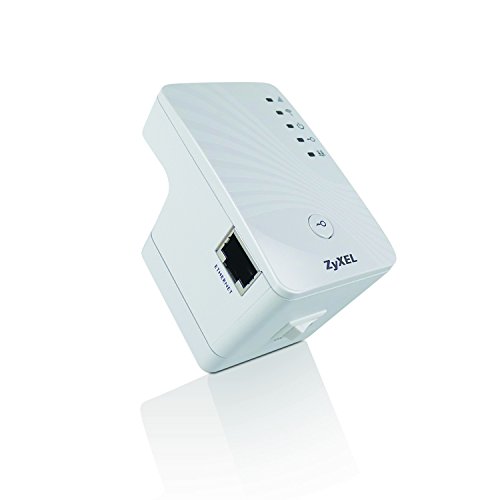
ZyXEL Wireless Access Point with AP / Universal Repeater / Client Mode [WAP3205V2]
![ZyXEL Wireless Access Point with AP / Universal Repeater / Client Mode [WAP3205V2]](https://m.media-amazon.com/images/I/41bQQjwODqL._SL500_.jpg)
![ZyXEL Wireless Access Point with AP / Universal Repeater / Client Mode [WAP3205V2]](https://m.media-amazon.com/images/I/31J9CuD5PcL._SL500_.jpg)
![ZyXEL Wireless Access Point with AP / Universal Repeater / Client Mode [WAP3205V2]](https://m.media-amazon.com/images/I/31cuGJ51DJL._SL500_.jpg)
![ZyXEL Wireless Access Point with AP / Universal Repeater / Client Mode [WAP3205V2]](https://m.media-amazon.com/images/I/41EqJPOcBQL._SL500_.jpg)
Key features
- •802.11n compliant with data transfer rates of up to 300 Mbps
- •Two 5 dBi antennas enhance wireless signals for stable data transmission
- •Four operating modes to satisfy different needs for wireless coverage extension
- •AP/Universal Repeater/Client mode switch simplifies operating mode setup
- •One-touch WPS button for wireless security setup
- •Two Ethernet ports for connecting wired devices to wireless networks
- •5-in-1 Wireless Networking – Access Point, Universal Repeater, Ethernet Client, Wireless Bridge, and WDS Repeater
- •802.11n with Data Transfer Rate of up to 300 Mbps*
- •WPS Button for Quick and Easy Wireless Security Setup
- •Secure Wireless Communications with WEP/WPA/WPA2
ZyXEL Wireless Access Point with AP / Universal Repeater / Client Mode [WAP3205V2]
List Price: $113.47$102.12DEALYou Save: $11.35 (10%)
Free shippingFree Returns – 30 daysFree Order CancellationSecure Payment2–3 Days DeliveryGet It October 24, 2026In Stock (1)No marketing spamNo account requiredFulfilment by FedEx / Amazon / UPS / ShipwirePayPal / Card Buyer Protection
Customer Reviews
Reviews sourced from verified Amazon purchasers3.3
out of 5
Based on 10 reviews
5★
40%
4★
60%
3★
0%
2★
0%
1★
0%
Works great!
DWS•June 6, 2017
I'm new to wireless, I've always just made my own RJ45 connection cables. So after I wanted to try using a ROKU wireless connection, my wireless modem had a hard time passing through multiple walls. So as line of sight works best for all wireless transmissions, I hooked this repeater up half way between the modem and the ROKU that was also at the edge of a 90 degree corner (this allows it to see around the corner so to speak)
Anyway, it connects to your modem just like a wireless ROKU connects to this repeater. If you've never done it before, there is a short learning curve. But it works great!
Anyway, it connects to your modem just like a wireless ROKU connects to this repeater. If you've never done it before, there is a short learning curve. But it works great!
Cheap AP with removable antennas
Paul M•February 4, 2017
I didn't attempt to set this up for a repeater, I used as another AP on my network so I comment on that feature.
In that context, it works well, is cheap and has removable antennas. If you need an AP that has these features, here you go.
One note- the thing is defaulted to grab it's IP via DHCP, and the setup tries to force you to go into the easy setup route.
If you want to get right into advanced, exit out at the change password screen. When you go to access it again, it will let you access the advanced settings.
In that context, it works well, is cheap and has removable antennas. If you need an AP that has these features, here you go.
One note- the thing is defaulted to grab it's IP via DHCP, and the setup tries to force you to go into the easy setup route.
If you want to get right into advanced, exit out at the change password screen. When you go to access it again, it will let you access the advanced settings.
great low cost repeater that works.
Mike•December 3, 2016
Works great this is the second one I have bought I have one connected to the second one. You do have to understand how to set it up. The old one allowed you to change modes in admin this one has a switch on the side.
The weather support was recently dropped so that wont work but who needs that it did not allow me to set my state when it was working.
Only drawback is it repeats on the same channel it receives from. You can repeat under the same SID however I do not recommend that because you wont be able to tell what point you are connected to. To repeat on a different channel I use the second one in client mode and have a old router set in access mode plugged into it to broadcast on another channel. Am planning on getting more.
In order to set it up you connect it direct to your PC and set your PC'S ip manually in the same zone as the devices IP. If your in a different zone then you wont be able to connect to it. If you don't know how to do that you need to read up on it before buying. Once you get connected I set the device to a IP in my lans net and use manual I don't allow it to get a IP because I don't want it changing.
The weather support was recently dropped so that wont work but who needs that it did not allow me to set my state when it was working.
Only drawback is it repeats on the same channel it receives from. You can repeat under the same SID however I do not recommend that because you wont be able to tell what point you are connected to. To repeat on a different channel I use the second one in client mode and have a old router set in access mode plugged into it to broadcast on another channel. Am planning on getting more.
In order to set it up you connect it direct to your PC and set your PC'S ip manually in the same zone as the devices IP. If your in a different zone then you wont be able to connect to it. If you don't know how to do that you need to read up on it before buying. Once you get connected I set the device to a IP in my lans net and use manual I don't allow it to get a IP because I don't want it changing.
Stick with it - you'll be happy you did
Jason•September 9, 2015
This is my 2nd ZyXEL - also have earlier white model - and use them to extend the range of my WiFi into the back yard and also to get a 'wireless Ethernet port' for my desktop computer on the other side of the house. I have both set as universal repeater, separated by about 50 feet on the main floor and both using the same channel, while my wireless router is in the basement. Using the same channel is not always recommended, but works for me. My very first unit (white one) was operationally DOA (though the LEDs worked) and Amazon quickly sent a replacement "“ even before I sent out the original. My more recent, second order for this black version 2 model, arrived with no issues.
Only annoyance, and this applies to both versions, is that they intermittently must be rebooted (disconnect power for a moment then plug in again) once or twice a month to regain WiFi connection. It's never occurred while using the ZyXEL, only between uses. If that repowering doesn't work, I must reconfigure one or the other using the EZ Config icon in upper right of screen after logging into the unit (after changing the computer's IP address). In these cases it forgets my SSID and password. This usually happens after a thunderstorm or for no apparent reason. A complaint specific to this black, version 2 unit is that it's too easy to accidentally hit the LED on/ off button on the back panel when disconnecting or reconnecting the power adapter; or when lifting the unit to move it
From other reviewers you can see that his may not be a pure Plug and Play unit but it is adaptable, relatively low price and powerful. An earlier review in Amazon was helpful, as was customer service for setting it up. When using more than one unit, customer service also suggested shutting one off while setting up the other. Other tips I'd pass along
1 - be sure you change the default SSID entry in configuration of ZyXEL (ZyXEL is entered as the default) to the SSID of your system.
2 - You must change your computer's IP address in order to make changes to the ZyXEL. Once you're done making changes, if you're going to use the same computer to check it out, be sure to go back and change the computer's IP address back to what it's IP address was originally, otherwise use a different computer to test. In any event you ultimately must change the computer's IP address to what it originally was.
3 "“ If your unit forgets information as mine does, having an easily accessible step by step instruction set handy, complete with your security (if used), password and IP numbers, is a real time saver. Once you initially get your unit operating satisfactory, immediately go back and write the steps down "“ it's too easy to forget an 'obvious' or 'insignificant' step later when you're trying to recall what you did.
Why not 5 stars? Poor instructions (but great customer service), hate having to reenter data every couple of weeks to get it working again. Why I like it: first unit made it unnecessary to me to run Ethernet cable across house to desktop, 2nd unit placed on kitchen window sill greatly extends wireless signal into back yard.
So would I buy it again? I did.
Only annoyance, and this applies to both versions, is that they intermittently must be rebooted (disconnect power for a moment then plug in again) once or twice a month to regain WiFi connection. It's never occurred while using the ZyXEL, only between uses. If that repowering doesn't work, I must reconfigure one or the other using the EZ Config icon in upper right of screen after logging into the unit (after changing the computer's IP address). In these cases it forgets my SSID and password. This usually happens after a thunderstorm or for no apparent reason. A complaint specific to this black, version 2 unit is that it's too easy to accidentally hit the LED on/ off button on the back panel when disconnecting or reconnecting the power adapter; or when lifting the unit to move it
From other reviewers you can see that his may not be a pure Plug and Play unit but it is adaptable, relatively low price and powerful. An earlier review in Amazon was helpful, as was customer service for setting it up. When using more than one unit, customer service also suggested shutting one off while setting up the other. Other tips I'd pass along
1 - be sure you change the default SSID entry in configuration of ZyXEL (ZyXEL is entered as the default) to the SSID of your system.
2 - You must change your computer's IP address in order to make changes to the ZyXEL. Once you're done making changes, if you're going to use the same computer to check it out, be sure to go back and change the computer's IP address back to what it's IP address was originally, otherwise use a different computer to test. In any event you ultimately must change the computer's IP address to what it originally was.
3 "“ If your unit forgets information as mine does, having an easily accessible step by step instruction set handy, complete with your security (if used), password and IP numbers, is a real time saver. Once you initially get your unit operating satisfactory, immediately go back and write the steps down "“ it's too easy to forget an 'obvious' or 'insignificant' step later when you're trying to recall what you did.
Why not 5 stars? Poor instructions (but great customer service), hate having to reenter data every couple of weeks to get it working again. Why I like it: first unit made it unnecessary to me to run Ethernet cable across house to desktop, 2nd unit placed on kitchen window sill greatly extends wireless signal into back yard.
So would I buy it again? I did.
Both 3205s are set up as wireless bridge/repeaters and they work great. I had no trouble configuring them as others ...
Tacoma, WA•March 19, 2015
I have a ZyXEL 5500 wireless router, a 3205 WAP out in my shop and I bought this 3205 ver 2 for the back bedroom. Both 3205s are set up as wireless bridge/repeaters and they work great. I had no trouble configuring them as others have complained about. I did NOT use the disk, just plug your PC ethernet port directly into the LAN 1 port, open up Chrome or Explorer, and issue address 192.168.1.2 (the default for the 3205) and you'll get to the setup screens. Note that you must assign your PC LAN port to the same domain first 192.168.1.x (x = use a number such as 10). The default password for the 3205 is 1234 (you can change that when you log in). The range is good: 150 feet to the shop and 60 feet through 4 walls to the bedroom. On occasion I do need to reset the unit if it loses connection with the router or if Comcast hiccups, but this is infrequent.
Page 1 of 2
![Wireless Bridge, KuWFi 2.4G Outdoor CPE Point to Point Long Range Access Nano Station with 12dBi Panel Antenna, Support 24V POE[2-Pack, Pre-Pairing]](https://m.media-amazon.com/images/I/31iv+aADLxL._SL500_.jpg)


![[New Upgraded] VIEWISE Outdoor Wireless WiFi Bridge, Point to Point or Point to Multi-Point, EZ Setup via Dip Switches, 5GHz, 900Mbps 48V PoE (5GHz / 900Mbps)](https://m.media-amazon.com/images/I/21WXzzy6KfL._SL500_.jpg)