Ubiquiti Networks UniFi Cloud Key Gen2 (UCK-G2)
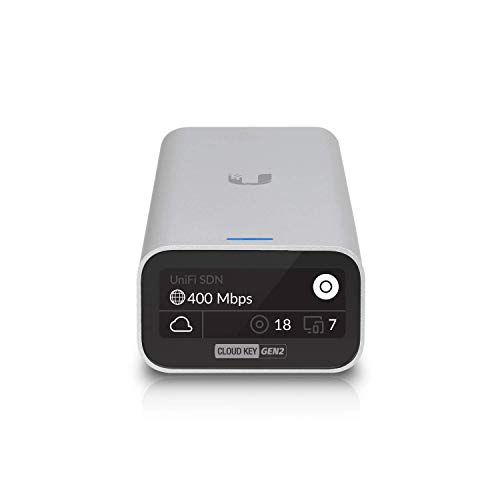


Key features
- •4X more powerful than the original Cloud Key
- •Easy Bluetooth setup with UniFi mobile app
- •Powered by 802.3af PoE or USB-C
- •Built-in battery for automatic safe shutdown
- •Front panel display for at-a-glance network details
BrandUbiquiti Networks
CategoryWireless Access Points
Ubiquiti Networks UniFi Cloud Key Gen2 (UCK-G2)
List Price: $295.22$265.70DEALYou Save: $29.52 (10%)
Free shippingFree Returns – 30 daysFree Order CancellationSecure Payment2–3 Days DeliveryGet It October 24, 2026In Stock (4)No marketing spamNo account requiredFulfilment by FedEx / Amazon / UPS / ShipwirePayPal / Card Buyer Protection
Customer Reviews
Reviews sourced from verified Amazon purchasers4.7
out of 5
Based on 10 reviews
5★
60%
4★
40%
3★
0%
2★
0%
1★
0%
Remote connect to Ubiquity network
Jed Wilson✓ Verified Purchase•August 15, 2023
This device allows me to connect to my Ubiquity network and see how it is performing, users connected, update firmware, network speed and much more. Since I have it I got a firmware update and it still works great. The hardware display shows its IP address and connected devices but the Ubiquity mobile app makes this easy to use even if you not in the same building with it.
Installed several UCK-G2's and they are essential!!! Great WAP controller and monitoring tool!!!
Greg✓ Verified Purchase•July 18, 2023
Don't bother with the original cloud key. Only use the G2's or Dream Machines. The dream machines are easiest.
This is a commercial/enterprise product, but it's inexpensive and works well in homes as well. I install these products in small and massive homes alike, because it's very reliable, and it scales easily. If you have a UniFi network without a G2 cloud key, you are missing the point of UniFi.
When you pair the cloud key with the security gateway (USG), you will sometimes run into problems with the adoption. DO NOT download the PC controller software for any reason, even if the USG tells you to. ALWAYS use the UniFi app. If you have issues adopting the USG, then factory default that unit. Occasionally you may need to access the web GUI of the cloud key and do a manual adoption of the USG. This is rare, but frustrating when it happens. It does not mean that the equipment is defective, just that there's probably a firmware discrepancy or something.
Sometimes after setting up the cloud key initially, you need to power cycle the unit for it to register that it needs a firmware update.
For DIY users without networking experience, use the Dream Machine instead, or a non-Ubiquiti product.
Once the Ubiquiti network is set up, it just works. Getting it set up is usually straightforward if you understand the order of operations for ubiquiti devices. Basically, do the bare minimum with the USG for internet connectivity. Set up the cloud key and adopt ONLY THE USG. FW update the cloud key, then update the controller software. Then FW update the USG. Then adopt the other network devices. FW update the POE switches first, then the WAPs.
IF YOU USE A CLOUD KEY WITHOUT A USG, BE SURE TO DISABLE THE DHCP SERVER WITHIN THE CLOUD KEY.
IF YOU ARE NOT USING A USG, YOU SHOULD RECONSIDER AND USE ONE. YOU WILL GET A MUCH BETTER SYSTEM MONITORING EXPERIENCE, AS WELL AS MUCH GREATER REMOTE ACCESS TO YOUR NETWORK - If you need to log into anything on the network remotely that has any sort of web GUI, you can easily port forward port 80 temporarily to that devices address (if it doesn't have a static IP address, the UniFi app will still allow you to easily determine what the client address is for that device) and remote into it from your web browser as needed. If the network is a residential network without a static IP, it's easy to determine the public IP address and use that for remote access from the browser to the port-forwarded device.
UNDERSTAND THAT WITH UBIQUITI, YOU PAY A VERY LOW PRICE FOR REALLY GOOD NETWORK EQUIPMENT, BUT TECH SUPPORT IS NONEXISTENT, SO MAKE SURE YOU KNOW WHAT YOU'RE DOING.
This is a commercial/enterprise product, but it's inexpensive and works well in homes as well. I install these products in small and massive homes alike, because it's very reliable, and it scales easily. If you have a UniFi network without a G2 cloud key, you are missing the point of UniFi.
When you pair the cloud key with the security gateway (USG), you will sometimes run into problems with the adoption. DO NOT download the PC controller software for any reason, even if the USG tells you to. ALWAYS use the UniFi app. If you have issues adopting the USG, then factory default that unit. Occasionally you may need to access the web GUI of the cloud key and do a manual adoption of the USG. This is rare, but frustrating when it happens. It does not mean that the equipment is defective, just that there's probably a firmware discrepancy or something.
Sometimes after setting up the cloud key initially, you need to power cycle the unit for it to register that it needs a firmware update.
For DIY users without networking experience, use the Dream Machine instead, or a non-Ubiquiti product.
Once the Ubiquiti network is set up, it just works. Getting it set up is usually straightforward if you understand the order of operations for ubiquiti devices. Basically, do the bare minimum with the USG for internet connectivity. Set up the cloud key and adopt ONLY THE USG. FW update the cloud key, then update the controller software. Then FW update the USG. Then adopt the other network devices. FW update the POE switches first, then the WAPs.
IF YOU USE A CLOUD KEY WITHOUT A USG, BE SURE TO DISABLE THE DHCP SERVER WITHIN THE CLOUD KEY.
IF YOU ARE NOT USING A USG, YOU SHOULD RECONSIDER AND USE ONE. YOU WILL GET A MUCH BETTER SYSTEM MONITORING EXPERIENCE, AS WELL AS MUCH GREATER REMOTE ACCESS TO YOUR NETWORK - If you need to log into anything on the network remotely that has any sort of web GUI, you can easily port forward port 80 temporarily to that devices address (if it doesn't have a static IP address, the UniFi app will still allow you to easily determine what the client address is for that device) and remote into it from your web browser as needed. If the network is a residential network without a static IP, it's easy to determine the public IP address and use that for remote access from the browser to the port-forwarded device.
UNDERSTAND THAT WITH UBIQUITI, YOU PAY A VERY LOW PRICE FOR REALLY GOOD NETWORK EQUIPMENT, BUT TECH SUPPORT IS NONEXISTENT, SO MAKE SURE YOU KNOW WHAT YOU'RE DOING.
Not required for Unify, but makes your network super friendly later
Eric✓ Verified Purchase•June 30, 2023
Setup is nothing like expected. If you are a network admin, this is a learning experience.
The user interface "smells" like iOS. Everything is refined and pretty. Once setup it's great having ALL controls accessible remotely from one pane of glass. Once running you can tweak almost anything from the mobile app.
NOTE: For those on the fence, a cloudkey is not required for a Unify system. You can run the system through your own onsite dedicated server. The cloudkey just makes it a lot easier and simpler. I went with the later generation cloudkey because it has the extra features.
The user interface "smells" like iOS. Everything is refined and pretty. Once setup it's great having ALL controls accessible remotely from one pane of glass. Once running you can tweak almost anything from the mobile app.
NOTE: For those on the fence, a cloudkey is not required for a Unify system. You can run the system through your own onsite dedicated server. The cloudkey just makes it a lot easier and simpler. I went with the later generation cloudkey because it has the extra features.
Great product, but know if you really need it...especially for home use
Garrett Dowling✓ Verified Purchase•June 25, 2023
I purchased this item because I wanted to (on a friend's recommendation) create a more permanent solution to my 3 story townhouse needing AP's and extenders on each floor. I bought this along with the standard AP for the Unifi system and a USG. About $500 in total, but I was told it was needed.
I'll admit it's great from the standpoint of storing data it's collecting and managing the network for you to some extent but I have not been able to get it to function properly for more than a week without it causing some issue and leading me to spend the whole day trouble shooting.
It's a great product, but don't buy it unless you are managing the network remotely or really understand all the nuances of network configuration. Never in my life did I think it would be so hard to get one AP to work with some other equipment that is supposed to be seemless in working together. The AP can be configured on its own and it will just run on its own without this, just save your money. Again, I think it's a solid and we'll featured product that will last it but until I fully figure out that and the USG out (useless don't buy it) I'll be busy hacking away at this. I should have stuck with powerline adapters.
I'll admit it's great from the standpoint of storing data it's collecting and managing the network for you to some extent but I have not been able to get it to function properly for more than a week without it causing some issue and leading me to spend the whole day trouble shooting.
It's a great product, but don't buy it unless you are managing the network remotely or really understand all the nuances of network configuration. Never in my life did I think it would be so hard to get one AP to work with some other equipment that is supposed to be seemless in working together. The AP can be configured on its own and it will just run on its own without this, just save your money. Again, I think it's a solid and we'll featured product that will last it but until I fully figure out that and the USG out (useless don't buy it) I'll be busy hacking away at this. I should have stuck with powerline adapters.
Took some time to get it working, but works well.
Michael S. Bauer✓ Verified Purchase•June 20, 2023
I was running the Unifi Controller as a Docker image on one of my servers. Bought this because 1) I was moving to Kubernetes, and although I could still run the docker image there just fine, I've been eyeballing this anyway, and 2) It's PoE, and I have the 8-port PoE router with an empty spot, so plugs right into my existing router with no problems.
Installation physically was a snap. Plugged it in. That's it. PoE was already on, so it booted right up. My Unifi app on my phone dinged and indicated it saw the new device and asked if I wanted to set it up. Since I was moving from an already existing Docker-run Unifi Controller I opted out of this method because I needed to import my old exported backup.
Logged in using my laptop that had my old controller's backup, hit the IP address (it displays right on the OLED screen) and was prompted with 2 choices: Either install as a new network OR import existing backup. Cool, seemed easy enough. Pick the backup file, but I get an error: Backup version doesn't match the version of the device.
Well, shoot! Restarted the unit, booted to the start screen again, walked through the "manual" install hoping I could get it updated. Updated to the latest version of the controller software, reset it to factory and tried again...same issue. It just does NOT like my backup.
I forget the eventual "fix", but suficit to say if you are upgrading from an existing software-based controller you might need to finagle it a bit to make it work with your backup. I think it was something about either exporting or importing only the settings? Anyway, it was something I found on the forums that ended up helping me, and I am too lazy to go find it right now.
The missing star: I dropped it a start for one main reason...the OLED does NOT display the same data that the sample pics show. Is that really a big deal? Well, I feel if they show it on their product page and it can't do that thing on the product page then it's a little misleading. They may do a software update at some point, but as of the time of this review they do not seem to support changing the OLED display to match what the promotional info shows. It's a small thing, really. It device itself does everything else advertised and more.
Installation physically was a snap. Plugged it in. That's it. PoE was already on, so it booted right up. My Unifi app on my phone dinged and indicated it saw the new device and asked if I wanted to set it up. Since I was moving from an already existing Docker-run Unifi Controller I opted out of this method because I needed to import my old exported backup.
Logged in using my laptop that had my old controller's backup, hit the IP address (it displays right on the OLED screen) and was prompted with 2 choices: Either install as a new network OR import existing backup. Cool, seemed easy enough. Pick the backup file, but I get an error: Backup version doesn't match the version of the device.
Well, shoot! Restarted the unit, booted to the start screen again, walked through the "manual" install hoping I could get it updated. Updated to the latest version of the controller software, reset it to factory and tried again...same issue. It just does NOT like my backup.
I forget the eventual "fix", but suficit to say if you are upgrading from an existing software-based controller you might need to finagle it a bit to make it work with your backup. I think it was something about either exporting or importing only the settings? Anyway, it was something I found on the forums that ended up helping me, and I am too lazy to go find it right now.
The missing star: I dropped it a start for one main reason...the OLED does NOT display the same data that the sample pics show. Is that really a big deal? Well, I feel if they show it on their product page and it can't do that thing on the product page then it's a little misleading. They may do a software update at some point, but as of the time of this review they do not seem to support changing the OLED display to match what the promotional info shows. It's a small thing, really. It device itself does everything else advertised and more.
Page 1 of 2
![Wireless Bridge, KuWFi 2.4G Outdoor CPE Point to Point Long Range Access Nano Station with 12dBi Panel Antenna, Support 24V POE[2-Pack, Pre-Pairing]](https://m.media-amazon.com/images/I/31iv+aADLxL._SL500_.jpg)


![[New Upgraded] VIEWISE Outdoor Wireless WiFi Bridge, Point to Point or Point to Multi-Point, EZ Setup via Dip Switches, 5GHz, 900Mbps 48V PoE (5GHz / 900Mbps)](https://m.media-amazon.com/images/I/21WXzzy6KfL._SL500_.jpg)

![ZyXEL Wireless Access Point with AP / Universal Repeater / Client Mode [WAP3205V2]](https://m.media-amazon.com/images/I/41bQQjwODqL._SL500_.jpg)