HUION 420 OSU Tablet Drawing Tablet, Graphics Tablet with Digital Stylus, 4 x 2.23 inches Pen Tablet for Digital Art, Design & Animation, Work with Mac, PC


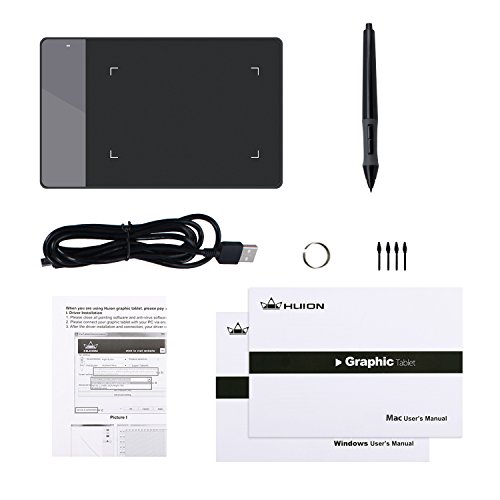
Key features
- •A mouse alternative. 420 graphics tablet adequates for OSU! gaming, document signing, causal art work editing, inking, sculpturing, and more.
- •Active Area 4 x 2.23 inch, signature pad demension: 6.96-by-4.40 inches. Easily fits into a laptop case pocket or in a briefcase, portable carrying on the go or on a trip.The digital tablet is compact and portable, convenient to bring along when you travel.
- •2048 Levels of Pressure Sensitivity. Resolution 4000 LPI, Report Rate 200RPS.
- •The graphic tablet is compatible with most currently available drawing software: Adobe Photoshop, Adobe Illustrator, Adobe Fireworks, Lightroom and so on.
- •The graphics tablet is compatible with Windows 7 or later, Mac OS 10.12 or later. One year warranty.
HUION 420 OSU Tablet Drawing Tablet, Graphics Tablet with Digital Stylus, 4 x 2.23 inches Pen Tablet for Digital Art, Design & Animation, Work with Mac, PC
List Price: $32.96$29.66DEALYou Save: $3.30 (10%)
Free shippingFree Returns – 30 daysFree Order CancellationSecure Payment2–3 Days DeliveryGet It October 26, 2026In Stock (174)No marketing spamNo account requiredFulfilment by FedEx / Amazon / UPS / ShipwirePayPal / Card Buyer Protection
Customer Reviews
Reviews sourced from verified Amazon purchasers4.0
out of 5
Based on 10 reviews
5★
70%
4★
20%
3★
10%
2★
0%
1★
0%
Small and low price, yet still a good drawing tablet
Kelsey Blake✓ Verified Purchase•January 30, 2018
I was initially surprised by how well this tablet works. I use it for drawing and although the pen pressure doesn't seem to work with every program (more on that later), the fact that it has pen pressure in the first place and it's actually decent is remarkable, considering I bought this for a grand total of $30 including shipping. The pen is battery powered, using one AAA battery, and unless you leave it on for multiple days the battery will last for a while. It's small and incredibly easy to travel with, which is precisely the reason why I got it - I can fit this, the cable, the pen, and a spare battery or two if I want in one of those plastic box pencil cases quite easily. and it makes working on drawings while at school or away from home far easier. It's best to use it with a computer that has a smaller screen or monitor because of how sensitive each movement is.
As for the pen pressure not always functioning, I couldn't seem to make it work with Medibang Paint when I was on Linux Mint, which may only have been an issue of WINE not recognizing pen pressure drivers. Krita, however, worked just fine with full pen pressure functionality from the start, and GIMP recognized it as well. One of the bonuses of this tablet is that it still works with the open source Wacom tablet drivers (you just can't remap the pen's button) that come natively with certain distributions of Linux.
If you already have Wacom tablet drivers on your computer and you intend to use the driver CD provided with the tablet (thus providing more customization options for your tablet), you do have to uninstall the Wacom drivers first in order for two different tablets to function the way you want them to. Once you install the Huion driver, you can just reinstall the Wacom driver and then there's no conflicts with your tablet configurations.
My only other complaint about this tablet is how it seems to gather light scratches quite easily from normal use. The pen's tips are a little bit pointy and if you press down really hard you can scratch the tablet. It's still usable, it's just that it wears it out kind of quickly. I don't know how long this tablet will last me, but I've already had it for five months and it's still working.
As for the pen pressure not always functioning, I couldn't seem to make it work with Medibang Paint when I was on Linux Mint, which may only have been an issue of WINE not recognizing pen pressure drivers. Krita, however, worked just fine with full pen pressure functionality from the start, and GIMP recognized it as well. One of the bonuses of this tablet is that it still works with the open source Wacom tablet drivers (you just can't remap the pen's button) that come natively with certain distributions of Linux.
If you already have Wacom tablet drivers on your computer and you intend to use the driver CD provided with the tablet (thus providing more customization options for your tablet), you do have to uninstall the Wacom drivers first in order for two different tablets to function the way you want them to. Once you install the Huion driver, you can just reinstall the Wacom driver and then there's no conflicts with your tablet configurations.
My only other complaint about this tablet is how it seems to gather light scratches quite easily from normal use. The pen's tips are a little bit pointy and if you press down really hard you can scratch the tablet. It's still usable, it's just that it wears it out kind of quickly. I don't know how long this tablet will last me, but I've already had it for five months and it's still working.
Nice little tablet for the price!
nicole✓ Verified Purchase•January 7, 2018
i wasn't exactly sure what to expect from this, but decided eh take the plunge and just do it. So I did, I purchased this for my son for christmas because he was really starting to get into the photoshop and editing of photos and such. It is a little small, it's not a huge tablet, but i mean for the price...come on you can't beat it! When my son opened it on christmas morning he was surprised and i actually got a smile out of him! He couldn't wait to set it up, he has used it for games and editing software. He loves that it comes with extra tips and the pen is awesome, he said you can change sensitivity and buttons...he is the computer guy around here not me, i just pay for the stuff lol. so I can't really give you all the ins and outs without him sitting next to me, but so far he is incredibly pleased with it. i do think he had a little trouble with installing the software or a driver maybe, but then he figured out whatever it was and it was smooth sailing from there. I always see him getting it out and using it, so we are definitely pleased with this purchase.
if you are looking for a tablet to start out with, just to get a feel of what one is like or maybe for your kids or just see if this is something that you would pursue further, i would definitely recommend this tablet, the price is wonderful and the quality is really great for what you get. It also is not just for the OSU game, it can be used for everything. My son has windows 10 on his computer and hasn't had issues since getting it set up and using it.
if you are looking for a tablet to start out with, just to get a feel of what one is like or maybe for your kids or just see if this is something that you would pursue further, i would definitely recommend this tablet, the price is wonderful and the quality is really great for what you get. It also is not just for the OSU game, it can be used for everything. My son has windows 10 on his computer and hasn't had issues since getting it set up and using it.
Love it
Andrea Castillo✓ Verified Purchase•December 27, 2017
I'm not new to digital art I've had other drawing tablets like Wacom and yiynova tablets, but sadly I don't have any of them now :( anyway this tablet is amazing small but amazing. I didn't really expect this tablet to work as well as I thought it would, super responsive. Let's just say it works as well as a Wacom intuos, I'm dead serious. You don't have to be a beginner to get this tablet. I got it because I don't really have money to get another Wacom tablet and this little tablet is all I need. I don't regret getting this tablet at all. If I could I'll give it more than five stars.
The tablet functions perfectly and seems very nice for such a cheap item
jared arand✓ Verified Purchase•September 19, 2017
The tablet functions perfectly and seems very nice for such a cheap item. Nice packaging, it comes with a nice thick usb cable and the stylus pen, plus instructions, discs, and replacement pen tips.
Only problem is something that isn't the manufacturers fault. This is a very tiny writing area and i bought it for the purpose of working math problems on and I find it difficult to do. Depending on your application this one might be perfect for you, but if you intend to do digital art or math or note taking, maybe one of the larger models would be better. For doing digital signatures it is really helpful.
Only problem is something that isn't the manufacturers fault. This is a very tiny writing area and i bought it for the purpose of working math problems on and I find it difficult to do. Depending on your application this one might be perfect for you, but if you intend to do digital art or math or note taking, maybe one of the larger models would be better. For doing digital signatures it is really helpful.
So far so good!
Denise✓ Verified Purchase•August 8, 2017
I didn't expect much for $20.00 however I'm pleasantly surprised by how easy it was to install and use.
I've been using it in photoshop since it arrived this morning and I'm impressed.
I was concerned that the active area may be too small but for me it's just right to use with my laptop and it's portable.
Like any tablet it takes some getting used to. It's well worth the money.
I've been using it in photoshop since it arrived this morning and I'm impressed.
I was concerned that the active area may be too small but for me it's just right to use with my laptop and it's portable.
Like any tablet it takes some getting used to. It's well worth the money.
Page 1 of 2



![Drawing Glove for Tablet,[Pink 2Pack] Palm Rejection Artist Right Hand Glove Digital Art Accessories](https://m.media-amazon.com/images/I/41Jvp6-d4oL._SL500_.jpg)