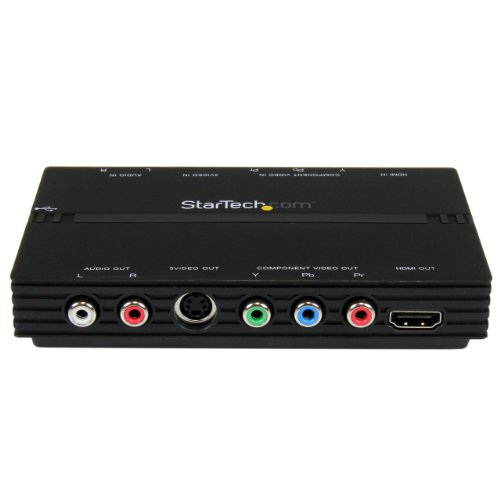
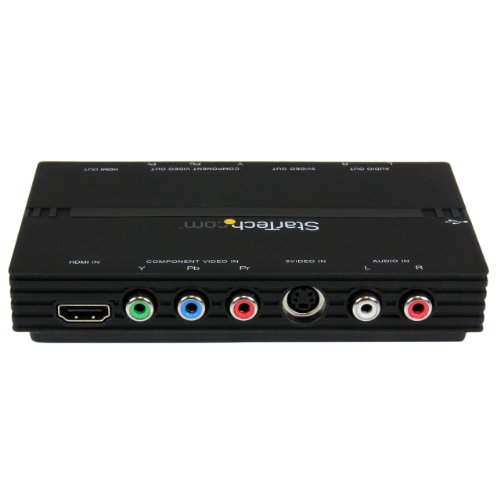
StarTech.com USB2HDCAP USB 2.0 HD PVR Gaming Box and Digital Video Capture Device with Video Pass Through and H264 Encoder HDMI/Component
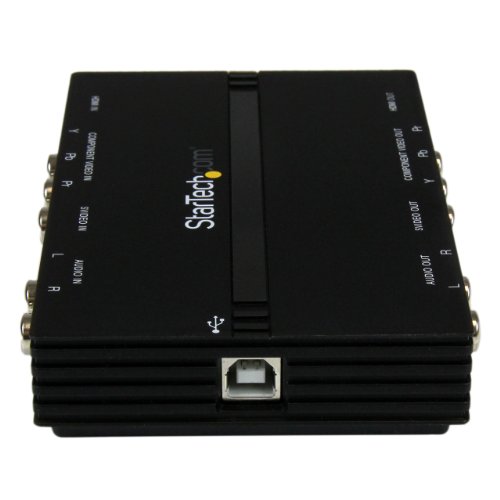
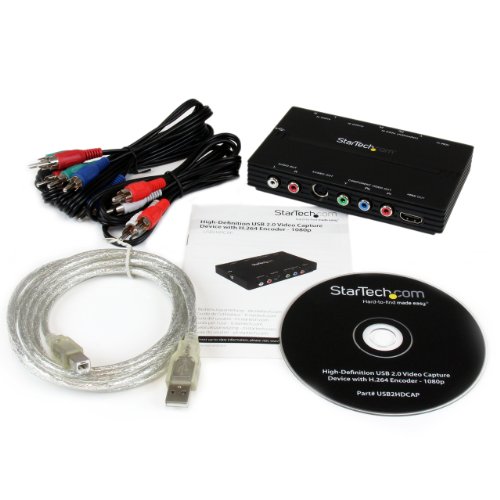
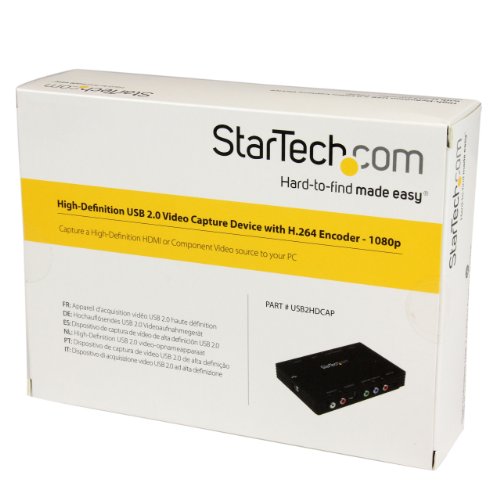
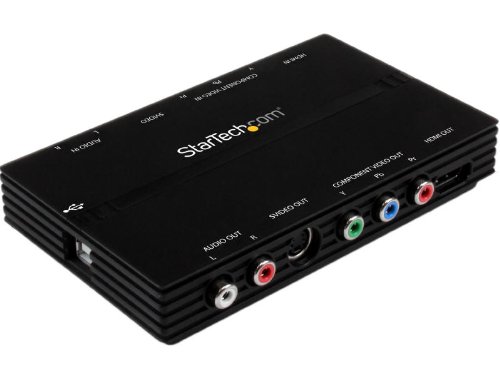
Key features
- •Produces a high quality re-production of the original (captured) audio and video, with support for full HD (1080p)
- •Capture video from HDMI, Component, S-Video, or Composite input sources
- •1080p Video Capture (HDMI and Component)
- •Video Pass Through (HDMI/Component/S-Video)
- •Built-in H.264 and MPEG-4 hardware encoder
- •Record and convert video from camcorders, game consoles (e.g. Xbox 360, PlayStation 3) or cameras, into digital format
- •Import recorded videos into your computer system for editing, to make your own compilations
- •HDMI/Component Screen Capture
- •Capture video from HDMI, Component, S-Video, or Composite input sources
- •1080p Video Capture (HDMI and Component)
- •Video Pass Through (HDMI / Component / S-Video)
- •Built-in H.264 and MPEG-4 hardware encoder
- •Supports 2-channel stereo audio (HDMI / RCA)
- •Still image capture supported
- •NTSC and PAL systems supported
- •16:9 and 4:3 Aspect Ratio
StarTech.com USB2HDCAP USB 2.0 HD PVR Gaming Box and Digital Video Capture Device with Video Pass Through and H264 Encoder HDMI/Component
List Price: $444.18$399.76DEALYou Save: $44.42 (10%)
Free shippingFree Returns – 30 daysFree Order CancellationSecure Payment2–3 Days DeliveryGet It October 25, 2026In Stock (43)No marketing spamNo account requiredFulfilment by FedEx / Amazon / UPS / ShipwirePayPal / Card Buyer Protection
Customer Reviews
Reviews sourced from verified Amazon purchasers3.5
out of 5
Based on 10 reviews
5★
40%
4★
50%
3★
0%
2★
10%
1★
0%
It works great for my uses (Twitch streaming), but tough to find the correct driver and not the most user friendly software
Marriland✓ Verified Purchase•July 13, 2016
I do a bit of streaming on Twitch and video recording for YouTube, so I need to have something capable of capturing from older consoles that use composite cables (the Red/Yellow/White ones). This one works great for my uses, BUT, it's extremely important that you have the proper drivers for it! There was a great review for this product that sends you on the right track for it, so definitely look around for it, because the software that it comes with is pretty lousy by itself, which is why I knocked a star off of it.
One of the things that I particularly like about this is how well it works with the streaming software OBS (Open Broadcast Software). Although it can sometimes be a little finicky while setting it up, once you have the driver going and it working in OBS, it provides with instant (at least no perceptible input delay) live viewing of your video capture, so you can just watch your OBS streaming window that's streaming your gameplay rather than utilizing a passthrough solution to a second monitor or TV.
This, in my opinion, is a huge advantage over one of the more popular composite streaming options, the Elgato Systems Game Capture HD High 1080p Definition Game Recorder, which has about a 1½"“2 second delay and thus requires more configuration when using OBS (or Xsplit, if that's your cup of tea; though I have not tested the SVID2USB2 on Xsplit, so I can't say how it compares). The quality also was superior and had less interlacing compared to the Elgato Game Capture HD, which was surprising for a device half the cost.
I have only used this on Windows 7, so beware if you are using Windows 8, 8.1, or 10, because there's a very good chance the drivers don't work for it since they haven't been updated in awhile and are also very hard to find. I also did order one of these probably 5 or 6 years ago and it stopped working last year, but I still got a lot of mileage out of it and didn't have a problem ordering another one, as it wasn't overly expensive.
If you're looking for something user friendly, or to archive old VHS tapes, or something like that, then you're probably better off going with something else. But if you can get this thing to work, it works well. At least it has for me. I just wish the manufacturer would keep the device updated more often and make it more accessible to people wanting to use it.
One of the things that I particularly like about this is how well it works with the streaming software OBS (Open Broadcast Software). Although it can sometimes be a little finicky while setting it up, once you have the driver going and it working in OBS, it provides with instant (at least no perceptible input delay) live viewing of your video capture, so you can just watch your OBS streaming window that's streaming your gameplay rather than utilizing a passthrough solution to a second monitor or TV.
This, in my opinion, is a huge advantage over one of the more popular composite streaming options, the Elgato Systems Game Capture HD High 1080p Definition Game Recorder, which has about a 1½"“2 second delay and thus requires more configuration when using OBS (or Xsplit, if that's your cup of tea; though I have not tested the SVID2USB2 on Xsplit, so I can't say how it compares). The quality also was superior and had less interlacing compared to the Elgato Game Capture HD, which was surprising for a device half the cost.
I have only used this on Windows 7, so beware if you are using Windows 8, 8.1, or 10, because there's a very good chance the drivers don't work for it since they haven't been updated in awhile and are also very hard to find. I also did order one of these probably 5 or 6 years ago and it stopped working last year, but I still got a lot of mileage out of it and didn't have a problem ordering another one, as it wasn't overly expensive.
If you're looking for something user friendly, or to archive old VHS tapes, or something like that, then you're probably better off going with something else. But if you can get this thing to work, it works well. At least it has for me. I just wish the manufacturer would keep the device updated more often and make it more accessible to people wanting to use it.
Works on Windows 7 but instructions should have been better.
FLLMTR✓ Verified Purchase•July 2, 2013
I used this on Windows 7 64-bit to transfer video from a 8mm video cassette.
It was a bit frustrating to set-up because there were no instructions. Here are the settings that finally worked.
1) Open the GrabBee software, click on the little wrench in the tool bar to open the "Option page"
2) In the General tab, click on "NTSC M" under the Video Format.
3) In the Encoder Property Tab, set the File Type to "DVD-NTSC".
I have not played around much with the other settings, but these are the settings I had to select in order to record the video. Once it works, it does a great job. I highly recommend it and would buy it again.
It works best with a USB 2.0 device otherwise the video may flicker with USB 1.0 connections.
It was a bit frustrating to set-up because there were no instructions. Here are the settings that finally worked.
1) Open the GrabBee software, click on the little wrench in the tool bar to open the "Option page"
2) In the General tab, click on "NTSC M" under the Video Format.
3) In the Encoder Property Tab, set the File Type to "DVD-NTSC".
I have not played around much with the other settings, but these are the settings I had to select in order to record the video. Once it works, it does a great job. I highly recommend it and would buy it again.
It works best with a USB 2.0 device otherwise the video may flicker with USB 1.0 connections.
Poor Quality video and a pain to get working
Phoenix Guy✓ Verified Purchase•January 11, 2013
As many have stated you must get the latest drivers. After you have the drivers and install the application then you plug the device in and the drivers are assigned if you have Windows 7 thru XP. If all you want is a DVD of your old videos without any need to edit then get a DVD recorder as it provides much better image quality, but you still need a means to get this captured so you can edit and display digitally. If you want to edit your videos this will allow you to get analog videos into digital format to edit, but the quality is so poor you won't want to spend much time editing or processing your videos to show/share with others. Overall I am disappointed with the quality and will be looking to find a different means to get my old videos into a computer so I can edit them and share with friends.
CONS:
You may have to install the application S/W more than once to get it to work. I had to install twice as the the first time the whole computer shutdown and to stop this I had to remove the S/W and reload again.
Even choosing the highest resolution option (720), things like peoples faces taken about 8 feet away are recognizable but without any detail on a screen larger than 9" x 9". If your just going to look at the result on a small youtube image (4"x 6" or smaller) it is barely ok, and no where near as good as your original quality.
The built in editing and compensation features work very poorly. To edit, it is best to have a dedicated program like Adobe Premiere or VideoStudio, etc.
PROS:
At least it lets you input your old videos into your computer and have a digital file to post online or do basic editing. Some of the programs just make a DVD which you can do with a DVD recorder and get much better quality (I have done both).
After installing, the actual inputting of video and sound to your computer is pretty ease.
CONS:
You may have to install the application S/W more than once to get it to work. I had to install twice as the the first time the whole computer shutdown and to stop this I had to remove the S/W and reload again.
Even choosing the highest resolution option (720), things like peoples faces taken about 8 feet away are recognizable but without any detail on a screen larger than 9" x 9". If your just going to look at the result on a small youtube image (4"x 6" or smaller) it is barely ok, and no where near as good as your original quality.
The built in editing and compensation features work very poorly. To edit, it is best to have a dedicated program like Adobe Premiere or VideoStudio, etc.
PROS:
At least it lets you input your old videos into your computer and have a digital file to post online or do basic editing. Some of the programs just make a DVD which you can do with a DVD recorder and get much better quality (I have done both).
After installing, the actual inputting of video and sound to your computer is pretty ease.
IT'S ALL ABOUT THE DRIVERS AND NEWER GRABBEE CAPTURE SOFTWARE!!! DON'T GO TO STARTECH'S SITE TO UPDATE YOUR DRIVERS!! READ ON...
A. Koziol•June 4, 2011
While this product is actually pretty good for a simple USB capture device, you HAVE TO, HAVE TO, HAVE TO get the most *current* drivers for it to work optimally. I understand the pain that 99.9% of users have with installing and using this product and I partly blame StarTech and the Chinese / Taiwanese hardware industry.
Guess what, if you get updated drivers from StarTech's site, they're old. "What? But StarTech makes this thing, they'll have the newest drivers. Right?" Wrong. In fact, this device is really just a re-branded product call the GrabBeeX+deluxe made by VideoHome of Taiwan. The drivers on StarTech's site are newer-ish but since the Taiwanese company that makes the GrabBeeX+deluxe (a.k.a StarTech SVID2USB2) is still around and have WAY newer drivers than what StarTech offers, go to their web site and get the latest drivers (look for the GrabBeeX+deluxe). Unless you really know computer's and how to read driver properties, you'd NEVER figure it out. It's no surprise this product gets a bad rap. Also, you can and should upgrade the GrabBee video capture software to version 1.0.9.3 if you go to VideoHome's site (see link info below). Startech's GrabBee video capture software (bundled or on their support site) is the WAY old version 1.0.7.6. The newer 1.0.9.3 version has updated codecs (read more below).
Having 21+ years in IT to track down who makes these obscure hardware components has become a refined skill and I can say that the chipset that is in the device is made by eMpia and it's the 28xx series. But don't go to eMpia's site to get newer drivers, go to the makers of the GrabBee hardware / software (VideoHome): [...] . tw and look for the product called GrabBeeX+Deluxe (USB Grabber). Under the "Driver" and "AP" section you can find the newest drivers and version of the GrabBee capture software. By the way, the newer GrabBee capture software has capture software and codecs as new as Feb of 2011 and supports formats like XVid and has a far newer MPEG encoder than even the 1.0.7.3 version. These newer codecs will yield far better results and are more optimized to take advantage of modern CPU features like SSE2/SSE3/SSE4 (which help in video / audio / multimedia processing) that the older codec versions were not as well optimized to use.
Do yourself and others a favor and get the newer drivers and GrabBee software and THEN review this product. What comes out of the box is ancient as far as drivers and capture software go and you WILL HAVE PROBLEMS, especially if you have Vista or Windows 7. By the way, the latest drivers do work on Windows 7 64-bit.
One other issue some people might have and not realize is that your computer may only have USB 1.1 ports. For this device to work well, you have to know if you have USB 1.1, USB 2.0, or USB 3.0 ports for it to plug into. You should also try and figure out if you have the chipset drivers for your motherboard installed already as they can help immensely. Also, if you're not tech minded, you may not know that in your computer's BIOS, your USB settings may be, by default, set to not fully utilize the max speed of you USB 2.0 ports which is called HighSpeed. USB 1.1 uses FullSpeed and USB 3.0 uses SuperSpeed. Theoretically, a USB 1.1 port has just enough bandwidth to capture *compressed* MPEG1 video stream but not raw, uncompressed video streams which is why you need USB 2.0 or faster. Also, having a slower speed IDE or SATA hard drive that spins at 5400RPM or less may impede writing to the hard drive fast enough and cause drop-outs and other anomalies. Always defragment your hard drive!
It's no surprise people get frustrated with this nifty device. I hope posting the below link directly to the GrabBeeX+deluxe will help some of you. Everything you need for updated drivers and GrabBee capture software is there (copy and paste to your browser and just remove the spaces): [...] and if it doesn't work, go to VideoHome's site and click on Products > USB Grabber > and find the GrabBeeX+deluxe at the bottom of the list and click More Details. The Driver and AP sections are what you want to download from. Have fun!
UPDATE 6/27/2011: GrabBee software 1.0.9.6 is now available on the [...].
UPDATE 8/9/2011: Well, it seems VideoHome has retired the GrabBeeX+Deluxe from it's products page in place of new hardware and as such have made it a bit tougher to easily find the driver. You can now find it here: go to VideoHome's site and choose Technical Support > Download, change Product Name to USB Grabber, then scroll down to the bottom of the page and go to page 2 or click Next >>. Have fun.
UPDATE: 8/15/2011: Amazon has removed the links to the drivers so follow the directions I have up on my 8/9/2011 update.
UPDATE: 10/4/2011: It seems eMpia has updated their drivers for this device around 8/23/2011 even though it seems VideoHome has stopped updating them. Just do a search for BDA_082311_UAC and that should get you to the eeti . com web site. If not, try [...] and remove the spaces. Updated my driver to one from 8/23/11.
UPDATE: 1/30/2012: Don't use the eMpia driver from eeti . com. It seems others have been having issues with the eMpia drivers from 8/23/2011 so it seems you might be best to stick with the drivers dated 4/22/2011 from Videohome's web site.
UPDATE: 10/5/2012: Although I have not tried them yet, eMpia has updated their drivers in February 2012 (WDM_Media_D020412_EMPAudio.rar & WDM_Media_D020412_UAC.rar). Do a Google search for WDM_Media_D020412_EMPAudio (you'll need Winzip to open the RAR files) and it should be the first hit pointing to home dot eeti dot com dot tw / web20 / ic_suppot dot html. I know some of you had issues with the August 2011 driver so these might be a bit better. Don't know yet if they work on Windows 8.
UPDATE: 1/29/2013: The videohome site (videohome dot com dot tw) has newer "official" drivers for Windows 8 support (dated 2011) and also GrabBee 2.0 (do a Google search for GrabBee_V2.0.0.0.zip, it should be the only hit that comes up).
UPDATE: 1/23/2014: Please don't send me messages asking for support with this device on Windows 8/8.1. I won't reply. Ok, eMpia has done a sneaky thing with their original web site at eeti and has secretly hidden slightly newer drivers (dated 9/27/2012.
You'll need the file(s) titled WDM092712_ImageUAC.rar and WDM092712_ImageEMPAudio.rar. The driver version shows as 2.2012.927.0 so slightly newer than the February 2012 driver. These will *not* turn up on a Google search. If there's any hope for you Windows 8 / 8.1 people, these are your best shot. Seeing as how there's *nothing* newer than these drivers, I would not hold my breath for proper Windows 8 (or 9) support if the 9/27/2012 drivers don't work. Check in the comments section for the link. Amazon keeps removing it.
UPDATE: 4/17/2014: I wish Amazon would stop deleting my comments on the newer drivers from 9/27/2012. Please go to the comments section and go to the very last comment and you will find the info I left on where the last drivers for Windows 7 are. I do not think this device works on Windows 8. I don't have Windows 8 to test with it but I would guess the 9/27/2012 Windows 7 drivers would work ok. (empiatech dot com/IC_drivers/201209/)
If you're having trouble with recording audio, it's likely Windows 7 is trying to use the audio capturing of your *sound card* and not the audio capture of the USB capture device so you have to set the USB capture device as the default sound recording input. That's why it is not working for you. I use Windows 7 and it works fine for me.
UPDATE: 8/7/17: It seems Amazon removed many of my comments and updated driver info. What I can say about getting newer drivers for this device is to use Snappy Driver Installer (SDI) v1.17.8.1. It's Windows only. One of the last times I used it, it found newer drivers for my setup than I even knew existed. In order to update your capture drivers using SDI, do this: 1. Google Snappy Driver Installer and download the SDI Lite version (about 4MB), 2. Extract it to it's own folder, 3. plug in the USB capture device, 4. run SDI, allow the firewall exception, choose the Download Indexes Only option, 5. wait for it to download the indexes (a few minutes), 6. you should see newer drivers appear with a blank checkbox next to them. Hover the mouse cursor over the driver it lists and it will show you the installed driver and the newer one available and it's driver date, 7. click the checkbox to the left of the newer driver(s) and then click the green Install button at the top right and wait for it to download and install the update driver for you. That's it!
I tested SDI again on Windows 7 x64. SDI finds two drivers: 1) USB 2821 Video (v2.2012.204.0) and USB EMP Audio Device (v5.2012.111.0).
Guess what, if you get updated drivers from StarTech's site, they're old. "What? But StarTech makes this thing, they'll have the newest drivers. Right?" Wrong. In fact, this device is really just a re-branded product call the GrabBeeX+deluxe made by VideoHome of Taiwan. The drivers on StarTech's site are newer-ish but since the Taiwanese company that makes the GrabBeeX+deluxe (a.k.a StarTech SVID2USB2) is still around and have WAY newer drivers than what StarTech offers, go to their web site and get the latest drivers (look for the GrabBeeX+deluxe). Unless you really know computer's and how to read driver properties, you'd NEVER figure it out. It's no surprise this product gets a bad rap. Also, you can and should upgrade the GrabBee video capture software to version 1.0.9.3 if you go to VideoHome's site (see link info below). Startech's GrabBee video capture software (bundled or on their support site) is the WAY old version 1.0.7.6. The newer 1.0.9.3 version has updated codecs (read more below).
Having 21+ years in IT to track down who makes these obscure hardware components has become a refined skill and I can say that the chipset that is in the device is made by eMpia and it's the 28xx series. But don't go to eMpia's site to get newer drivers, go to the makers of the GrabBee hardware / software (VideoHome): [...] . tw and look for the product called GrabBeeX+Deluxe (USB Grabber). Under the "Driver" and "AP" section you can find the newest drivers and version of the GrabBee capture software. By the way, the newer GrabBee capture software has capture software and codecs as new as Feb of 2011 and supports formats like XVid and has a far newer MPEG encoder than even the 1.0.7.3 version. These newer codecs will yield far better results and are more optimized to take advantage of modern CPU features like SSE2/SSE3/SSE4 (which help in video / audio / multimedia processing) that the older codec versions were not as well optimized to use.
Do yourself and others a favor and get the newer drivers and GrabBee software and THEN review this product. What comes out of the box is ancient as far as drivers and capture software go and you WILL HAVE PROBLEMS, especially if you have Vista or Windows 7. By the way, the latest drivers do work on Windows 7 64-bit.
One other issue some people might have and not realize is that your computer may only have USB 1.1 ports. For this device to work well, you have to know if you have USB 1.1, USB 2.0, or USB 3.0 ports for it to plug into. You should also try and figure out if you have the chipset drivers for your motherboard installed already as they can help immensely. Also, if you're not tech minded, you may not know that in your computer's BIOS, your USB settings may be, by default, set to not fully utilize the max speed of you USB 2.0 ports which is called HighSpeed. USB 1.1 uses FullSpeed and USB 3.0 uses SuperSpeed. Theoretically, a USB 1.1 port has just enough bandwidth to capture *compressed* MPEG1 video stream but not raw, uncompressed video streams which is why you need USB 2.0 or faster. Also, having a slower speed IDE or SATA hard drive that spins at 5400RPM or less may impede writing to the hard drive fast enough and cause drop-outs and other anomalies. Always defragment your hard drive!
It's no surprise people get frustrated with this nifty device. I hope posting the below link directly to the GrabBeeX+deluxe will help some of you. Everything you need for updated drivers and GrabBee capture software is there (copy and paste to your browser and just remove the spaces): [...] and if it doesn't work, go to VideoHome's site and click on Products > USB Grabber > and find the GrabBeeX+deluxe at the bottom of the list and click More Details. The Driver and AP sections are what you want to download from. Have fun!
UPDATE 6/27/2011: GrabBee software 1.0.9.6 is now available on the [...].
UPDATE 8/9/2011: Well, it seems VideoHome has retired the GrabBeeX+Deluxe from it's products page in place of new hardware and as such have made it a bit tougher to easily find the driver. You can now find it here: go to VideoHome's site and choose Technical Support > Download, change Product Name to USB Grabber, then scroll down to the bottom of the page and go to page 2 or click Next >>. Have fun.
UPDATE: 8/15/2011: Amazon has removed the links to the drivers so follow the directions I have up on my 8/9/2011 update.
UPDATE: 10/4/2011: It seems eMpia has updated their drivers for this device around 8/23/2011 even though it seems VideoHome has stopped updating them. Just do a search for BDA_082311_UAC and that should get you to the eeti . com web site. If not, try [...] and remove the spaces. Updated my driver to one from 8/23/11.
UPDATE: 1/30/2012: Don't use the eMpia driver from eeti . com. It seems others have been having issues with the eMpia drivers from 8/23/2011 so it seems you might be best to stick with the drivers dated 4/22/2011 from Videohome's web site.
UPDATE: 10/5/2012: Although I have not tried them yet, eMpia has updated their drivers in February 2012 (WDM_Media_D020412_EMPAudio.rar & WDM_Media_D020412_UAC.rar). Do a Google search for WDM_Media_D020412_EMPAudio (you'll need Winzip to open the RAR files) and it should be the first hit pointing to home dot eeti dot com dot tw / web20 / ic_suppot dot html. I know some of you had issues with the August 2011 driver so these might be a bit better. Don't know yet if they work on Windows 8.
UPDATE: 1/29/2013: The videohome site (videohome dot com dot tw) has newer "official" drivers for Windows 8 support (dated 2011) and also GrabBee 2.0 (do a Google search for GrabBee_V2.0.0.0.zip, it should be the only hit that comes up).
UPDATE: 1/23/2014: Please don't send me messages asking for support with this device on Windows 8/8.1. I won't reply. Ok, eMpia has done a sneaky thing with their original web site at eeti and has secretly hidden slightly newer drivers (dated 9/27/2012.
You'll need the file(s) titled WDM092712_ImageUAC.rar and WDM092712_ImageEMPAudio.rar. The driver version shows as 2.2012.927.0 so slightly newer than the February 2012 driver. These will *not* turn up on a Google search. If there's any hope for you Windows 8 / 8.1 people, these are your best shot. Seeing as how there's *nothing* newer than these drivers, I would not hold my breath for proper Windows 8 (or 9) support if the 9/27/2012 drivers don't work. Check in the comments section for the link. Amazon keeps removing it.
UPDATE: 4/17/2014: I wish Amazon would stop deleting my comments on the newer drivers from 9/27/2012. Please go to the comments section and go to the very last comment and you will find the info I left on where the last drivers for Windows 7 are. I do not think this device works on Windows 8. I don't have Windows 8 to test with it but I would guess the 9/27/2012 Windows 7 drivers would work ok. (empiatech dot com/IC_drivers/201209/)
If you're having trouble with recording audio, it's likely Windows 7 is trying to use the audio capturing of your *sound card* and not the audio capture of the USB capture device so you have to set the USB capture device as the default sound recording input. That's why it is not working for you. I use Windows 7 and it works fine for me.
UPDATE: 8/7/17: It seems Amazon removed many of my comments and updated driver info. What I can say about getting newer drivers for this device is to use Snappy Driver Installer (SDI) v1.17.8.1. It's Windows only. One of the last times I used it, it found newer drivers for my setup than I even knew existed. In order to update your capture drivers using SDI, do this: 1. Google Snappy Driver Installer and download the SDI Lite version (about 4MB), 2. Extract it to it's own folder, 3. plug in the USB capture device, 4. run SDI, allow the firewall exception, choose the Download Indexes Only option, 5. wait for it to download the indexes (a few minutes), 6. you should see newer drivers appear with a blank checkbox next to them. Hover the mouse cursor over the driver it lists and it will show you the installed driver and the newer one available and it's driver date, 7. click the checkbox to the left of the newer driver(s) and then click the green Install button at the top right and wait for it to download and install the update driver for you. That's it!
I tested SDI again on Windows 7 x64. SDI finds two drivers: 1) USB 2821 Video (v2.2012.204.0) and USB EMP Audio Device (v5.2012.111.0).
Excellent low-cost analog->video solution
Patrick E.✓ Verified Purchase•December 20, 2010
You can use this to convert any type of analog video feed to digital. You can burn to a video file or to DVD. For the cost, it's the best way I found short of a professional high-speed service.
The device comes in a box with CDs. I did not use those, since I run Windows 7 x64. I went to Startech.com and downloaded the latest driver as well as the latest version of the capture software (GrabBee).
The driver installed fine - or so I thought. When I got capture software running (more below) audio wasn't coming in. After some experimenting with different sources, I re-ran the driver setup, rebooted when prompted, and then all worked well. So if you run into this problem - video incoming but no audio - try re-running the driver setup.
The software from StarTech is one of many choices; you can use other video capture software. I researched and decided to try NCH Software's Golden Video (see nchsoftware.com), which is free. It's a much better UI, with more options, than GrabBee, and it clued me in that audio wasn't working. It lets you burn incoming video to several video file formats (wmv, avi, mp4) as well as straight to video DVD. So I would use this instead of StarTech's GrabBee.
My first recording was an old VHS tape. It worked flawlessly; the video and audio both are great, and now we have treasured family memories in a much more durable format. Did this on a laptop through one of its USB 2.0 ports without any trouble, and did not seem to slow the laptop down or cause any other issues.
The device has composite (yellow RCA jack) and S-Video inputs as well as RCA (red and white) audio inputs.
Highly recommended!
The device comes in a box with CDs. I did not use those, since I run Windows 7 x64. I went to Startech.com and downloaded the latest driver as well as the latest version of the capture software (GrabBee).
The driver installed fine - or so I thought. When I got capture software running (more below) audio wasn't coming in. After some experimenting with different sources, I re-ran the driver setup, rebooted when prompted, and then all worked well. So if you run into this problem - video incoming but no audio - try re-running the driver setup.
The software from StarTech is one of many choices; you can use other video capture software. I researched and decided to try NCH Software's Golden Video (see nchsoftware.com), which is free. It's a much better UI, with more options, than GrabBee, and it clued me in that audio wasn't working. It lets you burn incoming video to several video file formats (wmv, avi, mp4) as well as straight to video DVD. So I would use this instead of StarTech's GrabBee.
My first recording was an old VHS tape. It worked flawlessly; the video and audio both are great, and now we have treasured family memories in a much more durable format. Did this on a laptop through one of its USB 2.0 ports without any trouble, and did not seem to slow the laptop down or cause any other issues.
The device has composite (yellow RCA jack) and S-Video inputs as well as RCA (red and white) audio inputs.
Highly recommended!
Page 1 of 2