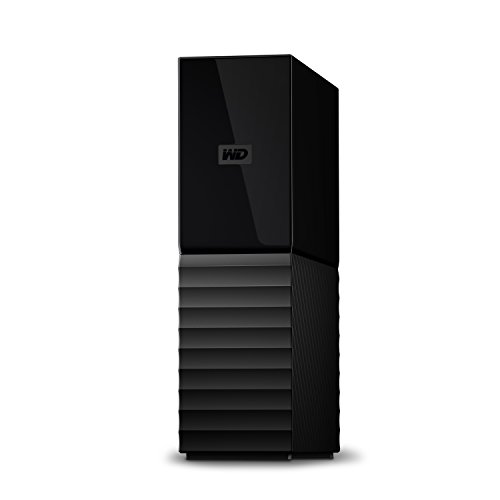
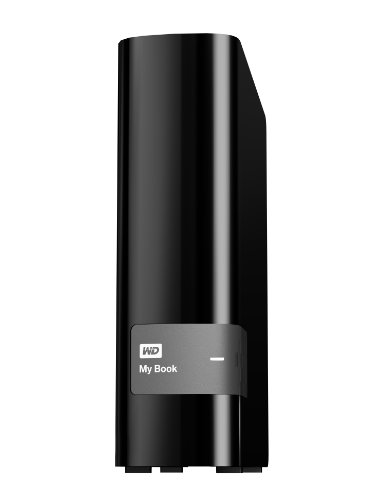
WD 2TB My Book Desktop External Hard Drive - USB 3.0 - WDBFJK0020HBK-NESN


Key features
- •Included WD Backup software makes backing up what's important to you easy and fast
- •Easy to use WD Backup software makes protecting what's important to you easy
- •Downloadable version of AcronisTrue Image WD Edition software offers system-level backup for complete protection
- •Compatible with Windows(R) File History, included on Windows 8 and Windows 10
- •Password protection with hardware encryption keep your private stuff private
- •USB 3.0 for fast data transfer rates
WD 2TB My Book Desktop External Hard Drive - USB 3.0 - WDBFJK0020HBK-NESN
List Price: $260.45$234.41DEALYou Save: $26.04 (10%)
Free shippingFree Returns – 30 daysFree Order CancellationSecure Payment2–3 Days DeliveryGet It October 24, 2026In Stock (1)No marketing spamNo account requiredFulfilment by FedEx / Amazon / UPS / ShipwirePayPal / Card Buyer Protection
Customer Reviews
Reviews sourced from verified Amazon purchasers4.6
out of 5
Based on 10 reviews
5★
60%
4★
40%
3★
0%
2★
0%
1★
0%
WD My Book 4TB USB 3.0 Hard Drive
M. Hill✓ Verified Purchase•August 18, 2023
I plugged in the AC adapter and connected the drive to an existing Western Digital My Cloud network drive using the included USB 3.0 cable. It was automatically detected and a shared drive folder with the name "My Book" appeared in the My Cloud program screen. Following the instructions in the My Cloud manual, I also mapped the My Book as the "G" drive on my laptop.
The software installation files were already loaded on the My Book drive, so using the "G" drive, I installed them on my laptop by double-clicking "WD Apps Setup.exe", which installed the Drive Utilities, Security, and SmartWare programs. The Drive Utilities included Diagnostics, Sleep Timer, Drive Erase, and Product Registration.
When I tried to run the utilities, a "No drives attached" message was displayed because the software did not recognize the mapped drive. The same was true of the included security program. The SmartWare did not display an error message, but it also did not show the new disk in its list of potential backup destinations, so My Book attached to the My Cloud cannot be used for the automatic SmartWare backups.
I had to connect the My Book USB cable directly to my computer to run the utilities and security apps. I ran the first two utilities, SMART Status and Quick Drive Test, which gave positive results, but I did not run the Complete Drive Test because it normally run only if there is a problem and since I did not have one I did not tie up my computer for the "several hours" the diagnostic screen stated was the likely runtime. And, standard Windows tools can be used to check the disk for errors, accomplishing the same thing.
After running the utilities, I re-connected the My Book to the My Cloud. Then I tried to run the Acronis True Image software, which was listed on the box as being included with hard drive, but in fact was not already loaded on the disk. I finally found it on the WD support site under "downloads" and installed it.
This is not a full version of the Acronis software, but it still has some very useful tools including the capability to create a cloned image of your computer's hard drive that loads like a real disk drive on any Windows computer. This will allow you to boot from the cloned image if the original is damaged or if you want to connect to it to manually restore files.
Unfortunately, the cloned image backup is going very slowly over my Gigabit Ethernet network. It has been running for 2 hours and is only 5% complete and displayed message says I still have 1 day 2 hours and 5 minutes left. Update: it crashed about 4 hours later, after only completing 30%. I restarted it to run overnight and it completed successfully in about 7 hours.
The SmartWare software also includes the ability to back-up to cloud services, specifically DropBox. But, since DropBox only includes 4 GB of space for free, in order to use it fully, a monthly fee would be required to utilize it fully for even an average PC which would be 250 GB or more. So, my intended use for this device is to back-up my PCs on my network, all to a single drive. Using the equipment in this manner, my needs are met, so the cloud accessibility is not of primary importance.
Maybe connecting the 4 TB My Book to the My Cloud device was an unfair test. All of the problems with the software and slowness were caused by the connection method used by the My Cloud. I thought since the two drives came from the same manufacturer and the My Cloud used the Linux operating system, that they would automatically integrate the additional drive more tightly and that the software would recognize the My Book as if it were locally connected to my PC. Perhaps these actions will occur with updates in the future. My rating will not reflect these deficiencies because the My Book is marketed as a desktop extension, not a network drive.
When connected directly to my laptop using the supplied USB 3.0 cable, everything worked well and was quite fast. The Image backup, for example, took about 45 minutes and finished without any error messages. So, based on the flawless operation when connected directly to the PC, I am pleased with the performance of the 4 GB My Book with software.
The software installation files were already loaded on the My Book drive, so using the "G" drive, I installed them on my laptop by double-clicking "WD Apps Setup.exe", which installed the Drive Utilities, Security, and SmartWare programs. The Drive Utilities included Diagnostics, Sleep Timer, Drive Erase, and Product Registration.
When I tried to run the utilities, a "No drives attached" message was displayed because the software did not recognize the mapped drive. The same was true of the included security program. The SmartWare did not display an error message, but it also did not show the new disk in its list of potential backup destinations, so My Book attached to the My Cloud cannot be used for the automatic SmartWare backups.
I had to connect the My Book USB cable directly to my computer to run the utilities and security apps. I ran the first two utilities, SMART Status and Quick Drive Test, which gave positive results, but I did not run the Complete Drive Test because it normally run only if there is a problem and since I did not have one I did not tie up my computer for the "several hours" the diagnostic screen stated was the likely runtime. And, standard Windows tools can be used to check the disk for errors, accomplishing the same thing.
After running the utilities, I re-connected the My Book to the My Cloud. Then I tried to run the Acronis True Image software, which was listed on the box as being included with hard drive, but in fact was not already loaded on the disk. I finally found it on the WD support site under "downloads" and installed it.
This is not a full version of the Acronis software, but it still has some very useful tools including the capability to create a cloned image of your computer's hard drive that loads like a real disk drive on any Windows computer. This will allow you to boot from the cloned image if the original is damaged or if you want to connect to it to manually restore files.
Unfortunately, the cloned image backup is going very slowly over my Gigabit Ethernet network. It has been running for 2 hours and is only 5% complete and displayed message says I still have 1 day 2 hours and 5 minutes left. Update: it crashed about 4 hours later, after only completing 30%. I restarted it to run overnight and it completed successfully in about 7 hours.
The SmartWare software also includes the ability to back-up to cloud services, specifically DropBox. But, since DropBox only includes 4 GB of space for free, in order to use it fully, a monthly fee would be required to utilize it fully for even an average PC which would be 250 GB or more. So, my intended use for this device is to back-up my PCs on my network, all to a single drive. Using the equipment in this manner, my needs are met, so the cloud accessibility is not of primary importance.
Maybe connecting the 4 TB My Book to the My Cloud device was an unfair test. All of the problems with the software and slowness were caused by the connection method used by the My Cloud. I thought since the two drives came from the same manufacturer and the My Cloud used the Linux operating system, that they would automatically integrate the additional drive more tightly and that the software would recognize the My Book as if it were locally connected to my PC. Perhaps these actions will occur with updates in the future. My rating will not reflect these deficiencies because the My Book is marketed as a desktop extension, not a network drive.
When connected directly to my laptop using the supplied USB 3.0 cable, everything worked well and was quite fast. The Image backup, for example, took about 45 minutes and finished without any error messages. So, based on the flawless operation when connected directly to the PC, I am pleased with the performance of the 4 GB My Book with software.
Reliable, have had almost ten years still strong
David Devine✓ Verified Purchase•August 17, 2023
I've had this drive nearly a decade now, working great.
Loaded it up with almost a couple terabytes in that ten years with family videos and photos.
I'm upgrading to a SSD with USB 3.2, as the transfer rate on this one is USB 3.0, which is very slow compared to more modern drives.
Loaded it up with almost a couple terabytes in that ten years with family videos and photos.
I'm upgrading to a SSD with USB 3.2, as the transfer rate on this one is USB 3.0, which is very slow compared to more modern drives.
So far, so good
tachi1✓ Verified Purchase•August 9, 2023
I bought the 3TB drive used from Amazon deals. I don't know if that is the reason why it didn't come with any software (no disk and nothing whatsoever on the drive.) I went to the manufacturer's website and downloaded the backup software, SmartWare. I did not download the Acronis software or any of the other options, but they are easily available. These are my observations after two days of round-the-clock use:
1. Windows 7 Pro immediately recognized the drive, even though it is larger than 2 TB (there are a lot of problems with this on the forums and, apparently this has to do with the motherboard.) In my case, however, it did, at least, recognize that it is larger than 2TB.
2. However, it did not recognize it as 3TB, it only recognizes 2.72TB (2794.36 GB) . I know that Windows takes a chunk of each drive for itself, but .28 TB (205.64 GB) seems like an awful lot to take. This might be due to that mysterious 2TB limit on Windows 7 or not. I have no clue.
3. The SmartWare software is easy to use and to understand. At any time you know what and how much has been backed up and how much more you have to go. I haven't had to restore anything, but the process looks pretty straight-forward. I chose the option to back up continuously, but you could back up at set intervals or at a particular time. The only non-intuitive aspect to it is that it calls files that (although selected for backup) haven't been backed up yet "excluded" files. This misnomer isn't explained in the help section. It should be "backed up" and "pending backup."
4. Although I have a lot of data to back up on 3 internal drives, it is chugging along at an impressive pace. (Much faster than the 2TB HP back up drive that I used before.)The contents of each drive are kept separately, as they should but, instead of calling the drives "C," "D," and "E" as my computer does, it issues a long string of numbers and letters to identify each drive. Not awful, but unnecessarily clunky.
5. There is one difference that I noted between this backup program and the HP one that I've used for years: this one gives you the option of saving a set number of versions of each document. The HP backup overwrites each time you save with the same name. I chose to only save one because, with the volume of files I have to save, 3TB wouldn't be enough to save multiples. But you could save as many as 5 versions of each file.
6. When you save with a different name, or rename a file or a folder, or delete a file or a folder, the item remains in the backup. This, it has in common with the HP backup software: you must manually delete things you don't want to keep if you don't want the hard drive to fill up fast with redundant or unnecessary files.
7. There is a Dropbox-related cloud storage function that I do not plan to use as I already back up to the cloud via Carbonite. But it is there, if you want it.
On the whole, I'm pretty pleased with my choice. The drive is silent, stays cool, and works in the background without hogging system resources too much, even on the initial seeding.
1. Windows 7 Pro immediately recognized the drive, even though it is larger than 2 TB (there are a lot of problems with this on the forums and, apparently this has to do with the motherboard.) In my case, however, it did, at least, recognize that it is larger than 2TB.
2. However, it did not recognize it as 3TB, it only recognizes 2.72TB (2794.36 GB) . I know that Windows takes a chunk of each drive for itself, but .28 TB (205.64 GB) seems like an awful lot to take. This might be due to that mysterious 2TB limit on Windows 7 or not. I have no clue.
3. The SmartWare software is easy to use and to understand. At any time you know what and how much has been backed up and how much more you have to go. I haven't had to restore anything, but the process looks pretty straight-forward. I chose the option to back up continuously, but you could back up at set intervals or at a particular time. The only non-intuitive aspect to it is that it calls files that (although selected for backup) haven't been backed up yet "excluded" files. This misnomer isn't explained in the help section. It should be "backed up" and "pending backup."
4. Although I have a lot of data to back up on 3 internal drives, it is chugging along at an impressive pace. (Much faster than the 2TB HP back up drive that I used before.)The contents of each drive are kept separately, as they should but, instead of calling the drives "C," "D," and "E" as my computer does, it issues a long string of numbers and letters to identify each drive. Not awful, but unnecessarily clunky.
5. There is one difference that I noted between this backup program and the HP one that I've used for years: this one gives you the option of saving a set number of versions of each document. The HP backup overwrites each time you save with the same name. I chose to only save one because, with the volume of files I have to save, 3TB wouldn't be enough to save multiples. But you could save as many as 5 versions of each file.
6. When you save with a different name, or rename a file or a folder, or delete a file or a folder, the item remains in the backup. This, it has in common with the HP backup software: you must manually delete things you don't want to keep if you don't want the hard drive to fill up fast with redundant or unnecessary files.
7. There is a Dropbox-related cloud storage function that I do not plan to use as I already back up to the cloud via Carbonite. But it is there, if you want it.
On the whole, I'm pretty pleased with my choice. The drive is silent, stays cool, and works in the background without hogging system resources too much, even on the initial seeding.
Fast shipping and outstanding customer service
Jim M✓ Verified Purchase•August 8, 2023
Unit came unformatted and I am not tech savvy enough to trust trying that on my own.
Scott at All4Computers quickly and simply walked me through the set up and formatting
This is my second WD unit and they work so well I am thinking of getting one as a secure back up in case something goes wrong with my desktop
Scott at All4Computers quickly and simply walked me through the set up and formatting
This is my second WD unit and they work so well I am thinking of getting one as a secure back up in case something goes wrong with my desktop
Good Drive if you give it the right software
r2pabq✓ Verified Purchase•August 2, 2023
I bought 2 of these drives to back up 2 identical Dell desk top PCs running W7 pro OS. I installed one and did some testing before I installed the other (wife's PC). Immediately Windows grabbed the drive and did a backup... not exactly what I wanted. Then I started getting reminders from Dell that I had not backed up my PC. To make matters more confusing, WD software kept prompting me to make a backup. My original intention was to use Acronis True Image for all backups. While I was still testing and learning about Acronis, a fight broke out between the Dell and the WD backup software... upon booting the PC, both were vying for use of the Internet. I could launch Outlook, but it had no Internet access, same for Chrome. I ran Task Manager until I finally found the two offending programs and terminated them. This told me that the Dell software and WD backup software were causing the problems. I un-installed both and all worked OK at that time. I loaded the WD Acronis 2013 software from the WD site. It's really pretty buggy. When I set it to back up at a day and time, it would not work. I did a couple manual starts and it worked OK, but backup of 62 GB took 5 hours.
I'd heard from friends that the Acronis 2015 True Image software works quite well. I recently downloaded the upgraded software after paying $30 (for 2 copies). After install of the backup and universal restore software, I did a manually initiated backup (64 GB) in about 15 minutes. I also created bootable restore files. The Acronis software works well and is pretty intuitive. I have since uninstalled the Dell software and installed the Acronis 2015 suite on my wife's PC (after the Windows backup occurred) with good results.
Since getting the system right a few days ago, the Acronis backups occurred on time. I can recommend the drive, but the WD software leaves much to be desired. If you are contemplating buying this drive, I'd recommend that you do not install the WD software in favor of installing the WD Acronis software and then upgrading the Acronis software to the 2015 level immediately (see the Acronis website). If you have a Dell PC (ours are XPS i7s) I would also disable or uninstall the Dell backup software so no fights break out. The Windows backup software has not made any appearance (on either PC) since I installed the Acronis software.
Time will tell... I will update this review in a few months.
I'd heard from friends that the Acronis 2015 True Image software works quite well. I recently downloaded the upgraded software after paying $30 (for 2 copies). After install of the backup and universal restore software, I did a manually initiated backup (64 GB) in about 15 minutes. I also created bootable restore files. The Acronis software works well and is pretty intuitive. I have since uninstalled the Dell software and installed the Acronis 2015 suite on my wife's PC (after the Windows backup occurred) with good results.
Since getting the system right a few days ago, the Acronis backups occurred on time. I can recommend the drive, but the WD software leaves much to be desired. If you are contemplating buying this drive, I'd recommend that you do not install the WD software in favor of installing the WD Acronis software and then upgrading the Acronis software to the 2015 level immediately (see the Acronis website). If you have a Dell PC (ours are XPS i7s) I would also disable or uninstall the Dell backup software so no fights break out. The Windows backup software has not made any appearance (on either PC) since I installed the Acronis software.
Time will tell... I will update this review in a few months.
Page 1 of 2