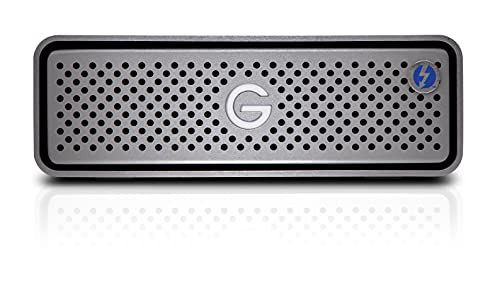
SanDisk Professional 4TB G-DRIVE Enterprise-Class Desktop Hard Drive HDD, Ultrastar Drive Inside, USB-C (5Gbps), USB 3.2 Gen 1 - SDPH91G-004T-NBAAD



Key features
- •USB-C (5Gbps) drive for fast backup (USB 3.2 Gen 1)
- •Enterprise-Class 7200RPM Ultrastar drive inside
- •Powerful performance with up to 200MB/s read and 200MB/s write (1 MB/s = 1 million bytes per second. Based on internal testing; performance may vary depending upon host device, usage conditions, drive capacity, and other factors.)
- •USB Power Delivery to charge your compatible laptop
- •Premium, all-aluminum enclosure for stylish durability
- •Apple Time Machine ready
BrandSanDisk Professional
CategoryExternal Hard Drives
Size4TB
ColorSpace Grey
Warranty3-year limited manufacturer
SanDisk Professional 4TB G-DRIVE Enterprise-Class Desktop Hard Drive HDD, Ultrastar Drive Inside, USB-C (5Gbps), USB 3.2 Gen 1 - SDPH91G-004T-NBAAD
List Price: $324.36$291.92DEALYou Save: $32.44 (10%)
Free shippingFree Returns – 30 daysFree Order CancellationSecure Payment2–3 Days DeliveryGet It October 26, 2026In Stock (2)No marketing spamNo account requiredFulfilment by FedEx / Amazon / UPS / ShipwirePayPal / Card Buyer Protection
Customer Reviews
Reviews sourced from verified Amazon purchasers4.2
out of 5
Based on 10 reviews
5★
70%
4★
30%
3★
0%
2★
0%
1★
0%
Works OK, but power button isn't really a power button?
Denny✓ Verified Purchase•September 24, 2023
Drive arrived on time. No problems with transferring data. Power button doesn't seem to work very well. There's no good tactile feel for whether or not the button is being "pushed". I contacted G-Drive customer support and was told the power button doesn't really turn the drive off completely. To do that, you have to unplug the power supply. Disappointing since that's one of the main reasons I purchased this particular drive. Also, the drive spins up and down periodically while the computer is sleeping and no it's not related to the computer settings. Support didn't give a very clear response to this, but I think it may be a Mac M2 issue, since there are other problems with external hard drives with the M1, M2 Macs.
Bottom line: as long as a functional power button isn't important to you, it's a decent purchase.
Bottom line: as long as a functional power button isn't important to you, it's a decent purchase.
reliable; sturdy case; good performance; quiet, cool, and a good value
DannyO✓ Verified Purchase•September 21, 2023
I've been using two of these for more than a month, and so far I haven't had any problems at all. I'm using them for backups, so they don't get stressed very much, but they stay cool and quiet, unlike some other drives I've had. The enclosure seems rugged, and even looks a bit stylish. The performance is more than adequate for what I'm doing -- not as good as a SSD, of course, but better than an ordinary "USB-powered" drives.
Note that this drive is much less "portable" than some of its peers: it has an external power supply (so you need to carry that with you, *and* have a place to plug it in, if you want to use it away from your office), and the enclosure is larger and heavier than those drives, and, although the enclosure seems very robust, it might not be as drop-resistant because it isn't padded like some of them are. This is fine with me, because my plan is to leave this on my desk and use it for backups when my computer is docked.
Note that this drive is much less "portable" than some of its peers: it has an external power supply (so you need to carry that with you, *and* have a place to plug it in, if you want to use it away from your office), and the enclosure is larger and heavier than those drives, and, although the enclosure seems very robust, it might not be as drop-resistant because it isn't padded like some of them are. This is fine with me, because my plan is to leave this on my desk and use it for backups when my computer is docked.
Didn't know I needed this but glad I got it!
James Hills ✓ Verified Purchase•September 7, 2023
I was moving and so wanted to make full backups of all my different hard drives to take with me as part of my carry on baggage. Worked fabulously from that perspective and was very easy as well as quick to backup various directories across our various pc / laptops and Nas.
These are Mountable
Peter Schmalfeldt✓ Verified Purchase•August 28, 2023
These are great drives, and if you are looking to mount these, you CAN !!! ( though it's not mentioned anywhere on this site, or documents in the box ).
So, what will you need?
1. Pop off the little hex bolt looking things, as these are actually just hole covers ( I used a hex bit and just tilted them a bit, and they popped right off )
2. You will find mounting holes Under the pseudo hex bolt cover. These take 1/4" - 20 screws ( the same kind you use to mount a camera ). They sell these on Amazon too. I needed the 1/4" - 20 x 17mm length for my installation. I also opted to add rubber washers to cut down on vibration ( these are called 1/4" anti-scratch rubber pads by most camera retailers )
3. I used 4" floating shelf mounts and got a 4-pack. Just ensure there is enough clearance from the wall so air can move around the entire device. You probably don't want this thing right up against your wall.
If you are worried about the orientation of how these are mounted, don't be ( as seen in the other reviews ). The main thing you need to worry about with these HHD is moving/bumping them when running. So as long as you mount them in a good spot that won't get disturbed, you are good.
So, what will you need?
1. Pop off the little hex bolt looking things, as these are actually just hole covers ( I used a hex bit and just tilted them a bit, and they popped right off )
2. You will find mounting holes Under the pseudo hex bolt cover. These take 1/4" - 20 screws ( the same kind you use to mount a camera ). They sell these on Amazon too. I needed the 1/4" - 20 x 17mm length for my installation. I also opted to add rubber washers to cut down on vibration ( these are called 1/4" anti-scratch rubber pads by most camera retailers )
3. I used 4" floating shelf mounts and got a 4-pack. Just ensure there is enough clearance from the wall so air can move around the entire device. You probably don't want this thing right up against your wall.
If you are worried about the orientation of how these are mounted, don't be ( as seen in the other reviews ). The main thing you need to worry about with these HHD is moving/bumping them when running. So as long as you mount them in a good spot that won't get disturbed, you are good.
Decently Fast For a Non-SSD Drive
Dash✓ Verified Purchase•August 23, 2023
I mostly use SSD drives professionally, but I have 2 of these that I use for longer term backups. For a non-SSD drive, this drive is reasonably fast for transferring big files. Great build quality, and I haven't had any issues with the drives crashing. Recommend.
Page 1 of 2