UtechSmart Venus Gaming Mouse RGB Wired, 16400 DPI High Precision Laser Programmable MMO Computer Gaming Mice [IGN's Recommendation]
![UtechSmart Venus Gaming Mouse RGB Wired, 16400 DPI High Precision Laser Programmable MMO Computer Gaming Mice [IGN's Recommendation]](https://m.media-amazon.com/images/I/41R-omAfZzL._SL500_.jpg)
![UtechSmart Venus Gaming Mouse RGB Wired, 16400 DPI High Precision Laser Programmable MMO Computer Gaming Mice [IGN's Recommendation]](https://m.media-amazon.com/images/I/51Bt01+9KQL._SL500_.jpg)
![UtechSmart Venus Gaming Mouse RGB Wired, 16400 DPI High Precision Laser Programmable MMO Computer Gaming Mice [IGN's Recommendation]](https://m.media-amazon.com/images/I/51Zn2xjEeVL._SL500_.jpg)
![UtechSmart Venus Gaming Mouse RGB Wired, 16400 DPI High Precision Laser Programmable MMO Computer Gaming Mice [IGN's Recommendation]](https://m.media-amazon.com/images/I/41whINLbfdL._SL500_.jpg)
![UtechSmart Venus Gaming Mouse RGB Wired, 16400 DPI High Precision Laser Programmable MMO Computer Gaming Mice [IGN's Recommendation]](https://m.media-amazon.com/images/I/41PvSdmkjWL._SL500_.jpg)
![UtechSmart Venus Gaming Mouse RGB Wired, 16400 DPI High Precision Laser Programmable MMO Computer Gaming Mice [IGN's Recommendation]](https://m.media-amazon.com/images/I/51WYzrnBNhL._SL500_.jpg)
![UtechSmart Venus Gaming Mouse RGB Wired, 16400 DPI High Precision Laser Programmable MMO Computer Gaming Mice [IGN's Recommendation]](https://m.media-amazon.com/images/I/51Y1UE1EzoL._SL500_.jpg)
Key features
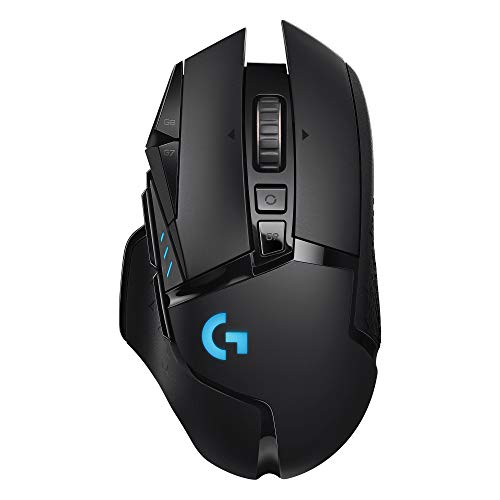
- •Focus on MMO gamers: this professional MMO gaming mouse built-in up to 16400 DPI, 12000 FPS, 1000 Hz polling rate, 30G acceleration, 100-150in/s cursor speed, and a high precision Avago sensor. It has an adjustable sensitivity level (range from 200 - 16400) built right into the gaming mouse. You can easily adjust the mouse sensitivity using buttons on the mouse. Omron micro switches provide crisp, firm clicks.
- •Venus MMO wired gaming mouse with multiple programmable buttons (included 12 side buttons), 5 custom profiles each with 5 LED RGB colors backlit modes for quick identification of profiles and additional options for over 16 million LED RGB colors. The LED breathing light can be disabled according to your preference. Special Setting Switch Button on the bottom of the wired gaming mouse allows you to execute the switch profile command with maximum efficiency.
- •Amazing and unexpected fully customizable/programmable mouse buttons. All the macro buttons allow you to customize the functions to your specific needs and can be easily mapped to any of the usual keyboard keys, combos. The 12 side buttons that you can be mapped to what will best fit your style of play are placed within easy reach of your thumb. "Auto Fire button" is a convenient key for most games which can optimize your preference makes gaming so much easier, even have the ability to increase your level of gameplay.
- •The Venus mmo mouse comes pre-assembled with (2. 4g) x 8 weights inside for adjustable weight. The alternating angle of the side 12 buttons helps with quicker pinpointing of the button needed only by feel. Venus mouse has a nice rest place on the left where your thumb can rest when not active. Equipped two durable smooth TEFLON feet pads for the bottom of the mouse to make the mouse slide better and bring the ultimate gaming experience for you.
- •Ergonomic Right-Handed design with the frosted painting surface avoids hand sweat and slippery. The shape and texture on the mouse are extremely comfortable in the hand and the size is suited for most. That can keep your grip firm during gameplay. 6ft braided-fiber cable with gold-plated USB connector ensures greater durability. 18-Month Manufacturer's Promise.
UtechSmart Venus Gaming Mouse RGB Wired, 16400 DPI High Precision Laser Programmable MMO Computer Gaming Mice [IGN's Recommendation]
List Price: $43.77$39.39DEALYou Save: $4.38 (10%)
Free shippingFree Returns – 30 daysFree Order CancellationSecure Payment2–3 Days DeliveryGet It October 24, 2026In Stock (30)No marketing spamNo account requiredFulfilment by FedEx / Amazon / UPS / ShipwirePayPal / Card Buyer Protection
Customer Reviews
Reviews sourced from verified Amazon purchasers4.5
out of 5
Based on 10 reviews
5★
60%
4★
30%
3★
0%
2★
0%
1★
10%
It worked great, never gave me a single issue
Bryan D.✓ Verified Purchase•September 3, 2017
EDIT: Yes. I was right, and it was a manufacturing issue and a QA issue, at the same time.
There is a PCB for the number keys on the side of the mouse, which is on the left of the photo. The wires running from it are to connect the switch for the 4th mouse button.
There is solder there, but it's not being used to secure the wiring. There is some type of cheap polymer adhesive being used to make that connection, and the connection to the switch module. The switch module PCB even has lead holes, which as I saw on my previous model, were used correctly. On this revision they were plugged with solder and then the wires were sloppily glued on top of the bead.
Luckily I had the old mouse handy and used the PCB for the switch from there since there was no saving the mangled module in my new unit.
The lack of green in the LED patterns and the side-keys overlapping was also a braindead fix; the ribbon cable connecting it to the main board had been obviously stuffed in in such a way that dislodged it from the connector, so it was a partial connection.
I have to say, I spotted those issues within the first second of opening the housing for this unit. It looks terrible, and it performed even worse. I can't recommend this product until they stop trying to cut corners.
END OF EDIT
I had one of these for about a year and it was reliable. It worked great, never gave me a single issue. I broke it by accident while trying to clean it, so i wanted to replace it.
The replacement is a heap of garbgage. the mouse 4 button (next to primary click) 100% doesn't work.
The LED can't display the color green, when pure green is selected as the color it doesn't turn on.
The num-pad on the side is borked, I can't press the "1" or "5" key without both of them triggering. Same with "2" and "3."
I'm super disappointed, as I loved this item when I got the first one. I really wish I hadn't broken it since it was clearly from a time before they changed something in the manufacturing or QA process.
There is a PCB for the number keys on the side of the mouse, which is on the left of the photo. The wires running from it are to connect the switch for the 4th mouse button.
There is solder there, but it's not being used to secure the wiring. There is some type of cheap polymer adhesive being used to make that connection, and the connection to the switch module. The switch module PCB even has lead holes, which as I saw on my previous model, were used correctly. On this revision they were plugged with solder and then the wires were sloppily glued on top of the bead.
Luckily I had the old mouse handy and used the PCB for the switch from there since there was no saving the mangled module in my new unit.
The lack of green in the LED patterns and the side-keys overlapping was also a braindead fix; the ribbon cable connecting it to the main board had been obviously stuffed in in such a way that dislodged it from the connector, so it was a partial connection.
I have to say, I spotted those issues within the first second of opening the housing for this unit. It looks terrible, and it performed even worse. I can't recommend this product until they stop trying to cut corners.
END OF EDIT
I had one of these for about a year and it was reliable. It worked great, never gave me a single issue. I broke it by accident while trying to clean it, so i wanted to replace it.
The replacement is a heap of garbgage. the mouse 4 button (next to primary click) 100% doesn't work.
The LED can't display the color green, when pure green is selected as the color it doesn't turn on.
The num-pad on the side is borked, I can't press the "1" or "5" key without both of them triggering. Same with "2" and "3."
I'm super disappointed, as I loved this item when I got the first one. I really wish I hadn't broken it since it was clearly from a time before they changed something in the manufacturing or QA process.
Fantastic value
Michael S. Prinke✓ Verified Purchase•July 1, 2017
I'd had my eye on a comparable Razer mouse for a while, then spotted this one on a good deal. Simply put, it's fantastic. The software makes it very easy to configure, the mouse is very accurate and sensitive, the laser deals with a big variety of different kinds of surfaces better than my Logitech mouse ever did. One of the best features that I wasn't even aware that I was getting was the sensitivity dialing. It turns out that those two buttons in the middle, just behind the wheel, let you dial the mouse's sensitivity up and down on the fly, in addition to the overall sensitivity that you can apply freely to different presets.
Apart from that, it's simply a very good mouse. The surface has a comfy texture to it, and the keypad buttons have an alternating form factor to them that makes it easy to distinguish which buttons you're hitting. To give you an idea I've got buttons 1 and 4 mapped as "Forward" and "Back" in the default configuration, and it feels very natural as they have an indentation between them. The second two rows of buttons have a similar relational form factor.
I got it on a deal -- but I'm fairly confident this one would've been worth full price. Never turning back to normal mice again after this one.
Apart from that, it's simply a very good mouse. The surface has a comfy texture to it, and the keypad buttons have an alternating form factor to them that makes it easy to distinguish which buttons you're hitting. To give you an idea I've got buttons 1 and 4 mapped as "Forward" and "Back" in the default configuration, and it feels very natural as they have an indentation between them. The second two rows of buttons have a similar relational form factor.
I got it on a deal -- but I'm fairly confident this one would've been worth full price. Never turning back to normal mice again after this one.
My pros & cons
Tim✓ Verified Purchase•May 21, 2017
Pros:
- Nice ergonomic design and texture
- 12 programmable buttons on side are very useful although a bit smaller than I would like (also don't mind what so ever that they are simply a number pad and not unique stand alone buttons (still programmable to any other key on key board))
- Mouse wheel has nice grip
- Nice dpi customizable range
- Good quality cord
- Customizable lighting
Cons:
- Right & Left mouse buttons are way too sensitive, I cannot comfortably rest my hand on the mouse without miss clicking, constantly having to hover my fingers ever so slightly over the buttons knowing any slight pressure will cause a miss click is annoying (I fixed this problem by inserting a strip of rubber under each button to create more resistance)
- On the opposite end the middle mouse button take too much pressure before it registers a click.
- And finally just a small nit pick (due to coming off my previous mouse I used for 4 years) I really miss a "forward" and "back" button on the side, I understand there simply isn't room for it to fit, would be nice if the 3 & 6 buttons had this feature.
Overall with all the searching I've done I would buy this mouse again even knowing its pros and cons.
- Nice ergonomic design and texture
- 12 programmable buttons on side are very useful although a bit smaller than I would like (also don't mind what so ever that they are simply a number pad and not unique stand alone buttons (still programmable to any other key on key board))
- Mouse wheel has nice grip
- Nice dpi customizable range
- Good quality cord
- Customizable lighting
Cons:
- Right & Left mouse buttons are way too sensitive, I cannot comfortably rest my hand on the mouse without miss clicking, constantly having to hover my fingers ever so slightly over the buttons knowing any slight pressure will cause a miss click is annoying (I fixed this problem by inserting a strip of rubber under each button to create more resistance)
- On the opposite end the middle mouse button take too much pressure before it registers a click.
- And finally just a small nit pick (due to coming off my previous mouse I used for 4 years) I really miss a "forward" and "back" button on the side, I understand there simply isn't room for it to fit, would be nice if the 3 & 6 buttons had this feature.
Overall with all the searching I've done I would buy this mouse again even knowing its pros and cons.
Quality Mouse, Never heard of UtechSmart
Cassean✓ Verified Purchase•May 5, 2017
I have never heard of UtechSmart, but I needed a new mouse and wanted an MMO-mouse. The cost of the mouse is what I saw first, so figured even if it was a bad mouse, it would not break the bank and I could try again.
Well, I was completely surprised by what I received after I bought the mouse. This thing is quality and feels great.
The texture on the mouse is like a soft rubberized super-fine grit "sand paper". It feels absolutely wonderful to my fingers and hand, my favorite mouse texture to-date.
The mouse comes with several small 2.4 gram weights in a simple and sleek container, and I found my comfortable weight. They are easy to install with a simple twist open/lock opening on the bottom of the mouse.
The mouse wheel has a nice soft "bump" feeling. When I scroll quickly, it is barely noticeable, but when I slow down it is easily felt. I like this kind of mouse wheel action, I find the heavy bump/clicks of other mouse wheels distracting at quick scroll movements.
The Wing and shelf on the left and right side respectively are fantastic. I had a Cyborg RAT 7 years ago, and while that mouse had its issues, the thing I absolutely loved about it was the wings on the left and right of the mouse to keep my thump and ring/pinky finger off the mouse pad/desk. The only thing I wish this mouse had was a wing on the right to keep my pinky off the mouse pad/desk instead of that shelf that only fits my ring finger. However, compared to other mice on the market, this is leaps and bounds better for my fingers than anything else I have found. Words cannot describe how annoying it is to have your fingers drag across your mouse pad or desk until you have had a mouse that prevents that completely and then you go back to a mouse that does have it. You notice it, all the time. I love this things thumb wing and finger shelf.
The main two buttons on the mouse have a nice "click" and are responsive. I do not have any issues with miss-clicks, but can easily click when I need. It is a comfortable level of pressure to activate the switch, and I have not had any issues with activating it when I did not mean to.
The side buttons are easily reachable with my thumb, and the pattern they are set at, the 1-3 and 4-6 dip inward towards each other so there is a little "valley" along the bottom of 1-3 and the top of 4-6. This is repeated with the 7-9 and 10-12 keys. The bottom of the 5 and top of the 8 also have a small bump on them, like the F and J key of a keyboard to further help identify where your thumb is.
It is easy to "feel" where you are, and the individual buttons along the valley, making them extremely easy to activate the correct button without ever looking away from your screen or having to shift your grip on the mouse.
The last button, the small "fire button" as they identify it in the product images, is easily reach by your index finger. I use this for my "Oh crap" button in MMOs or similar. It is positioned in a way that I do not accidentally activate it with my mouse grip, but can be activated by simply rolling my index finger slightly and applying a bit of pressure.
The software is easy to use, though the GUI is a bit "meh", which is not enough of an issue to take a star off. The interface is easy enough to navigate, set DPI marks for the DPI quick-change button on the mouse. You can change the lighting of the mouse using a color palette or a color "wheel" or by hex code. Brightness is controlled through an Off/Low/Med/High set of check boxes.
Wished for changes:
I wish it had a wing, or extended "finger shelf" on the right like it does on the left to keep my pinky off the mouse pad/desk.
I really dig this mouse and have recommend it highly to my gamer friends, I know two of them have actually picked one up and they love it as well.
If you are in the market for an MMO mouse, I cannot recommend this one more highly.
Well, I was completely surprised by what I received after I bought the mouse. This thing is quality and feels great.
The texture on the mouse is like a soft rubberized super-fine grit "sand paper". It feels absolutely wonderful to my fingers and hand, my favorite mouse texture to-date.
The mouse comes with several small 2.4 gram weights in a simple and sleek container, and I found my comfortable weight. They are easy to install with a simple twist open/lock opening on the bottom of the mouse.
The mouse wheel has a nice soft "bump" feeling. When I scroll quickly, it is barely noticeable, but when I slow down it is easily felt. I like this kind of mouse wheel action, I find the heavy bump/clicks of other mouse wheels distracting at quick scroll movements.
The Wing and shelf on the left and right side respectively are fantastic. I had a Cyborg RAT 7 years ago, and while that mouse had its issues, the thing I absolutely loved about it was the wings on the left and right of the mouse to keep my thump and ring/pinky finger off the mouse pad/desk. The only thing I wish this mouse had was a wing on the right to keep my pinky off the mouse pad/desk instead of that shelf that only fits my ring finger. However, compared to other mice on the market, this is leaps and bounds better for my fingers than anything else I have found. Words cannot describe how annoying it is to have your fingers drag across your mouse pad or desk until you have had a mouse that prevents that completely and then you go back to a mouse that does have it. You notice it, all the time. I love this things thumb wing and finger shelf.
The main two buttons on the mouse have a nice "click" and are responsive. I do not have any issues with miss-clicks, but can easily click when I need. It is a comfortable level of pressure to activate the switch, and I have not had any issues with activating it when I did not mean to.
The side buttons are easily reachable with my thumb, and the pattern they are set at, the 1-3 and 4-6 dip inward towards each other so there is a little "valley" along the bottom of 1-3 and the top of 4-6. This is repeated with the 7-9 and 10-12 keys. The bottom of the 5 and top of the 8 also have a small bump on them, like the F and J key of a keyboard to further help identify where your thumb is.
It is easy to "feel" where you are, and the individual buttons along the valley, making them extremely easy to activate the correct button without ever looking away from your screen or having to shift your grip on the mouse.
The last button, the small "fire button" as they identify it in the product images, is easily reach by your index finger. I use this for my "Oh crap" button in MMOs or similar. It is positioned in a way that I do not accidentally activate it with my mouse grip, but can be activated by simply rolling my index finger slightly and applying a bit of pressure.
The software is easy to use, though the GUI is a bit "meh", which is not enough of an issue to take a star off. The interface is easy enough to navigate, set DPI marks for the DPI quick-change button on the mouse. You can change the lighting of the mouse using a color palette or a color "wheel" or by hex code. Brightness is controlled through an Off/Low/Med/High set of check boxes.
Wished for changes:
I wish it had a wing, or extended "finger shelf" on the right like it does on the left to keep my pinky off the mouse pad/desk.
I really dig this mouse and have recommend it highly to my gamer friends, I know two of them have actually picked one up and they love it as well.
If you are in the market for an MMO mouse, I cannot recommend this one more highly.
Despite item issues it's a good mouse even for someone with smaller adult hands.
Rebecca P✓ Verified Purchase•January 24, 2017
First off I was the owner of a Razer Naga Molten Special Edition that I loved. I owned it since release, so it gave me many years of faithful gameplay. The weight inside the mouse broke off and fell onto it's internals shorting out whatever was inside. I tried to open it to investigate but two of its four screws are not standard and I can't remove them.
I did a lot of research and watched a lot of YouTube videos before deciding to try the UtechSmart Venus. It came quickly and I excitedly opened it when it arrived. Sadly the mouse was a used/like new model instead of new. (what I paid for) This problem probably happened in the packing/shipping department, but who knows.
I contacted UtechSmart as soon as my order registered as delivered and they were very helpful. They directed me first to their company but since I'm fairly sure it was Amazon's error, rather than UtechSmart, I decided to go ahead and just return the mouse and buy it again from UtechSmart, but not through Amazon.
I was able to hold the mouse before returning and it's bigger then the Naga. The thumb buttons are easier to navigate then the Naga by feel in my opinion, due to the wave-like angling on the rows. This made the back 6 buttons more useable then the Naga. I was able to feel them out with the back part of my thumb near the joint and press them more easily then the Naga.
I have smaller hands and short fingers so the thumb rest was unusable for me personally but my thumb fit comfortably relaxed over the button pad and I didn't miss it or need it. I use a palm grip on mice and was able to use the left and right mouse buttons easily and use the scroll wheel if needed using the same fingers I use on the Naga.
I will update this review when I get my replacement and get a chance to install and use the software.
I did a lot of research and watched a lot of YouTube videos before deciding to try the UtechSmart Venus. It came quickly and I excitedly opened it when it arrived. Sadly the mouse was a used/like new model instead of new. (what I paid for) This problem probably happened in the packing/shipping department, but who knows.
I contacted UtechSmart as soon as my order registered as delivered and they were very helpful. They directed me first to their company but since I'm fairly sure it was Amazon's error, rather than UtechSmart, I decided to go ahead and just return the mouse and buy it again from UtechSmart, but not through Amazon.
I was able to hold the mouse before returning and it's bigger then the Naga. The thumb buttons are easier to navigate then the Naga by feel in my opinion, due to the wave-like angling on the rows. This made the back 6 buttons more useable then the Naga. I was able to feel them out with the back part of my thumb near the joint and press them more easily then the Naga.
I have smaller hands and short fingers so the thumb rest was unusable for me personally but my thumb fit comfortably relaxed over the button pad and I didn't miss it or need it. I use a palm grip on mice and was able to use the left and right mouse buttons easily and use the scroll wheel if needed using the same fingers I use on the Naga.
I will update this review when I get my replacement and get a chance to install and use the software.
Page 1 of 2