Hauppauge HD PVR Rocket Portable Stand Alone HD 1080p Video Game Recorder for Xbox One, Xbox 360, PS4, PS3 and PC Gaming Systems (1540)
Key features
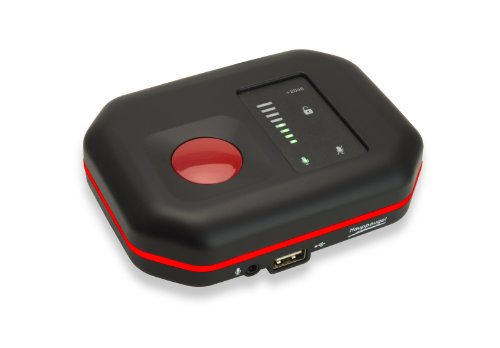
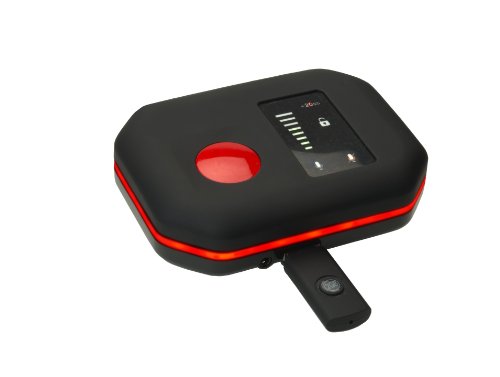
- •Portable, small enough to carry in your pocket, with built-in microphone mixer to record your commentary with game audio
- •Record your gameplay in HD from Xbox, PlayStation consoles and PC gaming systems, and upload your best moves to YouTube.
- •NOTE: (Blu-ray burner software not included) Kindly refer the Instructions inside the package for downloading the Software which is highly recommended.
- •Minimum Transfer Rate 2.5 MB/s
BrandHauppauge
Hauppauge HD PVR Rocket Portable Stand Alone HD 1080p Video Game Recorder for Xbox One, Xbox 360, PS4, PS3 and PC Gaming Systems (1540)
List Price: $173.15$155.84DEALYou Save: $17.31 (10%)
Free shippingFree Returns – 30 daysFree Order CancellationSecure Payment2–3 Days DeliveryGet It October 26, 2026In Stock (14)No marketing spamNo account requiredFulfilment by FedEx / Amazon / UPS / ShipwirePayPal / Card Buyer Protection
Customer Reviews
Reviews sourced from verified Amazon purchasers3.5
out of 5
Based on 10 reviews
5★
40%
4★
40%
3★
10%
2★
10%
1★
0%
5 stars for the hardware, 4 when averaging in the software
Slim✓ Verified Purchase•November 15, 2017
Video quality is superb. The WinTV software needs some work, imo.
My reason for buying is that I switched from Comcast to DirecTV. I used a Silicon Dust HD Homerun with Comcast and it was close to perfect. It integrated well with Windows Media Center and is setup with 10TV video storage. Five stars all the way.
I like the DirecTV Genie, but 1TB? I compared the cost of adding an external eSATA drive to the Genie, vs the cost of buying the HD-PVR 2. Even replacing the internal drive (not recommended) was going to be more expensive and you lose access to anything you've recorded.
Just to be clear, I'm happy with the product overall and plan on using it a lot. It is connected to a DirecTV Genie, with this HDMI splitter - https://www.amazon.com/gp/product/B004F9LVXC/.
The plan is to record TV and use MCE Buddy to convert the output files from *.ts to *.wtv, as I already have a lot of stuff from Comcast days. The goal is to have all of the recorded TV in one place.
So what's the beef?
1) No channel guide. If you want to schedule a recording, the only way I could find to do this is manual. Not saying that there isn't a way around it, but I haven't found it yet.
2) "Properties" on the output files are not editable. It would be very convenient to fill them in, either by including the properties on the scheduling screen in WinTV or just making the fields editable from Windows Explorer. I plan on contacting Hauppauge and see what they have to say.
New beef!
Using HDMI, I am not getting 5.1 audio recorded, just 2.0 Dolby. I'll update when I find a fix.
My reason for buying is that I switched from Comcast to DirecTV. I used a Silicon Dust HD Homerun with Comcast and it was close to perfect. It integrated well with Windows Media Center and is setup with 10TV video storage. Five stars all the way.
I like the DirecTV Genie, but 1TB? I compared the cost of adding an external eSATA drive to the Genie, vs the cost of buying the HD-PVR 2. Even replacing the internal drive (not recommended) was going to be more expensive and you lose access to anything you've recorded.
Just to be clear, I'm happy with the product overall and plan on using it a lot. It is connected to a DirecTV Genie, with this HDMI splitter - https://www.amazon.com/gp/product/B004F9LVXC/.
The plan is to record TV and use MCE Buddy to convert the output files from *.ts to *.wtv, as I already have a lot of stuff from Comcast days. The goal is to have all of the recorded TV in one place.
So what's the beef?
1) No channel guide. If you want to schedule a recording, the only way I could find to do this is manual. Not saying that there isn't a way around it, but I haven't found it yet.
2) "Properties" on the output files are not editable. It would be very convenient to fill them in, either by including the properties on the scheduling screen in WinTV or just making the fields editable from Windows Explorer. I plan on contacting Hauppauge and see what they have to say.
New beef!
Using HDMI, I am not getting 5.1 audio recorded, just 2.0 Dolby. I'll update when I find a fix.
needs a remote.
driftinge30✓ Verified Purchase•October 8, 2017
do need one at all times.
so many strange things in plays that I'd like to share, and now I can.
1 wish... a remote to hit record, and stop recording... b/c this sits next to the ps4, and I only want to record game plays.
the way it is now, I just record for a few hours at a time.
where-as if I could stop recording (without getting up every time to hit the button, as when I'm in a menu or pre-post game garbage) the recordings would have cleaner start-stop times.
currently, I have to hope each game is on one file, otherwise I have to patch 2 files together in an editing program... not a big deal, but it would be much easier to know each file is its own match or session.
also, each file size would be unique too, and searching for that 1 super short and great victory match would be easier.
but all in all, this is a fantastic device. I would buy a 2nd but it's a bit too pricey for a spare one. I have had a much cheaper one, that worked for about 3 months, (which had a remote) but hopefully this one lasts
so many strange things in plays that I'd like to share, and now I can.
1 wish... a remote to hit record, and stop recording... b/c this sits next to the ps4, and I only want to record game plays.
the way it is now, I just record for a few hours at a time.
where-as if I could stop recording (without getting up every time to hit the button, as when I'm in a menu or pre-post game garbage) the recordings would have cleaner start-stop times.
currently, I have to hope each game is on one file, otherwise I have to patch 2 files together in an editing program... not a big deal, but it would be much easier to know each file is its own match or session.
also, each file size would be unique too, and searching for that 1 super short and great victory match would be easier.
but all in all, this is a fantastic device. I would buy a 2nd but it's a bit too pricey for a spare one. I have had a much cheaper one, that worked for about 3 months, (which had a remote) but hopefully this one lasts
I hope Hauppauge is happy with my money
Jason M Anderson✓ Verified Purchase•August 18, 2017
Had this device for a year or so now. out of the box it was broken and one of the color hues didn't display right. I had to mail it in and wait 6 weeks to get it back repaired. Customer service was condescending and didn't give a damn what I had to say, but at least it was repaired. I put the device in storage because I was moving soon, so it sat for a couple of months. I recently tried to run it on my lap top and it has been a nightmare. I don't post reviews of items until i've had them for a while and have given them enough time to either be worth their cost or not. This thing is not worth the price tag. Get adobe afterfx and an HDMI splitter, save yourself the trouble. The device doesn't even work unless attached to a computer that is running and has the drivers installed. That means if you aren't running your comp or lap top near the TV you aren't playing your xbox ps4 whatever. Furthermore, the new software crashes constantly. This thing is more trouble than it's worth and there are far cheaper methods of recording your gaming.
I hope Hauppauge is happy with my money, I wonder what that stupid name even stands for.
I hope Hauppauge is happy with my money, I wonder what that stupid name even stands for.
Great Video Capture Device
GCI King✓ Verified Purchase•April 3, 2017
My old AverMedia system quit working so I decided to try this Hauppauge DH-DVR System. I used this system to capture video from my DirecTV Receiver and, using an HDMI Splitter, I was even able to connect my Roku 3 Player to bypass HDCP protection.
I thought about giving the Hauppauge 4 stars because it isn't the easiest system to set up, but the performance is so good it really does rate 5 stars. I had to read the instructions several times before I clearly understood the setup procedures. Overall it also took me about an hour to set up. Once you know how to do it, however, you should be able to set up, install the software and connect the system in under a half-hour.
The system doesn't come with an installed CD, you must download the software from the Hauppauge web site. It was also a little disconcerting to hook the Hauppauge hardware up but not see any video. You must complete the software installation on your PC before the video is connected. However, once I finished this set, the video popped right in.
As for performance, the Hauppauge PVR is all that is advertised. I can now view and capture video from either my DirecTV receiver or from my Roku. The Hauppauge isn't error-free however; I do find that when changing channels on my DirecTV receiver, I see a brief flash of color bars on my screen before the receiver connects to the new channel. This will happen on the Hauppauge since it is connected to the PC. Not a big issue, just something I have to get used to living with.
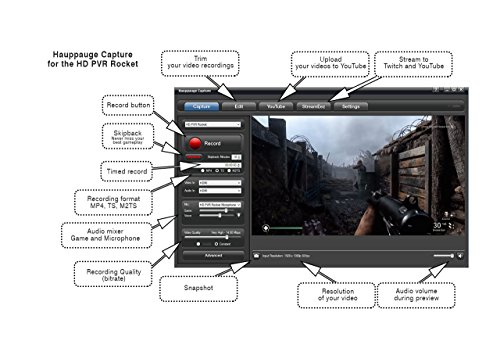
This system comes with several software tools to view input on your PC, plus a special Hauppauge capture app which works superbly (manual and timed record, stream video and a YouTube Link to upload videos).
Overall, the Hauppauge HD-PVR does everything I hoped it would and does it well. I don't miss my old system one bit.
I thought about giving the Hauppauge 4 stars because it isn't the easiest system to set up, but the performance is so good it really does rate 5 stars. I had to read the instructions several times before I clearly understood the setup procedures. Overall it also took me about an hour to set up. Once you know how to do it, however, you should be able to set up, install the software and connect the system in under a half-hour.
The system doesn't come with an installed CD, you must download the software from the Hauppauge web site. It was also a little disconcerting to hook the Hauppauge hardware up but not see any video. You must complete the software installation on your PC before the video is connected. However, once I finished this set, the video popped right in.
As for performance, the Hauppauge PVR is all that is advertised. I can now view and capture video from either my DirecTV receiver or from my Roku. The Hauppauge isn't error-free however; I do find that when changing channels on my DirecTV receiver, I see a brief flash of color bars on my screen before the receiver connects to the new channel. This will happen on the Hauppauge since it is connected to the PC. Not a big issue, just something I have to get used to living with.
This system comes with several software tools to view input on your PC, plus a special Hauppauge capture app which works superbly (manual and timed record, stream video and a YouTube Link to upload videos).
Overall, the Hauppauge HD-PVR does everything I hoped it would and does it well. I don't miss my old system one bit.
70% Failure Rate. POOR Customer Support. 3rd Party software.
Denise✓ Verified Purchase•January 6, 2017
70% Failure Rate!!!
Update January 19th 2017. Since my original review I have discovered that by placing my Hauppage on an open wire rack, the performance of the Hauppauge has improved significantly. Leading me to believe that this unit is prone to overheating and that the overheating is what is causing the constant crashing and malfunctioning. I have successfully recorded 30 episodes of Twin Peaks, 60 episodes of Game of Thrones, and about 20 additional movies since moving the unit to the open wire rack. I've not been successful in utilizing the streaming or YouTube functions and the IR Blaster is still useless to me however, to Simply offload shows from your DirecTV DVR this unit performs that task adequately. Upgrading my rating from one star to three.
I purchased this to offload my Directv DVR. In addition to that I purchased the component dongle from Directv, a brand new top of the line gaming laptop with the max RAM and Storage, Windows 10, and external hard drives with 8TB space each. I have used this laptop for nothing else but to utilize the Hauppauge unit. I also turn off the internet so nothing can run in the background and disrupt it's operation. There isn't even a screensaver. The immense power of this laptop is devoted entirely for the operation of this unit. And, everytime I close my computer...CCleaner removes all the trash and temp files. There is NOthing that can be interfering with this unit's operation. AND... after I get a good file... I move it to an external hard drive so as not to take up the laptop's space. Ya feel me?
Here is my experience. I attempted numerous times to offload Game of Thrones...60 hours give or take. But due to all the stuttering, stalling and out right crashing The unit only successfully recorded 10 hours...the rest of the file is 50 hours of a snapshot. Even though the files "appear" to be recording in the preview pane,,,the file is jacked, I have attempted to off load over 100 hours of movies...Each film basically crashed and had to be recorded multiple times to get a good file.
I have become accustomed to saving one file...Moving it to an external hard drive, shutting down the laptop, unplugging the Hauppauge and restarting everything for the next movie I wish to offload. It's the only thing that seems to work. This is convenience?
Things I absolutely hate:
The software isn't even Hauppaugge...so they don't support it. All it does is allow you to schedule recordings. What they don't tell you upfront is that unlike a dvr, this thing only records live tv. So you have to leave everything on and have your tv on the right channel if you want to record something in the future.
The IR blaster doesn't even work.
The interface is geared for gamers. Even though the particular model I purchased was specifically advertised for NON Gamers wishing offload set top boxes. So it took me more than a minute to figure out that I had configure the hookup and settings for a "Game Console" I don't even have because it said component interface.
Since I found the Wintv8 softare useless and suspected it of causing the crashes...I uninstalled it. It made no difference. So I re-installed it just to have in case the bugs got worked out. Now my seriel number isn't valid anymore and I refuse to PAY for a new one.
Their website is a joke. It took weeks for a human being to reply to my service ticket only to tell me to go their facebook and look and see if anyone has had similar problems in their blog (A THIRD PARTY BLOG!!!!!) Can you believe it? They don't stand behind their product. They don't service their product. They don't honor the warranty, they can't even find your unit so they can't or won't help you.
Thank the universe for AMAZON's exceptional customer service. They replaced the defective unit immediately. Guess what....it worked great for about 3 days...then all the same stuff kept happening. I even had GeekSquad check out my laptop and setup to see if the problem is mine or Hauppaugge. Guess what.... It's the Hauppauge that does not perform as it is supposed to.
There must be something else, something better out there for this purpose. If I find it I will update this review with that info.
Update January 19th 2017. Since my original review I have discovered that by placing my Hauppage on an open wire rack, the performance of the Hauppauge has improved significantly. Leading me to believe that this unit is prone to overheating and that the overheating is what is causing the constant crashing and malfunctioning. I have successfully recorded 30 episodes of Twin Peaks, 60 episodes of Game of Thrones, and about 20 additional movies since moving the unit to the open wire rack. I've not been successful in utilizing the streaming or YouTube functions and the IR Blaster is still useless to me however, to Simply offload shows from your DirecTV DVR this unit performs that task adequately. Upgrading my rating from one star to three.
I purchased this to offload my Directv DVR. In addition to that I purchased the component dongle from Directv, a brand new top of the line gaming laptop with the max RAM and Storage, Windows 10, and external hard drives with 8TB space each. I have used this laptop for nothing else but to utilize the Hauppauge unit. I also turn off the internet so nothing can run in the background and disrupt it's operation. There isn't even a screensaver. The immense power of this laptop is devoted entirely for the operation of this unit. And, everytime I close my computer...CCleaner removes all the trash and temp files. There is NOthing that can be interfering with this unit's operation. AND... after I get a good file... I move it to an external hard drive so as not to take up the laptop's space. Ya feel me?
Here is my experience. I attempted numerous times to offload Game of Thrones...60 hours give or take. But due to all the stuttering, stalling and out right crashing The unit only successfully recorded 10 hours...the rest of the file is 50 hours of a snapshot. Even though the files "appear" to be recording in the preview pane,,,the file is jacked, I have attempted to off load over 100 hours of movies...Each film basically crashed and had to be recorded multiple times to get a good file.
I have become accustomed to saving one file...Moving it to an external hard drive, shutting down the laptop, unplugging the Hauppauge and restarting everything for the next movie I wish to offload. It's the only thing that seems to work. This is convenience?
Things I absolutely hate:
The software isn't even Hauppaugge...so they don't support it. All it does is allow you to schedule recordings. What they don't tell you upfront is that unlike a dvr, this thing only records live tv. So you have to leave everything on and have your tv on the right channel if you want to record something in the future.
The IR blaster doesn't even work.
The interface is geared for gamers. Even though the particular model I purchased was specifically advertised for NON Gamers wishing offload set top boxes. So it took me more than a minute to figure out that I had configure the hookup and settings for a "Game Console" I don't even have because it said component interface.
Since I found the Wintv8 softare useless and suspected it of causing the crashes...I uninstalled it. It made no difference. So I re-installed it just to have in case the bugs got worked out. Now my seriel number isn't valid anymore and I refuse to PAY for a new one.
Their website is a joke. It took weeks for a human being to reply to my service ticket only to tell me to go their facebook and look and see if anyone has had similar problems in their blog (A THIRD PARTY BLOG!!!!!) Can you believe it? They don't stand behind their product. They don't service their product. They don't honor the warranty, they can't even find your unit so they can't or won't help you.
Thank the universe for AMAZON's exceptional customer service. They replaced the defective unit immediately. Guess what....it worked great for about 3 days...then all the same stuff kept happening. I even had GeekSquad check out my laptop and setup to see if the problem is mine or Hauppaugge. Guess what.... It's the Hauppauge that does not perform as it is supposed to.
There must be something else, something better out there for this purpose. If I find it I will update this review with that info.
Page 1 of 2