Docooler 2.4GHz Wireless Optical Pen Mouse Adjustable 500/1000DPI Handwriting Smart Mouse for PC Laptop iMac Android Tablet


Key features
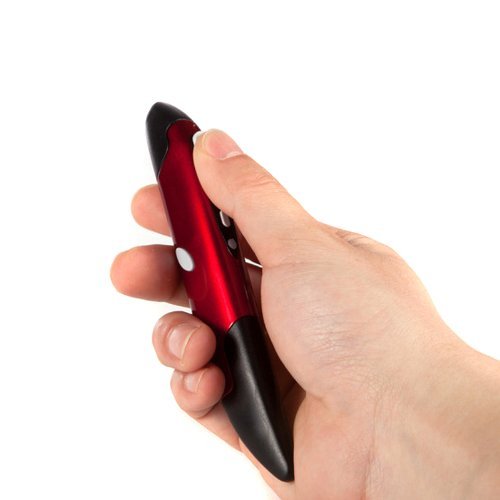
- •Innovative mini pen-style mouse provides accurate and easy control of the mouse cursor.
- •2.4GHz wireless connection, up to 10m operation distance.
- •Adjustable 500/1000 DPI optical sensor for smooth movement control.
- •Power saving: if there is no 2.4GHz signal, it will automatically power off.
- •Pen shaped, especially suitable for handwriting input.
Docooler 2.4GHz Wireless Optical Pen Mouse Adjustable 500/1000DPI Handwriting Smart Mouse for PC Laptop iMac Android Tablet
List Price: $25.20$22.68DEALYou Save: $2.52 (10%)
Free shippingFree Returns – 30 daysFree Order CancellationSecure Payment2–3 Days DeliveryGet It October 24, 2026In Stock (1)No marketing spamNo account requiredFulfilment by FedEx / Amazon / UPS / ShipwirePayPal / Card Buyer Protection
Customer Reviews
Reviews sourced from verified Amazon purchasers3.7
out of 5
Based on 10 reviews
5★
30%
4★
70%
3★
0%
2★
0%
1★
0%
Almost perfect
Bryan W✓ Verified Purchase•November 15, 2023
This thing is great. There is a little bit of a learning process but once you get used to it it becomes very natural and comfortable. It is very fun to use and you can use it on just about anything. It is also very accurate, I use it frequently with architectural software as well as photoshop and illustrator. The pen tip has flat edges which I use to make a rolling motion instead of sliding when extreme accuracy is needed. This technique makes this devise much more accurate and responsive to micro movements than a traditional optical mouse. My only complaint is that I would like it to have a bit more weight and to be more sturdy. Perhaps if they used metal instead of flimsy plastic it would solve the problem. I still gave it 5 stars because at only just above $10 it is well worth it. The battery life is also surprisingly good considering it only uses a single AAA.
Fun to use
Karen Reeves✓ Verified Purchase•October 25, 2023
I really like this pen mouse - especially if you are browsing rather than needing to type information. If you have to switch between scrolling and typing, it will take a little getting used to since you have to either lay it down or stick it in the stand that comes with it. With a little practice, I'm sure that could be easily managed.
works well, takes a bit to get used to, adjusted my pc settings for click, use more keyboard shortcuts
NY rat✓ Verified Purchase•October 13, 2023
bought it along with a track pad so I can switch at work between devices as my hand/wrist were getting sore from using regular mouse all day. I have been using it for about a month now and still it is a challenge to use a thumb to right click on things (as the button is right where your thumb is when you hold this mouse). So I got into a habit of using more keyboard shortcuts like ctrl/x to cut or ctrl/a to select all, or to hold shift and then tap at the end of the area I want to select etc I also had to change my settings on the computer so it only takes one click to have things open...this helped a lot as the left button of the mouse(right index finger push) takes a bit to get used to so I don't have to click it twice...just once. But overall, this is a big help if you trying to save your hands/wrists. I like using it and the more you use it, the better you'll get at it. It did take forever to arrive! Plus, it didn't arrive by the date indicated and I had to write to them to find out what's up. It arrived 2-3 days later than indicated. Took almost a month after ordering to get it but it's worth it.
I use it with a photoshop like product running on a mac and have the functions ...
A. Uzanas✓ Verified Purchase•October 7, 2023
The pen works well. I use it with a photoshop like product running on a mac and have the functions of a mouse but more precise control because of the pen like shape. A little bulkier than an actual pen but not uncomfortable. Was plug and play, no setup. I use it on white mouse pad and don't notice and tracking issues.
Good for general drawing, not precise work.
CG✓ Verified Purchase•October 2, 2023
Unfortunately, this pen did not work as expected. I had to train my hand into weird movements to write something or get anything done. I gave up and got a small tablet and solved the problem. I am now using this pen for general drawing for the grandchildren. They liked it as it requires less precision work.
Page 1 of 2