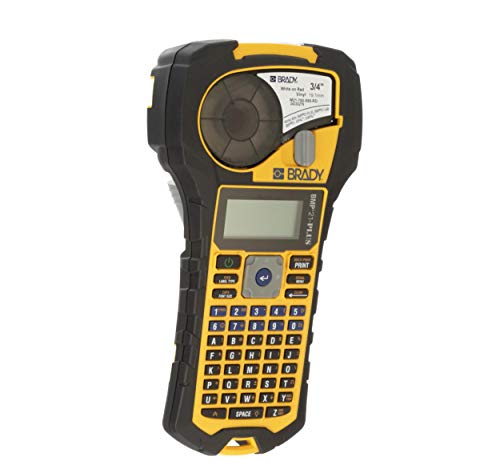
Brady Handheld Color Label Printer with Keyboard, Multi Line Print, 6 to 40, 6 Font Sizes, 203 Dpi - Yellow Black, 9.5 x 4.5 x 2.5, Tape Cartridge Included, 2 Year Warranty, Alphanumeric Thermal



Key features
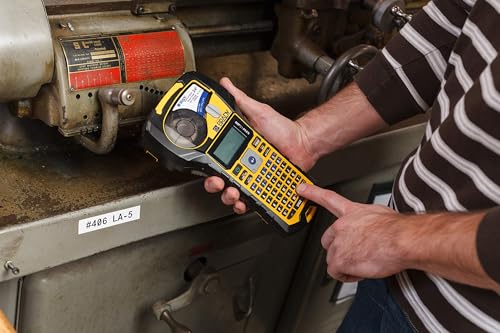
- •Handheld printer with keyboard creates multi line labels for clear identification of wires, panels, circuit boards, and other industrial items, and has a tough exterior with molded rubber bumpers for impact resistance
- •Keyboard contains letters A to Z and numbers 0 to 9, and the text displays on the LCD screen as it is typed
- •Text prints in a single color and in 6 font sizes (6 to 40 point)
- •Continuous tape cartridges (sold separately) enable labels of varying widths
- •Six AA alkaline batteries power the printer for portability
BrandBrady
CategoryOther Office Equipment
Size9.5 in H x 4.5 in W x 2.5 in D
ColorYellow/Black
Warranty2 Years
Brady Handheld Color Label Printer with Keyboard, Multi Line Print, 6 to 40, 6 Font Sizes, 203 Dpi - Yellow Black, 9.5 x 4.5 x 2.5, Tape Cartridge Included, 2 Year Warranty, Alphanumeric Thermal
List Price: $334.65$301.19DEALYou Save: $33.46 (10%)
Free shippingFree Returns – 30 daysFree Order CancellationSecure Payment2–3 Days DeliveryGet It October 27, 2026In Stock (1)No marketing spamNo account requiredFulfilment by FedEx / Amazon / UPS / ShipwirePayPal / Card Buyer Protection
Customer Reviews
Reviews sourced from verified Amazon purchasers4.7
out of 5
Based on 10 reviews
5★
50%
4★
50%
3★
0%
2★
0%
1★
0%
8 Month Review
Bull✓ Verified Purchase•August 1, 2023
I have used this labeler many times in the passed 8 months..
I could not be happier with the quality of the labels it produces
(the tapes are a bit pricy - but you get what you pay for )
Would love for a full listing of all the tape cartridge's available with description and photos
> kinda like a "compare" style page showing the differences
I could not be happier with the quality of the labels it produces
(the tapes are a bit pricy - but you get what you pay for )
Would love for a full listing of all the tape cartridge's available with description and photos
> kinda like a "compare" style page showing the differences
Great buy! Few things are odd.
xoundbox✓ Verified Purchase•July 12, 2023
OMG. This is so fun. I made a decision to buy this because of labeling for my media art work but I'm labeling all my stuff now. Really great one. There are several weird things though.
#1. Minor bug. You can increase number for date or time up to 99 so you can put 78 for hour for example. But system ignore the number you put and set a time within 12 hours anyway. Why are they just set a limit for it?
#2. No justification. Always center aligned even you see a left aligned graphic in LCD visually. I found that troubleshooting in manual says "The BMP21-PLUS/BMP21-LAB printer currently does not support left or right justification. All label text will be center justified only." Then I don't understand why there is a left aligned graphic for vial. I can see left aligned label in other page in the manual and also in a advertisement. They make me confused.
I'm not sure if someone did this way but I did a trick to solve this problem. And it actually works well. You just need to do a simple math. Here is how.
Let's say you have 3 lines like "HAPPY", "BIRTHDAY", "TO YOU". I will justify other two lines to the most short line.
[ 1 ] Have the number of letters includes space in the most short line. In this example, "HAPPY" is the most short line and it counts 5. This will be the base line and the two other lines will be justified to "H"
[ 2 ] Let's justify the second line. Count a number of letters in the second line. It's 8.
[ 3 ] Do subtraction. 8 - 5 = 3.
[ 4 ] Put three(3) spaces before the first letter of the second line like "_ _ _ BIRTHDAY" ( "_" means blank space. It doesn't mean a underbar symbol.)
[ 5 ] Let's justify the last line. Count a number of letters in the last line and it's 6. Space included.
[ 6 ] Subtract. 6 - 5 = 1.
[ 7 ] Put one(1) space before the first letter of the last line like "_ TO YOU"
Here is how it works.
The first line counts 5. The second line counts 8. The last line counts 6.
The second line has 3 more letters than the first line. If they are center justified like this machine does and you see the left side only, the second line has 1.5 (half of 3) more letters on the left side. So you need to indent 1.5 letters for the second line, then the second line will be justified to the first line.
But then why did I put 3 spaces? As I tried, one(1) indent space equals half(0.5) letters in this Brady machine. So you should put doubled number of what it actually needs. For example, to indent 1.5 letters of space, you should put 3 spaces in this machine. That's why I just put a subtract number.
That's it. You can change font size. It doesn't affect to justification.
I tested this way in banner only but there should be no issue in other label types too.
Sorry for my poor explanation but hope someone will get an idea and a help from this.
#1. Minor bug. You can increase number for date or time up to 99 so you can put 78 for hour for example. But system ignore the number you put and set a time within 12 hours anyway. Why are they just set a limit for it?
#2. No justification. Always center aligned even you see a left aligned graphic in LCD visually. I found that troubleshooting in manual says "The BMP21-PLUS/BMP21-LAB printer currently does not support left or right justification. All label text will be center justified only." Then I don't understand why there is a left aligned graphic for vial. I can see left aligned label in other page in the manual and also in a advertisement. They make me confused.
I'm not sure if someone did this way but I did a trick to solve this problem. And it actually works well. You just need to do a simple math. Here is how.
Let's say you have 3 lines like "HAPPY", "BIRTHDAY", "TO YOU". I will justify other two lines to the most short line.
[ 1 ] Have the number of letters includes space in the most short line. In this example, "HAPPY" is the most short line and it counts 5. This will be the base line and the two other lines will be justified to "H"
[ 2 ] Let's justify the second line. Count a number of letters in the second line. It's 8.
[ 3 ] Do subtraction. 8 - 5 = 3.
[ 4 ] Put three(3) spaces before the first letter of the second line like "_ _ _ BIRTHDAY" ( "_" means blank space. It doesn't mean a underbar symbol.)
[ 5 ] Let's justify the last line. Count a number of letters in the last line and it's 6. Space included.
[ 6 ] Subtract. 6 - 5 = 1.
[ 7 ] Put one(1) space before the first letter of the last line like "_ TO YOU"
Here is how it works.
The first line counts 5. The second line counts 8. The last line counts 6.
The second line has 3 more letters than the first line. If they are center justified like this machine does and you see the left side only, the second line has 1.5 (half of 3) more letters on the left side. So you need to indent 1.5 letters for the second line, then the second line will be justified to the first line.
But then why did I put 3 spaces? As I tried, one(1) indent space equals half(0.5) letters in this Brady machine. So you should put doubled number of what it actually needs. For example, to indent 1.5 letters of space, you should put 3 spaces in this machine. That's why I just put a subtract number.
That's it. You can change font size. It doesn't affect to justification.
I tested this way in banner only but there should be no issue in other label types too.
Sorry for my poor explanation but hope someone will get an idea and a help from this.
Wonderful tool!
Mark Jx✓ Verified Purchase•June 4, 2023
Just Wow. After using the normal brands from the office supply stores, I new I needed something better for labeling Cat5 Ethernet, HDMI cables, and other stuff. I wanted something that would do the self-laminating labels. This does a good job with those. BUT, it does a Fantastic job with the configuration where it just prints sideways on the normal labels with enough copies to go around the wire. I'll probably use that for all my personal stuff and just use the self-laminating ones for professional work.
I really like that I can print the labels I need with 2 copies of each number and have it auto increment serial numbers. This way I can easily print twenty labels numbered C0001-C0010 with two copies each and then put one cable on each end of each Ethernet cable. Make sense? :)
I should've broke down and bought this earlier!
Oh!!! One more thing: The manual is a joke. Be prepared to spend some time (and a foot or so of labels) trying out the various options. You've gotta tinker with it to get the best out of it. I just had some fun while watching TV and quickly figured out what I needed.
I really like that I can print the labels I need with 2 copies of each number and have it auto increment serial numbers. This way I can easily print twenty labels numbered C0001-C0010 with two copies each and then put one cable on each end of each Ethernet cable. Make sense? :)
I should've broke down and bought this earlier!
Oh!!! One more thing: The manual is a joke. Be prepared to spend some time (and a foot or so of labels) trying out the various options. You've gotta tinker with it to get the best out of it. I just had some fun while watching TV and quickly figured out what I needed.
Great label maker
Kallel_S✓ Verified Purchase•May 29, 2023
I bought this for work. We use it very often, and it's worked great. No complaints. Great label maker
Easy to use - designed to print and wrap around cable
MT - Colorado✓ Verified Purchase•April 22, 2023
The media could not be loaded. Uses 6 AA batteries (not included)
Keyboard is not QWERTY
Easy to create labels
Easily edit without having to delete current label
Print the label, squeeze the cutter and then easily remove the label from the backing.
Pricey, yes, but worth it.
Keyboard is not QWERTY
Easy to create labels
Easily edit without having to delete current label
Print the label, squeeze the cutter and then easily remove the label from the backing.
Pricey, yes, but worth it.
Page 1 of 2