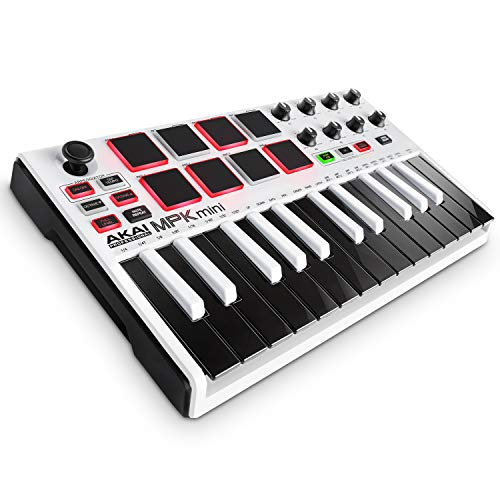
Akai Professional MPK Mini MKII – 25 Key USB MIDI Keyboard Controller With 8 Drum Pads, 8 Assignable Q-Link Knobs and Pro Software Suite Included


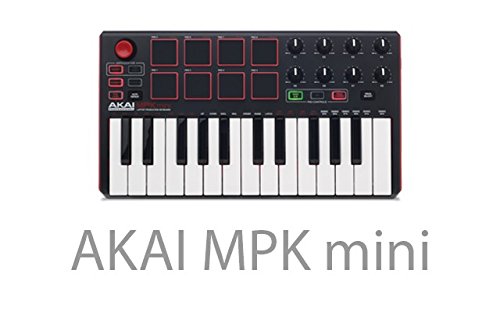


Key features
- •Total Control Wherever You Go USB MIDI keyboard controller with 25 velocity sensitive keys and octave up / down buttons to access the full melodic range perfect virtual synthesizer control
- •Express Yourself Innovative 4 way thumbstick for dynamic pitch and modulation MIDI control, plus a built in arpeggiator with adjustable resolution, range and modes
- •Plug & Play No drivers required, USB powered and ultra portable design lets you create anywhere
- •Beat Maker Essentials 8 backlit velocity sensitive MPC drum pads with Note Repeat & Full Level for programming drums, triggering samples and controlling virtual instrument / DAW controls
- •Take Command of Your DAW 8 fully assignable Q Link knobs for mixing, tweaking plug ins and more
Akai Professional MPK Mini MKII – 25 Key USB MIDI Keyboard Controller With 8 Drum Pads, 8 Assignable Q-Link Knobs and Pro Software Suite Included
List Price: $129.50$116.55DEALYou Save: $12.95 (10%)
Free shippingFree Returns – 30 daysFree Order CancellationSecure Payment2–3 Days DeliveryGet It October 24, 2026In Stock (1)No marketing spamNo account requiredFulfilment by FedEx / Amazon / UPS / ShipwirePayPal / Card Buyer Protection
Customer Reviews
Reviews sourced from verified Amazon purchasers3.9
out of 5
Based on 10 reviews
5★
60%
4★
30%
3★
0%
2★
0%
1★
10%
Awesome and not pricey pad with keys
Gabriella✓ Verified Purchase•May 2, 2017
Great product if your familiar with music. If you have no idea what your doing like me your going to have to take a lot of time researching and looking up videos. There isn't much that the device gives you for learning. Although the product does come with a program for music creating but it is almost like not having one at all. Great for Macs because garage band is a great start till you can afford something better or just to use while your learning. Programing the keys is so hard depending on what your using. If your a music production person you will have no trouble others beware. Great product wish I knew more about how to make music though.
Burned out after 2 months of use.
Eric Sullivan✓ Verified Purchase•February 15, 2017
I've had it for just over 2 months and the dang thing burned out. I've had it connect to my Acer E15 E5-575G-53VG with abelton live. I started smelling wire burn the other day and the lights on the machine started blinking. I quickly unplugged the device from the USB port and re-plugged it back in about 30mins later. Now it doesn't work but the usb port seems fine. The port works with my audio interface, mouse, and external hard drive when plugged up but when I plug in the Akai the device just blinks. Total waste of money. Wish I had waited and grabbed something different.
Fun and cheap, but with a learning curve.
Chelcee✓ Verified Purchase•February 9, 2017
This is a great piece of equipment for a beginner musician, but there IS a learning curve, so please be aware of that when buying. What you are purchasing is a MIDI controller (Musical Instrument Digital Interface). Unlike a synthesizer, MIDI controllers do not produce sound without software. It's basically just a tool to control computer software. So after you've downloaded the software and plug it in, you will still not have any sound generated until you've set everything up properly and loaded sounds onto the pads. So I feel it is slightly inaccurate to call it a "plug-in and go", as some people do.
Pros:
- Its easy to use AFTER you have learned how to set up and use it.
- Its fun.
- A good way to get into digital music making.
- Budget friendly.
Cons:
- The software setup is kind of intimidating but luckily there are easy-to-find tutorials to help you.
- Akai itself doesn't seem to have much assistance in actually using the controller. Every useful tutorial I found was by someone else, not the company. It would be nice for them to take the time to make more tutorials. Unless I just didn't find them? Everything I found just had to do with setting up the software, nothing really about HOW to actually use it.
-The software that is included is limited. You can't use the knobs with MPC Essentials, you need Ableton or something similar for that. Or rather, I should say, you can't use the knobs for effects in your track. I believe you can use it for other things but I still don't quite understand that part.
I am still learning to use this but it has gotten significantly funner to use as I have learned more about it and found sounds I like.
Just as a tip:
- Make sure you know where all your files are saved when you setup the software. You will need to know where your VST stuff is so you can load it into MPC Essentials.
-Use Program 2 when you're finally ready to start loading sounds in. Program 2 has the pads laid out in order in the software, so everything correlates properly.
-Read the manual and do a lot of research if you are new to it. It's worth the time, trust me.
Pros:
- Its easy to use AFTER you have learned how to set up and use it.
- Its fun.
- A good way to get into digital music making.
- Budget friendly.
Cons:
- The software setup is kind of intimidating but luckily there are easy-to-find tutorials to help you.
- Akai itself doesn't seem to have much assistance in actually using the controller. Every useful tutorial I found was by someone else, not the company. It would be nice for them to take the time to make more tutorials. Unless I just didn't find them? Everything I found just had to do with setting up the software, nothing really about HOW to actually use it.
-The software that is included is limited. You can't use the knobs with MPC Essentials, you need Ableton or something similar for that. Or rather, I should say, you can't use the knobs for effects in your track. I believe you can use it for other things but I still don't quite understand that part.
I am still learning to use this but it has gotten significantly funner to use as I have learned more about it and found sounds I like.
Just as a tip:
- Make sure you know where all your files are saved when you setup the software. You will need to know where your VST stuff is so you can load it into MPC Essentials.
-Use Program 2 when you're finally ready to start loading sounds in. Program 2 has the pads laid out in order in the software, so everything correlates properly.
-Read the manual and do a lot of research if you are new to it. It's worth the time, trust me.
Can't get lower than 46ms latency.
G Dubz✓ Verified Purchase•January 13, 2017
The only problem I'm having so far with this is getting the latency down. 46ms might seem like a short lag, but man it really makes a difference when you're trying to compose to a beat! Have installed ASIO4ALL drivers and everything, using Windows10 and FLStudio12. Overall I really like it and am discovering new ways to use it every new session, but I would really like to give it that fifth star if I could just figure out how to trim the latency down to where I can use it as a live instrument.
Great controller, despite Christmas Hiccup!
zacfreundt✓ Verified Purchase•December 26, 2016
While I understand the frustration of not having availability to download the free software on Christmas Day due to web traffic errors, my wife was patient and waited a day. Luckily, since it's a USB MIDI device, our PC and Mac recognized the drivers immediately and we could use it with the software we already had installed, like Garage Band or Logic Pro.
Construction of the controller is really great and the sale price was far below what I expected for such a well made product. The pads work and knobs work natively with the midi synthesizer settings within our programs and the keys are really responsive.
If you're looking for an affordable and great entry midi controller, this is a great item to start with.
Construction of the controller is really great and the sale price was far below what I expected for such a well made product. The pads work and knobs work natively with the midi synthesizer settings within our programs and the keys are really responsive.
If you're looking for an affordable and great entry midi controller, this is a great item to start with.
Page 1 of 2