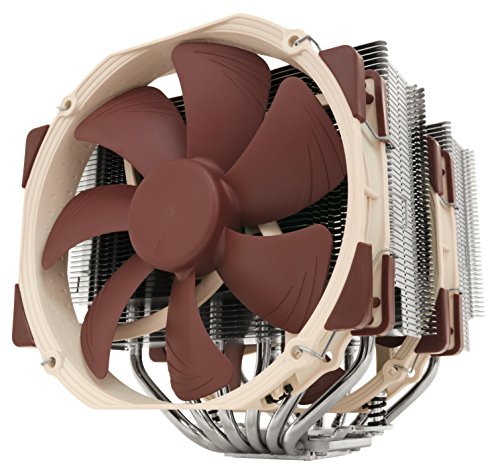
Noctua NH-D15, Premium CPU Cooler with 2X NF-A15 PWM 140mm Fans (Brown)


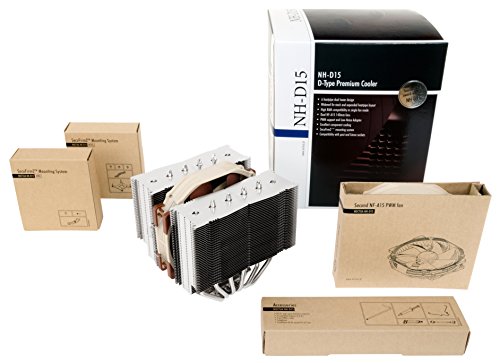


Key features
- •Excellent component cooling
- •Asymmetrical design for high compatibility
- •Dual NF-A15 PWM 140mm fan setup
- •6 heatpipe dual radiator design
Noctua NH-D15, Premium CPU Cooler with 2X NF-A15 PWM 140mm Fans (Brown)
List Price: $189.08$170.17DEALYou Save: $18.91 (10%)
Free shippingFree Returns – 30 daysFree Order CancellationSecure Payment2–3 Days DeliveryGet It October 24, 2026In Stock (5)No marketing spamNo account requiredFulfilment by FedEx / Amazon / UPS / ShipwirePayPal / Card Buyer Protection
Customer Reviews
Reviews sourced from verified Amazon purchasers4.8
out of 5
Based on 10 reviews
5★
90%
4★
10%
3★
0%
2★
0%
1★
0%
Excellent cooling solution!
Nunya•August 30, 2017
I use this fan/heatsink with an Intel i7-7820X (8 core), Asus TUF X299 Mark 2 motherboard, and a Corsair Obsidian Series 750D full tower case. Everything fits perfectly, through you do have to clip the second cooling fan a little bit higher on the heatsink so that it's not touching one of the RAM banks. Watch a couple of Youtube installation videos and you'll see this isn't a big deal.
The Noctua is whisper quiet and despite there being three other 12cm fans in the Obsidian case, I don't hear any noise from the system. Idle temp is 30c and hits 41c when doing a Handbrake DVD rip, where Windows 10 shows all 16 threads of execution being hit pretty hard. Considering that this is an air-only cooler, it does a great job and I absolutely/positively recommend the Noctua and would buy it again in a heartbeat.
The Noctua is whisper quiet and despite there being three other 12cm fans in the Obsidian case, I don't hear any noise from the system. Idle temp is 30c and hits 41c when doing a Handbrake DVD rip, where Windows 10 shows all 16 threads of execution being hit pretty hard. Considering that this is an air-only cooler, it does a great job and I absolutely/positively recommend the Noctua and would buy it again in a heartbeat.
Best Performing Value for your money, period. the choice if you are overclocking!
Karun Gahlawat•April 17, 2017
The package came well packed and intact and on time.
This is day three and system is still running.
**my problem**
System started to crash both on windows and ubuntu 16 after a year
**background**
intel i7 3.7GHZ cpu with 6 cores
nvidia geforce 780i
I had a corsair cooler with two fans and a radiator. I had it checked out with a couple people / stores and they came back with "maybe change graphics card as we cannot find anything wrong with hardware". Then i looked into ubuntu system logs and found cpu overheating and starting to throttle within 10 mins of usage. (compiler, dropbox you name it...)
After looking a lot online, i decided to change thermal paste. didn't work. maybe i applied too much!
**results**
Then finally I made a selection to this and system is still running >4 days with full cpu usage. I am even using Low Noise Adapter which turns down the efficiency a little bit. cpu temp according to cpupower package does not go beyond 47, ever.
I compared Zalman, Swiftech, Cooler Master and Corsair H 110. Chose this one based on price and other reviews.
So glad I got it.
installation was easy and i was done, up and running in 10 mins. make sure you clip the secondary fan first and punch it on the mother board first. otherwise it will be hard to push fan cord to motherboard later.
Best value for your money. the design is so simple you can literally see through it. It is basically noise less!
I'll update later if things go different.
This is day three and system is still running.
**my problem**
System started to crash both on windows and ubuntu 16 after a year
**background**
intel i7 3.7GHZ cpu with 6 cores
nvidia geforce 780i
I had a corsair cooler with two fans and a radiator. I had it checked out with a couple people / stores and they came back with "maybe change graphics card as we cannot find anything wrong with hardware". Then i looked into ubuntu system logs and found cpu overheating and starting to throttle within 10 mins of usage. (compiler, dropbox you name it...)
After looking a lot online, i decided to change thermal paste. didn't work. maybe i applied too much!
**results**
Then finally I made a selection to this and system is still running >4 days with full cpu usage. I am even using Low Noise Adapter which turns down the efficiency a little bit. cpu temp according to cpupower package does not go beyond 47, ever.
I compared Zalman, Swiftech, Cooler Master and Corsair H 110. Chose this one based on price and other reviews.
So glad I got it.
installation was easy and i was done, up and running in 10 mins. make sure you clip the secondary fan first and punch it on the mother board first. otherwise it will be hard to push fan cord to motherboard later.
Best value for your money. the design is so simple you can literally see through it. It is basically noise less!
I'll update later if things go different.
It was a perfect fit as far as height goes
S. Truong•April 11, 2017
HUGE, it's HUGE. Does it's job as described. I have a 7600k intel i5 processor. While gaming and since having it installed, it's kept my 7600k at a maximum of 40degrees celsius while my GTX1070 has reached 79 degrees I have it installed in my white NZXT PC case on a Asus Z270 Prime-AR. It was a perfect fit as far as height goes. I'm able to close the main side panel without any issues.
Visual wise I don't understand why Noctua went with the color scheme that they did. Very quiet and uses a 4 pin molex. It's aweful! The fans are easily removed and remounted for adjustments if/when needed.
Visual wise I don't understand why Noctua went with the color scheme that they did. Very quiet and uses a 4 pin molex. It's aweful! The fans are easily removed and remounted for adjustments if/when needed.
If it will fit your board and case you will never need to buy another CPU cooler... Free bracket upgrades
Cindy•March 20, 2017
I bought this for a new Ryzen build as the AM4 modle was not out yet. As soon as i got my Proof of purchase i sent it to Noctua who sent me a bracket for the AM4 socket. New bracket was free and shipped in less then 24 hours. It did take a bit to get to me but it was free...
The product its self may not be RGB and all super shiny and colorful but this is the best CPU cooler i have used.
Fans are super quite and i have yet to see the processes get even close to warm.
This thing is HUGE! check the website to make sure it fits your board.
They did a great job to make it clear RAM with heat syncs and you are able to face it any way you want and place the fans in a few areas.
With the life time free brackets i dont see my self buying another air CPU cooler for the rest of my life
The product its self may not be RGB and all super shiny and colorful but this is the best CPU cooler i have used.
Fans are super quite and i have yet to see the processes get even close to warm.
This thing is HUGE! check the website to make sure it fits your board.
They did a great job to make it clear RAM with heat syncs and you are able to face it any way you want and place the fans in a few areas.
With the life time free brackets i dont see my self buying another air CPU cooler for the rest of my life
It handles the FX9590 with ease.
Kirk•January 27, 2017
I'm usually not one to write a review, but in this case, I have to add to the praise about this cooler. I'm sitting here writing this as I'm running a prime95 test on my FX9590 @ 4.7GHz. AMD OverDrive shows the thermal margin getting no closer than 15 degrees from max. Ambient room temp when the test was started was roughly 21 degrees C. CoreTemp (actual temperature) numbers run right along with OverDrive (degrees from thermal margin) showing a maximum of 55 degrees C on a full load. I may have read somewhere that the low-end temps are unreliable but I show anywhere from 18-25 C at idle. The processor is just as happy as can be and that's only due to this cooler.
I believe it was $90 shipped to my door (Prime) and worth every single penny. This was my first purchase with Noctua and seeing how much research goes into their products as well as the pride they in their product have is going to make me a long-time customer for sure. The packaging, instructions, and overall value is just phenomenal. This is coming from someone who moved up from a AIO H60 (not really impressed). I used Noctua's supplied thermal paste with the installation.
I can't really comment on the noise or color as neither of those bother me enough to make any sort of measurement.
Cooler Master HAF 912
ASUS Sabertooth 990FX R2.0
AMD FX9590 @ 4.7GHz / Noctua NH-D15
GTX 960
Crucial Ballistix CL10 1866MHz (4Gb x 2)
Corsair 650W PSU
I believe it was $90 shipped to my door (Prime) and worth every single penny. This was my first purchase with Noctua and seeing how much research goes into their products as well as the pride they in their product have is going to make me a long-time customer for sure. The packaging, instructions, and overall value is just phenomenal. This is coming from someone who moved up from a AIO H60 (not really impressed). I used Noctua's supplied thermal paste with the installation.
I can't really comment on the noise or color as neither of those bother me enough to make any sort of measurement.
Cooler Master HAF 912
ASUS Sabertooth 990FX R2.0
AMD FX9590 @ 4.7GHz / Noctua NH-D15
GTX 960
Crucial Ballistix CL10 1866MHz (4Gb x 2)
Corsair 650W PSU
Page 1 of 2