AVerMedia EzRecorder, HD Video Capture High Definition HDMI Recorder, PVR, DVR, Schedule Recording, 32GB Flash Drive Incl (ER130)
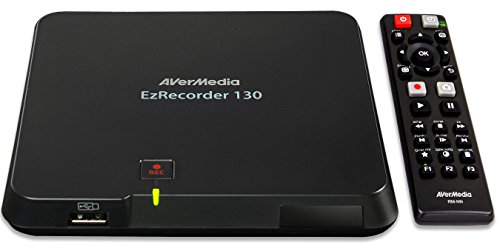


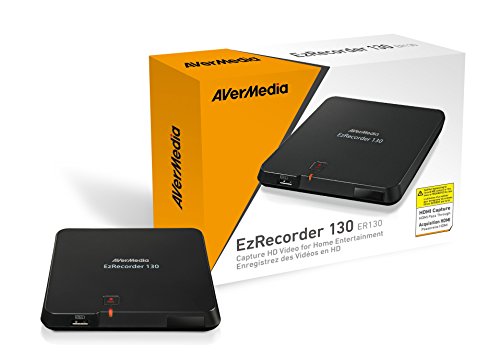
Key features
- •Splitter bypassing to record HD content or the likes is PROHIBITED by law; Max Pass-Through Resolutions:1080p60
- •Capture 1080p 30fps HD video from a variety of HDMI-connected devices - no PC necessary
- •Easily schedule recordings so you never miss your favorite cable/satellite shows
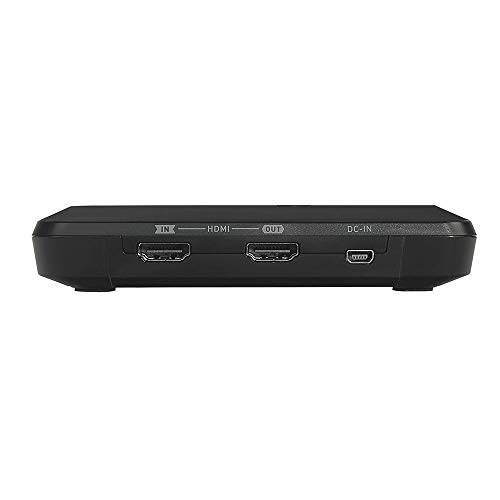
- •Input/output:HDMI. Recording Format:MP4(H.264/AAC); Does not support Recording of HDCP signal.
- •USB hard drive (Sold seperately) Recommend high-performance USB 2.0 or 3.0 hard drive. Source device with HDMI output. TV or monitor with HDMI input. Power Adapter Rating (5V/2A) EzRecorder 130 does not support viewing/recording/streaming of HDCP protected signals
- •2-year warranty after registration at AVerrmedia website. Supported resolutions (Video input)- 1080p, 1080i, 720p, 576p, 576i, 480p, 480i
AVerMedia EzRecorder, HD Video Capture High Definition HDMI Recorder, PVR, DVR, Schedule Recording, 32GB Flash Drive Incl (ER130)
List Price: $229.15$206.24DEALYou Save: $22.91 (10%)
Free shippingFree Returns – 30 daysFree Order CancellationSecure Payment2–3 Days DeliveryGet It October 26, 2026In Stock (2)No marketing spamNo account requiredFulfilment by FedEx / Amazon / UPS / ShipwirePayPal / Card Buyer Protection
Customer Reviews
Reviews sourced from verified Amazon purchasers3.6
out of 5
Based on 10 reviews
5★
30%
4★
30%
3★
30%
2★
0%
1★
10%
Great box, world class horrible support.
G. Denman✓ Verified Purchase•February 5, 2018
I wanted to write a review so anybody buying this product knows what to expect. Before I start this let me tell you that I'm very technical and troubleshoot telecommunications systems for a living. So I know my way around networks and electronic equipment.
1. The box isn't bad. I put a 2.5" laptop hard drive inside of it and that works really well. Occasionally the system says there's a problem and you have to pull the power to the box and when it comes back on it will say hard drive problems. Tell it to fix the problems and it's good to go. If you had any recordings that didn't look like they recorded properly or corrupt, this will fix them.
2. When I was setting up the AverMedia 310 I had two problems. First off the 310 wouldn't recognize anything from my remote. That's because my remote was in the HF mode not the IR mode. I had to go to the Internet and find out to switch it to IR. Then it would learn my remote.
3. My last problem was that it would turn on the cable box and enter the channel number but it wouldn't enter OK to actually switched the channel. This problem I couldn't figure out. I upgraded the firmeware from 1.0.3 which the box came with to 1.0.9 and that didn't help, then I upgraded to 1.0.10 while I was waiting on any kind of e-mail from AverMedia. I e-mailed AverMedia twice and it took about 3 weeks for each e-mail to be responded to. Both times they told me to go back to an older version of firmware.
4. I downgraded from 1.0.10 to the older version of firmware but it didn't work, it couldn't diffentiate between 2 and 3 on my remote so I want back to 10.0.10 there was something different in scheduling the recordings this time. Instead of getting three lines to program the channel I had about 10. When I hit the down key I normally got a zero. Now I was getting a . (period) and then the zero. So I went back into the learning mode and made the . an OK key and programmed my channels to be 046. and 004. and guess what? It worked !
Don't expect any help from AverMedia their customer service is non-existent. Their website doesn't help. Nothing at all on troubleshooting. If you like a challenge, this is it. I'm happy with how the unit is working for me now but I hope you get the idea that it was all on my effort and I spent about a month getting the kinks worked out. I hope what I've written helps somebody.
1. The box isn't bad. I put a 2.5" laptop hard drive inside of it and that works really well. Occasionally the system says there's a problem and you have to pull the power to the box and when it comes back on it will say hard drive problems. Tell it to fix the problems and it's good to go. If you had any recordings that didn't look like they recorded properly or corrupt, this will fix them.
2. When I was setting up the AverMedia 310 I had two problems. First off the 310 wouldn't recognize anything from my remote. That's because my remote was in the HF mode not the IR mode. I had to go to the Internet and find out to switch it to IR. Then it would learn my remote.
3. My last problem was that it would turn on the cable box and enter the channel number but it wouldn't enter OK to actually switched the channel. This problem I couldn't figure out. I upgraded the firmeware from 1.0.3 which the box came with to 1.0.9 and that didn't help, then I upgraded to 1.0.10 while I was waiting on any kind of e-mail from AverMedia. I e-mailed AverMedia twice and it took about 3 weeks for each e-mail to be responded to. Both times they told me to go back to an older version of firmware.
4. I downgraded from 1.0.10 to the older version of firmware but it didn't work, it couldn't diffentiate between 2 and 3 on my remote so I want back to 10.0.10 there was something different in scheduling the recordings this time. Instead of getting three lines to program the channel I had about 10. When I hit the down key I normally got a zero. Now I was getting a . (period) and then the zero. So I went back into the learning mode and made the . an OK key and programmed my channels to be 046. and 004. and guess what? It worked !
Don't expect any help from AverMedia their customer service is non-existent. Their website doesn't help. Nothing at all on troubleshooting. If you like a challenge, this is it. I'm happy with how the unit is working for me now but I hope you get the idea that it was all on my effort and I spent about a month getting the kinks worked out. I hope what I've written helps somebody.
Nice idea but poorly executed
CB✓ Verified Purchase•November 19, 2017
This is a nice idea but poorly executed; quality control is a major issue. My first device worked through the setup process, but when I attempted to update the firmware (as they recommend), the product froze with no output to the TV and a solid yellow light glowing. I contacted customer support via email, but they were no help telling me to go back to the menu screen and try again. I guess they didn't understand that "froze" means you can't get to any screen. So, I requested a return through Amazon and received a replacement a few days later. The new device didn't even get to the menu screen; the product was dead on arrival. It will be returned to Amazon as well and I'll look for another manufacturer. BTW, customer support is out of Taiwan so don't expect a quick response. It would be helpful if they had a US phone number to call and a representative to troubleshoot the issues. Waiting a day between emails drags out the process way too long, especially when their replies are not useful.
The EZ Recorder makes very nice recordings but has a lot of aggravating flaws.
CS✓ Verified Purchase•July 7, 2017
I'm a bit torn about this product right now. I've been using it for 3 weeks. The EZ Recorder makes very nice recordings but the programmed recording functions have become unreliable in the last several days. There was the occasional, unexplained scheduled recording that didn't actually record but, now, I've had five of them in the last three days interspersed between a number of good recordings. The list just says failed but I don't know why. I'm using it to record from a streaming box. Just to voice what others have said, this recorder does NOT record from HDCP (video copy protection) protected sources. To record from these kind of sources (cable box, satellite receiver, DVD player, Roku, Apple TV, etc.) you will need to strip the HDCP from the signal. I am using a SANOXY® HDMI 1x2 3D splitter purchased here on Amazon and it works fine.
Another snag is that there is a function on the recorder that will turn on the box when the source is turned on. This wasn't well thought out. Most cable boxes and satellite receivers, etc. don't actually turn off. The box is really on all the time but the video output is blanked until you 'turn it on' which is really just taking it out of standby. There's never a point where a signal goes from off to on. It just goes from black to the programming. This defeats the turn-on detection of the recorder, rendering it useless.
This leads to yet another problem when dealing with recording of streaming boxes, cable and satellite. My box goes to sleep after 4 hours of no use. So, something needs to bring it out of sleep. This is where the problem comes in. There is a function in the recorder that will issue a power on command and change channels before the recording starts. This problem goes back to the boxes not really turning off. The recorder doesn't think the box is off so it never issues the power on command. Mine requires that I either use the power/standby button or the Menu button to bring it out of sleep but then it goes to the menu. The remote IR sender programming doesn't allow you to program special sequences to cover this kind of issue. It does digits 1-10, a decimal, 11, 12 and Power memorization from your remote. If there's more than one step to getting you to the point you can change channels from powering on, the system won't let you do it and the lack of power-on detection renders the Power button programming useless. I had to really ponder how to accomplish this because I needed an actual Menu button press followed by a Live TV button press. I was able to trick the box into doing it by using the decimal point possibility to memorize Menu button press and the 12 button possibility to memorize the Live TV button press. So, in my case, the box could be 'on' or 'off' and I'd never know which so the use of the Power On/Standby button could put the box back to sleep. When I need to go to channel 10 I have to program the 'channel' in the recording programming as decimal point (really Menu) followed by 12 (really Live TV) and then 1 and 0. That sends the box to the menu (decimal point) from wherever it is, even sleep, and then Live TV (12) followed by the key presses 1 and 0 to send it to channel 10. I realize that seems really complicated but it makes the box do something it was never programmed to do and it works.
Now, the last issue. The box is very finicky about the data drive attached to it. It must be preformatted NTFS and AverMedia recommends that the HP formatting utility be used. You can use an NTFS formatted 2.5 inch inside the box, connect an external device or both. If you have an internal drive you can transfer the recordings over to the external device to get them to a computer or media player. I had a lot of problems at first getting the box to acknowledge there was a savable device attached to transfer the files. It knew the device was there but failed to see there was any space there. It didn't really identify the amount of space on the drive. I don't know why but it suddenly started seeing my external drive properly. It saves equally well to the internal drive or external device so going through the motions saving to the internal drive and then transferring to the external is just a waste of time. I've now removed the internal drive. I use a powered Western Digital external USB hard drive. I've seen a number of people say they couldn't get unpowered devices to work. I haven't tried USB flash drives again. So, now that it's recognizing the powered hard drive I'm afraid to tempt fate and try other storage devices with it when they originally didn't"‹ work.
I should also mention that it seems to corrupt the attached drive on its own. I'll check on the drive every once in a while from the box menu and it tells me there is a problem that must be fixed. If you let it fix the problem, it's good for a while and then it develops a problem again. This happens to both the externally connected drives as well as the internal hard drive.
I realize this has been a long explanation but I'd like for people to be fully informed rather than having to search out anwers to questions or, worse, being surprised when it doesn't work as you'd hoped. I'm running the latest software on the box but, functionally, it hasn't changed much. Keep an eye out for updates. The update process is pretty easy as long as the box is recognizing an external storage device.
There is a video editor built into the box software but it is pretty useless. It's awkward to use and requires far too many key presses to mark cuts. When you're all done, it saves an entirely new copy of the edited file and that takes a very long time to save. My recommendation is to transfer the file to a real computer and use actual editing software.
As noted at the beginning, it records in very good quality (there are 3 quality levels to choose from and I use the lowest). My 1TB drive says that is 209 hours of recording time. If you think you can deal with the deficits I've listed above, it's worth it. This box is really designed as being a DVR. If all you're planning on doing is recording game play or Record-button-press recordings, then you're better off just going with the next lower model (ER130) and save $50.
Another snag is that there is a function on the recorder that will turn on the box when the source is turned on. This wasn't well thought out. Most cable boxes and satellite receivers, etc. don't actually turn off. The box is really on all the time but the video output is blanked until you 'turn it on' which is really just taking it out of standby. There's never a point where a signal goes from off to on. It just goes from black to the programming. This defeats the turn-on detection of the recorder, rendering it useless.
This leads to yet another problem when dealing with recording of streaming boxes, cable and satellite. My box goes to sleep after 4 hours of no use. So, something needs to bring it out of sleep. This is where the problem comes in. There is a function in the recorder that will issue a power on command and change channels before the recording starts. This problem goes back to the boxes not really turning off. The recorder doesn't think the box is off so it never issues the power on command. Mine requires that I either use the power/standby button or the Menu button to bring it out of sleep but then it goes to the menu. The remote IR sender programming doesn't allow you to program special sequences to cover this kind of issue. It does digits 1-10, a decimal, 11, 12 and Power memorization from your remote. If there's more than one step to getting you to the point you can change channels from powering on, the system won't let you do it and the lack of power-on detection renders the Power button programming useless. I had to really ponder how to accomplish this because I needed an actual Menu button press followed by a Live TV button press. I was able to trick the box into doing it by using the decimal point possibility to memorize Menu button press and the 12 button possibility to memorize the Live TV button press. So, in my case, the box could be 'on' or 'off' and I'd never know which so the use of the Power On/Standby button could put the box back to sleep. When I need to go to channel 10 I have to program the 'channel' in the recording programming as decimal point (really Menu) followed by 12 (really Live TV) and then 1 and 0. That sends the box to the menu (decimal point) from wherever it is, even sleep, and then Live TV (12) followed by the key presses 1 and 0 to send it to channel 10. I realize that seems really complicated but it makes the box do something it was never programmed to do and it works.
Now, the last issue. The box is very finicky about the data drive attached to it. It must be preformatted NTFS and AverMedia recommends that the HP formatting utility be used. You can use an NTFS formatted 2.5 inch inside the box, connect an external device or both. If you have an internal drive you can transfer the recordings over to the external device to get them to a computer or media player. I had a lot of problems at first getting the box to acknowledge there was a savable device attached to transfer the files. It knew the device was there but failed to see there was any space there. It didn't really identify the amount of space on the drive. I don't know why but it suddenly started seeing my external drive properly. It saves equally well to the internal drive or external device so going through the motions saving to the internal drive and then transferring to the external is just a waste of time. I've now removed the internal drive. I use a powered Western Digital external USB hard drive. I've seen a number of people say they couldn't get unpowered devices to work. I haven't tried USB flash drives again. So, now that it's recognizing the powered hard drive I'm afraid to tempt fate and try other storage devices with it when they originally didn't"‹ work.
I should also mention that it seems to corrupt the attached drive on its own. I'll check on the drive every once in a while from the box menu and it tells me there is a problem that must be fixed. If you let it fix the problem, it's good for a while and then it develops a problem again. This happens to both the externally connected drives as well as the internal hard drive.
I realize this has been a long explanation but I'd like for people to be fully informed rather than having to search out anwers to questions or, worse, being surprised when it doesn't work as you'd hoped. I'm running the latest software on the box but, functionally, it hasn't changed much. Keep an eye out for updates. The update process is pretty easy as long as the box is recognizing an external storage device.
There is a video editor built into the box software but it is pretty useless. It's awkward to use and requires far too many key presses to mark cuts. When you're all done, it saves an entirely new copy of the edited file and that takes a very long time to save. My recommendation is to transfer the file to a real computer and use actual editing software.
As noted at the beginning, it records in very good quality (there are 3 quality levels to choose from and I use the lowest). My 1TB drive says that is 209 hours of recording time. If you think you can deal with the deficits I've listed above, it's worth it. This box is really designed as being a DVR. If all you're planning on doing is recording game play or Record-button-press recordings, then you're better off just going with the next lower model (ER130) and save $50.
ER 310 Works Works Well with one issue that has a work around
Thomas Doyle✓ Verified Purchase•April 21, 2017
The ER 310 works well but unfortunately the remote is less than ideal. In the picture you can see that the remote is only slightly larger than the small remote for the Apple TV. The Apple TV remote has what amounts to 7 buttons and is easy to use even in a darkened home theater. The ER 310 remote has 28 buttons. The buttons are small, not labeled clearly and very close together. There are even three function buttons along the bottom labeled F1, F2 and F3. Even with fresh top of the line batteries the remote has a very limited range in distance and angle of coverage. Fortunately there is a work around to the range issue. A remote extender like the Aketek shown in the picture works well. Simply tape the emitter to the front of the ER 310 and position the receiver in a convenient position and the remote will work much better.
Good quality HD, but some quirks with the on-device software
Steve H✓ Verified Purchase•January 22, 2017
When it works properly, it really does a great job at capturing HD video at a very high quality, absolutely no complaints. The problem is that this device is really for experts and those with the patience to figure it out, and the instructions are somewhat lacking in some key points around how to properly set-up the external hard drive. The on-device software is a little clunky and can be a bit difficult to navigate. I wanted to give this 4 stars just based on the video quality, but the clunky software and misleading on-screen error messages, plus the fact that you need to "eject" the disk, really drag this device down in terms of satisfaction.
In case you missed this elsewhere, because it's not in the instruction manual: most new drives come pre-formatted to use the GPT, or GUID Partition Table, to represent partitions on the disk. GPT has significant advantages over the old style, MBR, or Master Boot Record, in terms of its ability to have complex partition layouts and potentially larger partitions. The AVerMedia EzRecorder 130 does not recognize disks that use GPT. You need to switch the disk over to use MBR instead. The on-screen error messages don't tell you this at all, they give a misleading error that the drive is not formatted NTFS.
You can follow the FAQ on their website about how to switch to MBR, and then the drive will work for up to 2TB, and therein is another problem. If you want to capture a ton of clips and never worry about abruptly running out of space, and given how inexpensive drives over 2TB have gotten, it would also be nice if the box supported 4TB or 6TB in size, but alas it's stuck at a 2TB limit.
In case you missed this elsewhere, because it's not in the instruction manual: most new drives come pre-formatted to use the GPT, or GUID Partition Table, to represent partitions on the disk. GPT has significant advantages over the old style, MBR, or Master Boot Record, in terms of its ability to have complex partition layouts and potentially larger partitions. The AVerMedia EzRecorder 130 does not recognize disks that use GPT. You need to switch the disk over to use MBR instead. The on-screen error messages don't tell you this at all, they give a misleading error that the drive is not formatted NTFS.
You can follow the FAQ on their website about how to switch to MBR, and then the drive will work for up to 2TB, and therein is another problem. If you want to capture a ton of clips and never worry about abruptly running out of space, and given how inexpensive drives over 2TB have gotten, it would also be nice if the box supported 4TB or 6TB in size, but alas it's stuck at a 2TB limit.
Page 1 of 2