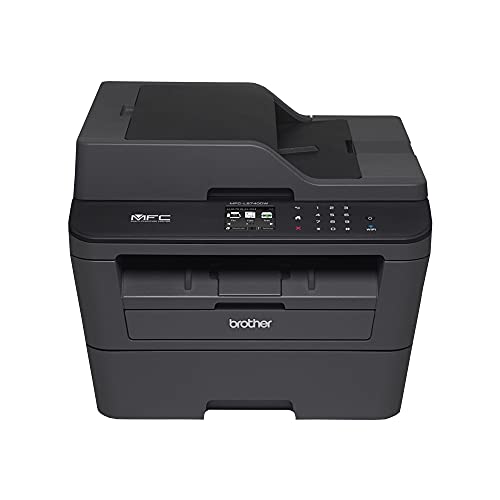
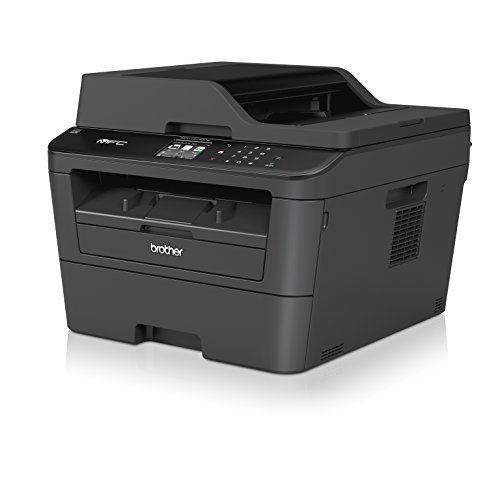
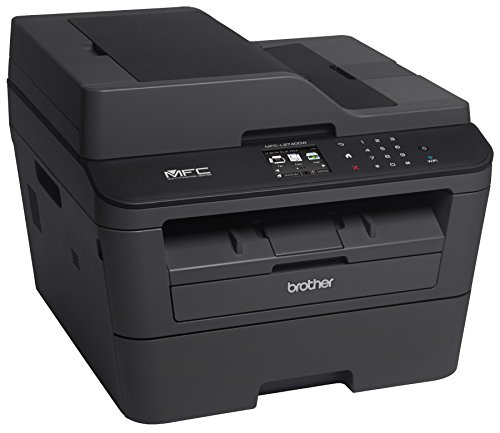
Brother MFCL2740DW Wireless Monochrome Printer with Scanner, Copier and Fax, Amazon Dash Replenishment Ready


Key features
- •Upon activation, the Amazon Dash Replenishment service measures the toner level and automatically orders toner from Amazon when low. This ensures that you never run out again.
- •2.7" color touchscreen display offers intuitive navigation to cloud services Dropbox, Google Drive, Evernote and more
- •Fast high quality printing and copying up to 32 ppm and up to 2400 x 600 dpi resolution.Operating Temperature:50 °F to 90 °F (10 to 32 °C) "
- •Wireless printing from your mobile device via AirPrint, Google Cloud Print, Brother iPrint & Scan, Cortado Workplace, Wi-Fi Direct
- •4-in-1 functionality (Print, Copy, Scan and Fax) with a 250 sheet capacity paper tray. Print Technology: Black & White Laser Technology
- •Class 1 Laser Product, power output is enclosed. Scanning Capability: B/W &Color
Brother MFCL2740DW Wireless Monochrome Printer with Scanner, Copier and Fax, Amazon Dash Replenishment Ready
List Price: $1244.58$1120.12DEALYou Save: $124.46 (10%)
Free shippingFree Returns – 30 daysFree Order CancellationSecure Payment2–3 Days DeliveryGet It October 25, 2026In Stock (1)No marketing spamNo account requiredFulfilment by FedEx / Amazon / UPS / ShipwirePayPal / Card Buyer Protection
Customer Reviews
Reviews sourced from verified Amazon purchasers4.2
out of 5
Based on 10 reviews
5★
40%
4★
20%
3★
10%
2★
10%
1★
20%
Wireless printer/copier/scanner with auto feed
Customer✓ Verified Purchase•May 30, 2017
Pros: All of its multi-functions actually work. Nice touch screen controls.
1. Functions well as a standalone copier, with the automatic feeder.
2. Wirelessly prints from laptop or other computers on home network. Can print on both sides, toner saving mode.
3. Scan documents to computer, wirelessly. (Automatic feed
Cons: Required downloading and installing extra software to get the wireless network to stay connected. With the original setup instructions, constantly had to re-enter the network password to use the printer or scanner. The recommended utility from Brother's troubleshooter has been working perfectly since installing it.
Overall, it is an excellent value.
1. Functions well as a standalone copier, with the automatic feeder.
2. Wirelessly prints from laptop or other computers on home network. Can print on both sides, toner saving mode.
3. Scan documents to computer, wirelessly. (Automatic feed
Cons: Required downloading and installing extra software to get the wireless network to stay connected. With the original setup instructions, constantly had to re-enter the network password to use the printer or scanner. The recommended utility from Brother's troubleshooter has been working perfectly since installing it.
Overall, it is an excellent value.
Easy to Use with an Excellent Feature Set
Tyler M✓ Verified Purchase•April 4, 2017
I bought this for my home to save money on buying ink for the inkjet printer. This printer has been excellent for us. With the starter toner cartridge we printed 600 pages. It was easy to setup (I have background in IT), use, and maintain.
Most of the setup is well documented in the instructions. Setting a DHCP reservation will vary based on the model of your router or DHCP server.
I set it up by installing all of the software that came with it (not necessary, if all you need is the driver). Eventually I uninstalled a few pieces of the software that came with it after realizing I will never use it. Anyway to set it up, I first connected it to our WiFi network and then in my router I gave it a DHCP reservation so it would get the same IP every time. You could also just set a static IP address too, but I read somewhere that it's better in this case to use a DHCP reservation so the printer will wake up when you print to it. I have not tested this with a static IP. This DHCP reservation is very important as otherwise it is possible for the printer to reconnect to the network with a different IP address and then you won't be able to print to it.
I have never had any issues with it not waking up to print. The only issue I've had so far is the internet fax option. It receives data but doesn't print anything no matter the format of the email/fax document. I'm sure I'm just doing something wrong though.
I also enabled Apple's iOS print which seems to work well and Google Cloud Print so my Mom can print from her android tablet. Generally when I'm trying to print something from my iPhone though, I use the Brother iPrint & Scan app. It is limited in it's features, but it works the way it should and does a great job for me.
Overall I am very pleased with this printer as it has saved me a lot of money and time. The duplex print/scan/copy is an extremely nice feature, one that I really wanted. It saves us a lot of paper and time.
Most of the setup is well documented in the instructions. Setting a DHCP reservation will vary based on the model of your router or DHCP server.
I set it up by installing all of the software that came with it (not necessary, if all you need is the driver). Eventually I uninstalled a few pieces of the software that came with it after realizing I will never use it. Anyway to set it up, I first connected it to our WiFi network and then in my router I gave it a DHCP reservation so it would get the same IP every time. You could also just set a static IP address too, but I read somewhere that it's better in this case to use a DHCP reservation so the printer will wake up when you print to it. I have not tested this with a static IP. This DHCP reservation is very important as otherwise it is possible for the printer to reconnect to the network with a different IP address and then you won't be able to print to it.
I have never had any issues with it not waking up to print. The only issue I've had so far is the internet fax option. It receives data but doesn't print anything no matter the format of the email/fax document. I'm sure I'm just doing something wrong though.
I also enabled Apple's iOS print which seems to work well and Google Cloud Print so my Mom can print from her android tablet. Generally when I'm trying to print something from my iPhone though, I use the Brother iPrint & Scan app. It is limited in it's features, but it works the way it should and does a great job for me.
Overall I am very pleased with this printer as it has saved me a lot of money and time. The duplex print/scan/copy is an extremely nice feature, one that I really wanted. It saves us a lot of paper and time.
Great for scanning, bad for printing.
Amazon Customer✓ Verified Purchase•January 28, 2017
In some ways I love this product. Set up is very easy, prints look good, and scans work very, very well. I'm very pleased with the Automatic Document Feeder, in particular. I can just drop in 30 corrected tests, press the "scan" button, and automatically get a folder full of high-quality two-sided scans.
That said, I HATE that I can't use it as a replacement to my 2340, which is a standard Brother printer. With this printer, if you print more than 20 or 30 pages, whether it's one long document or a short document printed many times, it will say that it's out of memory, and cancel the print job in the middle. Keep in mind, this is just printing word files, not complicated graphs or pictures. Even if there was a way to fix that, the paper tray is not large enough to physically fit much more. Totally stupid design, and I can't recommend it for general use for that reason.
That said, I HATE that I can't use it as a replacement to my 2340, which is a standard Brother printer. With this printer, if you print more than 20 or 30 pages, whether it's one long document or a short document printed many times, it will say that it's out of memory, and cancel the print job in the middle. Keep in mind, this is just printing word files, not complicated graphs or pictures. Even if there was a way to fix that, the paper tray is not large enough to physically fit much more. Totally stupid design, and I can't recommend it for general use for that reason.
CAREFUL IF YOU PRINT ALOT!!
Amazon Customer✓ Verified Purchase•November 28, 2016
I'm very disappointed in this Brother Model, I CANNOT PRINT a full PRINT job without getting the "OUT OF MEMORY" Error message. The wireless is always asleep per day. Spending my time looking aimlessly for troubleshooting via brother online, book etc and NOTHING for my situation. Very frustrating and total waste of my days!! Will NOT PURCHASE ANOTHER BROTHER!!! This is my 4th one by the way.
Despite repeated calls to the tech center, and resetting ...
Amazon Customer✓ Verified Purchase•October 29, 2016
Despite repeated calls to the tech center, and resetting machine...This multipurpose brother kept giving me a "Low Toner" signal, even with a new toner cartridge installed.
Page 1 of 2