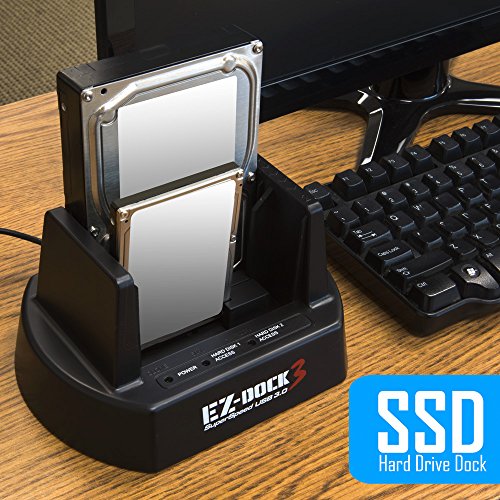
KingWin EZD-2537U3 2 Bay USB 3.0 EZ Dock for 2.5-Inch and 3.5-Inch with Clone



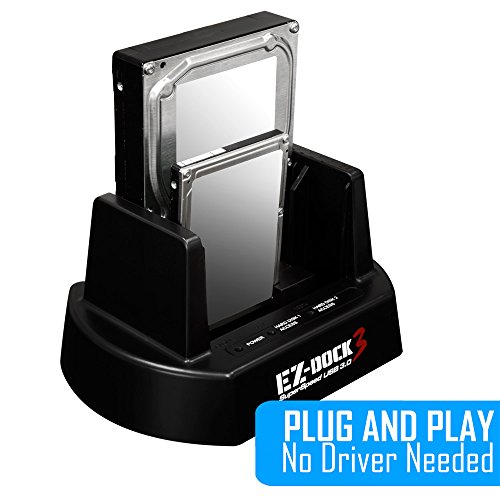


Key features
- •Dual-Bay 2.5"/3.5" SATA HDD & SSD Docking Station
- •Super Speed USB 3.0 interface offers 10X faster performance (up to 5Gbps)
- •Standalone Drive Duplicator Dock (no need for PC connection)
- •Supports 2.5" and 3.5" SATA I/II/III Drives
- •Supports up to 4TB SATA HDD
- •Vertical HDD insertion allows faster heat dissipation and cooling solution
KingWin EZD-2537U3 2 Bay USB 3.0 EZ Dock for 2.5-Inch and 3.5-Inch with Clone
List Price: $55.85$50.27DEALYou Save: $5.58 (10%)
Free shippingFree Returns – 30 daysFree Order CancellationSecure Payment2–3 Days DeliveryGet It October 25, 2026In Stock (2)No marketing spamNo account requiredFulfilment by FedEx / Amazon / UPS / ShipwirePayPal / Card Buyer Protection
Customer Reviews
Reviews sourced from verified Amazon purchasers4.5
out of 5
Based on 20 reviews
5★
70%
4★
20%
3★
0%
2★
10%
1★
0%
Not compatible with 2.5" hard drives
John Smith✓ Verified Purchase•July 21, 2017
Dealbreaker: It did not work with 2.5" (laptop) hard drives. I tried with different drives on different computers with different operating systems. I tried a few tricks for missing drives but nothing came up. I have to think the product just doesn't work with 2.5" drives.
Pros: With a 3.5" drive it worked very smoothly. I got USB 3.0 speeds. The product also looks well built. It's a shame it doesn't work because I am actually impressed with the construction and operation otherwise. Take caution buying this product if you need to dock 2.5" drives. You might luck out but you might not.
Pros: With a 3.5" drive it worked very smoothly. I got USB 3.0 speeds. The product also looks well built. It's a shame it doesn't work because I am actually impressed with the construction and operation otherwise. Take caution buying this product if you need to dock 2.5" drives. You might luck out but you might not.
Not compatible with 2.5" hard drives
John Smith✓ Verified Purchase•July 21, 2017
Dealbreaker: It did not work with 2.5" (laptop) hard drives. I tried with different drives on different computers with different operating systems. I tried a few tricks for missing drives but nothing came up. I have to think the product just doesn't work with 2.5" drives.
Pros: With a 3.5" drive it worked very smoothly. I got USB 3.0 speeds. The product also looks well built. It's a shame it doesn't work because I am actually impressed with the construction and operation otherwise. Take caution buying this product if you need to dock 2.5" drives. You might luck out but you might not.
Pros: With a 3.5" drive it worked very smoothly. I got USB 3.0 speeds. The product also looks well built. It's a shame it doesn't work because I am actually impressed with the construction and operation otherwise. Take caution buying this product if you need to dock 2.5" drives. You might luck out but you might not.
Good dock -- but maybe not *really* hot-swappable
zarmanto✓ Verified Purchase•May 24, 2017
I ordered the "2 Bay w/ USB 3.0 B" Power Dock to -- at least temporarily -- replace a couple of older external drive cases of the same brand, which both failed in the exact same fashion. Basically, the old cases would drop the connection to the computer randomly, which actually caused one of my drives to eventually end up with a corrupted partition map, as the computer was attempting to write to the drive at the moment that the case dropped connection. (Note to self: Cheap is cheap. And they were.)
I was mostly certain that the problem was just the cases and not the drives inside them, so I decided to toss some money at a dock to see if it could help me solve my problem. Yanked both drives out of the their cases, docked them into this gadget, manually copied the data from the corrupted drive to the secondary drive, and neither drive dropped connection throughout the data copy process. I was then able to reformat my corrupted drive, and everything looks good-to-go. So, this dock has successfully facilitated troubleshooting, and I can now confidently justify tossing out the old faulty cases. I haven't decided if I'm going to bother buying replacement external cases, or if I'm going to just leave the two drives in the dock... but I have to admit, with the limited number of ports on my iMac, there's some definite convenience to having both drives online by way of only a single USB cable.
That said, I will add one minor critical comment, about the product: The product description currently includes the term "Hot-Swap Capability", but you should probably take that with a grain of salt. I docked the first drive and it mounted and everything looked fine; I then docked the second drive -- and I heard a loud squelch from one of the drives, and the connection to the computer for the first drive was summarily dropped. I nearly panicked, thinking that I was going to end up worse off than when I started... but no; it doesn''t appear to have damaged either drive, and it seems that maybe that kind of thing only happens when connecting a second drive, while hot.
So... I strongly suggest that you don't do what I did. Instead, dismount the first drive from your computer and let it spin down, prior to connecting a second drive. I would even go so far as to suggest that maybe it shouldn't really be treated as a hot-swap capable device at all; it has an off switch on the back, so I recommend turning it off before connecting each drive. I'm still satisfied with the purchase; I'm just recommending reasonable caution, that's all.
As an aside: for some reason, the Amazon "Frequently bought together" section seems to be suggesting that you purchase a separate USB cable along with this dock. Don't let that mislead you; the dock I received did indeed come with an included USB cable.... just like pretty much every single other external hard drive case I have ever purchased. Amazon's recommendation system is just confused. Ignore it.
I was mostly certain that the problem was just the cases and not the drives inside them, so I decided to toss some money at a dock to see if it could help me solve my problem. Yanked both drives out of the their cases, docked them into this gadget, manually copied the data from the corrupted drive to the secondary drive, and neither drive dropped connection throughout the data copy process. I was then able to reformat my corrupted drive, and everything looks good-to-go. So, this dock has successfully facilitated troubleshooting, and I can now confidently justify tossing out the old faulty cases. I haven't decided if I'm going to bother buying replacement external cases, or if I'm going to just leave the two drives in the dock... but I have to admit, with the limited number of ports on my iMac, there's some definite convenience to having both drives online by way of only a single USB cable.
That said, I will add one minor critical comment, about the product: The product description currently includes the term "Hot-Swap Capability", but you should probably take that with a grain of salt. I docked the first drive and it mounted and everything looked fine; I then docked the second drive -- and I heard a loud squelch from one of the drives, and the connection to the computer for the first drive was summarily dropped. I nearly panicked, thinking that I was going to end up worse off than when I started... but no; it doesn''t appear to have damaged either drive, and it seems that maybe that kind of thing only happens when connecting a second drive, while hot.
So... I strongly suggest that you don't do what I did. Instead, dismount the first drive from your computer and let it spin down, prior to connecting a second drive. I would even go so far as to suggest that maybe it shouldn't really be treated as a hot-swap capable device at all; it has an off switch on the back, so I recommend turning it off before connecting each drive. I'm still satisfied with the purchase; I'm just recommending reasonable caution, that's all.
As an aside: for some reason, the Amazon "Frequently bought together" section seems to be suggesting that you purchase a separate USB cable along with this dock. Don't let that mislead you; the dock I received did indeed come with an included USB cable.... just like pretty much every single other external hard drive case I have ever purchased. Amazon's recommendation system is just confused. Ignore it.
Good dock -- but maybe not *really* hot-swappable
zarmanto✓ Verified Purchase•May 24, 2017
I ordered the "2 Bay w/ USB 3.0 B" Power Dock to -- at least temporarily -- replace a couple of older external drive cases of the same brand, which both failed in the exact same fashion. Basically, the old cases would drop the connection to the computer randomly, which actually caused one of my drives to eventually end up with a corrupted partition map, as the computer was attempting to write to the drive at the moment that the case dropped connection. (Note to self: Cheap is cheap. And they were.)
I was mostly certain that the problem was just the cases and not the drives inside them, so I decided to toss some money at a dock to see if it could help me solve my problem. Yanked both drives out of the their cases, docked them into this gadget, manually copied the data from the corrupted drive to the secondary drive, and neither drive dropped connection throughout the data copy process. I was then able to reformat my corrupted drive, and everything looks good-to-go. So, this dock has successfully facilitated troubleshooting, and I can now confidently justify tossing out the old faulty cases. I haven't decided if I'm going to bother buying replacement external cases, or if I'm going to just leave the two drives in the dock... but I have to admit, with the limited number of ports on my iMac, there's some definite convenience to having both drives online by way of only a single USB cable.
That said, I will add one minor critical comment, about the product: The product description currently includes the term "Hot-Swap Capability", but you should probably take that with a grain of salt. I docked the first drive and it mounted and everything looked fine; I then docked the second drive -- and I heard a loud squelch from one of the drives, and the connection to the computer for the first drive was summarily dropped. I nearly panicked, thinking that I was going to end up worse off than when I started... but no; it doesn''t appear to have damaged either drive, and it seems that maybe that kind of thing only happens when connecting a second drive, while hot.
So... I strongly suggest that you don't do what I did. Instead, dismount the first drive from your computer and let it spin down, prior to connecting a second drive. I would even go so far as to suggest that maybe it shouldn't really be treated as a hot-swap capable device at all; it has an off switch on the back, so I recommend turning it off before connecting each drive. I'm still satisfied with the purchase; I'm just recommending reasonable caution, that's all.
As an aside: for some reason, the Amazon "Frequently bought together" section seems to be suggesting that you purchase a separate USB cable along with this dock. Don't let that mislead you; the dock I received did indeed come with an included USB cable.... just like pretty much every single other external hard drive case I have ever purchased. Amazon's recommendation system is just confused. Ignore it.
I was mostly certain that the problem was just the cases and not the drives inside them, so I decided to toss some money at a dock to see if it could help me solve my problem. Yanked both drives out of the their cases, docked them into this gadget, manually copied the data from the corrupted drive to the secondary drive, and neither drive dropped connection throughout the data copy process. I was then able to reformat my corrupted drive, and everything looks good-to-go. So, this dock has successfully facilitated troubleshooting, and I can now confidently justify tossing out the old faulty cases. I haven't decided if I'm going to bother buying replacement external cases, or if I'm going to just leave the two drives in the dock... but I have to admit, with the limited number of ports on my iMac, there's some definite convenience to having both drives online by way of only a single USB cable.
That said, I will add one minor critical comment, about the product: The product description currently includes the term "Hot-Swap Capability", but you should probably take that with a grain of salt. I docked the first drive and it mounted and everything looked fine; I then docked the second drive -- and I heard a loud squelch from one of the drives, and the connection to the computer for the first drive was summarily dropped. I nearly panicked, thinking that I was going to end up worse off than when I started... but no; it doesn''t appear to have damaged either drive, and it seems that maybe that kind of thing only happens when connecting a second drive, while hot.
So... I strongly suggest that you don't do what I did. Instead, dismount the first drive from your computer and let it spin down, prior to connecting a second drive. I would even go so far as to suggest that maybe it shouldn't really be treated as a hot-swap capable device at all; it has an off switch on the back, so I recommend turning it off before connecting each drive. I'm still satisfied with the purchase; I'm just recommending reasonable caution, that's all.
As an aside: for some reason, the Amazon "Frequently bought together" section seems to be suggesting that you purchase a separate USB cable along with this dock. Don't let that mislead you; the dock I received did indeed come with an included USB cable.... just like pretty much every single other external hard drive case I have ever purchased. Amazon's recommendation system is just confused. Ignore it.
This $40 dock saved me all sorts of money and it was really easy to do myself
H. Gross✓ Verified Purchase•April 29, 2017
Saved me a world of headaches! With this dock I was able to do a Block Level Clone from one drive to another! I was getting quotes for companies to do this for me in the hundreds to thousands of dollars. This $40 dock saved me all sorts of money and it was really easy to do myself!
Page 1 of 4