Anker USB 3.0 to RJ45 Gigabit Ethernet Adapter Supporting 10/100/1000 bit Ethernet, Compatible with MacBook Pro 2015, MacBook Air 2017, and More

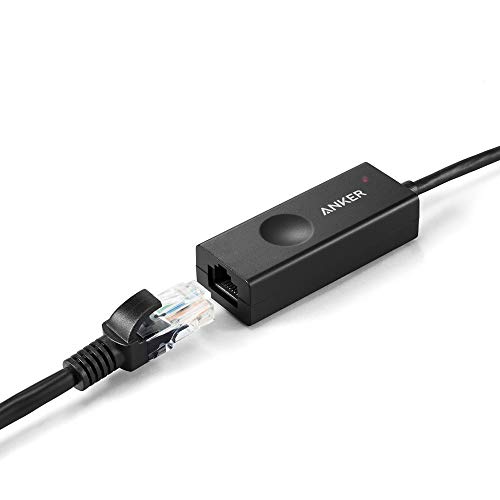

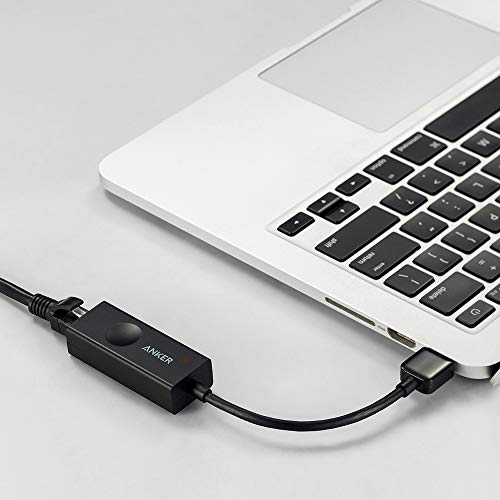


Key features
- •USB 3.0 male A to RJ45 female adapter supporting 10/100/1000 bit ethernet. Adopts USB 3.0 standard. Backward compatible with 2.0/1.1 standards.
- •Supports backpressure routing and IEEE 802.3x flow control for full-duplex (FDX) and half-duplex (HDX) systems. Compatible with IEEE 802.3, IEEE 802.3u and IEEE 802.3ab. Supports IEEE 802.3az (Energy Efficient Ethernet).
- •Supports crossover detection, auto-correction and Wake-on-LAN (WOL). Supports Windows (32/64 bit) 10 / 8 / 7 / Vista / XP, Mac OS 10.5 or higher.
- •Powered via USB - no external power adapter needed. LED indicators indicate operation.
- •Package contents: Anker USB 3.0 to Gigabit Ethernet Adapter, welcome guide, our fan-favorite 18-month warranty and friendly customer service.
Anker USB 3.0 to RJ45 Gigabit Ethernet Adapter Supporting 10/100/1000 bit Ethernet, Compatible with MacBook Pro 2015, MacBook Air 2017, and More
List Price: $36.65$32.99DEALYou Save: $3.66 (10%)
Free shippingFree Returns – 30 daysFree Order CancellationSecure Payment2–3 Days DeliveryGet It October 25, 2026In Stock (1)No marketing spamNo account requiredFulfilment by FedEx / Amazon / UPS / ShipwirePayPal / Card Buyer Protection
Customer Reviews
Reviews sourced from verified Amazon purchasers4.4
out of 5
Based on 10 reviews
5★
70%
4★
30%
3★
0%
2★
0%
1★
0%
In a permanent non-test situation I would add an actual network card to the machine but I am happy that this device worked and I
Andre Sourdiffe✓ Verified Purchase•August 13, 2023
Plugged it in and it was immediately found, and, after the driver was installed, started working. I got this as a quick way to add a second network card for use with Hyper-v inside a virtual machine I was testing and it gave me exactly what I needed. The up side is that it is quick to install and portable if I need to use it somewhere else. The downside is that it is a USB device and it gets a bit more interesting when configuring for use with a virtual machine. I had to set that virtual machine's settings to not automatically connect USB devices since I needed the network to be available on the host but if the USB device is grabbed by the virtual machine it is not available for use by the host and it needed to be. In a permanent non-test situation I would add an actual network card to the machine but I am happy that this device worked and I was able to get everything working the way I wanted it to. It may not be as fast as a regular non-usb network card, depends on whether you have USB 2.0 or 3.0 available, but it performs just fine for my purposes.
Works with Mac OS HighSierra
Andrea Polk✓ Verified Purchase•July 12, 2023
I have 60 Mbps wireless internet speeds consistently throughout my home using Charter-Spectrum service with a Linksys tri-band router. My Apple Mac Mini usually does great flying along a 5Ghz band as a priority device, but after updating to HighSierra the other day, things slowed to a trickle.
I played with network settings and got some of the speed back, but decided for a backup to purchase this Anker USB 3.0 Portable Gigabit Ethernet adapter. I'd been considering the purchase prior to this as the Mac Mini doesn't have an Ethernet port and if the wifi card went out I'd be unable to get on the internet using the Mini. The update to the OS was enough for me to purchase this item and I'm glad I did!
Setup was simple. I plugged the adapter into a USB (2.0) port on my older Mini and then a 3' long ethernet cable which I then connected to a port on the back of my wireless router. I restarted my Mini (not necessary, but always a good idea) and turned off the wifi on the Mini. The internet connection went directly through the adapter as expected. I was delighted that such a simple swap was possible and now I have my backup for the Mini and laptops.
The adapter has two lights; one red to indicate power is on and one green to indicate the network connection is active. They are super small so they don't emit a lot of light that can be annoying in a darkened workspace.
I used SpeedTest dot net to check internet connectivity speeds for uploads and downloads prior to switching to the adapter and afterward. Both speed tests were essentially the same 65+ downloads and 5 for uploads. Once again, just as expected.
I like that this product is small, useful and has an 18-month warranty through Anker. I would highly recommend it and will buy others if needed. Great for Mac OS HighSierra and Windows 10.
I played with network settings and got some of the speed back, but decided for a backup to purchase this Anker USB 3.0 Portable Gigabit Ethernet adapter. I'd been considering the purchase prior to this as the Mac Mini doesn't have an Ethernet port and if the wifi card went out I'd be unable to get on the internet using the Mini. The update to the OS was enough for me to purchase this item and I'm glad I did!
Setup was simple. I plugged the adapter into a USB (2.0) port on my older Mini and then a 3' long ethernet cable which I then connected to a port on the back of my wireless router. I restarted my Mini (not necessary, but always a good idea) and turned off the wifi on the Mini. The internet connection went directly through the adapter as expected. I was delighted that such a simple swap was possible and now I have my backup for the Mini and laptops.
The adapter has two lights; one red to indicate power is on and one green to indicate the network connection is active. They are super small so they don't emit a lot of light that can be annoying in a darkened workspace.
I used SpeedTest dot net to check internet connectivity speeds for uploads and downloads prior to switching to the adapter and afterward. Both speed tests were essentially the same 65+ downloads and 5 for uploads. Once again, just as expected.
I like that this product is small, useful and has an 18-month warranty through Anker. I would highly recommend it and will buy others if needed. Great for Mac OS HighSierra and Windows 10.
Great value and performance. OS X users should apply driver patch.
Julius O✓ Verified Purchase•July 10, 2023
The adapter's plug and play with my MacBook Pro (Model MacBookPro11,2) running OS X Yosemite 10.10.2, but it sometimes loses connectivity from the network and I have to unplug and plug the adapter back in. It doesn't lose its network settings, but I wouldn't be able to ping the router, other machines on the network, or browse the web.
The other major issue is that streaming AirPlay audio from the MacBook Pro to an Apple TV results in stuttering and choppy audio. Here's how it's all connected: [MacBook Pro] -> [Anker Adapter] -> [Gigabit Router/Switch] -> [Apple TV on 10/100 Ethernet]. So the entire setup is connected through Ethernet and the Airplay stream stutters. Wifi streaming on the other hand, appears to be flawless.
How do I know that this issue has something to do with this Ethernet adapter? Because I also have the Apple Thunderbolt Gigabit Ethernet adapter and Airplay works flawlessly.
Someone also mentioned problems when using IPv6. Well I temporarily turned that off and that didn't seem to help either.
Update (18 Mar 2015): Anker support instructed me to apply a driver patch to OS X here (http://www.ianker.com/support/A7610011), which seems to have resolved the disconnects and Airplay stuttering. From the looks of it, the adapter was using OS X's built-in Realtek drivers which were probably outdated or not optimized for Anker adapter. After applying the patch, Network Utility no longer identifies the adapter (en5) as an Apple adapter, but of Vendor: Realtek and Model: Realtek USB GBE Family Controller. The adapter appears stable, Airplay is stutter-free, and LAN transfers are very fast. Definitely a much better value and more universal than purchasing the Apple Thunderbolt Ethernet Adapter for $29. But OS X users are strongly encouraged to apply the driver patch for best performance.
The other major issue is that streaming AirPlay audio from the MacBook Pro to an Apple TV results in stuttering and choppy audio. Here's how it's all connected: [MacBook Pro] -> [Anker Adapter] -> [Gigabit Router/Switch] -> [Apple TV on 10/100 Ethernet]. So the entire setup is connected through Ethernet and the Airplay stream stutters. Wifi streaming on the other hand, appears to be flawless.
How do I know that this issue has something to do with this Ethernet adapter? Because I also have the Apple Thunderbolt Gigabit Ethernet adapter and Airplay works flawlessly.
Someone also mentioned problems when using IPv6. Well I temporarily turned that off and that didn't seem to help either.
Update (18 Mar 2015): Anker support instructed me to apply a driver patch to OS X here (http://www.ianker.com/support/A7610011), which seems to have resolved the disconnects and Airplay stuttering. From the looks of it, the adapter was using OS X's built-in Realtek drivers which were probably outdated or not optimized for Anker adapter. After applying the patch, Network Utility no longer identifies the adapter (en5) as an Apple adapter, but of Vendor: Realtek and Model: Realtek USB GBE Family Controller. The adapter appears stable, Airplay is stutter-free, and LAN transfers are very fast. Definitely a much better value and more universal than purchasing the Apple Thunderbolt Ethernet Adapter for $29. But OS X users are strongly encouraged to apply the driver patch for best performance.
PLUG AND PLAY, NO DRIVERS NEEDED, FAST, WORKS GREAT, HIGHLY RECOMMENDED
Stefan✓ Verified Purchase•July 9, 2023
The media could not be loaded. IN ANKER WE TRUST! I've always been a fan of Anker since 2012 because of the superior quality of their products and outstanding customer service. I work in the IT field, and this product has made my job a lot easier. After installing an OS, many times the network adapter driver is missing and the only way to get it is online. This device is so straight forward and easy to use even for dummies. All you need to do is plug it in and it works. That's right, NO DRIVER or additional software required. How much easier can it get? It even has three LEDs to let you know its operational. As far as performance, it's blazing fast and stable with no issues at all. The quality of the material and craftsmanship is also great. The value of this product is also superb. I love Anker products and HIGHLY RECOMMEND this and all Anker products.
Writing the title of this review took me longer than getting this adapter installed and working.
Carlos Santiago✓ Verified Purchase•June 30, 2023
That's how simple it was to install this product. I have several computers connected via a gigabit Ethernet network at home, but there was one PC in particular using an older USB 2.0/100Mbps adapter that I wanted to upgrade. I purchased the Anker USB 3.0 Gigabit Ethernet adapter brand based on past experience with a high-capacity extended battery purchase I made for my smart phone as well as the competitive price of this adapter compared to the rest.
I should note that the PC using the Anker adapter has Windows 10, but only a USB 2.0 connection, which limits the adapter to a theoretical max data transfer speed of 480Mbps (based on USB 2.0 specs) , not the full 1,000Mbps (1Gbps). My actual transfer rates using this adapter with USB 2.0 range from 13 to 33 Mbps, depending on the number and size of each file. There are other factors that affect data transfer speeds, like the hard drive transfer rate and the actual network traffic at the time of the transfer, but the speeds are still comparatively faster than with the older 100Mbps adapter. I plan to upgrade the motherboard at some point in the future, or buy a 3.0 USB card, which will make this adapter perform (at least theoretically) at full gigabit speeds.
This is a set-it and forget-it type of adapter, no driver installation was required and it has been working great so far. Be aware that this adapter is not designed to improve the Internet connection speeds, but to improve the internal network's data transfer speeds, provided that the rest of the devices and computers are also using gigabit connections (data transfers will go as fast as the slowest link).
I should note that the PC using the Anker adapter has Windows 10, but only a USB 2.0 connection, which limits the adapter to a theoretical max data transfer speed of 480Mbps (based on USB 2.0 specs) , not the full 1,000Mbps (1Gbps). My actual transfer rates using this adapter with USB 2.0 range from 13 to 33 Mbps, depending on the number and size of each file. There are other factors that affect data transfer speeds, like the hard drive transfer rate and the actual network traffic at the time of the transfer, but the speeds are still comparatively faster than with the older 100Mbps adapter. I plan to upgrade the motherboard at some point in the future, or buy a 3.0 USB card, which will make this adapter perform (at least theoretically) at full gigabit speeds.
This is a set-it and forget-it type of adapter, no driver installation was required and it has been working great so far. Be aware that this adapter is not designed to improve the Internet connection speeds, but to improve the internal network's data transfer speeds, provided that the rest of the devices and computers are also using gigabit connections (data transfers will go as fast as the slowest link).
Page 1 of 2