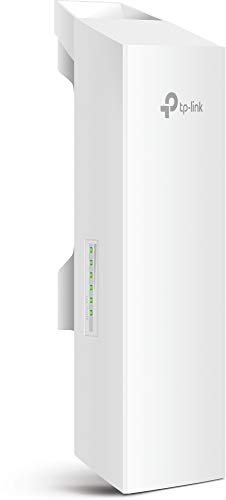
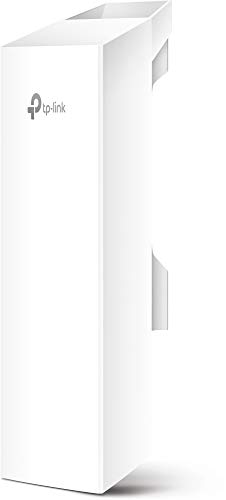
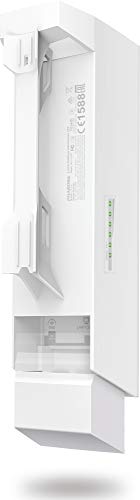
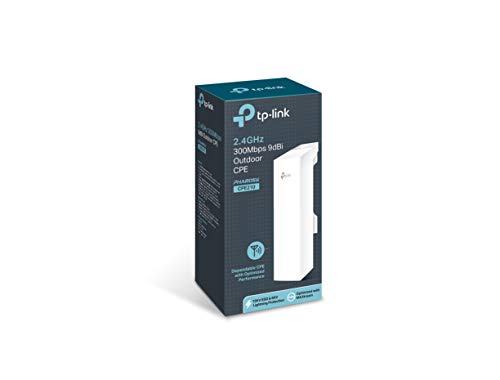
TP-Link 2.4GHz N300 Long Range Outdoor CPE for PtP and PtMP Transmission | Point to Point Wireless Bridge | 9dBi, 5km+ | Passive PoE Powered w/Free PoE Injector | Pharos Control (CPE210)


Key features
- •Built-in 9dBi 2x2 dual-polarized directional MIMO antenna
- •Adjustable transmission power from 0 to 27dBm/500mW
- •System-level optimizations for more than 5Km Long range wireless transmission
- •TP-Link Pharos tdma (Time-Division-Multiple-Access) technology improves product performance in throughput, capacity and latency performance
- •Centralized management system - Pharos control
- •Ap/ client/ Repeater/ AP router/ AP client router (WISP) operation modes
TP-Link 2.4GHz N300 Long Range Outdoor CPE for PtP and PtMP Transmission | Point to Point Wireless Bridge | 9dBi, 5km+ | Passive PoE Powered w/Free PoE Injector | Pharos Control (CPE210)
List Price: $72.44$65.20DEALYou Save: $7.24 (10%)
Free shippingFree Returns – 30 daysFree Order CancellationSecure Payment2–3 Days DeliveryGet It October 26, 2026In Stock (10)No marketing spamNo account requiredFulfilment by FedEx / Amazon / UPS / ShipwirePayPal / Card Buyer Protection
Customer Reviews
Reviews sourced from verified Amazon purchasers4.2
out of 5
Based on 10 reviews
5★
30%
4★
70%
3★
0%
2★
0%
1★
0%
doing the job but just barely
Amazon Customer Robert✓ Verified Purchase•August 30, 2023
CPE210 2.4GHz 300Mbps 9dBi Outdoor CPE - What I bought - 2 ea.
After doing a lot of research I strongly believe these CPE210 units are sold under false pretense and false claims.
No one.... NO ONE ever gets even close to the advertised speed.
FEW people get 100 mbps or more download speed.
300Mbps = BUNK - DO NOT BELIEVE THAT.
So here is what I'm doing and what I'm getting.
I have a shop building about 120 ft from my house. I have one CPE210 unit shooting through a window and the receiver CPE210 unit inside the shop so the signal is going through a wood and vinyl siding shop wall.
I am getting 45 to 50 mbps download speed. I have these configured as access point and client.
I tried every other setup, first being bridge mode. No dice. Access point and client was the ONLY mode that transmitted network connectivity to/from the access point and the client units.
My intended usage is: In the shop, there are 4 security cameras connected to a NVR connected to a Cisco 24 port POE gigabit switch. Also, a computer and a TV running ROKU.
I want to access the cams from the house. I want to access the internet from the shop. I some times want to put on the news and listen as I work using the ROKU.
I want all this to work at once, and it does. Goal met these CPE210 units are doing the job at the 45 - 50 mbps I am getting from them.
If I had paid a lot for these they would be going back but at the price point, under $100 for 2 of them and them doing the job well, I am grudgingly happy.
Still, I did hope/expect close to 100 mbps connection speed. My internet is around 300 mbps download speed and verified all that is working as expected right up to the access point unit at the house. Any computer, wired or wifi on laptop or phone on my house internet system/network gets 300 mbps on speed test.
I have done research and tried every possible configuration for the CPE210 2.4 wireless settings. I did get 60 mbps with security disabled but not going to run without security. If I figure out how to get more transfer speed from these I will edit this review and ad those details.
I could go though the trouble of mounting both units outside. Might open the window and then take the shop unit and make up a long cable and move it outside and test them.
WIFI - NO BUENO ??
One other complaint, read a review stating there would be wifi on the client unit and I could log on to it and use it.
NO.... I had to pickup another wifi router [cheap used but really nice on facebook marketplace] and plug that into my switch and set it up as a access point. After that My ROKU was able to work after inputting the needed wifi setup details.
Some day I will trench in a 1" plastic pipe from the house to the shop and run 2 cat6 cables inside that for network connectivity. Until then I got two of these CPE210 units and the piddly 50 mbps speeds but I can live with it, for now.
300Mbps??? how are they testing these CPE210 units and getting that speed?
300Mbps = BUNK, do not expect any more then about 50 mbps.
If 50 mbps transfer speed will do it for you then buy a set of these if you need them.
I had no trouble getting them to work once I decided to use "access point" for the unit at the house and "client" mode for the unit in the shop. I do have a lot of experience [professional level] with network system setup and installation though. I used to own an internet company.
After doing a lot of research I strongly believe these CPE210 units are sold under false pretense and false claims.
No one.... NO ONE ever gets even close to the advertised speed.
FEW people get 100 mbps or more download speed.
300Mbps = BUNK - DO NOT BELIEVE THAT.
So here is what I'm doing and what I'm getting.
I have a shop building about 120 ft from my house. I have one CPE210 unit shooting through a window and the receiver CPE210 unit inside the shop so the signal is going through a wood and vinyl siding shop wall.
I am getting 45 to 50 mbps download speed. I have these configured as access point and client.
I tried every other setup, first being bridge mode. No dice. Access point and client was the ONLY mode that transmitted network connectivity to/from the access point and the client units.
My intended usage is: In the shop, there are 4 security cameras connected to a NVR connected to a Cisco 24 port POE gigabit switch. Also, a computer and a TV running ROKU.
I want to access the cams from the house. I want to access the internet from the shop. I some times want to put on the news and listen as I work using the ROKU.
I want all this to work at once, and it does. Goal met these CPE210 units are doing the job at the 45 - 50 mbps I am getting from them.
If I had paid a lot for these they would be going back but at the price point, under $100 for 2 of them and them doing the job well, I am grudgingly happy.
Still, I did hope/expect close to 100 mbps connection speed. My internet is around 300 mbps download speed and verified all that is working as expected right up to the access point unit at the house. Any computer, wired or wifi on laptop or phone on my house internet system/network gets 300 mbps on speed test.
I have done research and tried every possible configuration for the CPE210 2.4 wireless settings. I did get 60 mbps with security disabled but not going to run without security. If I figure out how to get more transfer speed from these I will edit this review and ad those details.
I could go though the trouble of mounting both units outside. Might open the window and then take the shop unit and make up a long cable and move it outside and test them.
WIFI - NO BUENO ??
One other complaint, read a review stating there would be wifi on the client unit and I could log on to it and use it.
NO.... I had to pickup another wifi router [cheap used but really nice on facebook marketplace] and plug that into my switch and set it up as a access point. After that My ROKU was able to work after inputting the needed wifi setup details.
Some day I will trench in a 1" plastic pipe from the house to the shop and run 2 cat6 cables inside that for network connectivity. Until then I got two of these CPE210 units and the piddly 50 mbps speeds but I can live with it, for now.
300Mbps??? how are they testing these CPE210 units and getting that speed?
300Mbps = BUNK, do not expect any more then about 50 mbps.
If 50 mbps transfer speed will do it for you then buy a set of these if you need them.
I had no trouble getting them to work once I decided to use "access point" for the unit at the house and "client" mode for the unit in the shop. I do have a lot of experience [professional level] with network system setup and installation though. I used to own an internet company.
Tricky Setup But Strong, Focused Signal
Laura✓ Verified Purchase•August 13, 2023
I loved the price of this TP-Link 2.4GHz N300 Long Range Outdoor CPE for PtP and PtMP Transmission. It also includes the Power Over Ethernet adapter needed. Since most routers don't provide POE, it's a necessary item. It arrived quickly in excellent condition. Installation was easy, but the software setup was difficult. The power cord for the POE adapter is about 12" long. I had to use a power strip to get power to the adapter. The average person would have difficulty getting this CPE to work. They want you to give your computer a static IP of 192.168.0.10 which was difficult for me. When I set that static IP on my computer, I lost internet connection because I get DHCP through my provider and the router is 192.168.50.1. I'm pretty good with computers and software, but I had a lot of trouble with this. I finally got to the Pharos interface, and things were easier after that. The documentation that comes with the CPE and the support on the TP-Link website didn't really help me get it to work.
Once set up, I now have my wifi extended a half mile to another residence. This device has many capabilities and functions, and can transmit the signal more than 20 miles line of sight. I would probably buy it again, but I wouldn't want someone to need professional assistance to have it installed and set up.
Once set up, I now have my wifi extended a half mile to another residence. This device has many capabilities and functions, and can transmit the signal more than 20 miles line of sight. I would probably buy it again, but I wouldn't want someone to need professional assistance to have it installed and set up.
Good wifi bridge
Eric Rose✓ Verified Purchase•July 15, 2023
I'm a certified network engineer with over 20 years experience, so keep that in mind. I work on network devices like this every day.
So far I like the TP Link wifi bridge. We are connecting a guest house to the main house internet connection. The guest house is 400-500 feet away from the main house. The main house (transmitter, or Access Point) is mounted outside. The guest house receiver (client) is actually indoors, facing the main house, with direct line of site, resting against the exterior wall of the guest house.
This is the 3rd network bridge I've setup for this situation. The prior two solutions were from engenius. However, I like the TP Link solution better for the following reasons:
1. the web interface to manage the devices has a few more options and is easier to use, in my opinion.
2. The devices utilize 10/100 Mbps wired ethernet ports. Although this is counter-intuitive (how can you get 300Mbps wifi when the Access Point is only 100Mbps?). However, in my experience, these wifi bridges are MORE RELIABLE when the uplink is only 100Mbps.
If you are ONLY downloading from the internet, the gigabit ethernet devices work well. However, if you are trying to work remotely from the remote location, you need reliable uploads as well. In this situation, 10/100 ethernet seems to be more reliable.
The TPLink bridge solution uses a priority connection protocol (not an industry standard) when using two TP Link access points. This seems to work well, as advertised. With a simple button option you can change the priority from Throughput (for streaming downloaded video, for instance) to Latency (for using video calling, Voice over IP (VOIP) calling, etc). This option does seem to work well, and it only has to be enabled on the receiving end (the "client"), and not on the transmitting end (the "Access Point"). Also, switching the setting doesn't require a reboot of the client device so you can make that change on-the-fly.
There is an important setup tip which applies to any wifi bridge solution that you end up choosing: You need a computer with a physical ethernet port to connect to the devices for the first time. I have a few MacBook laptops, and none of them have a physical port. I ended changing my home wifi ip address to match the devices (192.168.0.x), and plugged the devices into our existing wifi router. Then I could connect to them to program them, change their default IP address, etc.
I downloaded the user manual from the internet before they arrived and read through it a few times, so by the time they arrived I knew exactly how to program them for our situation.
Another reason I went with TP Link is, our home wifi router is TP Link and I've been happy with that device as well. Most of the wifi bridges that you see on Amazon are from mysterious companies that I never heard of. When I finally found the TP Link, I was much more confident ordering it.
I hope this helps your decision.
So far I like the TP Link wifi bridge. We are connecting a guest house to the main house internet connection. The guest house is 400-500 feet away from the main house. The main house (transmitter, or Access Point) is mounted outside. The guest house receiver (client) is actually indoors, facing the main house, with direct line of site, resting against the exterior wall of the guest house.
This is the 3rd network bridge I've setup for this situation. The prior two solutions were from engenius. However, I like the TP Link solution better for the following reasons:
1. the web interface to manage the devices has a few more options and is easier to use, in my opinion.
2. The devices utilize 10/100 Mbps wired ethernet ports. Although this is counter-intuitive (how can you get 300Mbps wifi when the Access Point is only 100Mbps?). However, in my experience, these wifi bridges are MORE RELIABLE when the uplink is only 100Mbps.
If you are ONLY downloading from the internet, the gigabit ethernet devices work well. However, if you are trying to work remotely from the remote location, you need reliable uploads as well. In this situation, 10/100 ethernet seems to be more reliable.
The TPLink bridge solution uses a priority connection protocol (not an industry standard) when using two TP Link access points. This seems to work well, as advertised. With a simple button option you can change the priority from Throughput (for streaming downloaded video, for instance) to Latency (for using video calling, Voice over IP (VOIP) calling, etc). This option does seem to work well, and it only has to be enabled on the receiving end (the "client"), and not on the transmitting end (the "Access Point"). Also, switching the setting doesn't require a reboot of the client device so you can make that change on-the-fly.
There is an important setup tip which applies to any wifi bridge solution that you end up choosing: You need a computer with a physical ethernet port to connect to the devices for the first time. I have a few MacBook laptops, and none of them have a physical port. I ended changing my home wifi ip address to match the devices (192.168.0.x), and plugged the devices into our existing wifi router. Then I could connect to them to program them, change their default IP address, etc.
I downloaded the user manual from the internet before they arrived and read through it a few times, so by the time they arrived I knew exactly how to program them for our situation.
Another reason I went with TP Link is, our home wifi router is TP Link and I've been happy with that device as well. Most of the wifi bridges that you see on Amazon are from mysterious companies that I never heard of. When I finally found the TP Link, I was much more confident ordering it.
I hope this helps your decision.
They did what they could
Jessi Roberts✓ Verified Purchase•June 20, 2023
Got my 2 CPE210's a little over a month ago, and still not completely / correctly configured and working. The 1st customer service rep was doing her best, but her foreign accent was so strong I had a hard time understanding her. She had suggested new CAT5e (or higher) cables, so we dropped the issue until I had a chance to purchase them. Then last week, we tried again. This customer service rep was very understandable, patient and knowledgeable as to what need to be done to get both the AP and Client nodes to communicate with each other. At the end of 2 1/2 hours on the phone, we came to the conclusion that the WPA/PSA password and the default frequency were the trouble spots. We established that the 2 CPE210's were indeed getting signal between each other and she suggested that I leave the system down for a couple of hours before trying to use it. At that we concluded our call. Unfortunately, after that couple of hours, I tried my new extended WiFi system and on the client end, it would drop the connection about every 30 seconds or so. Frustrated, I started playing with it on my own. I disabled the AP node because I have the router WiFi signal outside the house up to the point I need it, just not in the building were I want it. Then I took a laptop to my Client node and set the receiving signal to come from the router ID instead of the AP node. Still no signal to inside my building, so as a test, I got that new cable I bought and hooked it up between the CPE210 Client node and the PC I was trying to access with a WiFi dongle. All of a sudden, I have a strong connection. Turns out the WiFi mesh I bought to use in this scenario was faulty and needed to be replaced. Have since sent that one back and am now waiting on a new one to arrive. We'll see.
Really strong signal
Bob Gilbert✓ Verified Purchase•June 10, 2023
Really strong signal traveling about a half mile thru trees and a couple of small buildings. Was a little difficult to get set up to connect to the internet, but that was a problem caused by the ISP and their modem/router setup.
Page 1 of 2
![Wireless Bridge, KuWFi 2.4G Outdoor CPE Point to Point Long Range Access Nano Station with 12dBi Panel Antenna, Support 24V POE[2-Pack, Pre-Pairing]](https://m.media-amazon.com/images/I/31iv+aADLxL._SL500_.jpg)


![[New Upgraded] VIEWISE Outdoor Wireless WiFi Bridge, Point to Point or Point to Multi-Point, EZ Setup via Dip Switches, 5GHz, 900Mbps 48V PoE (5GHz / 900Mbps)](https://m.media-amazon.com/images/I/21WXzzy6KfL._SL500_.jpg)
![ZyXEL Wireless Access Point with AP / Universal Repeater / Client Mode [WAP3205V2]](https://m.media-amazon.com/images/I/41bQQjwODqL._SL500_.jpg)