OptiShot 2 Golf Simulator for Home

Key features
- •The World's #1 Golf Simulator now for Mac or PC
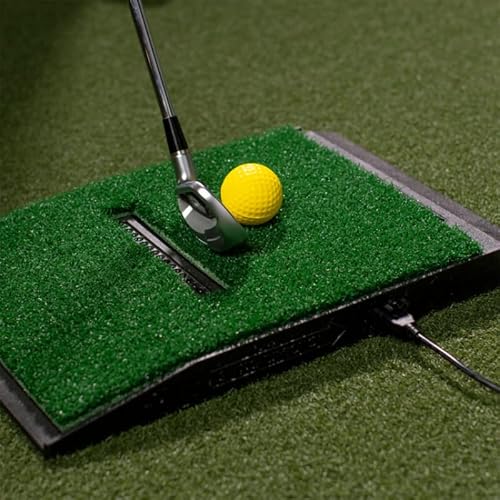
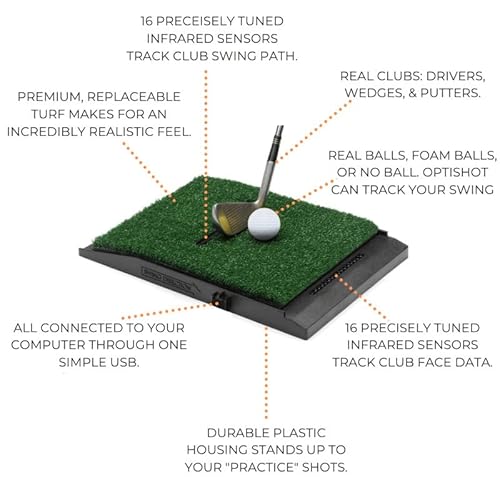
- •Use your own clubs to hit real or foam golf balls
- •Play and practice on world-famous courses
- •Windows System Requirements: Windows Vista, 7, 8 or 10, Graphics Card: 256MB available Adapter RAM with OpenGL 2.0 support and the latest Video Drivers, 3GB HDD Storage, 4GB RAM, USB 2.0 port
- •Mac System Requirements: Mac OS X 10.8, Intel Core 2 Duo, NVIDIA GeForce 8600M GT or ATI Radeon HD 2600 or Intel Iris Pro or better, OpenGL 2.0 Support, 3GB HDD Storage, 4GB RAM, USB 2.0 Port
OptiShot 2 Golf Simulator for Home
List Price: $727.49$654.74DEALYou Save: $72.75 (10%)
Free shippingFree Returns – 30 daysFree Order CancellationSecure Payment2–3 Days DeliveryGet It October 25, 2026In Stock (2)No marketing spamNo account requiredFulfilment by FedEx / Amazon / UPS / ShipwirePayPal / Card Buyer Protection
Customer Reviews
Reviews sourced from verified Amazon purchasers3.8
out of 5
Based on 10 reviews
5★
50%
4★
40%
3★
10%
2★
0%
1★
0%
The Best Simulator for the Average Golfers Home!
sam_19✓ Verified Purchase•February 21, 2018
This is the best product for any golfer. When the seasons aren't in the favor of golfers, many would like to keep there swing continuing through the seasons. When you go out to use a simulator, the cost is very high, and to have one at home is awesome.
The first comment I will make is if you go into purchasing this product assuming you will get the same accuracy as a $10,000 simulator, you shouldn't purchase this. Expensive professional simulators use ball tracking to provide the most accurate 'simulation' to an actual hit outdoors. They also require large equipment, and in most cases a dedicated room to be used solely for the golf simulator. This simulator uses swing (club) tracking to provide calculations and assumptions on where the ball should go.
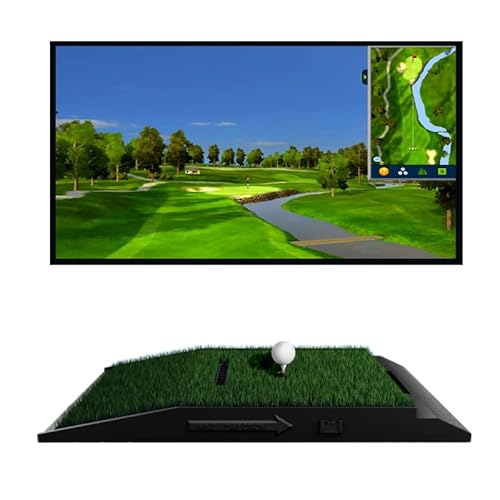
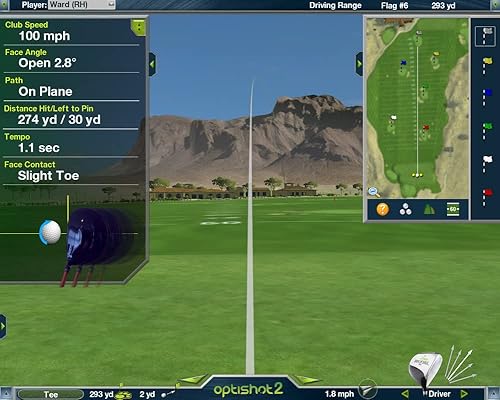
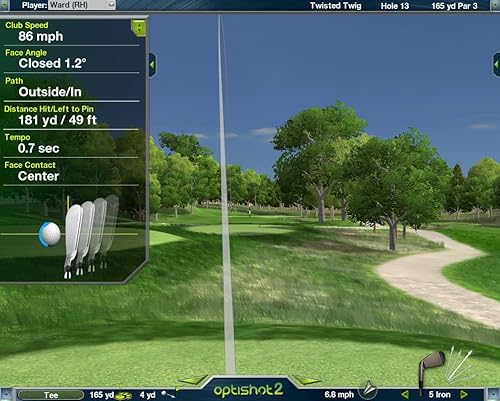
This will provide you with a lot of information about each swing. You will see the path of your club, with face angle and swing speed. This data is accurate and very useful. The courses are designed beautifully and the software has been flawless. We use the simulator in the family room, with no ball and net. We project the computer onto the TV; more about that below.
As far as computers, this requires you to plug in a USB into a computer and run the program to play. I currently use this with a I7 dell laptop. It seems that the software is not graphics intensive, hence we are running on maximum quality with no issues with frame rate. The setup we have is the computer is connected to our receiver which is connected to a 4K TV. The computer is outputting 4K so even though the software is not native 4K in quality, there was a noticeable difference with changing the Windows output settings to 4K over 1080P. Basically you do not need a net, projector and everything else to enjoy this. Using only the mat with a TV and computer works perfect. The other option that works would be use a MacBook with an Apple TV. You can use Airplay Mirroring on a Mac to an Apple TV and stream the game onto your TV without having to connect HDMI to your Mac. This is a great option if you don't have a computer you could dedicate to this setup. The software has worked perfectly on Mac as well and runs natively without any issues.
The quality has been fantastic. We have hit the plastic and the sensor lights multiple times with clubs at full speed and have had no issue, honestly there isn't even a scratch. You will be surprised when you see that this product is heavy and is built like a tank. In the combo they include the extra mat and extension USB cable which is nice. The quality of the turf seems to be fantastic after daily use for the past 2 months. Optishot includes many premium courses for purchase which are quite expensive and we haven't felt the need to purchase them as there is a wealth of courses included in the software for free and with the ability to change conditions you could change the way the courses play from green speed to weather, They also have a season pass you can purchase and can compete in tournaments. We haven't tried that so I can't speak to the quality of that.
For the price, you can't beat this for golf training. Look at golf training aids such as radar monitors for driving ranges that cost upwards of 200 and sometimes 300 to 350 dollars, when this is in the same range but is a lot more fun to use and still seems quite beneficial even without a ball.
The first comment I will make is if you go into purchasing this product assuming you will get the same accuracy as a $10,000 simulator, you shouldn't purchase this. Expensive professional simulators use ball tracking to provide the most accurate 'simulation' to an actual hit outdoors. They also require large equipment, and in most cases a dedicated room to be used solely for the golf simulator. This simulator uses swing (club) tracking to provide calculations and assumptions on where the ball should go.
This will provide you with a lot of information about each swing. You will see the path of your club, with face angle and swing speed. This data is accurate and very useful. The courses are designed beautifully and the software has been flawless. We use the simulator in the family room, with no ball and net. We project the computer onto the TV; more about that below.
As far as computers, this requires you to plug in a USB into a computer and run the program to play. I currently use this with a I7 dell laptop. It seems that the software is not graphics intensive, hence we are running on maximum quality with no issues with frame rate. The setup we have is the computer is connected to our receiver which is connected to a 4K TV. The computer is outputting 4K so even though the software is not native 4K in quality, there was a noticeable difference with changing the Windows output settings to 4K over 1080P. Basically you do not need a net, projector and everything else to enjoy this. Using only the mat with a TV and computer works perfect. The other option that works would be use a MacBook with an Apple TV. You can use Airplay Mirroring on a Mac to an Apple TV and stream the game onto your TV without having to connect HDMI to your Mac. This is a great option if you don't have a computer you could dedicate to this setup. The software has worked perfectly on Mac as well and runs natively without any issues.
The quality has been fantastic. We have hit the plastic and the sensor lights multiple times with clubs at full speed and have had no issue, honestly there isn't even a scratch. You will be surprised when you see that this product is heavy and is built like a tank. In the combo they include the extra mat and extension USB cable which is nice. The quality of the turf seems to be fantastic after daily use for the past 2 months. Optishot includes many premium courses for purchase which are quite expensive and we haven't felt the need to purchase them as there is a wealth of courses included in the software for free and with the ability to change conditions you could change the way the courses play from green speed to weather, They also have a season pass you can purchase and can compete in tournaments. We haven't tried that so I can't speak to the quality of that.
For the price, you can't beat this for golf training. Look at golf training aids such as radar monitors for driving ranges that cost upwards of 200 and sometimes 300 to 350 dollars, when this is in the same range but is a lot more fun to use and still seems quite beneficial even without a ball.
Optishot 2 review after owning SkyTrak
GoodDog✓ Verified Purchase•February 21, 2018
Only had the Optishot2 for a couple of days, and am quite pleased with it. Had a SkyTrak unit prior, and found it overly complicated compared to the Optishot. The best points about the Optishot are:
1) Quick easy setup
2) Simplicity
3) Reads every swing (at least for me)
4) Can use foam or real balls
5) Feedback on path, tempo, club face, swing speed
6) Includes 15 courses
7) Doesn't push your laptop too hard (a problem with SkyTrak - and I have a beast for a laptop)
8) Portability
10) Nice driving range
11) Mini Tour for $50/year where you can play tournaments and get access to many more courses
12) The ability to buy single courses for $30, versus expensive bundles with other golf sims
13) The multi-player is a dream come true - very simple
14) The amount of active games available in multi-player
The Cons:
1) Putting - it is pretty awful at this. All simulators are bad at putting, but Optishot is perhaps the worst that I've run across.
2) The graphic detail is lower than other golf sims (but easier on your computer). At the same time the image is brighter, clearer.
3) Those are the only cons I can think of at this point.
Would highly recommend the Optishot2 to anyone wanting to practice during the winter. Can you get a better system? Probably. Do you want to spend $5,000 for it versus $300? Probably not. The next "step up" from Optishot2 is SkyTrak - and it is not worth spending the extra $. Having owned both, I prefer the Optishot2.
1) Quick easy setup
2) Simplicity
3) Reads every swing (at least for me)
4) Can use foam or real balls
5) Feedback on path, tempo, club face, swing speed
6) Includes 15 courses
7) Doesn't push your laptop too hard (a problem with SkyTrak - and I have a beast for a laptop)
8) Portability
10) Nice driving range
11) Mini Tour for $50/year where you can play tournaments and get access to many more courses
12) The ability to buy single courses for $30, versus expensive bundles with other golf sims
13) The multi-player is a dream come true - very simple
14) The amount of active games available in multi-player
The Cons:
1) Putting - it is pretty awful at this. All simulators are bad at putting, but Optishot is perhaps the worst that I've run across.
2) The graphic detail is lower than other golf sims (but easier on your computer). At the same time the image is brighter, clearer.
3) Those are the only cons I can think of at this point.
Would highly recommend the Optishot2 to anyone wanting to practice during the winter. Can you get a better system? Probably. Do you want to spend $5,000 for it versus $300? Probably not. The next "step up" from Optishot2 is SkyTrak - and it is not worth spending the extra $. Having owned both, I prefer the Optishot2.
Love this machine
Don Rose✓ Verified Purchase•February 16, 2018
This accurately measures my swing speed. To fix the driver problem put unreflective tape on the sole and a strip of foil tape parallel to the face on the sole. Problem solved. Love this machine! I'm improving my game!
HOWEVER: you need robust graphics on your computer. I have a Mac Mini with 8 G memory. The program crashes all the time. Usually after just one swing, and it does that multiple times before finally settling down so I can hit 30 + balls. The crashes and reloading get real tedious, believe me. My communication with the home office confirms you need robust graphics capabilities, and my Mac Mini isn't up to it for trouble-free running.
HOWEVER: you need robust graphics on your computer. I have a Mac Mini with 8 G memory. The program crashes all the time. Usually after just one swing, and it does that multiple times before finally settling down so I can hit 30 + balls. The crashes and reloading get real tedious, believe me. My communication with the home office confirms you need robust graphics capabilities, and my Mac Mini isn't up to it for trouble-free running.
Recommend starting with one club you know and hit well ...
Jaime Lachmann✓ Verified Purchase•January 12, 2018
Was supposed to have a 15' usb and extra hitting pad but it didn't. The seller responded right away and refunded the cost of a cord.
Product seems as described, takes some time to calibrate your clubs. Recommend starting with one club you know and hit well then working through the rest.
Product seems as described, takes some time to calibrate your clubs. Recommend starting with one club you know and hit well then working through the rest.
Great product for the money
Amazon Customer✓ Verified Purchase•December 20, 2017
We enjoy playing on this very much. There are many courses to choose from. The only draw back is it has trouble reading the ball when using a driver. If you don't use a ball with the driver and just swing over the sensors it works just fine.
Page 1 of 2