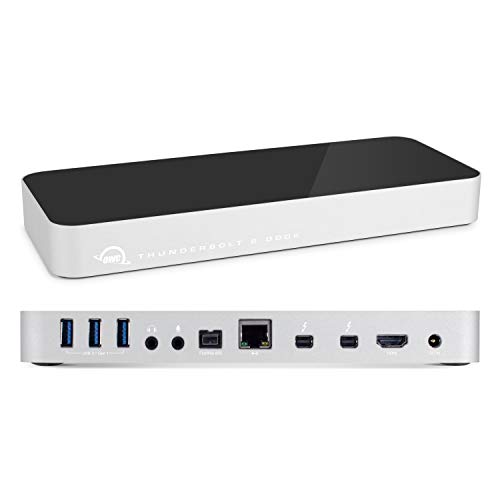
OWC Thunderbolt 2 Dock


Key features
- •5 Usb 3.0 Ports3 Standard & Two 1.5a
- •2 Thunderbolt Ports
- •3.5mm Mono Audio Input
- •3.5mm Stereo Audio Outpur
- •1 Firewire 800 Port
OWC Thunderbolt 2 Dock
List Price: $330.29$297.26DEALYou Save: $33.03 (10%)
Free shippingFree Returns – 30 daysFree Order CancellationSecure Payment2–3 Days DeliveryGet It October 24, 2026In Stock (1)No marketing spamNo account requiredFulfilment by FedEx / Amazon / UPS / ShipwirePayPal / Card Buyer Protection
Customer Reviews
Reviews sourced from verified Amazon purchasers4.2
out of 5
Based on 10 reviews
5★
40%
4★
60%
3★
0%
2★
0%
1★
0%
Apple Superdrive (CD/DVD R/W) does not work
Just Me✓ Verified Purchase•July 26, 2023
Does support SanDisk Extreme SSD via USB port, and old Apple keyboard via USB port.
However, an Apple Superdrive (CD/DVD reader and burner) will not work from either back USB ports or side (charging) USB ports.
** UPDATE ** You must download and install a special driver from OWC before Thunderbolt 2 Dock will support Apple Superdrive. Even if it driver is shown to be installed, Apple's OS X (Mojave) may be blocking driver from running.
Check under OS X's System Preferences / Security & Privacy panel. Look below "Allow apps downloaded from:" to see if there is any message about OWC software and "Allow". Make sure Padlock in bottom left hand corner is Unlocked.
If there is something about Allow OWC, click allow. Reboot.
De-Install OWC's driver. Reboot. (Look under /Library/Extensions for 'OWCThunderboltDockChargingSupport.kext' and remove it - Reboot).
Go back into OS X's System Preferences / Security & Privacy panel, making sure Padlock in bottom left hand corner is Un-locked (need to enter Admin password).
Then Re-install OWC's driver for their Thunderbolt 2 Dock, and reboot.
Main reason to buy OWC Thunderbolt 2 dock was to transfer load of SanDisk Extreme from iMac's built-in USB ports to iMac's Thunderbolt 2 port. Second reason was because one of iMac's built-in USB ports is dead.
However, an Apple Superdrive (CD/DVD reader and burner) will not work from either back USB ports or side (charging) USB ports.
** UPDATE ** You must download and install a special driver from OWC before Thunderbolt 2 Dock will support Apple Superdrive. Even if it driver is shown to be installed, Apple's OS X (Mojave) may be blocking driver from running.
Check under OS X's System Preferences / Security & Privacy panel. Look below "Allow apps downloaded from:" to see if there is any message about OWC software and "Allow". Make sure Padlock in bottom left hand corner is Unlocked.
If there is something about Allow OWC, click allow. Reboot.
De-Install OWC's driver. Reboot. (Look under /Library/Extensions for 'OWCThunderboltDockChargingSupport.kext' and remove it - Reboot).
Go back into OS X's System Preferences / Security & Privacy panel, making sure Padlock in bottom left hand corner is Un-locked (need to enter Admin password).
Then Re-install OWC's driver for their Thunderbolt 2 Dock, and reboot.
Main reason to buy OWC Thunderbolt 2 dock was to transfer load of SanDisk Extreme from iMac's built-in USB ports to iMac's Thunderbolt 2 port. Second reason was because one of iMac's built-in USB ports is dead.
Worth every penny!
Guy Maness✓ Verified Purchase•July 22, 2023
If you still have a mackbook from the thunderbolt 2 days, this dock is a welcomed pardon from dongle pergatory! I don't remember how many adapters/cables I used to have hanging out of my mbp ( 2 external monitors, usb keyboard, Ethernet, etc). When my Ethernet adapter crapped out, I decided to use the opportunity to get a good TB2 dock. There weren't a lot of options. When I came across this, it had all the features I wanted, and I am comfortable with the OWC name. I have been extremely happy with my purchase. It pushes all of my peripherals through one thunderbolt port (minus my second external monitor which still has to plug into the HDMI port of the mbp). It handles it beautifully. I couldn't be happier. Bonus tip: I temporarily had to use a new mbp (tb3 with usb-c ports only) and I was concerned about not being able to use my whole setup. I bought a thunderbolt 2 to thunderbolt 3 adapter and used it to connect the new mbp to my existing dock setup. To my surprise, everything worked beautifully... Ethernet, video, usb, all of it. So, if you can't find a good price on a new tb3 (usb-c) dock, I wouldn't hesitate to recommend this dock with a good tb2 to tb3 adapter. I purchased an Apple brand adapter when I did it.
Connecting both a Thunderbolt monitor and a Cinema monitor to a 2013 Macbook Air -- Great product but inaccurate tech support
NNM✓ Verified Purchase•June 28, 2023
Let me say first that this product is wonderful. I have never had two large external monitors before, and it is life changing!! I do a lot of genealogy research, and the ability to look at records on one monitor and enter the data on my software program on the other monitor is great. I was already using a mid-year 2013 13-inch MacBook Air with a Thunderbolt external monitor. I had an old Cinema (minidisplay port monitor) that I was hoping I could also hook up. I read a lot of reviews on docks, etc., and it was really frustrating that the Cinema couldn't just daisy chain to the Thunderbolt. A couple of the reviews said that a daisy chain could work if there was a Thunderbolt peripheral between the Thunderbolt monitor and the Cinema, e.g., dock or external hard drive. Although this didn't make much sense to me (I'm not very computer sophisticated), I decided to risk it, so I bought this dock. When it arrived, I was puzzled about the "order" or "sequence" in which to set it all up, so I called OWC support. The man I spoke with on 9/8/17 was very pleasant, but he basically said it couldn't work. He said I could connect my Thunderbolt monitor to the dock, but to connect an additional non-Thunderbolt monitor, I would have to use the HDMI port. This was not going to help me since the Cinema has only a minidisplay output. I said to the OWC guy, "So basically I've spent about $250 on a dock and a cord, and it's not going to help me at all?" He said, "That's right. Is there anything else I can help you with, ma'am?" After we hung up, I experimented with the different hook-up configurations. Here is what worked perfectly: The Thunderbolt cable coming out of the Thunderbolt monitor is connect to the single Thunderbolt port on my MacBook Air. The dock is plugged in to a power strip. One Thunderbolt port on the dock is connected to the Cinema monitor. The other Thunderbolt port on the dock is connected to the Thunderbolt port on the back of the Thunderbolt monitor. I would give this product five stars but for the inaccurate tech support from OWC. If you call OWC and they tell you it won't work, ask for a different tech.
Great Thunderbolt 2 dock, if you need what it offers
Craig Jones✓ Verified Purchase•June 20, 2023
As with all thunderbolt docks, this is on the pricey side. In fact, even when compared to other thunderbolt docks, this is expensive. What you get, however, are more USB ports and FireWire 800. I host a podcast, and in my recording setup I absolutely need a FIreWire 800 port, so the presence of one here was essential. This also contains 5 USB 3.0 posts, two of which are high powered to allow for fast charging and charging of tablets. Most other docks only have two or three, and many do not include high powered options. If you have need for anything mentioned in this paragraph, this dock is your best and only option.
There are some downsides to this dock. It does not have eSATA connections, so you cannot plug HDDs and SSDs in at native speeds (you can of course use thunderbolt or USB 3, however). The dock is also enormous. I believe it may be the largest dock of it's kind that is widely available. If portability is an issue for you, this is not the dock to buy.
Overall, I am very pleased with this dock. I have had no connection issues whatsoever, and the breadth of ports available makes this very attractive for me. I do not need eSATA and I do not require that it be portable, so this ended up being the best dock for me. It may not be the best one for you, so read other reviews and look at the specs for each dock. There are smaller and cheaper options available that might be better suited for your needs.
As far as this docks goes, however, I am very, very happy with it and recommend it to anyone.
There are some downsides to this dock. It does not have eSATA connections, so you cannot plug HDDs and SSDs in at native speeds (you can of course use thunderbolt or USB 3, however). The dock is also enormous. I believe it may be the largest dock of it's kind that is widely available. If portability is an issue for you, this is not the dock to buy.
Overall, I am very pleased with this dock. I have had no connection issues whatsoever, and the breadth of ports available makes this very attractive for me. I do not need eSATA and I do not require that it be portable, so this ended up being the best dock for me. It may not be the best one for you, so read other reviews and look at the specs for each dock. There are smaller and cheaper options available that might be better suited for your needs.
As far as this docks goes, however, I am very, very happy with it and recommend it to anyone.
A Perfect Dock!
ATX2013✓ Verified Purchase•May 31, 2023
Excellent! (OWC products are always excellent!) This Thunderbolt 2 dock is perfectly designed, can be set up instantly (if you have the cable necessary) and works exactly as stated. I'm very happy with this purchase. The shipping/delivery was quick and the product nicely packaged. While not shown in the photos, one can also stand the dock on the side, thereby saving space between a Macbook on a stand (I'm using the Twelve South BookArc) and a monitor display. Previously, I was plugging my old Apple 24" LED Cinema Display directly into my 2014 MBP Retina 13" (with a magsafe 2 adapter), but this dock is a much better solution, as the cables stay firmly in place. It does not come with a Thunderbolt Cable, so be sure to have one on hand. As expected, I am unable to use the Apple Super Drive with the dock, but so far, I haven't found anything that would power the ASD except by directly plugging into the computer or display. The two high-powered USB charging ports are great for devices when you don't want to sync. (ie. One less device charger having to be plugged in to a power point). Clean lines, easy to use, and probably the best dock available. OWC rocks!
Page 1 of 2