midiplus i61 USB MIDI Keyboard controller


Key features
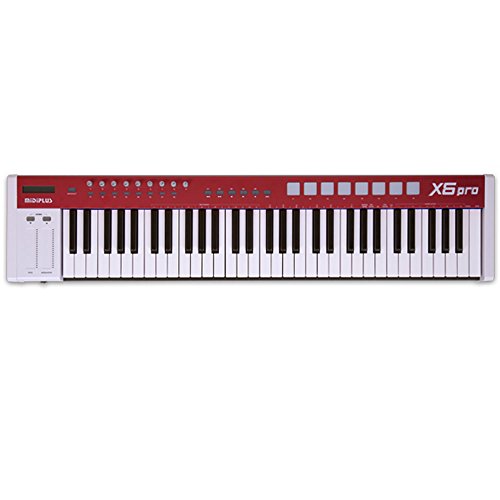
- •61 keys full size sensitive key support 61 notes to output simultaneously Wheels: Pitch and Modulation Control units: Data Entry wheel and MIDI/Select mode toggle button
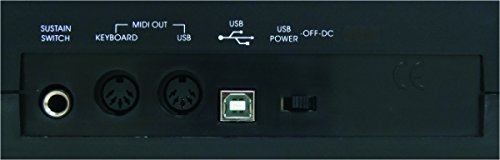
- •Interface: USB-B interface(to send MIDI message or to provide power) ,Sustain Pedal interface, two MIDI OUT interfaces USB-powered,
- •NOTE: Check User Manual on Technical Specification before use
midiplus i61 USB MIDI Keyboard controller
List Price: $144.05$129.65DEALYou Save: $14.40 (10%)
Free shippingFree Returns – 30 daysFree Order CancellationSecure Payment2–3 Days DeliveryGet It October 25, 2026In Stock (1)No marketing spamNo account requiredFulfilment by FedEx / Amazon / UPS / ShipwirePayPal / Card Buyer Protection
Customer Reviews
Reviews sourced from verified Amazon purchasers4.1
out of 5
Based on 10 reviews
5★
60%
4★
30%
3★
10%
2★
0%
1★
0%
The Midiplus i61 is great
Wayne M.•November 15, 2017
Excellent MIDI Keyboard, very good action, I was surprised, very good quality.
Three Stars
Peter D.•September 18, 2017
Reasonable value for the cost. Sharps are too stiff.
Hauptwerk Virtual Pipe Organ
Bill Woughter•July 19, 2017
I purchased this midi keyboard controller to use with a software product called Hauptwerk which results in a virtual pipe organ. My desire is to construct a fully functional 4 manual organ with pedalboard conforming to the AGO standards. However, I want the organ to be compact rather than bulky like most pipe organ consoles. This i61 from midiplus fits the bill very well. The external case can be removed so the keyboard and its electronics can be stacked with others to form a modern, attractive organ playing unit. The keyboard seems to be well made, and the keyboard has all the functionality needed for this application.
it works for me
rushmanphotos•July 18, 2017
the may not be the greatest controller keyboard out there but it does what I need it to do which is interface into a motif-xs rack via the five pin midi plug. so for the price it fits the bill. the manual which is available in pdf form isn't the greatest. I had to fool with it a few times to get the reset command to work. some reviews complained about the key velocity whereas the users had to really hit the keys to get any volume. I haven't experienced anything like that when connected to the motif-xs. so i'm not sure what that's about. the keys are slightly shorter than a standard keyboard. i'm not quite a piano virtuoso however, some people complained about it but doesn't impair me at all. so for the price, I think it was a good deal.
this seems like an good budget MIDI controller
defnotmyname•June 6, 2017
I just received this keyboard a few hours ago; if anything new develops, I'll update my review.
At the moment, this seems like an good budget MIDI controller. There are a few quirks to it, such as the typos on various parameters, and the lack of a manual, but the former is easily interpreted and the latter is available online. More egregiously, my ipad doesn't recognize this midi controller (at least in garageband). This may be an issue with my USB adapter, but I have used it successfully for midi controllers in the past. If something has a picture of an ipad screenprinted on it, you would expect it to connect better.
The keys feel nice so far, and they're responsive to my velocity. The drivers installed on my PC almost instantaneously, and after selecting it as a midi device in Reaper it worked without any hassle. The parameters I've adjusted (octave and midi channel) have worked so far, though the manual is a bit difficult to decipher as to what the others do. I imagine I'll figure that out with time and experimentation.
Overall, I'm happy with this purchase so far. I'm sure there are more professionally made keyboards out there, but they don't cost $85! For the price, you get a lot.
EDIT: I'm still using this controller, and it is still getting by. However, a few things I've encountered since the initial review:
1) some of the keys squeak A LOT. This started to happen after maybe a week of heavy use. It can be pretty dang annoying when recording yourself singing and playing at the same time.
2) occasionally, random numbers flash on the display. My best guess is that I'm hitting the keys hard enough to jiggle one of the two wheels or the slider. This hasn't affected performance at all, but it doesn't bode well.
3) I cannot get aftertouch to work at all. When I edit the "Aftertouch" parameter of the midi controller, it seems to just send constant aftertouch data at whatever value I set it to. This is incredibly useless, as I want to be able to add vibrato or pitch bends by pressing down the keys harder or softer after initially pressing them.
It's still working for me for now, but an upgraded controller is definitely on my wishlist.
At the moment, this seems like an good budget MIDI controller. There are a few quirks to it, such as the typos on various parameters, and the lack of a manual, but the former is easily interpreted and the latter is available online. More egregiously, my ipad doesn't recognize this midi controller (at least in garageband). This may be an issue with my USB adapter, but I have used it successfully for midi controllers in the past. If something has a picture of an ipad screenprinted on it, you would expect it to connect better.
The keys feel nice so far, and they're responsive to my velocity. The drivers installed on my PC almost instantaneously, and after selecting it as a midi device in Reaper it worked without any hassle. The parameters I've adjusted (octave and midi channel) have worked so far, though the manual is a bit difficult to decipher as to what the others do. I imagine I'll figure that out with time and experimentation.
Overall, I'm happy with this purchase so far. I'm sure there are more professionally made keyboards out there, but they don't cost $85! For the price, you get a lot.
EDIT: I'm still using this controller, and it is still getting by. However, a few things I've encountered since the initial review:
1) some of the keys squeak A LOT. This started to happen after maybe a week of heavy use. It can be pretty dang annoying when recording yourself singing and playing at the same time.
2) occasionally, random numbers flash on the display. My best guess is that I'm hitting the keys hard enough to jiggle one of the two wheels or the slider. This hasn't affected performance at all, but it doesn't bode well.
3) I cannot get aftertouch to work at all. When I edit the "Aftertouch" parameter of the midi controller, it seems to just send constant aftertouch data at whatever value I set it to. This is incredibly useless, as I want to be able to add vibrato or pitch bends by pressing down the keys harder or softer after initially pressing them.
It's still working for me for now, but an upgraded controller is definitely on my wishlist.
Page 1 of 2