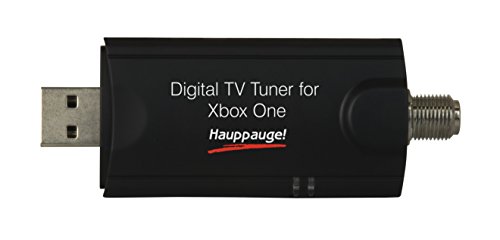
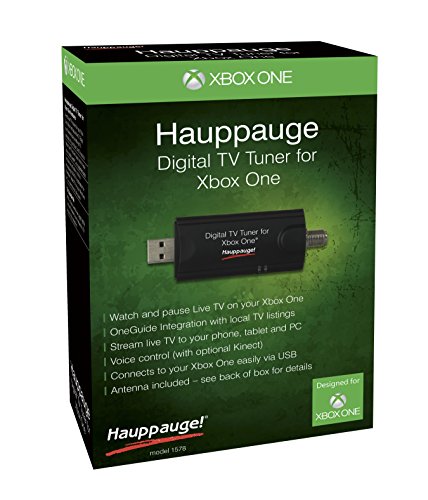
Hauppauge Digital TV Tuner for Xbox One TV Tuners and Video Capture 1578,Black
Key features
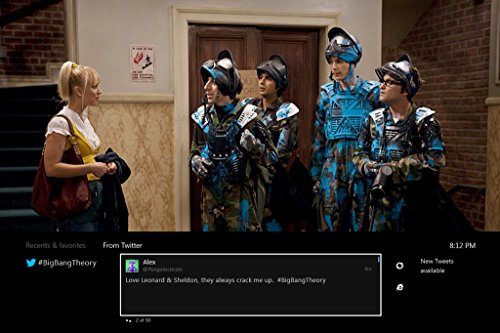
- •Watch free over-the-air broadcast TV on your Xbox One monitor
- •Pause live TV and stream live TV around your home with the Xbox SmartGlass application.
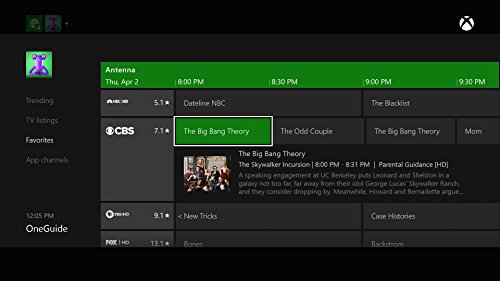
- •One Guide integration will display local TV listings
- •Connects easily to your Xbox One via USB and includes the USB TV Tuner
- •System requirement is windows PC-microsoft windows 10, 8.1, 8, 7 or vista or windows XP with service pack 2. WinTV v8 application available as a download
Hauppauge Digital TV Tuner for Xbox One TV Tuners and Video Capture 1578,Black
List Price: $96.60$86.94DEALYou Save: $9.66 (10%)
Free shippingFree Returns – 30 daysFree Order CancellationSecure Payment2–3 Days DeliveryGet It October 26, 2026In Stock (3)No marketing spamNo account requiredFulfilment by FedEx / Amazon / UPS / ShipwirePayPal / Card Buyer Protection
Customer Reviews
Reviews sourced from verified Amazon purchasers4.2
out of 5
Based on 10 reviews
5★
70%
4★
30%
3★
0%
2★
0%
1★
0%
This thing is awesome. I plugged it in and went into settings ...
William✓ Verified Purchase•January 4, 2018
This thing is awesome. I plugged it in and went into settings on Xbox one x for TV tuner. It scanned and shows up in one guide with TV listings and I can see ahead to see whats showing. I couldn't believe the amount of channels I get OTA....over 50 in my area in ATL. Xbox One X also gave me the option to pause, rewind, forward but it would take up 2gb of disk space which is no big deal and well worth it. HD quality as well. I finally get channel 2 in HD which its very hard to find a streaming service for channel 2(ABC) as well as NBC that is not just on demand but live. This was very easy to setup and well worth it.
Works for me with exceptions
chef doeuvre✓ Verified Purchase•December 20, 2017
Works great with my antenna when my antenna is getting reception. I check reception with a TV that has a signal meter. You can buy a TV signal strength meter on Amazon for around $12. I just use what's available. Couple of things I don't like is sometimes if my internet is out or I disabled it when I boot my XBOX ONE S the tuner won't work until I can sign in using the network. If I leave the XBOX on and the internet goes out it's OK. I figured out that if the XBOX boots without internet access the channel guide doesn't work even if you sign in. When I boot the XBOX I can view the last channel I was viewing but only if I reception. I can't change channels until the internet connection is restored and the guide is working. I guess this is because XBOX it doesn't store the channel list and has to go to the internet to load the latest. There isn't any kind of programming search function for OTA (over the air). I don't know about cable. It does not have a signal strength meter like most TV's.
Works great for me!
John C. Phillips✓ Verified Purchase•October 9, 2017
Ordered this a couple of days ago. Got it today. Used the antenna that comes with it and everything works great so far! I live in the city limits, so the "10 mile" range of the included antenna works good for me. It works better than the 50-mile range Leaf Mohu antenna which continuously drops channels that aren't even 5 miles away. I have this running through my XBOX One. Clear picture, 28 channels found in New Orleans.
flat panel digital antenna with good review rating- be sure you purchase an amplified one ...
Spacejockey✓ Verified Purchase•June 23, 2017
Living in the outskirt of Seattle WA, I decided to get this for my PC in my studio instead of buying another TV+antenna. I purchased a small, flat panel digital antenna with good review rating- be sure you purchase an amplified one to pull in weak signals!
Most of the time, I have been extremely happy with this product but still, it has its share of bugs. From time to time, using the included WinTV software, it would crash and pictures would lock up, requiring to close down the window and a re-launch. From time to time, it would crash too when changing channels using the left and right arrow buttons on the bottom of the WinTV window... maybe it's just that particular software and not an actual hardware issue.
Still, operational wise, I am still very happy with this product! And yes, this is exactly the same as the one labeled for PC only. Buy the one that is cheaper on Amazon!!!
Enjoy, folks.
Most of the time, I have been extremely happy with this product but still, it has its share of bugs. From time to time, using the included WinTV software, it would crash and pictures would lock up, requiring to close down the window and a re-launch. From time to time, it would crash too when changing channels using the left and right arrow buttons on the bottom of the WinTV window... maybe it's just that particular software and not an actual hardware issue.
Still, operational wise, I am still very happy with this product! And yes, this is exactly the same as the one labeled for PC only. Buy the one that is cheaper on Amazon!!!
Enjoy, folks.
This lets my bunny ear antennae: Rewind live TV, get a convenient TV channel guide.
Chawpped✓ Verified Purchase•September 16, 2016
Highly recommended. I can watch my antennae TV on my Xbox now. The TV listing feature is amazing, I posted a picture of it.
Biggest Pro: While you're watching antennae TV you can rewind up to 30 minutes of live TV! This is SO NICE to have again. This might sound basic, but when you are used to watching TV with your bunny ear antennae, you don't normally get to rewind. A big help in cutting the cable.
Biggest Pro: While you're watching antennae TV you can pull up a TV listing that shows you what's on. This might sound basic, but when you are used to watching TV with your bunny ear antennae, you don't normally get a TV Guide.
Only Con: You have to change the channel with your Xbox controller. The Xbox controller turns itself off after a while. Which is a little annoying. (I hear there is a 'remote' you can purchase that will change the channel for you, but it requires direct line of sight to the Xbox, which doesn't work for me since mine is tucked away out of sight.)
Pro: When you are setting this up, you can choose to have the Xbox go straight to the TV function as soon as it boots. This makes it WAY easier for Grandma to use.
Pro: USB: There are two usb ports on the back of your Xbox One, you don't have to plug into the USB port on the front of the Xbox.
Pro: USB: You could plug this directly into the Xbox USB port, but it actually comes with a little extension cable which makes pluggin in a little easier.
Biggest Pro: While you're watching antennae TV you can rewind up to 30 minutes of live TV! This is SO NICE to have again. This might sound basic, but when you are used to watching TV with your bunny ear antennae, you don't normally get to rewind. A big help in cutting the cable.
Biggest Pro: While you're watching antennae TV you can pull up a TV listing that shows you what's on. This might sound basic, but when you are used to watching TV with your bunny ear antennae, you don't normally get a TV Guide.
Only Con: You have to change the channel with your Xbox controller. The Xbox controller turns itself off after a while. Which is a little annoying. (I hear there is a 'remote' you can purchase that will change the channel for you, but it requires direct line of sight to the Xbox, which doesn't work for me since mine is tucked away out of sight.)
Pro: When you are setting this up, you can choose to have the Xbox go straight to the TV function as soon as it boots. This makes it WAY easier for Grandma to use.
Pro: USB: There are two usb ports on the back of your Xbox One, you don't have to plug into the USB port on the front of the Xbox.
Pro: USB: You could plug this directly into the Xbox USB port, but it actually comes with a little extension cable which makes pluggin in a little easier.
Page 1 of 2