Opolar LC05 Laptop Cooler with Vacuum Fan (Rapid Cooling, Auto-Temp Detection, 13 Wind Speed, Unique Clamp Design, Compatible with Cooling Pads)
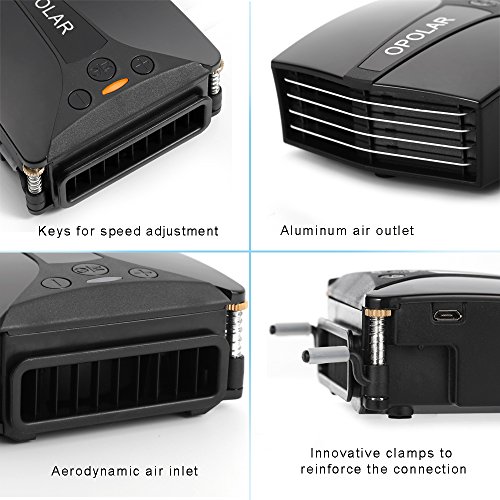
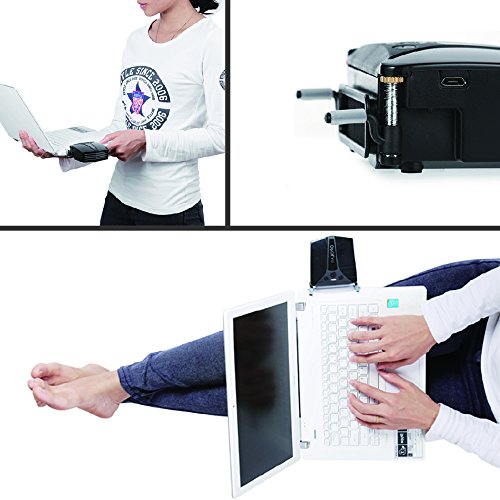

Key features
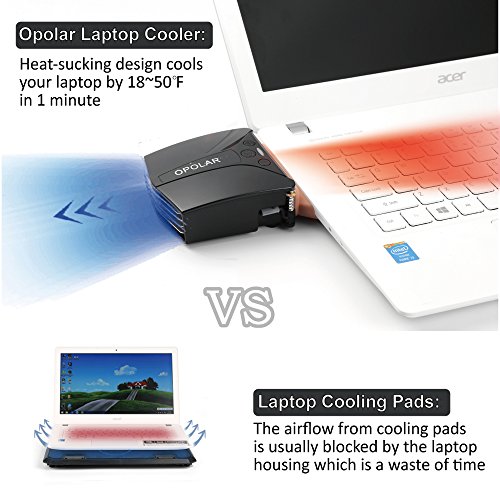
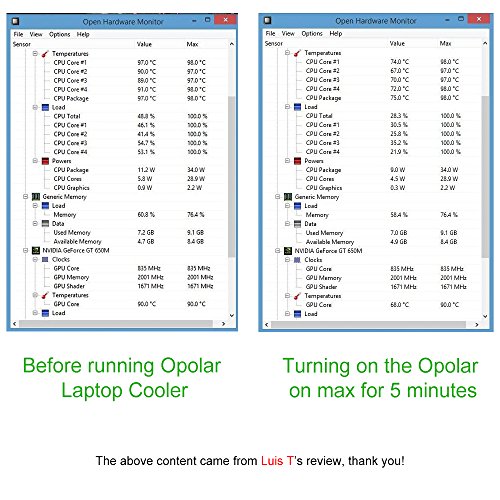
- •The best cooler to ease heat dissipation in laptops, rapidly reduce both surface and internal temperature in just a few minutes which is far better than cooling pads.
- •Designed for laptops with ventilation on both sides and rear, ideal for gaming laptops or systems that tax the CPU,high quality Japanese motor ensure 5000 working hours
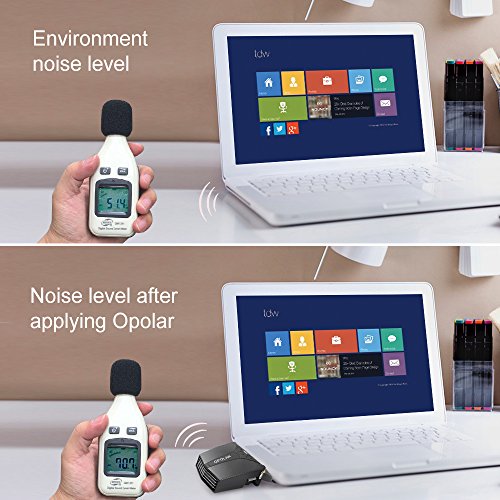
- •Automatic and manual adjustment modes with 13 speeds to manage the airflow and noise; quiet operation in auto mode
- •Patented clamping arms keep cooler firmly attached to laptop when moving, USB powered operation, easy 4 step installation
- •Life time Maintennance for product defects and 30 day no hassle return and refund for incompatibility; friendly customer care provided by Opolar
BrandOPOLAR
CategoryCooling Pads & External Fans
Opolar LC05 Laptop Cooler with Vacuum Fan (Rapid Cooling, Auto-Temp Detection, 13 Wind Speed, Unique Clamp Design, Compatible with Cooling Pads)
List Price: $45.38$40.84DEALYou Save: $4.54 (10%)
Free shippingFree Returns – 30 daysFree Order CancellationSecure Payment2–3 Days DeliveryGet It October 25, 2026In Stock (2)No marketing spamNo account requiredFulfilment by FedEx / Amazon / UPS / ShipwirePayPal / Card Buyer Protection
Customer Reviews
Reviews sourced from verified Amazon purchasers4.5
out of 5
Based on 10 reviews
5★
80%
4★
20%
3★
0%
2★
0%
1★
0%
A big improvement over my cooling pad.
Darkemans✓ Verified Purchase•August 13, 2017
*Brief Update*
I recently acquired a new laptop, an HP Omen, and this cooler will not work with it because the fan vent is right below the HDMI and the only available USB on that side of the laptop. Also, the other fan vent on the back will not work because the laptop's feet get in the way and there is no way to hook the cooler's arms onto the laptop, as the display is in the way. Still, this thing works great with my old laptop. I just wish it worked with my new one.
*End Update*
I have an Acer Aspire 7739G, a bit of an older laptop, and a large one at that, with a 17" screen. Lately, CPUID's Hardware Monitor has been recording internal temperatures anywhere from 70-80 degrees Celsius under fairly heavy load without any additional cooling, and those higher temps had me worried my laptop would die soon.
I've used a Thermaltake cooling pad occasionally, but it's big and clunky. My laptop slides all over it, and it's just barely big enough, despite claims that it was designed for 17" laptops. It's not an ideal solution, though it has helped keep the temps at least in the lower 70s Celsius, which is still warmer than I'd like.
Today, Opolar's Laptop Fan Cooler arrived, which I bought with the hope that it would prove better, and it has--substantially. Under the kind of load that would push my laptop near the 80 degree Celsius mark without any cooling, this Laptop Fan Cooler kept the temps in the low 60s, which is a big improvement.
I find the permanent mount more convenient. You get the precise position every time that way, and when the fan is not attached, the little piece of plastic stuck to the bottom is barely noticeable.
For anyone thinking about getting this because their laptop is overheating, I can assure you that it definitely does work, and pretty well too. The only real downsides are probably pretty obvious: you have a big old fan stuck to the side of your laptop, and it can be loud when dialed up to the max RPMs. Still, you can turn it down when you don't need that much cooling, and the permanent mount seems pretty durable. Another downside is arguably that the arms of the fan impede the laptop from closing completely, though you can just move the arms to the side when the laptop is closed or just remove the fan.
I was not in any way compensated for writing this review. I am just a regular old consumer who wanted to share that this thing works.
Props to Opolar for a clever little product. I appreciate it, as does my laptop, which I hope will now live a little while longer than before. Thanks.
I recently acquired a new laptop, an HP Omen, and this cooler will not work with it because the fan vent is right below the HDMI and the only available USB on that side of the laptop. Also, the other fan vent on the back will not work because the laptop's feet get in the way and there is no way to hook the cooler's arms onto the laptop, as the display is in the way. Still, this thing works great with my old laptop. I just wish it worked with my new one.
*End Update*
I have an Acer Aspire 7739G, a bit of an older laptop, and a large one at that, with a 17" screen. Lately, CPUID's Hardware Monitor has been recording internal temperatures anywhere from 70-80 degrees Celsius under fairly heavy load without any additional cooling, and those higher temps had me worried my laptop would die soon.
I've used a Thermaltake cooling pad occasionally, but it's big and clunky. My laptop slides all over it, and it's just barely big enough, despite claims that it was designed for 17" laptops. It's not an ideal solution, though it has helped keep the temps at least in the lower 70s Celsius, which is still warmer than I'd like.
Today, Opolar's Laptop Fan Cooler arrived, which I bought with the hope that it would prove better, and it has--substantially. Under the kind of load that would push my laptop near the 80 degree Celsius mark without any cooling, this Laptop Fan Cooler kept the temps in the low 60s, which is a big improvement.
I find the permanent mount more convenient. You get the precise position every time that way, and when the fan is not attached, the little piece of plastic stuck to the bottom is barely noticeable.
For anyone thinking about getting this because their laptop is overheating, I can assure you that it definitely does work, and pretty well too. The only real downsides are probably pretty obvious: you have a big old fan stuck to the side of your laptop, and it can be loud when dialed up to the max RPMs. Still, you can turn it down when you don't need that much cooling, and the permanent mount seems pretty durable. Another downside is arguably that the arms of the fan impede the laptop from closing completely, though you can just move the arms to the side when the laptop is closed or just remove the fan.
I was not in any way compensated for writing this review. I am just a regular old consumer who wanted to share that this thing works.
Props to Opolar for a clever little product. I appreciate it, as does my laptop, which I hope will now live a little while longer than before. Thanks.
Works like a dream
Farrah Zahran✓ Verified Purchase•July 14, 2017
Works like a dream. Playing Overwatch on maximum supported specs (High mode, 60fps) on my laptop used to burn it out after two or three rounds, becoming laggy, unresponsive, sometimes crashing, and always being too hot to comfortably touch. Because my computer does not have bottom vents, fan boards were functionally useless, so for a long time I assumed this was just how gaming would be on the laptop, and stuck to my desktop machine whenever possible.
This fan vent manages to keep my computer at is average operating temperature, even during moderate gameplay. During strenuous and extended gameplay, the temperature does climb, but never reaches the danger zone anymore.
If you have a laptop with a side vent instead of bottom vents, this little piece of technology is fantastic.
This fan vent manages to keep my computer at is average operating temperature, even during moderate gameplay. During strenuous and extended gameplay, the temperature does climb, but never reaches the danger zone anymore.
If you have a laptop with a side vent instead of bottom vents, this little piece of technology is fantastic.
Intial review after a couple weeks only - good so far, will see how it does in the long run.
Amazon Customer✓ Verified Purchase•July 11, 2017
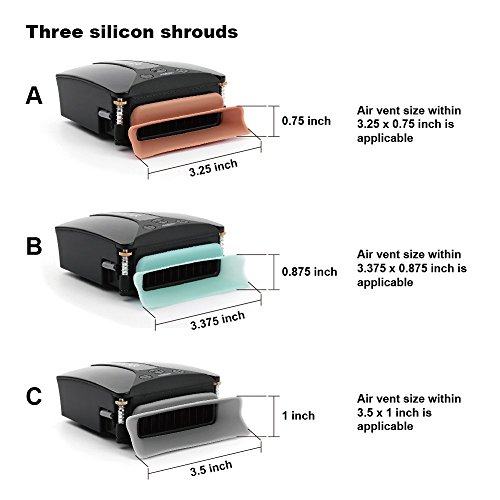
Initial thoughts - works pretty good so far, but only had it a little while. Noticeable difference in laptop heat (close to screen) using this fan compared to using the cooler master X3. Laptop has a speaker inline with the fan vent rifht where the suction cups would go, so the suction cups do not really work as optimal and the spring arms do not work for an older tpshiba portege laptop (but seems like a well thought out fan to have those features). Seller was prompt to check this would fit and looked up dimensions for laptop, ppint out about what suction cup to use, about the spring arms, etc. and was pretty up front about this versus the older LC05 - went with this one for the temperature indicator. With this, i do not have to use the cooler master X3 (though i leave it on just in case). Will see if it affects the laptop internal fan over time, so using auto so the fan setting is not too high. I did test two different silicone pieces to double check which had a lower temperature.
Keep it cool with this gadget.
Gerret M. Peters✓ Verified Purchase•April 29, 2017
This little cooling fan made an immediate and positive impact on the performance of my Lenovo Y510 laptop. Before the OPOLAR cooling fan, the exit port reached temperatures of approximately 135 degrees (Fahrenheit), and the entire left side of the laptop was almost too hot to touch. After using the temporary attachments for the cooling fan, for most tasks the exit port reads in the low 90 degree range, and the laptop chassis is lukewarm at best. Most importantly, the machine itself seems to be performing more crisply (anecdotal, but it seems that way.) I routinely blow out the vent ports on the laptop, so there is little to no dust inside - it just runs hot. The OPOLAR made a big difference!
The only reason it gets 4 stars instead of 5 is that due to the shape of the Lenovo chassis, the fan wants to sag away from the exit port and it loses its seal. I slipped a folded business card under the fan and it's working famously. It's possible the permanent fan installation would resolve it, as the connecting plate is metal rather than plastic. However, the permanent install requires an adhesive pad on the underside of the laptop, and I've been reluctant to attach it. My laptop spends most of its time sitting next to the desk harnessed to an external monitor and keyboard, so this hasn't been an issue.
The only reason it gets 4 stars instead of 5 is that due to the shape of the Lenovo chassis, the fan wants to sag away from the exit port and it loses its seal. I slipped a folded business card under the fan and it's working famously. It's possible the permanent fan installation would resolve it, as the connecting plate is metal rather than plastic. However, the permanent install requires an adhesive pad on the underside of the laptop, and I've been reluctant to attach it. My laptop spends most of its time sitting next to the desk harnessed to an external monitor and keyboard, so this hasn't been an issue.
This Fan is the best!
Amazon Customer✓ Verified Purchase•April 9, 2017
This cooling fan is fan-tastic (no pun intended). One thing that really sets it apart is the supports that clip on to the top edge and help to hold it in place. I went through two others that had cheap suction cups for the bottom that just didn't work. This has a track that you can attach to the bottom of the computer that it fits into and with the clips is quite secure. The automatic sensing keeps the computer at a good temp increasing or decreasing the fan speed as necessary. I would highly recommend this over any other fan. The extra cost is worth it.
Page 1 of 2