Wacom Intuos Art Medium Pen and Touch (Old Version)

Key features
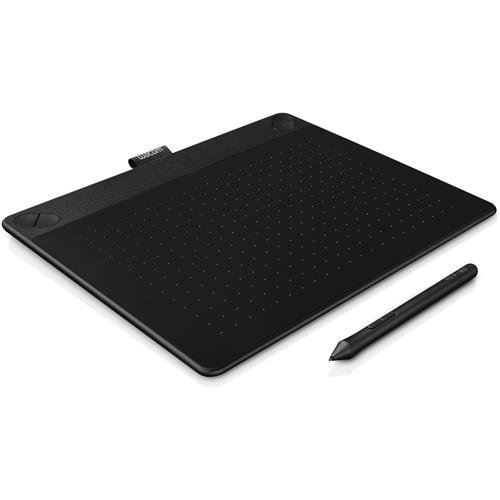
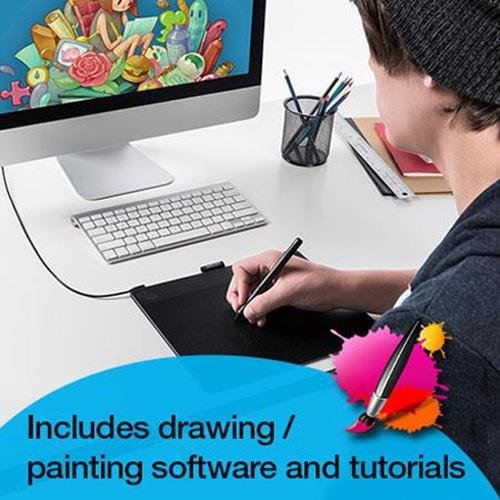
- •Paint, design, and create directly on your computer
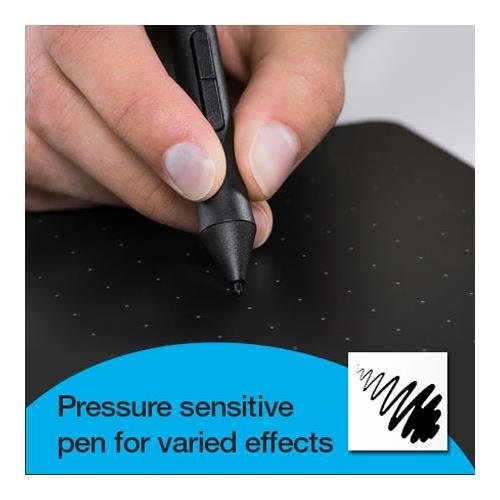
- •Battery-free, pressure sensitive pen helps you to draw thicker and thinner lines depending on how hard you push on the pen
- •Comes with a free Art Pack including: Corel Painter Essentials drawing and painting software, online tutorials and a free 8x10 metal photo print
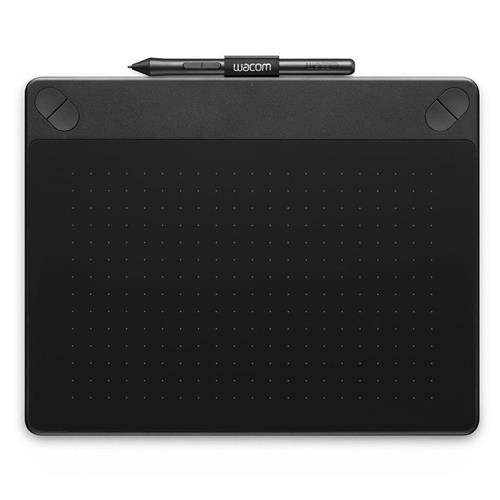
- •Four customizable ExpressKeys that put your favorite shortcuts like undo or copy/paste at your fingertips
- •Active Area, Medium: 216 x 135 mm (8.5 x 5.3 in), is perfect for limited desktop areas and can be setup for both left and right handed use
BrandWacom
CategoryInput Devices
SizeMedium
ColorBlack
WarrantyWarranty for intuos pen tabletswacom warrants the product, to the original consumer purchaser, except for the software and consumable items such as the pen nibs, to be free from defects in materials and workmanship under normal use and service for a perio
Wacom Intuos Art Medium Pen and Touch (Old Version)
List Price: $240.08$216.07DEALYou Save: $24.01 (10%)
Free shippingFree Returns – 30 daysFree Order CancellationSecure Payment2–3 Days DeliveryGet It October 25, 2026In Stock (9)No marketing spamNo account requiredFulfilment by FedEx / Amazon / UPS / ShipwirePayPal / Card Buyer Protection
Customer Reviews
Reviews sourced from verified Amazon purchasers3.9
out of 5
Based on 10 reviews
5★
20%
4★
50%
3★
10%
2★
10%
1★
10%
Very Frustrating Product
Suad Bejtovic•February 28, 2018
I've had Intuos tablets before (Graphire 4) and just wanted something bigger for photo retouching. This Art Pen and Touch tablet is wildly inconsistent in how it works, how sensitive it is, and how poorly supported it is. It takes some getting used to because it doesn't use a mouse, and by the time I realized how frustrating it is, it was too late to return it. It works well enough in Photoshop, and for the most part in Lightroom (LR has a hard time realizing you're dragging a slider until the adjustment is severe), but for everyday use it's annoying to say the least. Resting your palm on it will sometimes confuse it, so you have to wear the silly two-finger glove. Sometimes it's stuck either in pen mode or the touch mode, sometimes it just activates some invisible "CTRL LOCK" function for no apparent reason... It took a while to set up all the drivers, too - the process was not at all intuitive. I don't even remember that period (a few months ago), because I blocked it from my memory. Then, you have to purchase the wireless bundle separately (it's a $200 computer accessory, shouldn't that be included?). I can't remember the last time I was this frustrated with an electronic product.
Paid for Quality; Works Great!
Ocean•January 12, 2018
It's great. This is my first draw tablet and it took some getting used to. Right away I realized that I was using a great deal of arm movement to get across the screen; this is because I'm using a 13" MacBook, and I'm used to the tiny 4" touchpad. Once I got the hang of the big draw area, it was easy to play around with the tablet. I could have gotten a smaller tablet for my small screen, but it works alright and gives me great control on the Retina screen. Easy to install the software. Easy to use. If your new to draw tablets, expect some lag between making large gestures and the drawing software rendering the image, especially if you use dynamic brushes. Aside from this, you won't be disappointed.
It's not bad, but it's not great
Jessie Beck•September 5, 2017
First thing I noticed about this tablet is how small it was. I had the older (now no longer made) Intuos5 Medium. I loved that tablet, except for how the cord fit. They improved that on this version. The cord doesn't seem like it's going to break as easily as my old Intuos cord. However, this medium tablet is much smaller compared to that. I'd imagine partly due to button placement. The size is good and I'm glad I didn't go with the small.
Another thing I noticed was how cheap the pen looked and felt. I just don't like it. It makes a really annoying scratching sound when it touches the tablet's surface. It's very distracting and I'm constantly worried that I'm going to make scratches in my brand new tablet just from the pen!
I got it because it was cheap and I liked the Intuos I previously had. However, I still prefer the old edition over this one. It's fine for a cheap option or you're just getting into digital art, but it'll probably be annoying for those have tablet experience.
Another thing I noticed was how cheap the pen looked and felt. I just don't like it. It makes a really annoying scratching sound when it touches the tablet's surface. It's very distracting and I'm constantly worried that I'm going to make scratches in my brand new tablet just from the pen!
I got it because it was cheap and I liked the Intuos I previously had. However, I still prefer the old edition over this one. It's fine for a cheap option or you're just getting into digital art, but it'll probably be annoying for those have tablet experience.
Performance better than older devices - structural integrity not so much.
Vernon Williams•August 26, 2017
Let me start by saying that Wacom makes pretty awesome products and they are the default brand for me if I am looking for a graphics tablet. I have had a Graphire, and a Bamboo in the past and the reason that I got a more recent one was because I'd lost the USB cable for the Bamboo and using a standard one was a little iffy because of how the port was situated. It's also an old model so the latest software did not really support it.
Enter the Pen and Touch. Much lighter and more sensitive than the Bamboo. It also has the option for touch control, but I turned that off because it did not suit my needs.
The case is made of a lighter plastic and the first thing that I had trouble with was the back panel. I couldn't put it on reliably. One side was always a little loose. eventually this got worse and in attempting to right things I dropped the device and the part of the case that surrounds cracked on the side that the USB cable enters it. This was a problem because not only did it make the back panel issue worse, it also seemed to have affected the performance of the machine. The pen would sometimes stop working I could move the pointer, but no amount of pressure would make the pen draw. I contacted the service folk to see if it could be repaired (and I assumed that I would have to pay for it since I *did* drop it) but after a bit of back and forth I was told that they couldn't do anything.
So I have bought another rather than be unable to draw. I'm never taking the back panel off (I'll get replacement nibs online) unless I get the wireless option which requires plugging a module into the tablet.
The replacement works fine... and it works with the pen from the old tablet, so I can put the other one away for future use. But I can only give the product three stars because it is a much flimsier design than the old devices and it looks like they are unrepairable which makes it a "throw away device" in my eyes. A company should arrange for its devices to be serviceable even if it is at the clients expense.
Enter the Pen and Touch. Much lighter and more sensitive than the Bamboo. It also has the option for touch control, but I turned that off because it did not suit my needs.
The case is made of a lighter plastic and the first thing that I had trouble with was the back panel. I couldn't put it on reliably. One side was always a little loose. eventually this got worse and in attempting to right things I dropped the device and the part of the case that surrounds cracked on the side that the USB cable enters it. This was a problem because not only did it make the back panel issue worse, it also seemed to have affected the performance of the machine. The pen would sometimes stop working I could move the pointer, but no amount of pressure would make the pen draw. I contacted the service folk to see if it could be repaired (and I assumed that I would have to pay for it since I *did* drop it) but after a bit of back and forth I was told that they couldn't do anything.
So I have bought another rather than be unable to draw. I'm never taking the back panel off (I'll get replacement nibs online) unless I get the wireless option which requires plugging a module into the tablet.
The replacement works fine... and it works with the pen from the old tablet, so I can put the other one away for future use. But I can only give the product three stars because it is a much flimsier design than the old devices and it looks like they are unrepairable which makes it a "throw away device" in my eyes. A company should arrange for its devices to be serviceable even if it is at the clients expense.
This pen is made for an 8 year old's hands. And the drivers need to be updated.
Randal Ford•July 13, 2017
I am coming from a Bamboo Create that was about 5 years old. Before that I had an Intuos Pro (almost 10 years ago)
First of all, the newest Wacom Drivers are problematic. By removing the new ones and reinstalling the old helped solve that problem.
Second, the size of this pen is tiny. If you have hands that are remotely large, this sucks. I mean it really sucks.
The positives? The tactile feel of this pad compared to the Bamboo is much nicer.
Wacom, update your drivers so they work with photoshop! This is a well documented problem.
UPDATE: I'm returning this tablet and purchasing the Pro version. It's really unfortunate because the pen is the only reason I'm going to pay almost double for the pro version. Really, this pen is garbage. It's tiny. It's slick. I can grip a 5 dollar pen from Office Depot better. The previous versions of the Wacom Bamboo offer a much better pen and grip. Super disappointed.
First of all, the newest Wacom Drivers are problematic. By removing the new ones and reinstalling the old helped solve that problem.
Second, the size of this pen is tiny. If you have hands that are remotely large, this sucks. I mean it really sucks.
The positives? The tactile feel of this pad compared to the Bamboo is much nicer.
Wacom, update your drivers so they work with photoshop! This is a well documented problem.
UPDATE: I'm returning this tablet and purchasing the Pro version. It's really unfortunate because the pen is the only reason I'm going to pay almost double for the pro version. Really, this pen is garbage. It's tiny. It's slick. I can grip a 5 dollar pen from Office Depot better. The previous versions of the Wacom Bamboo offer a much better pen and grip. Super disappointed.
Page 1 of 2


![TourBox Lite, [2024 New] Comic Concept Art Animation, Colorgrade, Video Editing, ClipStudioPaint, Photoshop, Blender, DaVinciResolve, FCPX, Premiere, Lightroom, Drawing Tablet, Custom Keyboard](https://m.media-amazon.com/images/I/31pm1gXpmCL._SL500_.jpg)