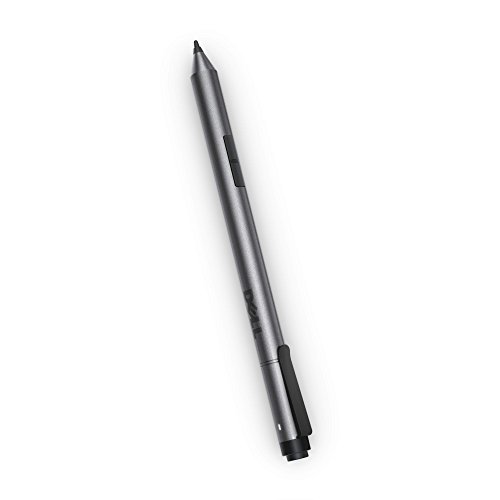
Dell Active Pen PN556W (N1DNK)
Key features
- •Whether you're taking notes, creating artwork or checking your email, this pen provides a natural writing feel and quick, effortless interaction with your screen.
- •The Active Pen is designed to work flawlessly with Windows 10 programs and will make daily tasks easier on your Dell 2-in-1 tablet.
- •Designed with technology from Wacom, a global leader in digital interface technologies, the Dell Active Pen offers high precision and accuracy, sensing 2048 levels of pressure sensitivity
- •This product is compatible with the following systems:XPS 12 (9250)Venue 10 Pro (5056)Venue 8 Pro (5855)Latitude 7275Latitude 11 (5175)Latitude 11 (5179)Inspiron (7568) (FHD Only) 'wake up feature not available'XPS 9365Latitude 3189
Dell Active Pen PN556W (N1DNK)
List Price: $38.55$34.70DEALYou Save: $3.85 (10%)
Free shippingFree Returns – 30 daysFree Order CancellationSecure Payment2–3 Days DeliveryGet It October 25, 2026In Stock (8)No marketing spamNo account requiredFulfilment by FedEx / Amazon / UPS / ShipwirePayPal / Card Buyer Protection
Customer Reviews
Reviews sourced from verified Amazon purchasers3.6
out of 5
Based on 10 reviews
5★
20%
4★
20%
3★
30%
2★
20%
1★
10%
Active Pen works with some issues related to the top button opening Inkspace with a Lag.
Neil K✓ Verified Purchase•October 12, 2016
The pen worked okay overall. It was able to detect the levels of pressure so when I was drawing it was pretty accurate. Although using this with a compatible Dell machine, I could never get the top button to work properly. I had to hold it down longer than expected to get Windows Inkspace or One note to open. I tried driver updates and customizing the settings but the top button had too many issues that just wouldn't work properly. If you don't care about the top button, the pen features it self works properly. Just make sure you don't turn off Bluetooth as this uses Bluetooth for the connection.
I loved the pen
HD Dem✓ Verified Purchase•September 22, 2016
I loved the pen, it was great. I used it with my HP Spectre X360 that I recently purchased. The pen worked great on the screen and produced fine crisp lines. My only gripe with the product is that every half hour or so, I need to remove the battery the pen and place it in again, as the pen quits emitting a signal and writing. I need to do this every so often because my laptop will stop detecting the pen input, and by resting the pen by removing the battery this usually fixes the issue. Still using it, but still upsetting
Super nice addition to your Dell tablet ... when it works
Sam✓ Verified Purchase•September 10, 2016
Seems to go through batteries VERY fast and be very finicky as to when it will work. I believe some of the blame lies with the Dell Venue Pro 11 7130 tablet that I'm using it with but I do believe the pen it's self is also partly to blame and is evidenced by the fact that all it's predecessors have had very similar issues. But when it works it's a must-have addition to your tablet.
Works Well
Sarah S.✓ Verified Purchase•August 17, 2016
I actually used this for my HP Spectre, and it generally works quite well. It also works right out of the package--there's nothing to install, and the battery is included, so you can start using it right away. I do find that it runs out of battery fairly quickly, and the palm rejection isn't perfect, but considering how nicely it works otherwise I think those things are forgivable.
I mostly use mine for note-taking and working through physics and math problems with my computer in tablet mode, so it's very helpful to have something that allows me to write quite finely. Combined with my matte screen protector, which does have a bit of tooth to it, it actually feels almost exactly like writing on paper! I should note that it'd be quite tough to use this to make legitimate art or anything, as it's not really meant for that, but it's just about perfect for what I'm using it for!
I mostly use mine for note-taking and working through physics and math problems with my computer in tablet mode, so it's very helpful to have something that allows me to write quite finely. Combined with my matte screen protector, which does have a bit of tooth to it, it actually feels almost exactly like writing on paper! I should note that it'd be quite tough to use this to make legitimate art or anything, as it's not really meant for that, but it's just about perfect for what I'm using it for!
I'm not sure if it is the stylus or the ...
Krashed✓ Verified Purchase•July 14, 2016
Update: A new firmware update finally resolved the diagonal lines. Not as good as a Wacom tablet, but it's good for the price.
Old review: I'm not sure if it is the stylus or the laptop(HP Envy x360), but it can't do a straight line when drawing diagonally. Tried calibrating the pen input but had the same results.
Old review: I'm not sure if it is the stylus or the laptop(HP Envy x360), but it can't do a straight line when drawing diagonally. Tried calibrating the pen input but had the same results.
Page 1 of 2


![TourBox Lite, [2024 New] Comic Concept Art Animation, Colorgrade, Video Editing, ClipStudioPaint, Photoshop, Blender, DaVinciResolve, FCPX, Premiere, Lightroom, Drawing Tablet, Custom Keyboard](https://m.media-amazon.com/images/I/31pm1gXpmCL._SL500_.jpg)