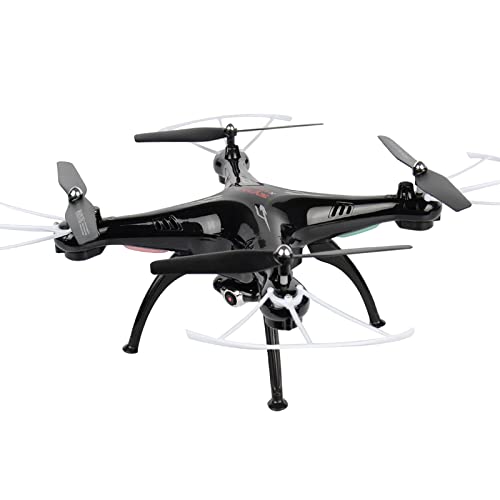
Cheerwing Syma X5SW-V3 FPV Drone with 720P Camera for Adults and Kids, One Key Start, Altitude Hold, Custom Flight


Key features
- •Headless/IOC function. Usually, the forward direction of a Flying multi-rotor is the same as the nose direction. By using headless/IOC, the forward direction has nothing to do with nose direction. This lessens the steepness of the learning curve and allows the pilot to enjoy flight while slowly learning each specific orientation of the quadcopter.
- •Equipped with the latest 6-Axis flight control systems, 3D lock, more scheduled flight, operating more to the force!
- •Equipped with HD camera to take photos and videos while flying! Bring a new perspective to your photos and videos from the air.
- •Wi-fi FPV allows you to view photos & Video while flying it supports any IOS and Android phones. The cell phone holder keeps your phone secure all the time.
- •One key 360° roll, continuous roll for perfect action and wonderful performance.
Cheerwing Syma X5SW-V3 FPV Drone with 720P Camera for Adults and Kids, One Key Start, Altitude Hold, Custom Flight
List Price: $80.49$72.44DEALYou Save: $8.05 (10%)
Free shippingFree Returns – 30 daysFree Order CancellationSecure Payment2–3 Days DeliveryGet It October 26, 2026In Stock (1)No marketing spamNo account requiredFulfilment by FedEx / Amazon / UPS / ShipwirePayPal / Card Buyer Protection
Customer Reviews
Reviews sourced from verified Amazon purchasers3.9
out of 5
Based on 10 reviews
5★
40%
4★
60%
3★
0%
2★
0%
1★
0%
Drone is Good but Not Features
Frank W✓ Verified Purchase•July 8, 2023
This drone is a lot more stable than all the rest of the beginner drones I owned. I use beginner drones for practice only especially when I haven't had the time to fly my 450-size drone. Now, the drone is not all that stable to the point where you can use the features freely without crashing. The only way to use the trimming feature you have to use the app via smartphone. Without the app, you have to keep guiding it. That doesn't bother me at all though, because as I said earlier, I use these drones for practice.
But what does bother me is the placement of the mark lights. When using the head mode, the red lights identify as the front of the drone. Meaning when you go forward, it will go in the direction of the Red Lights. Normally it's the green lights that indicate the front of the drone and the forward direction.
Although you have more flight time without the propeller guards and the camera, they are important because they can save you money from buying replacement parts. I had an issue with the camera not recording video. It just took a still shot when I pressed the record button. That's all I can think of right now.
UPDATE: (02/19/2023) Yeah the camera pretty much doesn't work. I would advise a beginner drone pilot to start out flying fast. This drone offers a calibration feature to stabilize the flight but it's not 100% stable. This drone is best for beginner flight, hovering. Take your time because this drone with improve your drone skills as a pilot.
But what does bother me is the placement of the mark lights. When using the head mode, the red lights identify as the front of the drone. Meaning when you go forward, it will go in the direction of the Red Lights. Normally it's the green lights that indicate the front of the drone and the forward direction.
Although you have more flight time without the propeller guards and the camera, they are important because they can save you money from buying replacement parts. I had an issue with the camera not recording video. It just took a still shot when I pressed the record button. That's all I can think of right now.
UPDATE: (02/19/2023) Yeah the camera pretty much doesn't work. I would advise a beginner drone pilot to start out flying fast. This drone offers a calibration feature to stabilize the flight but it's not 100% stable. This drone is best for beginner flight, hovering. Take your time because this drone with improve your drone skills as a pilot.
Fun Quadcopter if you don't mind some technical issues.
Robyn✓ Verified Purchase•June 3, 2023
The media could not be loaded. Fun, fun, fun! Firstly, don't expect this to be a Phantom, or a Q500, and certainly not a Mavic! It's a toy. If you are looking for a trainer, this is a great starting point before you jump in the water. This is what I did. I also own a Yuneec Q500 4K which I absolutely love for aerial photography, and general fun flying, but I always come back to this thing to sling it around in the yard expending 5 batteries at a time!
The video quality is pretty bad at best. Watchable just to view your flight, but not for anything you would want to present in any way. Maybe get a good high shot of your home or whatever, but again, not good quality. And depending on how high you decide to fly, you'll lose that video signal, and control of the copter (read below for more on this). If you don't care about the photos/video, remove the camera and the landing gear. It's a blast like this! A bit more agile, and the battery lasts a bit longer.
The camera's wifi signal runs on the same frequency as the transmitter. Therefore getting canceled out at times. If I would fly more than 20 feet away (probably even less), the camera signal would disappear. And this is a problem since to record video, this is done on your device, and not the copter itself. So if video signal is lost, so is your recorded video. So you'll get stuttered video as a result. Also, the copter will just die in the air when this happens. Constantly going in and out. So just forget the camera if it's not important to you.
The prop guards are just stupid. The props hit them when it's flying. You will constantly have to bend them back out of the way which is just ridiculous. I don't fly with them.
I've driven this thing into the ground and walls and everything in my house, and it's in fine shape. Still running on the original props! One motor has died, but replacements are so cheap and easy to replace, it's not a problem at all. You can buy 8 extra motors to keep on hand for less than $10. I've replaced the motor, and she's screaming through my yard again!
Headless mode is really tricky, so I suggest learning to fly in the real mode in which the left of the craft, is the left on your controller, front is front, etc. This is something every quadcopter pilot should practice anyway. But in headless mode on this one, every time the copter crashes, it's supposed to be simple to reset the headless mode so it knows where you stand from it. But it has never worked for me. So if you have better luck than I, great! Otherwise, just use normal mode.
As for the rest of the options, I don't use them. I just fly it barebones (no camera, no guards and no landing gear) and I love every minute of it. The only reason for the 4 stars is the above mentioned issues. But I wouldn't hesitate to buy a replacement should it ever become completely disabled or lost!
The video quality is pretty bad at best. Watchable just to view your flight, but not for anything you would want to present in any way. Maybe get a good high shot of your home or whatever, but again, not good quality. And depending on how high you decide to fly, you'll lose that video signal, and control of the copter (read below for more on this). If you don't care about the photos/video, remove the camera and the landing gear. It's a blast like this! A bit more agile, and the battery lasts a bit longer.
The camera's wifi signal runs on the same frequency as the transmitter. Therefore getting canceled out at times. If I would fly more than 20 feet away (probably even less), the camera signal would disappear. And this is a problem since to record video, this is done on your device, and not the copter itself. So if video signal is lost, so is your recorded video. So you'll get stuttered video as a result. Also, the copter will just die in the air when this happens. Constantly going in and out. So just forget the camera if it's not important to you.
The prop guards are just stupid. The props hit them when it's flying. You will constantly have to bend them back out of the way which is just ridiculous. I don't fly with them.
I've driven this thing into the ground and walls and everything in my house, and it's in fine shape. Still running on the original props! One motor has died, but replacements are so cheap and easy to replace, it's not a problem at all. You can buy 8 extra motors to keep on hand for less than $10. I've replaced the motor, and she's screaming through my yard again!
Headless mode is really tricky, so I suggest learning to fly in the real mode in which the left of the craft, is the left on your controller, front is front, etc. This is something every quadcopter pilot should practice anyway. But in headless mode on this one, every time the copter crashes, it's supposed to be simple to reset the headless mode so it knows where you stand from it. But it has never worked for me. So if you have better luck than I, great! Otherwise, just use normal mode.
As for the rest of the options, I don't use them. I just fly it barebones (no camera, no guards and no landing gear) and I love every minute of it. The only reason for the 4 stars is the above mentioned issues. But I wouldn't hesitate to buy a replacement should it ever become completely disabled or lost!
Awesome drone, below average SD camera.
MalakJoe✓ Verified Purchase•June 3, 2023
This is my second Syma after getting one stuck up in a 40ft tree. (It's still there, taunting me. :) ).
Here's my review of the X5SW by Syma/Cheerwing - 4 stars ****, deducting one only because of the misleading and confusing camera specs.
I'm not a professional drone user, but I am a relatively new camera-drone enthusiast. I received this, fulfilled by Amazon, so it arrived very quickly. I have used toy drones in the past and found many of them difficult to control and none of them with a camera. I was curious as to whether or not this drone would be better and I was curious as to the quality of the photo.
QUALITY
The drone is incredibly lightweight. Which is great. The legs are study and the blade guards are high quality. There are spare propellers but not spare legs or guards. You have to assemble the slightly by attaching the legs and prop guards. They include a small screwdriver which was completely unusable on the tiny screws (at least mine was). It worked fine to access the battery compartment of the controller.
CONTROLLER
The controller is a great size and holds your phone sturdily. It clamps onto the antenna, which I can't imagine is good for it. Time will tell. It has "fake buttons" on the sides of the LCD screen which just screams: "I'm a toy!" But, it *is* a toy. Nevertheless, there's no need to include these features when your actual product is already pretty cool. There are lots of deceptive practices with these Chinese kits (See VIDEO below)
FLYING
The operation of this drone is much, much easier than I have experienced with other toy drones. With that said, it *is* a toy drone. It should be obvious to most people, but you're not going to get GPS, return home, follow me, and other high tech fancy functions.
CAMERA
The camera is forward facing and mounted. It is not PTZ (Pan, tilt, zoom). It's not looking downward nor can you move the camera in flight independently of the drone. The camera can, however, be removed. I presume it will increase flying time because of the lighter weight and the fact that the battery doesn't need to power the camera.
VIDEO
The title and the BOX is misleading in that it says HD camera. Even the description says:
* Camera: 0.3MP
* FPV Wifi Transmission: 640*480P / 30FPS
I'm not sure of the reality, but it's definitely on the low end. The resolution is 640x480 which is standard definition. I wish these Chinese companies would quit flat-out lying about this resolution being "HD". They'll sometimes say "High Resolution" which is just as misleading.
Nevertheless, the video quality was decent. Better than you would expect if you had your expectations as low as I did. It's much, much worse if you're thinking you'll be getting DJI Phantom quality. :) Think of a cell phone video from 10 years ago. I found it easy to download the app, connect the the drone's wifi, and record the video. (I WILL PUT UP A VIDEO LATER). Some reviewers discount the video out of hand as "crap" and "useless." Well, quality is relative. Kids, teens, and adults who are not expecting HD photo quality will still be pleased.
Here's my review of the X5SW by Syma/Cheerwing - 4 stars ****, deducting one only because of the misleading and confusing camera specs.
I'm not a professional drone user, but I am a relatively new camera-drone enthusiast. I received this, fulfilled by Amazon, so it arrived very quickly. I have used toy drones in the past and found many of them difficult to control and none of them with a camera. I was curious as to whether or not this drone would be better and I was curious as to the quality of the photo.
QUALITY
The drone is incredibly lightweight. Which is great. The legs are study and the blade guards are high quality. There are spare propellers but not spare legs or guards. You have to assemble the slightly by attaching the legs and prop guards. They include a small screwdriver which was completely unusable on the tiny screws (at least mine was). It worked fine to access the battery compartment of the controller.
CONTROLLER
The controller is a great size and holds your phone sturdily. It clamps onto the antenna, which I can't imagine is good for it. Time will tell. It has "fake buttons" on the sides of the LCD screen which just screams: "I'm a toy!" But, it *is* a toy. Nevertheless, there's no need to include these features when your actual product is already pretty cool. There are lots of deceptive practices with these Chinese kits (See VIDEO below)
FLYING
The operation of this drone is much, much easier than I have experienced with other toy drones. With that said, it *is* a toy drone. It should be obvious to most people, but you're not going to get GPS, return home, follow me, and other high tech fancy functions.
CAMERA
The camera is forward facing and mounted. It is not PTZ (Pan, tilt, zoom). It's not looking downward nor can you move the camera in flight independently of the drone. The camera can, however, be removed. I presume it will increase flying time because of the lighter weight and the fact that the battery doesn't need to power the camera.
VIDEO
The title and the BOX is misleading in that it says HD camera. Even the description says:
* Camera: 0.3MP
* FPV Wifi Transmission: 640*480P / 30FPS
I'm not sure of the reality, but it's definitely on the low end. The resolution is 640x480 which is standard definition. I wish these Chinese companies would quit flat-out lying about this resolution being "HD". They'll sometimes say "High Resolution" which is just as misleading.
Nevertheless, the video quality was decent. Better than you would expect if you had your expectations as low as I did. It's much, much worse if you're thinking you'll be getting DJI Phantom quality. :) Think of a cell phone video from 10 years ago. I found it easy to download the app, connect the the drone's wifi, and record the video. (I WILL PUT UP A VIDEO LATER). Some reviewers discount the video out of hand as "crap" and "useless." Well, quality is relative. Kids, teens, and adults who are not expecting HD photo quality will still be pleased.
Neat Little Quad for novices, LOVE IT.
Scott✓ Verified Purchase•May 29, 2023
This little thing is so much FUN!! Easy to control in Low mode. For high mode, make sure you have plenty of room because this thing goes! Easy to pair with smart phone with the right app (get the Syma DRONE FPV+), not the greatest video but still good enough for almost any general purpose video. I have banged this thing into just about everything inside and outside of my house! It even got away from me in a gust of wind that blew it four or five streets away from me! It was a dot in the sky and I could still control it, not very well tho as a novice, but this thing has awesome range!! If I was a better pilot with it, I may have been able to get it back to my location, but another gust and it was gone.. I turned off the control power and grabbed my car keys. I was thinking, as impossible as it sounds, that I would drive around in the general direction it was last spotted and try to pick up the wifi signal to locate it. Well I did find it in the front yard of a home about 6 blocks away.. sitting in the grass, right side up and ready to fly! THIS THING IS TOUGH!!! After banging into everything at my house, it had just fallen from about 50 ft and worked like it was fresh out of the box! Nothing broken, I simply has to bent the soft plastic prop guards back out of the way of the props and I was ready to fly again! Indoors..
Observations: Headless mode is ESSENTIAL for novice like myself..It got away from me because I was not sure how to activate it. However.. I noticed that if you spin it a lot or it gets banged into something resulting in a flip, the quad gets confused and readjusts itself in weird orientations.. Like the side between the red and green light might be front. I frequently have to land it, turn it off and pair with it again.. a pain in the rear if you are running video as well because you have to pair the phone also. Sometimes the control can correct the headless glitch with the procedures to reorient it..but not always. The quad loses quite a bit of battery power before the lights begin to flash. It's ok for light wind.. maybe 8 and below.. but near impossible in anything over 10 MPH. Don't try the flip indoors unless you have a vaulted ceiling.. 8ft is NOT ENOUGH... the quad goes up about a foot to perform its flip and then looses a bit of altitude during the flip and a little more to return to hovering. Doing this inside it will hit the ceiling, the floor or both.
Tips:
The quad comes with a 500mha battery... grab a pack of 1200mha batteries! They greatly increase the flying time, are cheap, and actually required NO modification to the battery compartment. They snugly slide in and out like a glove with no problems.
when you notice that you have to go to full throttle to maintain altitude, the batteries are pretty low and the flashing lights indicator for low batteries are not far away. In this case you may want to consider bringing it close for battery swap.
You can increase flight time, if you're not recording, by disconnecting the camera as it draws valuable power. You can also save a little (minuscule) weight by removing the camera altogether when not needed. As a novice, I found it better to remove the camera to have longer practice time flying. When I got comfortable with it, I added the camera back to the quad to start filming some flights.
Syma has several apps for different drones and not all of them work with this one. The one that does work is the - DRONE FPV+
I purchased a pack of multi colored replacement parts. It has prop guards, props and legs but with the way this little thing has held up so far, I doubt I will ever need to use them but they are good to have, just in case, and they're pretty cheaply priced.
I LOVE THIS DRONE and I cant wait to get a bigger one!
Observations: Headless mode is ESSENTIAL for novice like myself..It got away from me because I was not sure how to activate it. However.. I noticed that if you spin it a lot or it gets banged into something resulting in a flip, the quad gets confused and readjusts itself in weird orientations.. Like the side between the red and green light might be front. I frequently have to land it, turn it off and pair with it again.. a pain in the rear if you are running video as well because you have to pair the phone also. Sometimes the control can correct the headless glitch with the procedures to reorient it..but not always. The quad loses quite a bit of battery power before the lights begin to flash. It's ok for light wind.. maybe 8 and below.. but near impossible in anything over 10 MPH. Don't try the flip indoors unless you have a vaulted ceiling.. 8ft is NOT ENOUGH... the quad goes up about a foot to perform its flip and then looses a bit of altitude during the flip and a little more to return to hovering. Doing this inside it will hit the ceiling, the floor or both.
Tips:
The quad comes with a 500mha battery... grab a pack of 1200mha batteries! They greatly increase the flying time, are cheap, and actually required NO modification to the battery compartment. They snugly slide in and out like a glove with no problems.
when you notice that you have to go to full throttle to maintain altitude, the batteries are pretty low and the flashing lights indicator for low batteries are not far away. In this case you may want to consider bringing it close for battery swap.
You can increase flight time, if you're not recording, by disconnecting the camera as it draws valuable power. You can also save a little (minuscule) weight by removing the camera altogether when not needed. As a novice, I found it better to remove the camera to have longer practice time flying. When I got comfortable with it, I added the camera back to the quad to start filming some flights.
Syma has several apps for different drones and not all of them work with this one. The one that does work is the - DRONE FPV+
I purchased a pack of multi colored replacement parts. It has prop guards, props and legs but with the way this little thing has held up so far, I doubt I will ever need to use them but they are good to have, just in case, and they're pretty cheaply priced.
I LOVE THIS DRONE and I cant wait to get a bigger one!
Great model for beginners
Chris✓ Verified Purchase•May 15, 2023
The media could not be loaded. I've been pretty happy with this drone as a beginner model but, like anything it has it's pros & cons. That said, I believe some of the cons actually helped me become a better pilot in a shorter period of time. One of the things I didn't like about this drone was it's lightweight to power ratio. If you're just starting out like I was, you'll want to make sure you fly this outdoors on a calm day. By calm I mean absolutely no wind. This model is advertised as being an "indoor/outdoor" model and I would have to disagree. UNLESS, you have a large spacious house with vaulted ceilings, keep this drone outdoors (unless you are an experienced drone pilot)
Stay in Mode 1 while you're learning because the controls can be very touchy in Mode 2. My problem was, it was windy the entire first week I had my drone, so I learned real quick that the wind will make you crash into the ground if you stay too low, and will literally carry it away if you go too high. Before I forget, buy extra batteries! Lots of them! I purchased an extra 4 pack which gave me 5 batteries in total, and I could have used a few more. Start off learning without the camera attached. It will be lighter which will in turn give you longer battery life. Also, using the camera will drain you battery much faster. After two days of crashing, but learning by trial and error, I switched to Mode two which boosted the power significantly. Even in Mode 2, any winds over 5mph will make piloting this drone a challenge. (At least for beginners) That said, learning to fly this drone in the wind helped me master the controls much more quickly. By day 5 I had mastered the controls and when I got up that morning to a perfectly sunny day with absolutely no wind, I have to say I had the most amazing day of flying all week. Another "con" is WiFi FPV. The camera on this drone is like a webcam from the mid 90s. If you have perfect lighting with the sun to the back of the drone, you might get a decent shot or short video clip, but, for the price of this drone, most people aren't buying it with the realization that it has an awesome camera. It's advertised as a "toy drone" for a reason. That leads me to an important "pro"... being a plastic toy drone. This thing can take some major abuse. It's lightweight design works to it's advantage. As long as you use the prop guards while you're learning you'll be fine nose diving this into the ground (not on purpose of course) dozens of times. If/when you do crash it, make sure you immediately cut power by dropping the left stick down, then when you set it upright to get ready to go again, spin each prop with your finger real quick. If one is catching on the prop guard, simply bend the prop guard down gently (it's flexible plastic, it can take it) until all 4 props spin freely.
Once you get the hang of the controls, you'll have a blast and can move on to bigger & better drones.
Have fun & save flying!
Stay in Mode 1 while you're learning because the controls can be very touchy in Mode 2. My problem was, it was windy the entire first week I had my drone, so I learned real quick that the wind will make you crash into the ground if you stay too low, and will literally carry it away if you go too high. Before I forget, buy extra batteries! Lots of them! I purchased an extra 4 pack which gave me 5 batteries in total, and I could have used a few more. Start off learning without the camera attached. It will be lighter which will in turn give you longer battery life. Also, using the camera will drain you battery much faster. After two days of crashing, but learning by trial and error, I switched to Mode two which boosted the power significantly. Even in Mode 2, any winds over 5mph will make piloting this drone a challenge. (At least for beginners) That said, learning to fly this drone in the wind helped me master the controls much more quickly. By day 5 I had mastered the controls and when I got up that morning to a perfectly sunny day with absolutely no wind, I have to say I had the most amazing day of flying all week. Another "con" is WiFi FPV. The camera on this drone is like a webcam from the mid 90s. If you have perfect lighting with the sun to the back of the drone, you might get a decent shot or short video clip, but, for the price of this drone, most people aren't buying it with the realization that it has an awesome camera. It's advertised as a "toy drone" for a reason. That leads me to an important "pro"... being a plastic toy drone. This thing can take some major abuse. It's lightweight design works to it's advantage. As long as you use the prop guards while you're learning you'll be fine nose diving this into the ground (not on purpose of course) dozens of times. If/when you do crash it, make sure you immediately cut power by dropping the left stick down, then when you set it upright to get ready to go again, spin each prop with your finger real quick. If one is catching on the prop guard, simply bend the prop guard down gently (it's flexible plastic, it can take it) until all 4 props spin freely.
Once you get the hang of the controls, you'll have a blast and can move on to bigger & better drones.
Have fun & save flying!
Page 1 of 2


![Nero 11 Platinum [Old Version]](https://m.media-amazon.com/images/I/51FN826rLTL._SL500_.jpg)