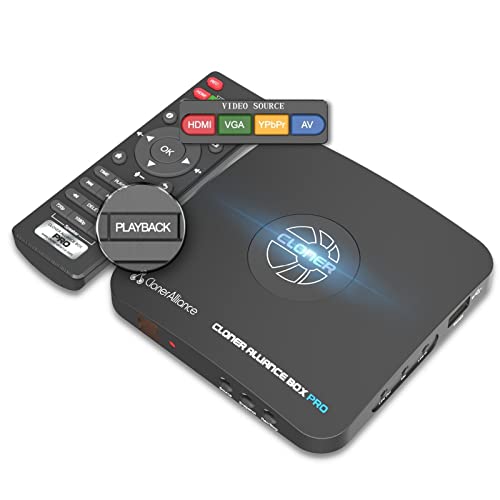
ClonerAlliance Box Pro, 1080p@60fps Video Recorder, DVR with HDMI Capture, Playback on TV. RCA/YPbPr/VGA to Digital Converter. Schedule Recording. No PC Required.


Key features
- •Standalone video capture device and video recorder. Instantly playback videos with remote control.
- •Capture and record Full HD 1080p hdmi videos from various game console and other video sources.
- •H.264 hardware encoder. Save videos as MP4 files to USB flash drive/external HDD. No PC required.
- •Free video edit/conversion software included. Live gameplay/videos to YouTube, Twitch or Facebook.
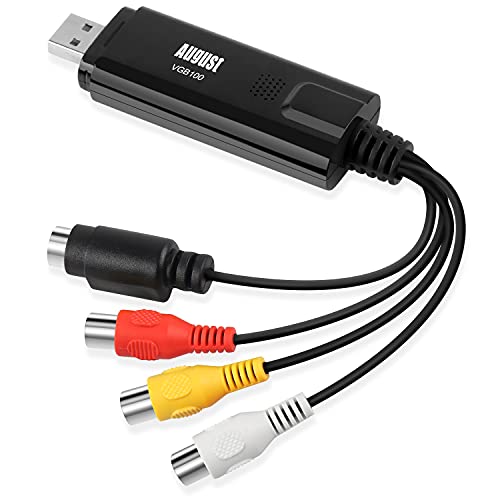
- •Analog video to digital video converter. VGA, AV(composite), YPbPr(component) input are supported.
BrandClonerAlliance
ColorBlack
Warranty90-Day No Hassle Return (at our cost) and 2-Year replacement Service.
ClonerAlliance Box Pro, 1080p@60fps Video Recorder, DVR with HDMI Capture, Playback on TV. RCA/YPbPr/VGA to Digital Converter. Schedule Recording. No PC Required.
List Price: $284.60$256.14DEALYou Save: $28.46 (10%)
Free shippingFree Returns – 30 daysFree Order CancellationSecure Payment2–3 Days DeliveryGet It October 28, 2026In Stock (1)No marketing spamNo account requiredFulfilment by FedEx / Amazon / UPS / ShipwirePayPal / Card Buyer Protection
Customer Reviews
Reviews sourced from verified Amazon purchasers4.2
out of 5
Based on 10 reviews
5★
50%
4★
40%
3★
10%
2★
0%
1★
0%
good as far as it goes
straightinsf•May 4, 2017
Not bad for the price, but not good either. Pros -- It does what it claims. Cons -- There are real problems with data drops
Okay, this will give you a nice video, BUT if you are going to do any editing of the raw video produced, you are probably looking at a lot of work unless you have some expensive editing software. This is my main gripe after using this a couple of days. Yes, other reviewers are correct, the unit can get hot, but this is easily addressed by just making a little carriage for the unit so that you can stand it on end (or you could just lean it against something. It is a thin unit, so when standing on end you effectively double the surface area exposed for heat dissipation. The heat problem is easily resolved and I don't know why the manufacturer doesn't supply a small stand to operate the unit on end. Ok, now for the complaints.
Video quality produced is good, but the unit drops data whether you use the supplied USB cable and a fast computer, or a SATA III flash drive. The processor in the unit simply can't handle the heavy data streams of HD video without the occasional buffer overrun. In the raw video produced, these just seem like an occasional pause or hiccup but if you are editing they are a nightmare. The reason they are such a problem is because the overworked processor doesn't insert any key frames into the video! The result is that every data drop isn't just a momentary glitch but puts the audio and video streams out of synch for the remainder of the clip when recoded on editing! So when you edit, you have to go through the entire video, identify each data drop and patch it. It is simple, but VERY tedious and the main reason for the three stars.
A second problem is that new televisions don't like the signal from this cloner when connected to a cable box. There are two possible solutions: The first (suggested by the TV manufacturer) is to used the supplied component cable rather than HDMI to feed the cloner box. Yea, converting digital to analog to digital is just peachy! not to mention an even bigger strain on an already overworked processor. So I tried a different approach, which is to use a powered HDMI splitter. This actually works really well, and you don't have to use a split signal, but can cable the TV directly to the cloner when the cloner is receiving the signal through the spitter rather than directly from the cloner box.
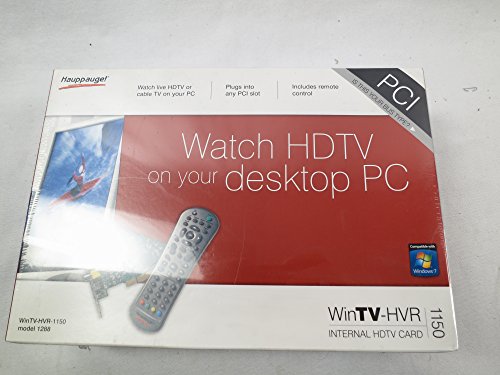
So yea, it is better than a Hauppage card for quality, but you can probably get a pci-e card that is just a little more expensive than this box that will not suffer from the data loss issues (if you have a decent computer). So this is good, but it could be better and needs some updating. I feel like I am in a time warp editing in 1999 when I am using this thing,
Okay, this will give you a nice video, BUT if you are going to do any editing of the raw video produced, you are probably looking at a lot of work unless you have some expensive editing software. This is my main gripe after using this a couple of days. Yes, other reviewers are correct, the unit can get hot, but this is easily addressed by just making a little carriage for the unit so that you can stand it on end (or you could just lean it against something. It is a thin unit, so when standing on end you effectively double the surface area exposed for heat dissipation. The heat problem is easily resolved and I don't know why the manufacturer doesn't supply a small stand to operate the unit on end. Ok, now for the complaints.
Video quality produced is good, but the unit drops data whether you use the supplied USB cable and a fast computer, or a SATA III flash drive. The processor in the unit simply can't handle the heavy data streams of HD video without the occasional buffer overrun. In the raw video produced, these just seem like an occasional pause or hiccup but if you are editing they are a nightmare. The reason they are such a problem is because the overworked processor doesn't insert any key frames into the video! The result is that every data drop isn't just a momentary glitch but puts the audio and video streams out of synch for the remainder of the clip when recoded on editing! So when you edit, you have to go through the entire video, identify each data drop and patch it. It is simple, but VERY tedious and the main reason for the three stars.
A second problem is that new televisions don't like the signal from this cloner when connected to a cable box. There are two possible solutions: The first (suggested by the TV manufacturer) is to used the supplied component cable rather than HDMI to feed the cloner box. Yea, converting digital to analog to digital is just peachy! not to mention an even bigger strain on an already overworked processor. So I tried a different approach, which is to use a powered HDMI splitter. This actually works really well, and you don't have to use a split signal, but can cable the TV directly to the cloner when the cloner is receiving the signal through the spitter rather than directly from the cloner box.
So yea, it is better than a Hauppage card for quality, but you can probably get a pci-e card that is just a little more expensive than this box that will not suffer from the data loss issues (if you have a decent computer). So this is good, but it could be better and needs some updating. I feel like I am in a time warp editing in 1999 when I am using this thing,
Excellent for saving from DVR
Coghan•May 4, 2017
DirecTV is about to upgrade our DVR box and we have some shows we really didn't want to lose. So I got this, set it up, and it works perfectly. Set up time was maybe 15 minutes. Quality of video was really high and we were not in the least disappointed. Software had to upgrade a couple of times but that wasn't too bad. I would say that it gets pretty hot on the bottom which isn't ideal. And it is temperamental whenever starting up from being off, needing the source button to be pushed basically every time to reestablish to the DVR signal. I couldn't see taking off a whole star for this, though if we could do half stars I probably would take off a half. Overall, it does what it says it will do, save a high quality video file from the input source.
WORKS AS ADVERTISED !
S. CAL.•May 3, 2017
April 20th - Just contacted support via Chat, but she was very helpful. Only recorded one item so far, but seemed to work very well. I still need to load the software on my PC to try out the editing features. Will post a follow-up after I have more experience with the unit.
Update May 5th 2017.
First, my use of Cloner Box Pro is to take Movies I own and create a backup copy that I place on my Home NAS unit. I can then view the videos with Kodi (XBMC) on several TVs and computers in my home. I have now recorded almost 40 videos and unit has worked great. Contacted customer support via chat, a couple more times and they were very helpful.
I did experience the initial screen/error "Och, something wrong!'Don't worry:)" message.
Followed their instructions:
1. Please confirm LED is solid BLUE or solid GREEN (NO FLASHING).
2. Press and hold the SOURCE button( It is located at one side of HDML-Cloner Box Pro, which is next to the button "REC/STOP" and "ON/OFF".) about 10 seconds. Then HDML-Cloner Box Pro will restart (The LED will turn off and then turn on).
3. After restarting, the LED will illuminate solid blue or solid green and you can see images on TV.
My suggestions for settings:
1. My first recording seemed way too dark, changed the Picture Mode from Standard to User and increased the brightness level to 50. Left the Color Temperature at Medium
2. Picture was a bit truncated on both sides, so changed Aspect Ratio from 16:9 to "Just Scan"
3. MP4 files for 2 hr movie were over 8GB, I changed Recording Bitrate to Low and set resolution to 720P. I think the bitrate setting did the most to reduce file size.
5. I purchased a second 16GB thumb drive, formatted it NTFS, and use it to record on while I process other thumb drive to my NAS.
I also used MP4-Cloner software to trim MP4 file when I accidentally let recording run too long. You must first set the start time (0:00:00 for me) and then select the play function. Then you can move the slider close to the end point you want, wait for exact spot and press pause. Then set the end time. If you try to move the slider without first mouse clicking the play function, the software with abend (crash for newer generation).
I tried the MP4-Cloner to "Burn" a DVD (this was my initial test to reduce the size of the recording). This created a proper set of DVD files (VIDEO_TS folder and .vob & .ifo & .bup files). It created two .vob files of 1 GB each and a 3rd that was 268MB. (See attached images) This was a full length movie so I expected at least 4 .vob files. Per chat they said they are aware of this problem. The Movie was playable, I was just concerned about video quality. Perhaps they are utilizing a DVD Shrink type process??
Overall I am very satisfied with the unit, it has saved time and reduced the steps in the process.
Cons:
The second HDMI port will NOT take an HDMI cable, it is specifically for the MMI cable that can be used to feed in a VGA/AV/YPbPr device.
Must have unit powered on to watch TV, I may introduce an HDMI splitter before the HDML-Cloner box to avoid this
Instructions could be a bit more detailed in outlining what effect the different settings would have on video quality and file size.
Firmware update process seems a bit complex, but my unit was up-to-date, so I have not had to perform update yet.
Update May 5th 2017.
First, my use of Cloner Box Pro is to take Movies I own and create a backup copy that I place on my Home NAS unit. I can then view the videos with Kodi (XBMC) on several TVs and computers in my home. I have now recorded almost 40 videos and unit has worked great. Contacted customer support via chat, a couple more times and they were very helpful.
I did experience the initial screen/error "Och, something wrong!'Don't worry:)" message.
Followed their instructions:
1. Please confirm LED is solid BLUE or solid GREEN (NO FLASHING).
2. Press and hold the SOURCE button( It is located at one side of HDML-Cloner Box Pro, which is next to the button "REC/STOP" and "ON/OFF".) about 10 seconds. Then HDML-Cloner Box Pro will restart (The LED will turn off and then turn on).
3. After restarting, the LED will illuminate solid blue or solid green and you can see images on TV.
My suggestions for settings:
1. My first recording seemed way too dark, changed the Picture Mode from Standard to User and increased the brightness level to 50. Left the Color Temperature at Medium
2. Picture was a bit truncated on both sides, so changed Aspect Ratio from 16:9 to "Just Scan"
3. MP4 files for 2 hr movie were over 8GB, I changed Recording Bitrate to Low and set resolution to 720P. I think the bitrate setting did the most to reduce file size.
5. I purchased a second 16GB thumb drive, formatted it NTFS, and use it to record on while I process other thumb drive to my NAS.
I also used MP4-Cloner software to trim MP4 file when I accidentally let recording run too long. You must first set the start time (0:00:00 for me) and then select the play function. Then you can move the slider close to the end point you want, wait for exact spot and press pause. Then set the end time. If you try to move the slider without first mouse clicking the play function, the software with abend (crash for newer generation).
I tried the MP4-Cloner to "Burn" a DVD (this was my initial test to reduce the size of the recording). This created a proper set of DVD files (VIDEO_TS folder and .vob & .ifo & .bup files). It created two .vob files of 1 GB each and a 3rd that was 268MB. (See attached images) This was a full length movie so I expected at least 4 .vob files. Per chat they said they are aware of this problem. The Movie was playable, I was just concerned about video quality. Perhaps they are utilizing a DVD Shrink type process??
Overall I am very satisfied with the unit, it has saved time and reduced the steps in the process.
Cons:
The second HDMI port will NOT take an HDMI cable, it is specifically for the MMI cable that can be used to feed in a VGA/AV/YPbPr device.
Must have unit powered on to watch TV, I may introduce an HDMI splitter before the HDML-Cloner box to avoid this
Instructions could be a bit more detailed in outlining what effect the different settings would have on video quality and file size.
Firmware update process seems a bit complex, but my unit was up-to-date, so I have not had to perform update yet.
Good recordings. Poorly designed software interface.
Mikey•March 12, 2017
Would be five stars, but the device can record until the supplied USB is full, leaving the drive unrecognizable to the device or external computers. I lost hours of recordings this way.
Also, because the recording tuner is a non-intuitive recording scheduler, it's easy to set it to record for too long. I would prefer a timer, like many TV sets use for sleep, where recording is set in 15 minute intervals, for example. However, this device takes you to first set the internal clock and calendar. Then, you schedule recording by setting the start time and date, and then the stop time and date. It doesn't automatically copy the start time to the stop time, so it's possible to try to set it to stop before it starts. It won't allow this setting to save, but you can easily make mistakes.
The other menus and settings are equally difficult and not intuitive, and navigating recorded media is really tough.
That said, the recordings themselves are quite good. I did end up buying a separate (inexpensive) HDMI scaler, because input from the SD video RCA input, if processed using the built-in scaler, was a bit dark and had lots of edge blur from poor deinterlacing. Also, the device doesn't directly support S-video input.
I would probably buy this again, because it does the job, has its own recorder that doesn't require me to have software or a computer connected, and it was relatively inexpensive. I might splurge for a more robust unit with better scaler and video processing, if I had it to do over.
Also, because the recording tuner is a non-intuitive recording scheduler, it's easy to set it to record for too long. I would prefer a timer, like many TV sets use for sleep, where recording is set in 15 minute intervals, for example. However, this device takes you to first set the internal clock and calendar. Then, you schedule recording by setting the start time and date, and then the stop time and date. It doesn't automatically copy the start time to the stop time, so it's possible to try to set it to stop before it starts. It won't allow this setting to save, but you can easily make mistakes.
The other menus and settings are equally difficult and not intuitive, and navigating recorded media is really tough.
That said, the recordings themselves are quite good. I did end up buying a separate (inexpensive) HDMI scaler, because input from the SD video RCA input, if processed using the built-in scaler, was a bit dark and had lots of edge blur from poor deinterlacing. Also, the device doesn't directly support S-video input.
I would probably buy this again, because it does the job, has its own recorder that doesn't require me to have software or a computer connected, and it was relatively inexpensive. I might splurge for a more robust unit with better scaler and video processing, if I had it to do over.
This is my SECOND unit
Amazon Customer•February 26, 2017
The device records and preserves HD quality product from the HDMI or other inputs. Follow the instructions. Be especially aware of instructions which come via email in response to your order. They are there to help you avoid problems. If you use your computer as part of the recording setup, IT BECOMES PART OF THE SYSTEM. Your COMPUTER audio recording volume control becomes important. Don't start out (as I did) and record a BUNCH of stuff with virtually no audio volume. I use 32 GByte sticks formatted NTFS and get 4 to 6 hours of Video. THEN I can transfer them to my 1 TByte drives in no time via USB to USB (both 3.0). Bluray DVD now seems antiquated. You can record live TV if they ever produce anything worth watching and recording. The files are mp4. If you have questions, the customer service is as good as it gets. Remote control and TV menu need a little more work to be easier and more stable to use.
Page 1 of 2