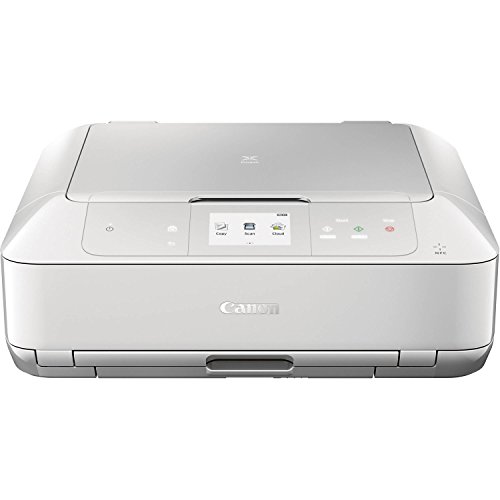
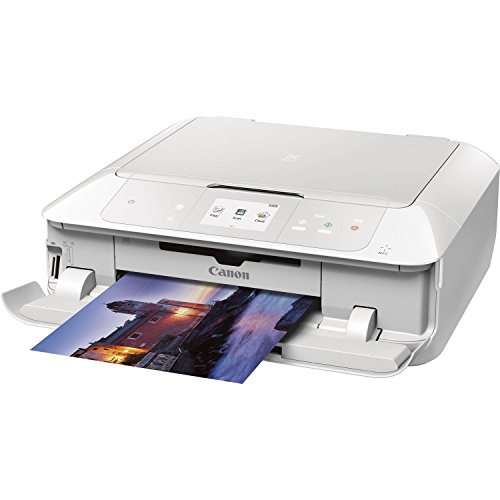
Canon MG7720 Wireless All-In-One Printer with Scanner and Copier: Mobile and Tablet Printing, with Airprint™ and Google Cloud Print compatible, White




Key features
- •Quick and Easy Wireless Setup
- •Mobile Device Printing: Easily print from your iPhone, iPad, Android or tablet
- •Powerful Printing options: Air print, Google Cloud Print, NFC, Mopria, Canon PRINT app and more
- •CD/ DVD Printing: Enjoy the ability to create CD or DVD labels
- •Print with a touch from NFC-enabled mobile devices
BrandCanon
Size17.2 (W) X 14.6 (D) X 5.9 (H)
ColorWhite
Warranty1-Year Limited Warranty with Instant Exchange Program.
Canon MG7720 Wireless All-In-One Printer with Scanner and Copier: Mobile and Tablet Printing, with Airprint™ and Google Cloud Print compatible, White
List Price: $501.98$451.78DEALYou Save: $50.20 (10%)
Free shippingFree Returns – 30 daysFree Order CancellationSecure Payment2–3 Days DeliveryGet It October 25, 2026In Stock (5)No marketing spamNo account requiredFulfilment by FedEx / Amazon / UPS / ShipwirePayPal / Card Buyer Protection
Customer Reviews
Reviews sourced from verified Amazon purchasers3.9
out of 5
Based on 10 reviews
5★
50%
4★
30%
3★
10%
2★
10%
1★
0%
Much better than previous wireless models
Christopher✓ Verified Purchase•April 21, 2017
Small, compact and works as expected. Previous model would disconnect from the wireless and seemed to require a reboot to have all systems see it again. This one is always at the ready, even when in sleep mode. Fast printing both black and white and color. Color photos are amazing (but expect slower printing for better quality). Scanning from device to a selected system was a nice feature. As far as ink usage, it is all based on how much you print. Comparing to my last Canon printer, it was definitely able to print more documents and photos before replacing the cartridges. However, the price for ink is higher for this model and I did not have the time to compare # of print jobs to $ on print cartridges. I am sure someone else has done this and google has that answer.
Wireless set up flawed but it does work.
Hawkeye✓ Verified Purchase•December 12, 2016
Wireless set up is flawed. It gives an error message even when the set up is properly completed. Software flaw in the firmware, even after a firmware update was applied. Maybe that was why it was discounted? Didn't have this problem with my earlier Canon printers. Finally figured it out while auditing the connection log on my router/modem. The log showed a perfect connection, so I just backed out of the wireless setup dialogue and the WIFI indicator was turned on in the upper right corner of the display indicating a good connection.
Also the scanner control is no longer part off the printer control on the PC dashboard. You have to launch the scanner using the IJ Scan Utility. not sure why they keep changing these they way things work. Some consistency would be nice. I replaced an MG7520 that just quit out of the blue and out of warranty. Hopefully this printer will last a couple of years. They do not include a printer USB cord these days, so you will have to buy one if you need one. Also the ink tanks are different from my MG7520, so can't use any left overs. Another place where consistency would be appreciated.
Other than the above, I nothing else to report. Print quality is fine and I have liked previous Canon printers.
Also the scanner control is no longer part off the printer control on the PC dashboard. You have to launch the scanner using the IJ Scan Utility. not sure why they keep changing these they way things work. Some consistency would be nice. I replaced an MG7520 that just quit out of the blue and out of warranty. Hopefully this printer will last a couple of years. They do not include a printer USB cord these days, so you will have to buy one if you need one. Also the ink tanks are different from my MG7520, so can't use any left overs. Another place where consistency would be appreciated.
Other than the above, I nothing else to report. Print quality is fine and I have liked previous Canon printers.
Great at printing photos!
Bonnie P. McCalmon✓ Verified Purchase•October 16, 2016
I got this to print photos as well as scan & print documents. It seems to print photos very well & I'm sure it will eat up ink but If you plan on printing lots of pics, go to Walmart. I haven't quite got it set up with my daughters I-phone or her google chromebook. I tried to find o the website how to print off the printer ID again(missed it the first time) with no luck. It connected to my windows7 laptop very easy with no problems. I like having the disk to load the software. I 've had no problems scanning to my computer & printing or copying & printing. Hope this one last longer than my last HP
I also downloaded the Canon Print app on my iPhone and did a test airprint from the app and it worked like a charm on the first
Dallas Girl✓ Verified Purchase•July 29, 2016
This arrived last week, so I haven't printed out a lot of stuff on it yet, I'm basing my review on the setup, look, user-friendly factor.
I had zero issues w/the setup. I did follow the instructions to ensure I was doing the physical setup correctly and inserting the printer cartridges correctly, but this was just a few quick steps.
I also downloaded the Canon Print app on my iPhone and did a test airprint from the app and it worked like a charm on the first try. I used the CD the printer comes with to perform the printer drivers and software installation on my laptop and that too, worked like a charm.
This printer has a great look, very nice touch screen and has a nice sleek design to it. It fits nicely right on top of my filing cabinet, so I didn't have to find a special spot for it or worry about buying a printer stand either.
So far, so good. I'm pretty pleased with my purchase so far.
I had zero issues w/the setup. I did follow the instructions to ensure I was doing the physical setup correctly and inserting the printer cartridges correctly, but this was just a few quick steps.
I also downloaded the Canon Print app on my iPhone and did a test airprint from the app and it worked like a charm on the first try. I used the CD the printer comes with to perform the printer drivers and software installation on my laptop and that too, worked like a charm.
This printer has a great look, very nice touch screen and has a nice sleek design to it. It fits nicely right on top of my filing cabinet, so I didn't have to find a special spot for it or worry about buying a printer stand either.
So far, so good. I'm pretty pleased with my purchase so far.
Good, but heads up to Mac users!
honest✓ Verified Purchase•June 16, 2016
I'd have given it a higher rating if it wasn't for the lack of instructions for the software installations indicating what needs to be done in order to connect to the label printing feature wirelessly. I purchased this printer with the intention of printing labels to CD's for our church. I use a MacBook Pro with the latest (10.11.5 (15F34)) version installed. I downloaded the latest printer drivers directly from Canon, and was able to install with a couple of small, easily recoverable, hiccups. Great, all set to go, right? Nope. I used their package software bundle (My Image Garden) to create the disc label, and went to print. The message received was "Cannot print because a printer supported by this software is not installed." Looked for the problem in the documentation...nothing. Contacted Canon via email...silence. Not good. I did some digging online, and discovered that if I plugged into it with a USB cable, the error message would be resolved. That kind of defeats the purpose of a 'wireless" print option. After some more digging, someone mentioned in a Canon help forum regarding a different Canon printer that on Macs, the default is to use their Bonjour Service as printer service interface, and that it should be switched to the Canon CUPS driver for this printer. With nothing to lose, I tried it. That resolved both the error message AND the wireless printing problem.
Page 1 of 2