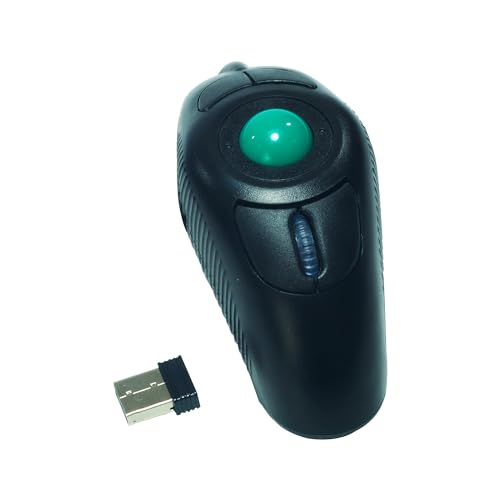
YUMQUA Y-10W 2.4 GHz Portable Finger Handheld Wireless USB Trackball Mouse for PC Laptop Mac Lovers


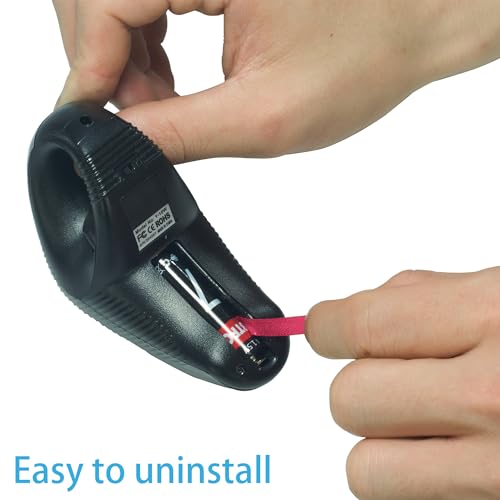


Key features
- •Free replacement and after sale service available, please buy with confidence.
- •Interface PS/2 or USB
- •Four group adjust DPI:400,600,800,1200
- •Effective distance within 10M.
- •It can greatly ease the harm of palm joint or muscle for long time using mouse
YUMQUA Y-10W 2.4 GHz Portable Finger Handheld Wireless USB Trackball Mouse for PC Laptop Mac Lovers
List Price: $52.35$47.12DEALYou Save: $5.23 (10%)
Free shippingFree Returns – 30 daysFree Order CancellationSecure Payment2–3 Days DeliveryGet It October 26, 2026In Stock (1)No marketing spamNo account requiredFulfilment by FedEx / Amazon / UPS / ShipwirePayPal / Card Buyer Protection
Customer Reviews
Reviews sourced from verified Amazon purchasers4.0
out of 5
Based on 10 reviews
5★
60%
4★
20%
3★
10%
2★
10%
1★
0%
Very happy
DaDueler•August 14, 2018
Impressed by this device, it definitely helps with ergonomics for challenging setups and for multi-computer setups. It's very responsive, I haven't tried switching the ball for a steel ball bearing as suggested by other comments yet but also haven't had any issues with using the trackball. I will say that it's important to let go of the trackball when clicking, otherwise you'll end up inadvertently moving the trackball as you click. No noticeable lag which is important. It would be nice to reprogram the Enter and Escape keys, but overall I'm very pleased with this device.
You must replace the ball with a 3/4" steel ball bearing.
J. Singleton Mosby•July 7, 2018
Great auxiliary mouse/ trackball. I use this to review lengthy documents when I know I won't be on and off the keyboard. I sit way back from the monitors, lean back and navigate with this device resting on my lap or with my arm on the armrest of the chair. This position relieves strain on the shoulder and on the heel of the hand. I use this Yumqua in conjunction with a Kensington Orbit wireless trackball which is pretty great too. I switch from one to the other throughout the day and this helps relieve strain on my shoulder, wrist and hand.
If you buy this handheld trackball, you must also buy a 3/4" diameter steel ball bearing (sold on Amazon, pack of six for $6.25). The ceramic or plastic ball that the device comes with is a hair too small and it is lopsided which makes for a very twitchy and imprecise action. The heavier more balanced steel ball turned a frustrating aggravating experience into an enjoyable one.
If you buy this handheld trackball, you must also buy a 3/4" diameter steel ball bearing (sold on Amazon, pack of six for $6.25). The ceramic or plastic ball that the device comes with is a hair too small and it is lopsided which makes for a very twitchy and imprecise action. The heavier more balanced steel ball turned a frustrating aggravating experience into an enjoyable one.
-2 stars for NO Software and Not Rechargable other than that it works amazing, worth 15$ IMO though, Would buy again for sure
david•May 1, 2018
absolutely great concept !! i bought this so that i can lay down in the bed with the wife with a wireless keyboard and this product and use my gaming PC as a pseudo console ....ish... Even though it doesn't look very ergonomic it actually is oddly comfortable to use and almost feels natural enough to play FPS games and i have huge hands 6.1in 280ibs . All the buttons are in a easy to reach place with acceptation of the 2 button use as a default ESC macro at the top froward of the ball but i never need to use it being as i have a keyboard with an ESC. the instruction are pretty straight forward and tells you what each button corresponded to. it uses a singe AAA battery which seems to last a decent amount of time, which brings me to my few and only complaints.... This mouse badly needs software!!, to my knowledge it has no ability to remap or change any of the button functionality and DPI Scales other than pushing the tiny dpi select button inside the trigger well (3 modes) which doesn't help with ease of access or personal ergonomics, it doesnt need razor synapse but it does need the ability to scale dpi and change button configurations. It has no brand name on it or on its packaging or even a website you can check for said software. The scroll wheel depress is a little stiff for scroll click. (could be because its new) Just a personal opinion the left click and the right click should be on the same trigger left side depress for left click then right side depress for right click then both depress for both, not use thumb for right click and use a big trigger for left alot of unuse potentual there on the trigger, and lastly it should be rechargeable with a moderate long battery life if it wants to call it self worth 35$ Logitech has rechargeable lazer optic mappable mouse for like 20$
A Better Mouse
wheeler81•April 25, 2018
I love this item. It was delivered within the promised two days. It was sturdily packaged and easy to open. It seems well built but really haven't used it long enough to be objective, It works as I had hoped. The buttons and wheel are well organized and quickly responsive. It takes the strain away from your arm and wrist. The pointer is accurate and you can set the dpi high enough to pay a game with no latency and pinpoint accuracy. if you have a tendency for carpal tunnel, this allows freedom of movement without wrist friction. I haven't used it long enough to give it 5 stars, but with more use, I am sure It will earn a 5.Y-10W 2.4 GHz Portable Finger Wireless Ambidextrous Trackball Mouse for Left/Right Handed Users to improve on this mouse I would raise the buttons or add some accent to make tactile finding so mu easier. Maybe a click on menu button to know that your pressing it.
Quality can be improved, but the form is useful
John "William" Galt•January 25, 2018
Cascadian's review mirrors my thoughts.
Having read other reviews of the quality, I decided to buy 2 of these. And was I right to do so: the first one stopped working after 2 days of use. However, no worries, as I had another one!
It is not perfectly ergonomic, especially with the scroll wheel, right click and middle click. Feels weird in the hand, although still beats using a normal mouse. The point of this is not to chain you to a desk, and it does it very well.
I can lie down on the bed, place my laptop on its side and do casual browsing very easily. Better for mouse-only tasks rather than those that involve the keyboard: in order to move to the keyboard you have to remove the mouse from your hand which is inconvenient.
Precision is just fine as I've been using trackballs for a while. Thumb is not feeling great after too long usage, but I'd rather have localised strain than strain all over my body because of poor ergonomics.
For those interested, there's also a Twiddler3 that combines keyboard and mouse, albeit being 7x more expensive. It's being delivered to me right now. There's also AlphaGrip which comes with a trackball but it's currently unavailable for sale.
To YUMQUA, I'd say: improve quality of the hardware (it does feel super cheap) as well as ergonomics, and I'd gladly pay $60+. Or better, combine it with a keyboard somehow and I'll pay even more.
If Twiddler3 doesn't work out I'll buy more of these.
Having read other reviews of the quality, I decided to buy 2 of these. And was I right to do so: the first one stopped working after 2 days of use. However, no worries, as I had another one!
It is not perfectly ergonomic, especially with the scroll wheel, right click and middle click. Feels weird in the hand, although still beats using a normal mouse. The point of this is not to chain you to a desk, and it does it very well.
I can lie down on the bed, place my laptop on its side and do casual browsing very easily. Better for mouse-only tasks rather than those that involve the keyboard: in order to move to the keyboard you have to remove the mouse from your hand which is inconvenient.
Precision is just fine as I've been using trackballs for a while. Thumb is not feeling great after too long usage, but I'd rather have localised strain than strain all over my body because of poor ergonomics.
For those interested, there's also a Twiddler3 that combines keyboard and mouse, albeit being 7x more expensive. It's being delivered to me right now. There's also AlphaGrip which comes with a trackball but it's currently unavailable for sale.
To YUMQUA, I'd say: improve quality of the hardware (it does feel super cheap) as well as ergonomics, and I'd gladly pay $60+. Or better, combine it with a keyboard somehow and I'll pay even more.
If Twiddler3 doesn't work out I'll buy more of these.
Page 1 of 2