HAYEAR 14MP HD TV HDMI USB Industry Digital C-Mount Microscope Camera TF Card + 180x Zoom C-Mount Lens
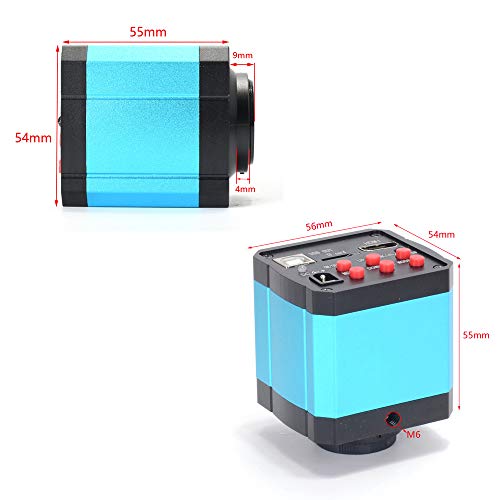


Key features
- •14 megapixel Panasonic sensor 1/2.3 inch
- •It build in digital crosshairs and color control, add line in the pictures
- •Transverse and vertical line: Support multi-color, 5 pcs of transverse lines/vertical lines, movable
- •Image resolution: 4320x3240 (for TF card) 1920x1080 @ 60FPS(for TF card);1920x1080 @ 30FPS(for USB)
- •Video format: MP4(for TF card) ; Image format: JPG; USB Video resolution: 1920x1080 @ 30FPS
BrandHAYEAR
CategoryUSB Microscopes
HAYEAR 14MP HD TV HDMI USB Industry Digital C-Mount Microscope Camera TF Card + 180x Zoom C-Mount Lens
List Price: $276.44$248.80DEALYou Save: $27.64 (10%)
Free shippingFree Returns – 30 daysFree Order CancellationSecure Payment2–3 Days DeliveryGet It October 25, 2026In Stock (1)No marketing spamNo account requiredFulfilment by FedEx / Amazon / UPS / ShipwirePayPal / Card Buyer Protection
Customer Reviews
Reviews sourced from verified Amazon purchasers4.6
out of 5
Based on 3 reviews
5★
67%
4★
33%
3★
0%
2★
0%
1★
0%
The best scope for the money available!
Larry Battraw Jr•July 16, 2017
This is the best digital camera/microscope at this price I've ever found and the combination of a high-quality sensor with a great lens really makes this special. I did buy another lower-power lens (0.12X - 2X/about 8X - 100X on-screen) since for my purposes (PCB assembly and inspection) the magnification was a bit too much as I needed more area visible: 8x-100x 43mm-150mm C-mount Zoom Glass Lens for Industry Lab Microscope Camera
With that lens I get a reasonable amount of area visible and an amazing 6 inch distance between the lens and board I'm viewing, more than enough for perfectly natural soldering. The depth of field (height range that objects are in focus for) isn't that great but given that I'll be working on surface-mount parts that are fairly uniform in height it's not a big issue.
The distance between the lens and board decreases significantly when zooming in/increasing magnification, though I have little need for higher magnification. I did look into seeing if it was cheaper to buy the camera without a lens however it's only $10 less to just buy the camera alone which seemed pointless; you never know when a higher-power lens could prove useful.
BTW the resolution stated for USB video/photos in this listing is wrong and reaches 1920x1080@30FPS. I believe they're referring to the resolution of videos recorded to the SD card (1280x720). I've attached a few pictures captured via USB to give you an idea of the quality you may see, though keep in mind these were taken with the $50 lower-magnification lens I mentioned above. One odd discrepancy I came across was that for photos captured to the SD card the resolution is actually 4032x3024 (12.2MP), not the actual 14MP cited in the description. I'll be contacting the seller to follow up on this and will update this review once I find out more.
***UPDATE August 5 2017*** I've been in contact with the seller and what they said is that the sensor is 14MP but due to the aspect ratio of the sensor you'd get squashed/stretched pictures if you used the full resolution. I wanted to see what that would look like and they were kind enough to send me a modified firmware that used the full 14MP resolution when taking pictures. As far as I can tell this didn't affect the aspect ratio at all (Though the pictures were definitely full resolution). Although I haven't done pixel-by-pixel measurements to verify circles are perfectly round, squares are square on-screen, etc. the pictures look great.
I'm not sure if the seller would want me to distribute the firmware, so please don't ask. I really think they'd be doing everyone a favor if they posted the original and modified firmware so people could try it out themselves.
One note in case anybody does get the firmware, save yourselves a ton of annoyance and wasted time and only use a Windows PC to format the micro SD card and copy the firmware to it. I tried using an Ubuntu (Linux) system to format and copy the firmware to the micro SD card and it never recognized the file, though everything else worked as far as taking pictures, recording video, etc. You'll be able to tell if it's upgrading the firmware when you turn the camera on and the LED starts flashing for around 30-60 seconds (There's no on-screen feedback). There's no menu option or keys you need to press to make it flash the firmware, just copy the file over to the micro SD card insert it into the camera, and power the camera on.
Finally, it bears mentioning that you definitely need some way of mounting the scope above your work. The camera and lens is rather heavy and with it 4-6 inches above the work the stand needs to be fairly tall and capable of supporting it without over-balancing. Such stands aren't terribly cheap and if you can afford it I would definitely suggest buying what looks to be the same scope+lens with a stand and light combo for about $239: 14MP HDMI HD USB Digital Industry Video Monocular Microscope Camera Set Big Stereo Table Stand Zoom C-MOUNT Lens 144 LED Light (180X Zoon Lens)
[I have no business/personal connection with these sellers and did all my own research on finding what I felt was the best scope for someone on a budget that couldn't put up with the terrible quality and working distance of cheaper USB scopes.]
With that lens I get a reasonable amount of area visible and an amazing 6 inch distance between the lens and board I'm viewing, more than enough for perfectly natural soldering. The depth of field (height range that objects are in focus for) isn't that great but given that I'll be working on surface-mount parts that are fairly uniform in height it's not a big issue.
The distance between the lens and board decreases significantly when zooming in/increasing magnification, though I have little need for higher magnification. I did look into seeing if it was cheaper to buy the camera without a lens however it's only $10 less to just buy the camera alone which seemed pointless; you never know when a higher-power lens could prove useful.
BTW the resolution stated for USB video/photos in this listing is wrong and reaches 1920x1080@30FPS. I believe they're referring to the resolution of videos recorded to the SD card (1280x720). I've attached a few pictures captured via USB to give you an idea of the quality you may see, though keep in mind these were taken with the $50 lower-magnification lens I mentioned above. One odd discrepancy I came across was that for photos captured to the SD card the resolution is actually 4032x3024 (12.2MP), not the actual 14MP cited in the description. I'll be contacting the seller to follow up on this and will update this review once I find out more.
***UPDATE August 5 2017*** I've been in contact with the seller and what they said is that the sensor is 14MP but due to the aspect ratio of the sensor you'd get squashed/stretched pictures if you used the full resolution. I wanted to see what that would look like and they were kind enough to send me a modified firmware that used the full 14MP resolution when taking pictures. As far as I can tell this didn't affect the aspect ratio at all (Though the pictures were definitely full resolution). Although I haven't done pixel-by-pixel measurements to verify circles are perfectly round, squares are square on-screen, etc. the pictures look great.
I'm not sure if the seller would want me to distribute the firmware, so please don't ask. I really think they'd be doing everyone a favor if they posted the original and modified firmware so people could try it out themselves.
One note in case anybody does get the firmware, save yourselves a ton of annoyance and wasted time and only use a Windows PC to format the micro SD card and copy the firmware to it. I tried using an Ubuntu (Linux) system to format and copy the firmware to the micro SD card and it never recognized the file, though everything else worked as far as taking pictures, recording video, etc. You'll be able to tell if it's upgrading the firmware when you turn the camera on and the LED starts flashing for around 30-60 seconds (There's no on-screen feedback). There's no menu option or keys you need to press to make it flash the firmware, just copy the file over to the micro SD card insert it into the camera, and power the camera on.
Finally, it bears mentioning that you definitely need some way of mounting the scope above your work. The camera and lens is rather heavy and with it 4-6 inches above the work the stand needs to be fairly tall and capable of supporting it without over-balancing. Such stands aren't terribly cheap and if you can afford it I would definitely suggest buying what looks to be the same scope+lens with a stand and light combo for about $239: 14MP HDMI HD USB Digital Industry Video Monocular Microscope Camera Set Big Stereo Table Stand Zoom C-MOUNT Lens 144 LED Light (180X Zoon Lens)
[I have no business/personal connection with these sellers and did all my own research on finding what I felt was the best scope for someone on a budget that couldn't put up with the terrible quality and working distance of cheaper USB scopes.]
Fantastic microscope camera combo
Dave K.•July 16, 2017
Fantastic microscope camera combo. I haven't been able to get the software to work with my computer, but it takes photos to the SD card fine, although they have the wrong aspect ratio.
Five Stars
Ron H•October 23, 2016
Very nice for micro assemblies and/or circuit board inspection.