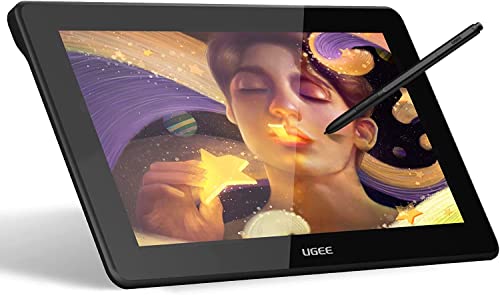
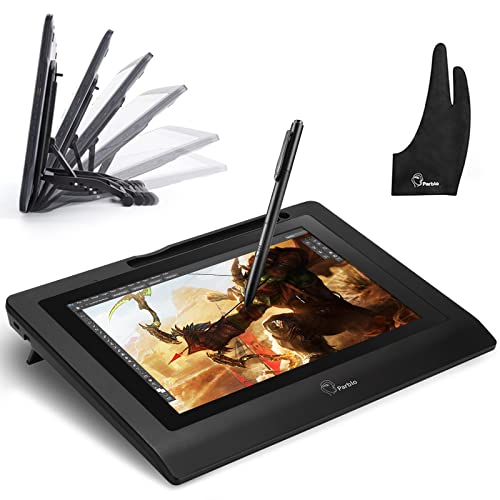
Parblo Coast10 10.1" Digital Pen Tablet Display Drawing Monitor 10.1 Inch with Cordless and Battery-Free Pen+ 4ports USB3.0 Hub+ Glove


Key features
- •1. Battery-Free pen,you don't need to worry about the power capacity, or battery leakage cause pen malfunction. Without a battery did reduce the weight of graphic pen, the light weight gives more comfort and handy nature feel during your designing work or art works.
- •2. High Viewing Angle, Horizontal 170°and Vertical 170° Viewing Angle allow you to see the screen in a very comfortable way,you can put the monitor in everywhere and still easy to get clear view
- •3. Ergonomic Design, you can put the digital screen in your lap,or on your desktop,or other dynamic movement of the scene which also provide a perfect perspective
- •4. Compatible with all major graphics applications: Corel Painter, CorelDraw, Adobe Photoshop, Adobe Illustrator, Adobe Fireworks, Macromedia Flash, Comic Studio, SAI,Paint Tool Sai, Infinite Stratos, 3D MAX, Autodesk MAYA, Corel Painter, Manga Studio,Pixologic ZBrush and so on.
- •5. Operation system: Windows XP, Windows 7, Windows 8, Windows 10. Mac OS X 10.11/12/13/14.
Parblo Coast10 10.1" Digital Pen Tablet Display Drawing Monitor 10.1 Inch with Cordless and Battery-Free Pen+ 4ports USB3.0 Hub+ Glove
List Price: $272.07$244.86DEALYou Save: $27.21 (10%)
Free shippingFree Returns – 30 daysFree Order CancellationSecure Payment2–3 Days DeliveryGet It June 25, 2026In Stock (1)No marketing spamNo account requiredFulfilment by FedEx / Amazon / UPS / ShipwirePayPal / Card Buyer Protection
Customer Reviews
Reviews sourced from verified Amazon purchasers3.3
out of 5
Based on 10 reviews
5★
70%
4★
10%
3★
20%
2★
0%
1★
0%
It was working just fine until sometime in the 2-3 month mark
Michelle Johnson•August 11, 2017
When I first got it I ran into a small problem, that was mainly my fault, dealing with the drivers. You HAVE to install them in a certain order for the tablet to work correctly, and to be able to have the tablet be used as a separate monitor rather than a mirror of the screen of your computer. Now, I have had the tablet for 3, almost 4 months now. It was working just fine until sometime in the 2-3 month mark. The tablet would start to not always register what I was doing, having to repeat my action multiple times for it to do it, sometimes having to rotate the pen. I draw very often, as most artist do, and I had to replace the pen nib once already after 2 months. Partly as an attempt to fix the pen register problem but mainly because the nib had gotten to the point where it was starting to scratch the surface of the protector. Half way through the 3rd month, it had already needed to be replaced again.
The tablet does work really nicely when it does register all of my actions, but it's caused a ton of annoyance from just how often this problem happens, that i am having to replace it already which is very sad. I have a collection of art tablets, this being my first LCD one. All of my previous ones have all worked for over a year, some 3 years now, with only needing a nib change once if that, and are still in perfect working condition. When art tablets that are under 3x the price of this one (with the sale price of $255), work longer than it with next to no problems, there is something that needs to be looked at.
The tablet does work really nicely when it does register all of my actions, but it's caused a ton of annoyance from just how often this problem happens, that i am having to replace it already which is very sad. I have a collection of art tablets, this being my first LCD one. All of my previous ones have all worked for over a year, some 3 years now, with only needing a nib change once if that, and are still in perfect working condition. When art tablets that are under 3x the price of this one (with the sale price of $255), work longer than it with next to no problems, there is something that needs to be looked at.
Awesome tablet! Must Buy!
Calie•April 28, 2017
This is my first display tablet for drawing that I have ever bought. I am majoring in graphic design, so I needed a cheap one that had its own screen. It was delivered in a nice package, with its own branding and everything. I was surprised. It came with a drawing glove, a screen protector, a wiping cloth, and everything else that should come with a tablet. I got the 2 day shipping and the packaging wasn't damaged or anything. Very nicely sent. It wasn't hard at all to install the software online, and the directions were very clear. I have had no issues at all with any of my drawing programs. It basically works as an extended screen that you can use the pen with. I like the features such as the fact that you can't use your finger, you can only use the pen. It makes it easy to rest your hand on it while drawing, so that's a plus. For a first display tablet, this is a very good and high quality product. It even comes with a usb plug in strip, which I can use to not only plug in my tablet, but also things like my phone and such that I have laying out on my desk. Easy to use, and you can use any drawing programs and software with it. I'm impressed with the product for the price, and I would recommend this tablet to friends and family. Hell, I'll probably buy one for my sister for Christmas. 10/10 would buy again!
READ THIS ENTIRE REVIEW IF YOU WANT YOUR TABLET TO WORK
Kris•March 11, 2017
I used a friend's 800 dollar cintiq and it inspired me to order a graphic tablet of my own but one within my budget. Took a chance on this device despite never hearing of parblo before and here are some things I have encountered for those of you who need a run down of the installation process. As soon as I plugged it in, my computer automatically installed the first driver which is called "displaylink driver" on the website, this activated the screen but the pen did not work so I then downloaded the second driver named "digitizer driver" after an install and restart the pen worked but was quite a way off from the cursor. I tried to calibrate it but everytime I began the callibration sequence the first red target would appear on screen and that was it, there were no others to click on so I couldn't successfully callibrate. I found that the issue was I had my monitor set to duplicate display, set your moniter to EXTEND display instead and in the select monitor 2 in the tablet software. Callibrate again and the red targets will appear in every corner now. At first I thought it didn't work because even after callibration it was still very off, hover your pen above the screen and move it around and the cursor will jump into the correct position after a couple seconds. Now you're all set, everything on this tablet works on this tablet very well and the instructions are in clear english if you need to reference them. I'm satisfied with this product.
Great beginner tablet!
blackpegasus•August 7, 2016
This is my first on screen tablet ever. I was thrilled with the price and it has been worth every penny! I decided to use it for several weeks before writing a review.
Here's what I've found:
There are a few drawbacks:
1. Setting it up was a pain due to no physical instructions and vague online instructions.
2. I can't get it to work with Corel Painter Essentials 5, which might be the tablet's fault or Windows10 (but it works perfectly with Manga Studios 5)
3. The calibration seems a bit off.
4. The words Parblo on the lower part of the tablet catch annoyingly on the glove.
Those are the only issues I've run into. Other than that, the tablet works very smoothly! Totally worth it for the price and a great beginner's tablet! It's not perfect but giving it a five star because I am very happy with it and feel that the tablet is worth what I paid.
Here's what I've found:
There are a few drawbacks:
1. Setting it up was a pain due to no physical instructions and vague online instructions.
2. I can't get it to work with Corel Painter Essentials 5, which might be the tablet's fault or Windows10 (but it works perfectly with Manga Studios 5)
3. The calibration seems a bit off.
4. The words Parblo on the lower part of the tablet catch annoyingly on the glove.
Those are the only issues I've run into. Other than that, the tablet works very smoothly! Totally worth it for the price and a great beginner's tablet! It's not perfect but giving it a five star because I am very happy with it and feel that the tablet is worth what I paid.
I love my Parblo Tablet!
C.R. Fowler•August 5, 2016
Art is really just a hobby for me, so I couldn't afford an expensive Wacom. The fact that a wacom this size is twice as much made me start looking for cheaper alternatives. I wanted quality, but was willing to accept that anything I could get for half the price of a Wacom would probably be half the quality. Basically I was prepared for this to be very cheap and to not work very well at all.
I was pleasantly surprised.
It is very lightweight, and I think a lot of people think light weight equals cheap. They say "this feels cheaply made" just because it is light. I don't think it feels cheap however. When I am drawing on this it feels perfectly sturdy and I have no qualms with resting the weight of my arm on it while I draw. The pen is small and light as well, and being used to drawing with mechanical pencils I actually prefer this small pen size to the fat wacom size.
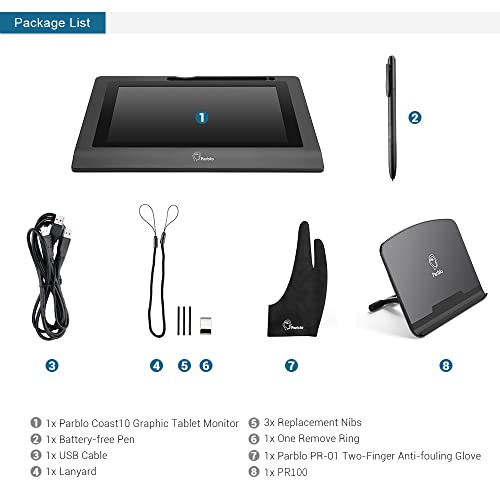
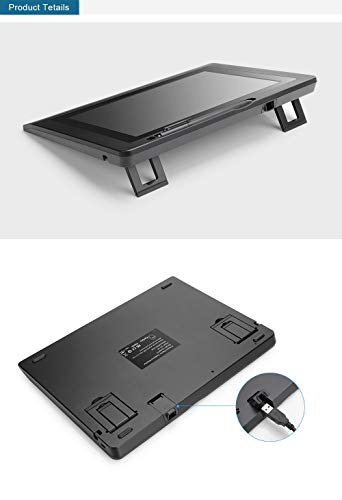
It includes a disk that I didn't use, I actually got the software off of Parblo's website, which I strongly recommend because there is an order you need to install them with that the site tells you that the CD may not. It took no time at all to set this up, I had it up and running within 15 minutes of the box landing on my porch. It plugs in via a usb cable that requires 2 slots on your computer. Mine has six in the back and three more in the front so this was not a problem for me. However they also include a free USB hub which is a great bonus and perfect for people who may not be drowning in empty usb slots like I am. I especially like how you actually open a little cover to plug the usb into the tablet and then close it, securing the usb in there so you can't accidentally unplug it if you pull it. That is just one example of an attention to detail that I appreciate in this product.
They also included a screen protector that I failed miserably to put on. That isn't the fault of the product but entirely my own. I have a cat and dog so the notion of putting a screen protector on anything in this place is laughable. I tried anyway (I always do). They also included something I didn't know was a thing but already after just one day love. It is a small microfiber glove that has 2 fingers, designed to fit over your hand and cover your pinky and ring finger, so you don't smudge up the surface of your tablet while you draw. As someone who hates fingerprints all over my stuff, I love this thing and wear it every time I draw.
The screen is 10.1, and I was worried that would be too small to really work on. It is pretty small, but once you have your art program up the size fades away pretty quick. I use GIMP at the moment (I ordered Manga Studio 5, that's coming tomorrow) and while it works okay for me the fact that the tool boxes float around has always been a frustration of mine, and the small screen does make it difficult because it shrinks the toolbars down a lot.
Now, while I had this up and running within 15 minutes, I wasn't drawing within 15 minutes. I wasn't able to get the pressure sensitivity to work. At first I jumped to the notion that it was the Parblo tablet's fault, and was ready to condemn it. I spent over an hour trying to find solutions to these problems. It turns out however that it was not the tablet's fault, but the program's. The newest version of GIMP is not very "tablet friendly" in that it doesn't play well with anything other than Wacom. After over an hour of frustratingly googling my eyeballs out of my head I found a throw-away comment on a forum to try installing GIMP 2.6, a lightly older version. I did that, and now it works like a dream. I didn't have to mess with any settings, as soon as I had 2.6 pressure sensitivity just automatically worked. So my guess is the people who have commented here that it doesn't work with GIMP didn't find the solution I did (which I'm not surprised, I almost had given up).
This tablet is great, and it is especially great for hobbyists or artists on a budget. I think that if you are a serious artist planning to make serious money on your artwork and produce top quality work, you may want to look at the larger sizes, 22 inches or so. But for someone who can't spend $800 - $1500 on an artist tablet, this is possibly the perfect solution for you.
I saw some comments that said theirs arrived with dead pixels. Mine did not, the screen is crystal clear and actually better quality image than my main monitor (which is actually an older 1080p TV and not an actual computer monitor). You can set the tablet up to mirror your monitor or be a second (or third, or fourth) monitor. I chose for mine to be a second monitor so I can draw on it while watching youtube tutorials or netflix while I work.
So I personally give this 5 stars. It isn't the best tablet on the market by far, but for the price and for what it is, I think it goes above and beyond any expectations. I love it, and I would recommend it to anyone who wants to try this kind of tablet, or anyone who wants one on a smaller budget!
I was pleasantly surprised.
It is very lightweight, and I think a lot of people think light weight equals cheap. They say "this feels cheaply made" just because it is light. I don't think it feels cheap however. When I am drawing on this it feels perfectly sturdy and I have no qualms with resting the weight of my arm on it while I draw. The pen is small and light as well, and being used to drawing with mechanical pencils I actually prefer this small pen size to the fat wacom size.
It includes a disk that I didn't use, I actually got the software off of Parblo's website, which I strongly recommend because there is an order you need to install them with that the site tells you that the CD may not. It took no time at all to set this up, I had it up and running within 15 minutes of the box landing on my porch. It plugs in via a usb cable that requires 2 slots on your computer. Mine has six in the back and three more in the front so this was not a problem for me. However they also include a free USB hub which is a great bonus and perfect for people who may not be drowning in empty usb slots like I am. I especially like how you actually open a little cover to plug the usb into the tablet and then close it, securing the usb in there so you can't accidentally unplug it if you pull it. That is just one example of an attention to detail that I appreciate in this product.
They also included a screen protector that I failed miserably to put on. That isn't the fault of the product but entirely my own. I have a cat and dog so the notion of putting a screen protector on anything in this place is laughable. I tried anyway (I always do). They also included something I didn't know was a thing but already after just one day love. It is a small microfiber glove that has 2 fingers, designed to fit over your hand and cover your pinky and ring finger, so you don't smudge up the surface of your tablet while you draw. As someone who hates fingerprints all over my stuff, I love this thing and wear it every time I draw.
The screen is 10.1, and I was worried that would be too small to really work on. It is pretty small, but once you have your art program up the size fades away pretty quick. I use GIMP at the moment (I ordered Manga Studio 5, that's coming tomorrow) and while it works okay for me the fact that the tool boxes float around has always been a frustration of mine, and the small screen does make it difficult because it shrinks the toolbars down a lot.
Now, while I had this up and running within 15 minutes, I wasn't drawing within 15 minutes. I wasn't able to get the pressure sensitivity to work. At first I jumped to the notion that it was the Parblo tablet's fault, and was ready to condemn it. I spent over an hour trying to find solutions to these problems. It turns out however that it was not the tablet's fault, but the program's. The newest version of GIMP is not very "tablet friendly" in that it doesn't play well with anything other than Wacom. After over an hour of frustratingly googling my eyeballs out of my head I found a throw-away comment on a forum to try installing GIMP 2.6, a lightly older version. I did that, and now it works like a dream. I didn't have to mess with any settings, as soon as I had 2.6 pressure sensitivity just automatically worked. So my guess is the people who have commented here that it doesn't work with GIMP didn't find the solution I did (which I'm not surprised, I almost had given up).
This tablet is great, and it is especially great for hobbyists or artists on a budget. I think that if you are a serious artist planning to make serious money on your artwork and produce top quality work, you may want to look at the larger sizes, 22 inches or so. But for someone who can't spend $800 - $1500 on an artist tablet, this is possibly the perfect solution for you.
I saw some comments that said theirs arrived with dead pixels. Mine did not, the screen is crystal clear and actually better quality image than my main monitor (which is actually an older 1080p TV and not an actual computer monitor). You can set the tablet up to mirror your monitor or be a second (or third, or fourth) monitor. I chose for mine to be a second monitor so I can draw on it while watching youtube tutorials or netflix while I work.
So I personally give this 5 stars. It isn't the best tablet on the market by far, but for the price and for what it is, I think it goes above and beyond any expectations. I love it, and I would recommend it to anyone who wants to try this kind of tablet, or anyone who wants one on a smaller budget!
Page 1 of 2



![Drawing Glove for Tablet,[Pink 2Pack] Palm Rejection Artist Right Hand Glove Digital Art Accessories](https://m.media-amazon.com/images/I/41Jvp6-d4oL._SL500_.jpg)