REOLINK 16CH Network Video Recorder for Home Security Camera System,Only Work with 16MP/12MP/4K/8MP/5MP/4MP The Same Brand PoE IP Cam,24/7 Recording to Pre-Installed 4TB Hard Drive,RLN16-410
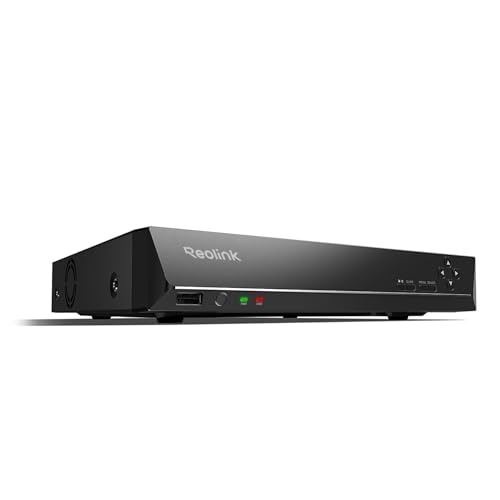


Key features
- •4MP HD 100FT NIGHT VISION and WIDE VIEWING ANGLE: 4MP 1440p Super HD camera, long-distance night vision range 65-100ft with 36 infrared LEDs, up to 80˚ wide viewing angle, capture more clearer and sharper images and video, great for driveway, hallways, etc.
- •POE OUTDOOR and INDOOR: PoE with only one Ethernet cable (up to 330ft), no power adapter needed, optional PoE switch or injector, easy setup with plug and play, waterproof camera, fit for indoor and outdoor, residential areas, retail store, business.
- •SMART MOTION DETECT and ALERT: Schedulable Motion detection, motion recording and real-time motion alert via email, app push notification to mobile phone, FTP upload snapshots and videos, motion sensibility adjustment - accurate and smart motion detection less false alarm.
- •FREE VERSITLE APPS and REMOTE VIEW: Free and intuitive Reolink Client and mobile app for iPhone and Android, PC Windows and MAC, no monthly subscription fee, support at least 8 camera sources, live view, remote view, motion detection, live stream control, and recorded video playback.
- •AUDIO FUNCTION and 24x7 NVR RECORDING: Built-in microphone, audio function; 24x7 HD video recording and storage with Reolink PoE network video recorders (support up to 16 cameras and with built-in 3TB HDD).
BrandREOLINK
CategorySurveillance Video Recorders
Size16CH NVR w/ 3TB HDD
Color5MP 16CH POE NVR
Warrantycustomer service (support@reolink dot com); 30-day money back guarantee; 2-year warranty
REOLINK 16CH Network Video Recorder for Home Security Camera System,Only Work with 16MP/12MP/4K/8MP/5MP/4MP The Same Brand PoE IP Cam,24/7 Recording to Pre-Installed 4TB Hard Drive,RLN16-410
List Price: $581.99$523.79DEALYou Save: $58.20 (10%)
Free shippingFree Returns – 30 daysFree Order CancellationSecure Payment2–3 Days DeliveryGet It October 26, 2026In Stock (3)No marketing spamNo account requiredFulfilment by FedEx / Amazon / UPS / ShipwirePayPal / Card Buyer Protection
Customer Reviews
Reviews sourced from verified Amazon purchasers4.4
out of 5
Based on 10 reviews
5★
60%
4★
40%
3★
0%
2★
0%
1★
0%
no spare parts
JC Graham✓ Verified Purchase•October 16, 2023
Lightning storm. Power adapter failed - entire system goes dark. Contact mfr to buy replacement 48V supply. They don't have any for sale / just have enough to ship out new systems. "Hope you'll understand that we can't help you".
OK so I can buy a replacement from a 3rd party but what does this say about their customer support.
OK so I can buy a replacement from a 3rd party but what does this say about their customer support.
Excellent capability for the money
Arkansas Ozarker✓ Verified Purchase•September 23, 2023
I have this system setup with 9 POE cameras (5mp). The quality of the image is excellent. A few notes: the 3TB sounds like a huge amount, but with 5mp cameras set at highest setting with audio, it doesn't allow for more than about 6-8 days of recording storage. I had another 2TB hard drive (same type, brand etc. from an older NVR) that I mounted inside this NVR case- no problem. I have it all hooked up to a 4k 42" television through one HDMI cable. I have the NVR also hooked to my wireless router with a ethernet cable for remote access through my laptop or smartphones. I recommend not going small on your monitor or television. There are several options for display, which are great. I can watch all 9 cameras at one time, but with 9 cameras on a 42"- lets just say the individual camera feeds aren't huge... I like the fact that the audio monitoring comes through the one ethernet cable from each camera and also through the hdmi output to the monitor/tv. I did try a true dedicated widescreen computer monitor at first (34 or 35" screen), but it wasn't 4k and it was much more expensive than the 4k 42" tv. Advantage of the monitor- I could use my desktop computer and monitor the video feeds on the same screen by splitting the inputs. That didn't outweigh the disadvantage for me of the much more expensive screen and lack of 4k capability for future camera upgrades. It isn't clear on the description, but this NVR works with 4k cameras also. Also, while using my smartphone, I can review stored video feeds at up to 16x speed (audio only available on 1k speed). That makes it much faster if you want to review any strange situations.
So, when is that important: I had a situation where we were on a trip and my back hose bib (outside water faucet) came on during a storm. I couldn't tell for sure that it was on while looking at the video feed while gone, but sure enough, it was on when I got home. The water ran for 3 days. Was it a vandal? I sure thought so, but I went back to the camera feed that covered that area and backed it up. A plastic lawn chair on my deck had blown into the faucet at just the right angle and bounced off, but turned on the water. I wouldn't have thought that was possible, but it happened. Never would have believed had I not saw it with my own eyes.
My takeaways: I thought initially 4 or 6 cameras would be enough. To actually cover my house and detached carport took eight (8) cameras. The 9th is for my shop. You just can't do it with 4 or 6 cameras. The TV/monitor hardwire (hdmi) hookup only allows video review at 4X speed. Smartphone or laptop hooked up through my wireless router (or 4g) allows up to 16X review speed of stored video. Not sure why this is. Also, there is no phone number for tech support anywhere in the US. All tech support is via email. I am old school and I like to talk to a person. To me, that is the biggest downside. Supposedly, this only supports Reolink cameras. I haven't tried any other brands, but I may for the PTZ feature. I will update my review when I do. Why would I do that? Reolink only offers a 4x optical zoom camera at this time. Other makers offer up to 20x optical zoom. That would be nice. Also, the compression is a different standard (H264 vs H265). That may be why it doesn't work with other makes.
All in all a very nice, easy to set up system with audio and excellent video quality. Hardest part was running the wiring.
Any questions about my installation, please don't hesitate to message me.
Hope this helps.
UPDATE 11/17/2020
I saw some reviews that state this NVR doesn't work on 4k cameras. They make two versions of the RLN16-410. I do have the 4k version. Make sure when you order it, you go with the 4k for future upgrades. Also, I added an extra internal hard drive for as 3tb for 24/7 recording does only do about 4 days with 8 cameras. To me, I like the option of having 7 or 8 days and the fact that you can occasionally format one hard drive and not lose your settings. Only issue I have had is the firmware upgrades. I haven't been able to successfully do a firmware upgrade yet. Am going to contact customer support on this today.
So, when is that important: I had a situation where we were on a trip and my back hose bib (outside water faucet) came on during a storm. I couldn't tell for sure that it was on while looking at the video feed while gone, but sure enough, it was on when I got home. The water ran for 3 days. Was it a vandal? I sure thought so, but I went back to the camera feed that covered that area and backed it up. A plastic lawn chair on my deck had blown into the faucet at just the right angle and bounced off, but turned on the water. I wouldn't have thought that was possible, but it happened. Never would have believed had I not saw it with my own eyes.
My takeaways: I thought initially 4 or 6 cameras would be enough. To actually cover my house and detached carport took eight (8) cameras. The 9th is for my shop. You just can't do it with 4 or 6 cameras. The TV/monitor hardwire (hdmi) hookup only allows video review at 4X speed. Smartphone or laptop hooked up through my wireless router (or 4g) allows up to 16X review speed of stored video. Not sure why this is. Also, there is no phone number for tech support anywhere in the US. All tech support is via email. I am old school and I like to talk to a person. To me, that is the biggest downside. Supposedly, this only supports Reolink cameras. I haven't tried any other brands, but I may for the PTZ feature. I will update my review when I do. Why would I do that? Reolink only offers a 4x optical zoom camera at this time. Other makers offer up to 20x optical zoom. That would be nice. Also, the compression is a different standard (H264 vs H265). That may be why it doesn't work with other makes.
All in all a very nice, easy to set up system with audio and excellent video quality. Hardest part was running the wiring.
Any questions about my installation, please don't hesitate to message me.
Hope this helps.
UPDATE 11/17/2020
I saw some reviews that state this NVR doesn't work on 4k cameras. They make two versions of the RLN16-410. I do have the 4k version. Make sure when you order it, you go with the 4k for future upgrades. Also, I added an extra internal hard drive for as 3tb for 24/7 recording does only do about 4 days with 8 cameras. To me, I like the option of having 7 or 8 days and the fact that you can occasionally format one hard drive and not lose your settings. Only issue I have had is the firmware upgrades. I haven't been able to successfully do a firmware upgrade yet. Am going to contact customer support on this today.
This NVR works well for my unique situation.
SOu✓ Verified Purchase•September 22, 2023
This is an initial review, since I just got this NVR.
Background :
I was looking for a decent camera system, to replace (2) separate 720p systems. I had Zmodo and Jooan Systems. The Zmodo system worked ok, but the iOS and Android app was somewhat iffy. Also, Zmodo uses a proprietary "4" wire / Cat 5 cabling system (they call it "simplified" POE), that I regret running. Otherwise it worked good and the cameras lasted, including the IR bulbs.
The Jooan system (using the XMEye App- which was buggy) worked well, used Cat5e and was ONVIF. But the IR bulbs burned out in about a year, so they were useless at night. Each unit I used their proprietary NVR. The Zmodo NVR was hooked up to the lan, and the Jooan was hooked up to the Lan via a TP-Link Ethernet of Powerline adapter.
My problem-
Replace all cameras and run them on a computer based NVR (Zoneminder). This required (2) POE switches. (1) for the local set-up and (1) for the Ethernet over Powerline system.
Reolink cameras are infact ONVIF compliant, and Zoneminder did see and was able to record (running on a test computer). But, there is no PTZ profile and more importantly, I need a good computer with at least an Intel i7-8400 and min 8G ram to run this power hungry "heater".
With Zoneminder and a new POE switch (BV-Tech), I was able to power and get data from the new Reolink camera using the crummy Zmodo cables, YEAH!
The solution-
After reading all of the negative reviews on the Reolink NVR, from klunky interface, to loud squeaky fan, etc etc etc, I figured let's try it out.
Initially, I tried using the Zmodo cables with the Reolink camera. It was a no go. So, I had no chose but to use the POE switch (from the Zoneminder experiment).
That was OK, since re-wiring was a dreaded task.
Now, my Reolink NVR sits on the LAN, with the 4 cameras on the LAN using the POE Switch (and 4 cameras via the powerline and a seperate POE switch), and it worked just fine. The phone apps are very good, and thank the gods, they have a MAC desktop client. My other camera systems REQUIRED windows and REQUIRED Internet Explorer and the hateful ActiveX.
The client software integrates well with NVR. The NVR itself is somewhat "unrefined", according to today's slick interfaces. But, once you set it up, I have no need to look at it.
**** One important and confusing note, the NVR has a warning stating to NOT connect the VGA or HDMI cable until after you power the unit. What happens if there is a power outage??? **** I find this very odd. I pulled the sticker off and placed it on the FRONT, so I don't forget. **** but what happens with a power outage and power comes back.....REOLINK?
My configuration works well for me, since I can still directly connect to each camera. If you used the NVR's POE, the NVR has a DHCP server, creates a Class "B" network, for the cameras. You cannot directly connect to each camera, you must use the NVR, to control/config the cameras.
Overall the DVR works very well. It uses by far less electricity than a dedicated computer. It easily recorded full stream, 8 cameras,out of 16. and the PTZ works well. ( but the PTZ speed of "32" is way to fast over the phone app or client software this is adjustable on the client software, but not on the app_____ hmmm....I digress).
Sadly, the NVR it is proprietary, too. But Reolink is in the camera business, not the NVR business, so they have a vested interested in keeping you "locked" with their DVR. Reolink has a nice, and honest "paper" on their site about using a Reolink NVR, or using the Reolink Client software to record or using a 3rd party NVR.
The NVR connects over the internet using a Reolink "UID". It is probably similar to a dynamic DNS service, where you don't need to open ports on your router/firewall, which is nice.
Again, this NVR works well , and so far I'm happy with it.
Background :
I was looking for a decent camera system, to replace (2) separate 720p systems. I had Zmodo and Jooan Systems. The Zmodo system worked ok, but the iOS and Android app was somewhat iffy. Also, Zmodo uses a proprietary "4" wire / Cat 5 cabling system (they call it "simplified" POE), that I regret running. Otherwise it worked good and the cameras lasted, including the IR bulbs.
The Jooan system (using the XMEye App- which was buggy) worked well, used Cat5e and was ONVIF. But the IR bulbs burned out in about a year, so they were useless at night. Each unit I used their proprietary NVR. The Zmodo NVR was hooked up to the lan, and the Jooan was hooked up to the Lan via a TP-Link Ethernet of Powerline adapter.
My problem-
Replace all cameras and run them on a computer based NVR (Zoneminder). This required (2) POE switches. (1) for the local set-up and (1) for the Ethernet over Powerline system.
Reolink cameras are infact ONVIF compliant, and Zoneminder did see and was able to record (running on a test computer). But, there is no PTZ profile and more importantly, I need a good computer with at least an Intel i7-8400 and min 8G ram to run this power hungry "heater".
With Zoneminder and a new POE switch (BV-Tech), I was able to power and get data from the new Reolink camera using the crummy Zmodo cables, YEAH!
The solution-
After reading all of the negative reviews on the Reolink NVR, from klunky interface, to loud squeaky fan, etc etc etc, I figured let's try it out.
Initially, I tried using the Zmodo cables with the Reolink camera. It was a no go. So, I had no chose but to use the POE switch (from the Zoneminder experiment).
That was OK, since re-wiring was a dreaded task.
Now, my Reolink NVR sits on the LAN, with the 4 cameras on the LAN using the POE Switch (and 4 cameras via the powerline and a seperate POE switch), and it worked just fine. The phone apps are very good, and thank the gods, they have a MAC desktop client. My other camera systems REQUIRED windows and REQUIRED Internet Explorer and the hateful ActiveX.
The client software integrates well with NVR. The NVR itself is somewhat "unrefined", according to today's slick interfaces. But, once you set it up, I have no need to look at it.
**** One important and confusing note, the NVR has a warning stating to NOT connect the VGA or HDMI cable until after you power the unit. What happens if there is a power outage??? **** I find this very odd. I pulled the sticker off and placed it on the FRONT, so I don't forget. **** but what happens with a power outage and power comes back.....REOLINK?
My configuration works well for me, since I can still directly connect to each camera. If you used the NVR's POE, the NVR has a DHCP server, creates a Class "B" network, for the cameras. You cannot directly connect to each camera, you must use the NVR, to control/config the cameras.
Overall the DVR works very well. It uses by far less electricity than a dedicated computer. It easily recorded full stream, 8 cameras,out of 16. and the PTZ works well. ( but the PTZ speed of "32" is way to fast over the phone app or client software this is adjustable on the client software, but not on the app_____ hmmm....I digress).
Sadly, the NVR it is proprietary, too. But Reolink is in the camera business, not the NVR business, so they have a vested interested in keeping you "locked" with their DVR. Reolink has a nice, and honest "paper" on their site about using a Reolink NVR, or using the Reolink Client software to record or using a 3rd party NVR.
The NVR connects over the internet using a Reolink "UID". It is probably similar to a dynamic DNS service, where you don't need to open ports on your router/firewall, which is nice.
Again, this NVR works well , and so far I'm happy with it.
UI good, easy to use and configure.
Alan✓ Verified Purchase•August 29, 2023
NVR's are pretty simple. This one is adequate to the task. Only big downside is the playback depending on what cameras you have. I have the 8mp cameras and you can only playback 1 at a time. The message the NVR displays indicates this is something they are working on and may correct in a future firmware update. Overall I'm extremely pleased with the system as a whole, having previously having a Zosi system where the app rarely worked correctly. Reolink app functions reliably, the cameras are impressive, and the NVR does what it's supposed to. There is a learning curve for what the options do, but once you get that down it's cake.
Easy to use
Lynda✓ Verified Purchase•July 13, 2023
Like everything about this unit. Easy to set up and use!! A big plus for us non techy users
Page 1 of 2


