North Bayou Dual Monitor Desk Mount Stand Full Motion Swivel Computer Monitor Arm Gas Spring fits 2 Screens up to 27'' 14.3lbs Each Monitor
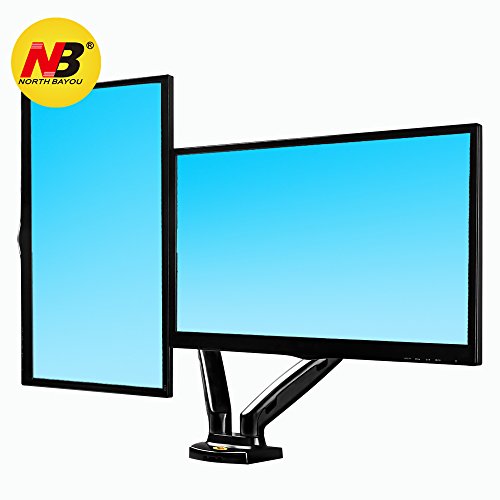
Key features
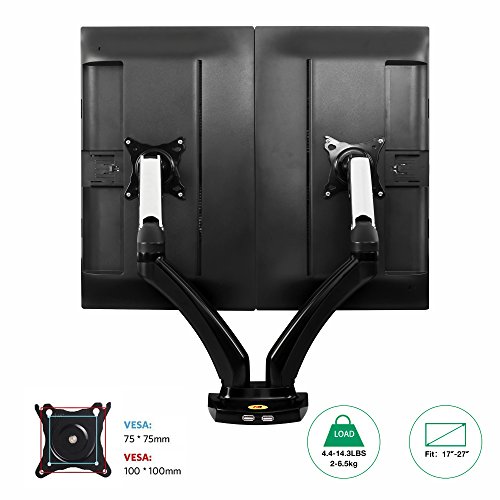
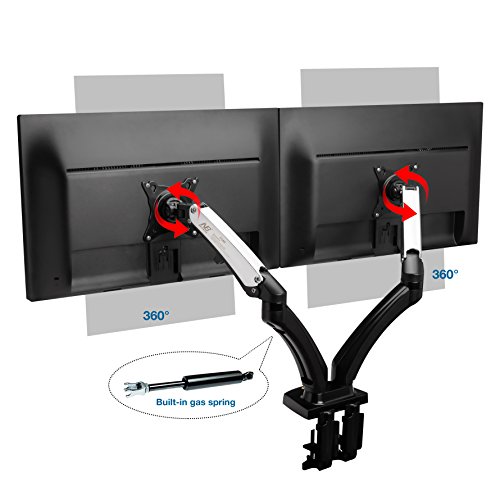
- •COMPATIBILITY: UNIVERSAL dual desk monitor mount for two 17" - 27 inch LED LCD Flat Panel screens and monitors weighing from 4.4 lbs to 14.3 lbs each; C-clamp or grommet installation are available; desk mount comes with all needed hardware for easy installation
- •FULLY ADJUSTABLE: TWICE as FUNCTIONAL; The durable easy-to-use gas spring arm system helps create ERGONOMIC settings and declutter your workspace. You can adjust the monitor bracket ONLY AFTER you fix it and hang a screen/monitor on it!
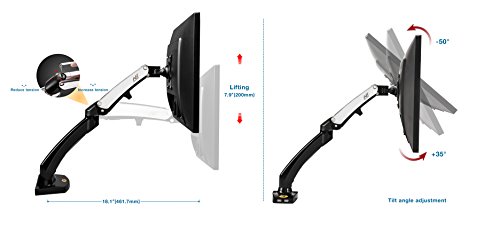
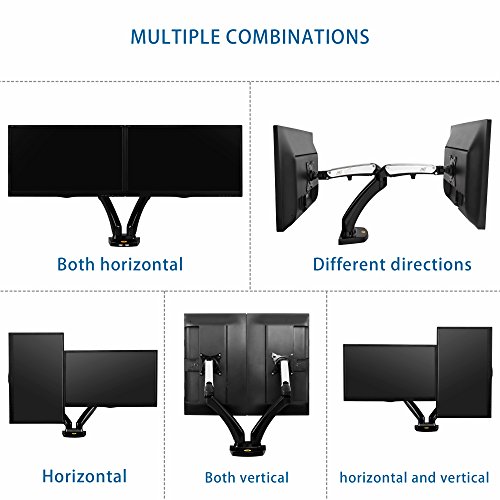
- •FULL MOTION monitor stand: A wide range of movement: the screens can be rotated and tilted effortlessly and smoothly in any direction - up 35 degrees and down 50 degrees combined with a 360 degree rotation; PORTRAIT + LANDSCAPE mode
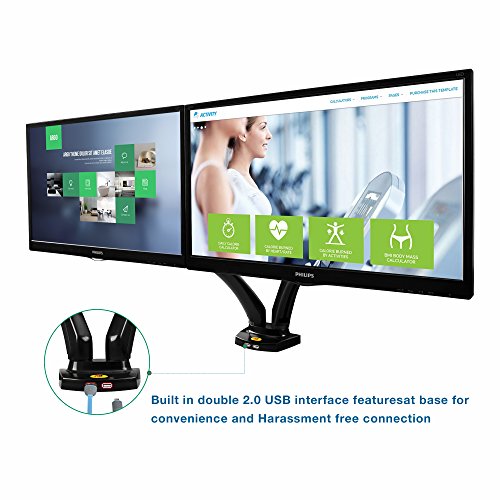
- •USB feature: The USB hub in the base provides an easy way to dock, charge your USB devices without using valuable desk space
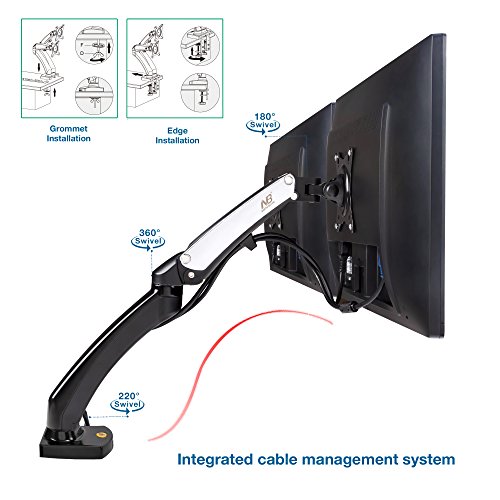
- •EASY INSTALLATION: Complete package includes the sturdy pre-assembled aluminum frame which serves to hide wires inside in order to achieve clutter free look
BrandNB North Bayou
CategoryMonitor Arms & Stands
Sizedual monitor
ColorF180:chromed+black 17-27' Dual Screens
North Bayou Dual Monitor Desk Mount Stand Full Motion Swivel Computer Monitor Arm Gas Spring fits 2 Screens up to 27'' 14.3lbs Each Monitor
List Price: $69.67$62.70DEALYou Save: $6.97 (10%)
Free shippingFree Returns – 30 daysFree Order CancellationSecure Payment2–3 Days DeliveryGet It June 25, 2026In Stock (1)No marketing spamNo account requiredFulfilment by FedEx / Amazon / UPS / ShipwirePayPal / Card Buyer Protection
Customer Reviews
Reviews sourced from verified Amazon purchasers4.3
out of 5
Based on 10 reviews
5★
70%
4★
10%
3★
10%
2★
0%
1★
10%
Great monitor arms for the price
Froemer✓ Verified Purchase•March 25, 2018
So far I love this dual monitor arm. The setup is fairly painless. The only thing I found strange was having to install the USB cables that came with it, instead of them just being installed by the manufacturer, but I don't mind a little extra work here and there. I haven't yet plugged them in to test them though.
After getting everything mounted to the desk and the monitors mounted to the arm, I needed to adjust the tension on the arms because they wouldn't stay in the positions I adjusted them to. This is done by loosening or tightening the hex bolt in the elbow of the arm at the top until you can position your monitors in any position and have them stay in place.
Overall, adjustments are made fairly easily, and I was able to have one monitor placed vertically and one horizontally for projects and coding.
After getting everything mounted to the desk and the monitors mounted to the arm, I needed to adjust the tension on the arms because they wouldn't stay in the positions I adjusted them to. This is done by loosening or tightening the hex bolt in the elbow of the arm at the top until you can position your monitors in any position and have them stay in place.
Overall, adjustments are made fairly easily, and I was able to have one monitor placed vertically and one horizontally for projects and coding.
Great cable management
Melany✓ Verified Purchase•February 14, 2018
These are your monitor stands that do it all. Great cable management. Great adjustment options.
However I would like to discuss one adjustment option that straight up is NOT in the instructions book for this model at all.
Some backstory:
I noticed that my screens were drooping by tilting forward. This was especially annoying since I would tilt them backwards and they would droop until they were looking down at my table.
I knew this was a matter of adjusting the tension behind the monitor but the area where you need to adjust it is covered by plastic and seemingly wouldnt come off.
I googled around looking for a fix for my specific model of these arms but no one had any solutions so I decided to check out North Bayous other models to see if they mention something about it. Boom! One of their other arms has a photo showing off the adjustability, and in that photo it showed that that plastic piece pulls off on the right side only.
Its a little difficult to actually pull off but once you do, take the bigger Allen wrench the arm came with and use it to adjust the tension. Make sure your screen is MOUNTED as you do this. Counter clockwise is tighten and clockwise is loosen.
Wonderful arm! Incomplete instructions!
However I would like to discuss one adjustment option that straight up is NOT in the instructions book for this model at all.
Some backstory:
I noticed that my screens were drooping by tilting forward. This was especially annoying since I would tilt them backwards and they would droop until they were looking down at my table.
I knew this was a matter of adjusting the tension behind the monitor but the area where you need to adjust it is covered by plastic and seemingly wouldnt come off.
I googled around looking for a fix for my specific model of these arms but no one had any solutions so I decided to check out North Bayous other models to see if they mention something about it. Boom! One of their other arms has a photo showing off the adjustability, and in that photo it showed that that plastic piece pulls off on the right side only.
Its a little difficult to actually pull off but once you do, take the bigger Allen wrench the arm came with and use it to adjust the tension. Make sure your screen is MOUNTED as you do this. Counter clockwise is tighten and clockwise is loosen.
Wonderful arm! Incomplete instructions!
Believe The Product Description!
Robert B.✓ Verified Purchase•February 7, 2018
The mount holds my 24" monitors just fine . . . but allowed them to be only 8 inches above the desk surface at max!
This should have been no surprise, since the drawings clearly indicate a relatively small range of vertical adjustment, but after 15 minutes of use my neck and shoulders were tied in knots. I had been using books, boxes, reams of printer paper, whatever it took to get my monitors up to eye level--which I would guess is a main reason--besides clearing desk space and upping your office style game--that people buy these, imagining that they would allow the extension required for eye level viewing. Not so, I'm afraid. I see that all cheaper gas spring monitor stands have the same extension limit.
I had to buy an extension bracket that gave me three more inches of lift AND put shims totaling another 1.75" under the base of the stand simply to get my monitors up to acceptable level for me--a 5'9" man--at my desk.
Why make stands with such a glaring design deficiency?
For shoppers who feel my pain about eye level monitors, you should be looking for one with arms that attach to a pole. Amazon has these, too, at reasonable prices. Wish I had saved myself all that time, effort and money--but I can't blame the seller for my ignorance. They do post the measurements!
Now my desk is beautifully cleared, yes, and after another $35 and an embarrassing number of hours brainstorming, shopping, tearing my office apart and so on, my monitors are even eye level.
I doubt ANYBODY really WANTS their monitors that low, however. Think and measure carefully if you're considering this type of monitor stand, folks.
This should have been no surprise, since the drawings clearly indicate a relatively small range of vertical adjustment, but after 15 minutes of use my neck and shoulders were tied in knots. I had been using books, boxes, reams of printer paper, whatever it took to get my monitors up to eye level--which I would guess is a main reason--besides clearing desk space and upping your office style game--that people buy these, imagining that they would allow the extension required for eye level viewing. Not so, I'm afraid. I see that all cheaper gas spring monitor stands have the same extension limit.
I had to buy an extension bracket that gave me three more inches of lift AND put shims totaling another 1.75" under the base of the stand simply to get my monitors up to acceptable level for me--a 5'9" man--at my desk.
Why make stands with such a glaring design deficiency?
For shoppers who feel my pain about eye level monitors, you should be looking for one with arms that attach to a pole. Amazon has these, too, at reasonable prices. Wish I had saved myself all that time, effort and money--but I can't blame the seller for my ignorance. They do post the measurements!
Now my desk is beautifully cleared, yes, and after another $35 and an embarrassing number of hours brainstorming, shopping, tearing my office apart and so on, my monitors are even eye level.
I doubt ANYBODY really WANTS their monitors that low, however. Think and measure carefully if you're considering this type of monitor stand, folks.
Super with 2 flaws. But price is incredible
1686✓ Verified Purchase•January 16, 2018
This monitor stand has been fantastic. I've onIy had it for a couple of months but so far so good.
I got it for use with Dell U Series 27-Inch Screen LED-lit Monitor (U2718Q) which Amazon lists having a weight of 13.79 lbs. It has no trouble supporting the weight and it fit perfectly. Movement is great. One thing to note is that based on the image, I thought this was black and white in color and the white turned out to be a faux chrome. Doesn't look bad"“just wasn't what I expected.
First Issue
This issue is illustrated in the picture. The adjustable bracket didn't quite reach at the maximum setting, but moving it to the next smaller setting left the bottom part of the bracket interfering with my table. The blue shape shows where the lower bracket would be at the other setting. The bracket would need to be shifted out, but then only a small part of the bracket would be in contact with the table edge. As such, I had to jerry rig it. It has worked fine though. So with a mount this cheap, I was willing to compromise.
Second issue
The USB cables that came with unit to be inserted into the base were poor quality. I was using them for charging and they were extremely slow. I managed to find replacement cables here on amazon that fit the unit perfectly and were cheap:
StarTech.com 1m Black SuperSpeed USB 3.0 Extension Cable A to A - Male to Female USB 3 Extension Cable Cord 1 m
Your needs probably don't require a USB 3 cable. So you should be able to get USB 2 cables even cheaper.
I got it for use with Dell U Series 27-Inch Screen LED-lit Monitor (U2718Q) which Amazon lists having a weight of 13.79 lbs. It has no trouble supporting the weight and it fit perfectly. Movement is great. One thing to note is that based on the image, I thought this was black and white in color and the white turned out to be a faux chrome. Doesn't look bad"“just wasn't what I expected.
First Issue
This issue is illustrated in the picture. The adjustable bracket didn't quite reach at the maximum setting, but moving it to the next smaller setting left the bottom part of the bracket interfering with my table. The blue shape shows where the lower bracket would be at the other setting. The bracket would need to be shifted out, but then only a small part of the bracket would be in contact with the table edge. As such, I had to jerry rig it. It has worked fine though. So with a mount this cheap, I was willing to compromise.
Second issue
The USB cables that came with unit to be inserted into the base were poor quality. I was using them for charging and they were extremely slow. I managed to find replacement cables here on amazon that fit the unit perfectly and were cheap:
StarTech.com 1m Black SuperSpeed USB 3.0 Extension Cable A to A - Male to Female USB 3 Extension Cable Cord 1 m
Your needs probably don't require a USB 3 cable. So you should be able to get USB 2 cables even cheaper.
Defective
Dee✓ Verified Purchase•January 11, 2018
everything was super easy to install, but once I started using it, the mount would not allow my monitor to stay down. No matter how much I tighten or loosen the tension, the monitor keeps popping back up. I have a 2nd mount (fleximount) that is more expensive and decided to try a cheaper option. Unfortunately, it was the wrong decision. I don't want to risk buying this is again and get another defective mount, so i'll stick with the pricey mount.
Page 1 of 2