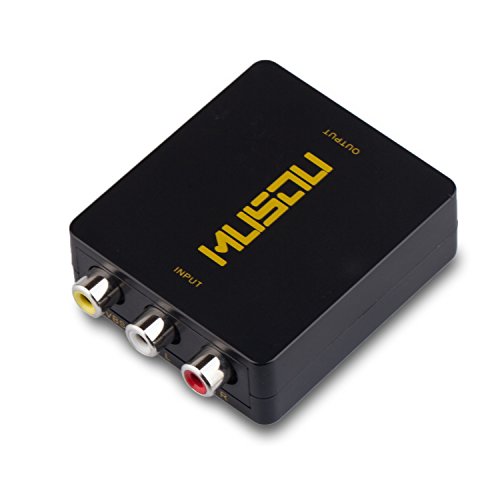
Musou RCA AV Composite to HDMI Video Audio Converter Adapter Mini RCA to HDMI Box Support 1080P for TV/PC/PS2/Blue-Ray DVD,Black



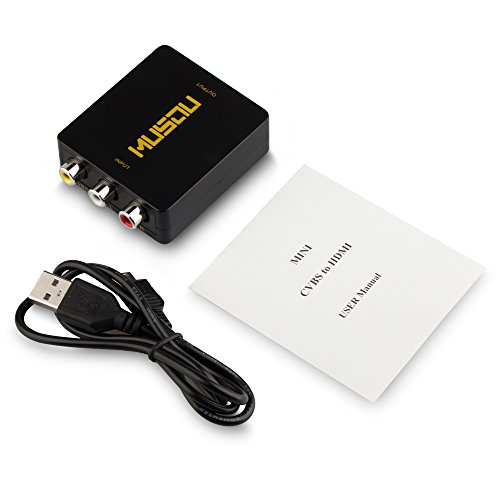

Key features
- •◆EASY USE: User-friendly,plug and play - no installation needed. Low power, No power adapter
- •◆MINI SIZE: Very little rca to hdmi converter box,portable and flexible,work like a charm
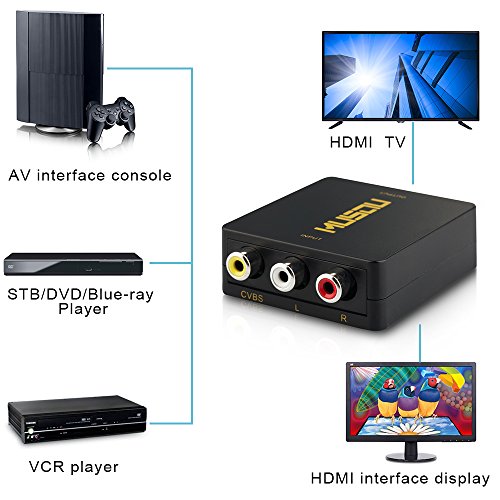
- •◆GOOD COMPATIBILITY: Support PAL, NTSC3.58, NTSC4.43, SECAM, PAL/M, PAL/N standard TV formats input. Support HDMI 1080p or 720p output
- •◆GREAT TRANSMISSION: Provide advanced signal processing with great precision, colors, resolutions, and details
- •◆WHAT YOU GET: Musou RCA to HDMI Converter,convert analog composite signal to HDMI only,30 days money back,1-year warranty
Musou RCA AV Composite to HDMI Video Audio Converter Adapter Mini RCA to HDMI Box Support 1080P for TV/PC/PS2/Blue-Ray DVD,Black
List Price: $25.20$22.68DEALYou Save: $2.52 (10%)
Free shippingFree Returns – 30 daysFree Order CancellationSecure Payment2–3 Days DeliveryGet It October 26, 2026In Stock (1)No marketing spamNo account requiredFulfilment by FedEx / Amazon / UPS / ShipwirePayPal / Card Buyer Protection
Customer Reviews
Reviews sourced from verified Amazon purchasers3.9
out of 5
Based on 10 reviews
5★
60%
4★
20%
3★
0%
2★
10%
1★
10%
Use: Streaming
Ocelot Tamer✓ Verified Purchase•March 3, 2018
I'm a small-time video game streamer that greatly enjoys streaming games that absolutely no one cares about. It's a passion. So of course, in order to do so properly you need a capture card and cables for days. Then, for old consoles you're going to need one of these doo-dads to convert your signal to HDMI for the capture card that is for modern-consoles.
It's a pain in the backside.
For PSP I have to use a component to RWY, then this, then HDMI to the capture card, and finally it goes into the computer. I've noticed no delay from that, nor N64 or PS2. What's really nice about this set is that you can change the output to 720 or 1080p. It's not an excellent upscaling if that's what you're looking for, but that's really not the point of the device.
Because my setup runs through an HDMI splitter, that's yet another device that has to convert the signal on top of everything. To test it for latency, I used a PSP title called Project Diva, which is incredibly picky about timing due to it being a rhythm game. I noticed a 1ms delay at most, which is not enough to be considered a problem for any other game or movie. Since this was through four different devices hooked up to do one thing, I doubt with a direct connection anyone will notice any problems.
I wish it didn't need to be powered, but the majority of televisions have USB ports on them, so it's not really a major issue. Fantastic product.
It's a pain in the backside.
For PSP I have to use a component to RWY, then this, then HDMI to the capture card, and finally it goes into the computer. I've noticed no delay from that, nor N64 or PS2. What's really nice about this set is that you can change the output to 720 or 1080p. It's not an excellent upscaling if that's what you're looking for, but that's really not the point of the device.
Because my setup runs through an HDMI splitter, that's yet another device that has to convert the signal on top of everything. To test it for latency, I used a PSP title called Project Diva, which is incredibly picky about timing due to it being a rhythm game. I noticed a 1ms delay at most, which is not enough to be considered a problem for any other game or movie. Since this was through four different devices hooked up to do one thing, I doubt with a direct connection anyone will notice any problems.
I wish it didn't need to be powered, but the majority of televisions have USB ports on them, so it's not really a major issue. Fantastic product.
Awesome !!
Vince Cooper✓ Verified Purchase•January 19, 2018
I used this Converter to hook up an old Sega Genesis Model 2 Game Console to my HDMI Monitor with built in speakers. I had to get a newer Video Cable for the Model 2 that has 3 RCA connections at the end & hooked up the HDMI Cable to my Monitor. The Sound & Picture quality I'm getting in 1080P is fantastic in my opinion. I notice this Converter sends a little Message to the upper right hand corner of my Monitor letting me know it's in 1080P Mode. I like that. This converter comes with a USB power cord & must be plugged into a USB power source. I bought one of the newer power strips sold here on Amazon that has 5 normal outlets & 2 USB ports that made life easy. I didn't need to use my PC or any other USB Hub device.
The Power Strip I have does it all. Now I'm really enjoying all my Genesis games in 1080P on my HDMI Monitor with built in speakers.
I just ordered another one of this Converter to have as a spare.
The Power Strip I have does it all. Now I'm really enjoying all my Genesis games in 1080P on my HDMI Monitor with built in speakers.
I just ordered another one of this Converter to have as a spare.
Useful for plugging RCA into HDMI, but doesn't really help the picture look good
G.E. from NJ✓ Verified Purchase•December 31, 2017
I used this for my Super Nintendo into my 42" and 32" 720p LCD TVs. It works, and it's fine. It just doesn't provide any improvement in quality compared to plugging my Super Nintendo directly into my 42" RCA connectors. I was hoping that this box would help with the poor display quality (fuzzy text, stretched textures, etc), but really all this does is allow you to plug in a RCA / AV cable into HDMI.
My guess is that there are other boxes like this out there that would convert the signal AND make it look better, and that's what we should track down.
My guess is that there are other boxes like this out there that would convert the signal AND make it look better, and that's what we should track down.
DOESN'T WORK WITH LAPTOP HDMI PORT. HDMI INPUT MONITORS ONLY!!!
Norma✓ Verified Purchase•July 8, 2017
I bought this with the intention to play my Nintendo GameCube using my laptop as a monitor via its HDMI port.
There were no instructions on how to get this started, so I just plugged the white/red/yellow RCA cables from my gamecube into the colored input, plugged the Musou HDMI cable I also bought with the signal converter directly into my laptop HDMI port, and plugged the signal converter's USB power into an apple wall charger plug. All three cables were properly plugged in and I could see blue light glowing from inside the device.
I'm quite sure that everything was connected properly, I even used a friend's HDMI cable to check if the Musou HDMI cable was faulty.
Turns out the signal converter itself just doesn't work no matter what I unplug & replug. My gamecube is properly set up so it's not the gamecube's fault. I guess I must have received a product that doesn't work. If Musou could get in touch with me to replace this with a working RCA to HDMI converter, I would be happy. For now, I am disappointed and sad!!
~~~~~~~~~~~~~~~~~~ EDIT ~~~~~~~~~~~~~~~~~~~~~~~~~
I got in contact with Musou and they responded very quickly to clarify that there is a difference between HDMI input and HDMI output.
Most laptops mac/PC only have HDMI output, which means you can send a signal from your laptop to a TV monitor, but you can never get the output from a TV on your laptop since the signal only goes one way. This has made me realize that I ought to get some sort of monitor before I say anything bad about the product. MAKE SURE YOU HAVE SOMETHING THAT ACCEPTS HDMI INPUT OR YOU'LL FEEL SILLY LIKE ME.
~~~~~~~~ //EDIT AS OF SEVERAL MONTHS LATER ~~~~~~~~
I used my boyfriend's desktop monitor for the HDMI connection, since I know for sure it accepts HDMI INPUT. Everything was plugged in like usual and it worked!! I couldn't believe it, since I had left it collecting dust for at least 2 months until I could get my hands on a monitor. I was able to play my GameCube perfectly fine even though the screen resolution was much smaller than the widescreen monitor. It works consistently and I'm happy with my product! Switching between the resolutions in the musou box isn't very noticeable of a difference to me, so I leave it on whichever setting.
I just knocked 1 star off because every now and then the screen jitters like a 90s commercial on an old school VHR tape. It happened twice in a 3 hour sitting of gaming so no big deal.
There were no instructions on how to get this started, so I just plugged the white/red/yellow RCA cables from my gamecube into the colored input, plugged the Musou HDMI cable I also bought with the signal converter directly into my laptop HDMI port, and plugged the signal converter's USB power into an apple wall charger plug. All three cables were properly plugged in and I could see blue light glowing from inside the device.
I'm quite sure that everything was connected properly, I even used a friend's HDMI cable to check if the Musou HDMI cable was faulty.
Turns out the signal converter itself just doesn't work no matter what I unplug & replug. My gamecube is properly set up so it's not the gamecube's fault. I guess I must have received a product that doesn't work. If Musou could get in touch with me to replace this with a working RCA to HDMI converter, I would be happy. For now, I am disappointed and sad!!
~~~~~~~~~~~~~~~~~~ EDIT ~~~~~~~~~~~~~~~~~~~~~~~~~
I got in contact with Musou and they responded very quickly to clarify that there is a difference between HDMI input and HDMI output.
Most laptops mac/PC only have HDMI output, which means you can send a signal from your laptop to a TV monitor, but you can never get the output from a TV on your laptop since the signal only goes one way. This has made me realize that I ought to get some sort of monitor before I say anything bad about the product. MAKE SURE YOU HAVE SOMETHING THAT ACCEPTS HDMI INPUT OR YOU'LL FEEL SILLY LIKE ME.
~~~~~~~~ //EDIT AS OF SEVERAL MONTHS LATER ~~~~~~~~
I used my boyfriend's desktop monitor for the HDMI connection, since I know for sure it accepts HDMI INPUT. Everything was plugged in like usual and it worked!! I couldn't believe it, since I had left it collecting dust for at least 2 months until I could get my hands on a monitor. I was able to play my GameCube perfectly fine even though the screen resolution was much smaller than the widescreen monitor. It works consistently and I'm happy with my product! Switching between the resolutions in the musou box isn't very noticeable of a difference to me, so I leave it on whichever setting.
I just knocked 1 star off because every now and then the screen jitters like a 90s commercial on an old school VHR tape. It happened twice in a 3 hour sitting of gaming so no big deal.
Makes this ancient TRS-80 Model I computer usable with an LCD monitor
kgcode✓ Verified Purchase•June 1, 2017
I have an unusual application of this product, and it works exactly as I had hoped.
Background: I have a TRS-80 Model I computer (yes, from 1977, 40 years ago) whose video monitor no longer worked. The video output from this computer is a black-and-white composite video signal. I built a video cable (5-pin DIN to RCA video out), and connected it directly to an old TV with an RCA game input, but the quality was poor and the signal seemed to get more unstable as more information was displayed on the screen. I was hoping that converting the composite signal to a digital HDMI signal, I'd get a better result.
Solution: Connecting the RCA out cable to the video RCA in on this device, setting this device to 720p, and then connecting this device's HDMI output to an LCD computer monitor (Viewsonic VA2012wb with an HDMI-to-DVI adapter) gives me a perfect result. I can now use the TRS-80 Model I computer with this spare computer monitor...no CRT needed.
Background: I have a TRS-80 Model I computer (yes, from 1977, 40 years ago) whose video monitor no longer worked. The video output from this computer is a black-and-white composite video signal. I built a video cable (5-pin DIN to RCA video out), and connected it directly to an old TV with an RCA game input, but the quality was poor and the signal seemed to get more unstable as more information was displayed on the screen. I was hoping that converting the composite signal to a digital HDMI signal, I'd get a better result.
Solution: Connecting the RCA out cable to the video RCA in on this device, setting this device to 720p, and then connecting this device's HDMI output to an LCD computer monitor (Viewsonic VA2012wb with an HDMI-to-DVI adapter) gives me a perfect result. I can now use the TRS-80 Model I computer with this spare computer monitor...no CRT needed.
Page 1 of 2