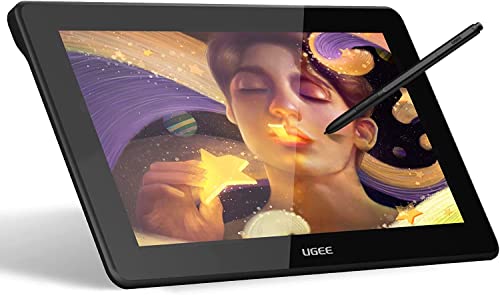
HUION Inspiroy H1060P Graphics Drawing Tablet with 8192 Pressure Sensitivity Battery-Free Stylus and 12 Customized Hot Keys, 10 x 6.25 inches Digital Art Tablet for Mac, Windows PC and Android




Key features
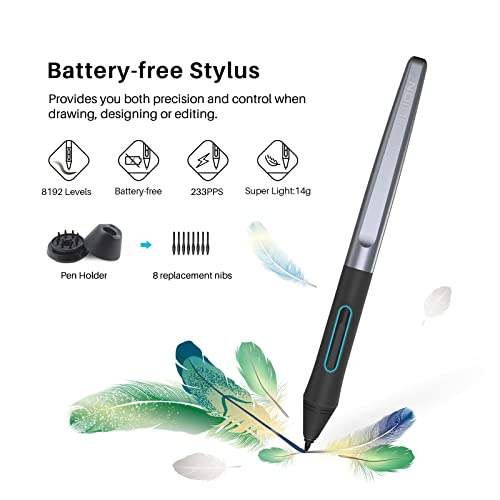
- •8192 Levels of Pen Pressure Sensitivity - You can enjoy smooth and accurate lines when using the drawing tablet. Resolution - 5080 Report Rate: 233 RPS.
- •12 Express Keys and 16 Soft Keys - The 12 physical express-keys on the left and 16 soft keys on the top of the drawing surface are all customizable, which provides you a plethora of ways to tailor your software experience and raise your work efficiency.
- •Difference with the original 1060PLUS digital tablet in Appearance - Full-Area Surface Cover, Pen Carrier, and Thinner Border, which makes the drawing surface bigger. Quieter Express Keys, Better Linearity in art programs, Better pen pressure sensitivity. The 8GB MicroSD Card is built in the product, NOT separately packed.
- •Free Gifts - 1 Carrying Case that guards your Huion Graphics Tablet from scratches and scrapes, 1 Glove that reduces the friction between your hand and the tablet surface.
- •Huion art tablet is compatible with Windows 7 or later, mac OS 10.11 or later and can work for the mainstream digital art software including Adobe Photoshop, Illustrator, Corel Painter, Manga Studio, Clip Studio, Zbrush, Krita, Gimp and more
HUION Inspiroy H1060P Graphics Drawing Tablet with 8192 Pressure Sensitivity Battery-Free Stylus and 12 Customized Hot Keys, 10 x 6.25 inches Digital Art Tablet for Mac, Windows PC and Android
List Price: $72.44$65.20DEALYou Save: $7.24 (10%)
Free shippingFree Returns – 30 daysFree Order CancellationSecure Payment2–3 Days DeliveryGet It October 26, 2026In Stock (3)No marketing spamNo account requiredFulfilment by FedEx / Amazon / UPS / ShipwirePayPal / Card Buyer Protection
Customer Reviews
Reviews sourced from verified Amazon purchasers4.3
out of 5
Based on 10 reviews
5★
80%
4★
0%
3★
10%
2★
0%
1★
10%
Worth the price!
Katherine Speed•November 14, 2017
For the price it is a worthy buy. I am still enjoying this tablet and love all the buttons you can bind. For those who can't get paint tool sai to work. Of you restart the computer a couple times and make sure you have the most updated driver it will work fine. Also, IT IS VERY IMPORTANT when you are downloading the driver to make sure you have all virus protection software TURNED OFF. after turning the virus protectore back on after installing, restart your computer, it worked for me! Pen preasure is wonderfull and the interface is gently on the hands. Personally, I would like to have the drawing pen just a tad longer, but that is probably just me. Love all the extra pen nibbs it comes with! Remember when storeing your tablet not to leave anything sitting on top of it to keep the pressure sensativity high! Anyways, all in all the tablet is wonderful and it just about as comfortable as drawing on papee, for those new to this type of drawing it can take a bit to get use to, but the tablets texture has a similar feel to paper making it a lot easier to cope with. I would recommend useing the glove it came with to not just add comfort, but also to keep your tablet clean. Have drawn on it for over 48 hours and so far no sign whatsoever of wear. Plenty nice and the cords stay pretty out of the way. Would buy again and recommend to both beginning artists and professionals! Good luck mates! :D
Great Product!
Mike Martinez•October 5, 2017
This is a great product at a great price! Sure they could've used more softer materials in the stylus and made it wireless, but it gets the job done! and at a fraction of the cost of something similar to Wacom (intous pro medium). Would highly recommend to any digital art student.
Love it! My wacom intuos4 recently broke
Amazon Customer•July 31, 2017
Love it!
My wacom intuos4 recently broke, and I wanted to get a tablet to replace it.
Chose this one over the new intuos pros because it is just so much cheaper, and I am super happy with it.
I've only used it for a couple of hours, but side buttons are great and the pen pressure sensitivity seems consistent with my old wacom tablets.
If you are having trouble installing the huion driver (ver 13.6.8) onto a mac, you might need to change the permissions of the driver folder and give yourself read/write privileges to allow it to work properly. Otherwise you won't have pen pressure or will get some jagged lines.
My wacom intuos4 recently broke, and I wanted to get a tablet to replace it.
Chose this one over the new intuos pros because it is just so much cheaper, and I am super happy with it.
I've only used it for a couple of hours, but side buttons are great and the pen pressure sensitivity seems consistent with my old wacom tablets.
If you are having trouble installing the huion driver (ver 13.6.8) onto a mac, you might need to change the permissions of the driver folder and give yourself read/write privileges to allow it to work properly. Otherwise you won't have pen pressure or will get some jagged lines.
Awesome
Kindle Customer•March 27, 2017
Love this guy. The pen with this pad works very well for Manga Studio or Clip Art from my experience. No idea why anyone would pay more for other products when this one is perfect at a much lower price point.
Driver issue: Active Area settings don't work in left-handed mode.
Age•November 13, 2016
Day 1:
After I set the active area setting and tested it I set the tablet into left-handed mode. This reset it back to the default full area and I can't get it to acknowledge my changes to shrink it down a bit even though it shows that I still have a smaller area selected. They should probably fix the driver so that both functions work as intended together.
After I set the active area setting and tested it I set the tablet into left-handed mode. This reset it back to the default full area and I can't get it to acknowledge my changes to shrink it down a bit even though it shows that I still have a smaller area selected. They should probably fix the driver so that both functions work as intended together.
Page 1 of 2



![Drawing Glove for Tablet,[Pink 2Pack] Palm Rejection Artist Right Hand Glove Digital Art Accessories](https://m.media-amazon.com/images/I/41Jvp6-d4oL._SL500_.jpg)