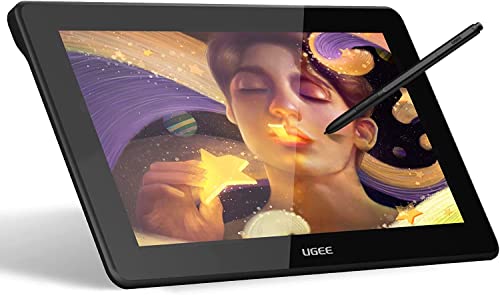
Parblo Coast10 Graphics Drawing Tablet LCD Monitor with Cordless Battery-Free Pen, 10.1 Inches Pen Display with Wool Liner Bag


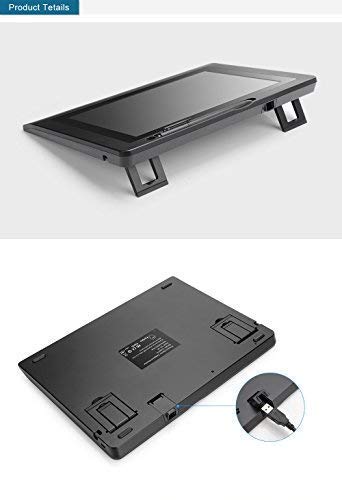

Key features
- •1. Battery-Free pen,you don't need to worry about the power capacity, or battery leakage cause pen malfunction. Without a battery did reduce the weight of graphic pen, the light weight gives more comfort and handy nature feel during your designing work or art works.
- •2. High Viewing Angle, Horizontal 170°and Vertical 170° Viewing Angle allow you to see the screen in a very comfortable way,you can put the monitor in everywhere and still easy to get clear view.
- •3. Ergonomic Design, you can put the digital screen in your lap,or on your desktop,or other dynamic movement of the scene which also provide a perfect perspective.
- •4. Unique and convenient operation all in one design,can meet various kinds of drawing creation,safe digital signature,easily fulfill the function of smoothly handwriting; Application: Painting, Multimedia Teaching, Surfing, QQ/MSN Chatting, Animation Editing, Handwriting Annotation, etc.
- •5. Operation system: Windows XP, Windows 7, Windows 8, Windows 8.1, Windows 10,Windows Vista.
Parblo Coast10 Graphics Drawing Tablet LCD Monitor with Cordless Battery-Free Pen, 10.1 Inches Pen Display with Wool Liner Bag
List Price: $241.52$217.37DEALYou Save: $24.15 (10%)
Free shippingFree Returns – 30 daysFree Order CancellationSecure Payment2–3 Days DeliveryGet It October 28, 2026In Stock (1)No marketing spamNo account requiredFulfilment by FedEx / Amazon / UPS / ShipwirePayPal / Card Buyer Protection
Customer Reviews
Reviews sourced from verified Amazon purchasers3.6
out of 5
Based on 20 reviews
5★
45%
4★
15%
3★
20%
2★
10%
1★
10%
Great hobby tablet if you're willing to go through a lot of trial-and-error installation.
Tia•August 24, 2018
I intend to update this as time goes on, but initial thoughts: it works well enough for what you pay for.
It arrived within 2 days with the free shipping and the seller actually messaged me first a few hours after with some tips.
It was hard to set up even with all the reviews and guides and required a lot of testing, reinstalling, and rebooting. I still cannot get the calibration tool to work properly, however, it seems to function well enough under these settings on Windows 10: both screens set to 125%, the tablet cannot be higher than the lowest level of the laptop, tablet cannot be the primary, laptop cannot be shut (very sad about that), the tablet must be plugged in prior to powering on my laptop, tablet must be plugged into my strongest usb ports.
The image is simultaneously both saturated and dull and it's not as bright as I'd like. The cursor is slightly offset, which I imagine I will get used to in time. The screen protector was really hard to set, but the bubbles don't actually seem to cause an issue.
Onto the good things: I am very pleased with the pressure sensitivity. It is definitely an upgrade to my old wacom non-monitor tablet. Portability is great. I love all the little gifts included, especially the carrying case.
If you want it as a secondary for travel or if you're a hobbyist on a budget, this should work for you. Of course, it still is new, so if something happens I'll be updating my review.
It arrived within 2 days with the free shipping and the seller actually messaged me first a few hours after with some tips.
It was hard to set up even with all the reviews and guides and required a lot of testing, reinstalling, and rebooting. I still cannot get the calibration tool to work properly, however, it seems to function well enough under these settings on Windows 10: both screens set to 125%, the tablet cannot be higher than the lowest level of the laptop, tablet cannot be the primary, laptop cannot be shut (very sad about that), the tablet must be plugged in prior to powering on my laptop, tablet must be plugged into my strongest usb ports.
The image is simultaneously both saturated and dull and it's not as bright as I'd like. The cursor is slightly offset, which I imagine I will get used to in time. The screen protector was really hard to set, but the bubbles don't actually seem to cause an issue.
Onto the good things: I am very pleased with the pressure sensitivity. It is definitely an upgrade to my old wacom non-monitor tablet. Portability is great. I love all the little gifts included, especially the carrying case.
If you want it as a secondary for travel or if you're a hobbyist on a budget, this should work for you. Of course, it still is new, so if something happens I'll be updating my review.
READ THE INSTRUCTIONS
Joshua J.•June 25, 2018
I took a gamble and won with this thing. I thought to myself, "Maybe all the one stars are just people who don't know how to follow directions." I was right. The tablet was a steal. Not going to lie the drivers are tricky right up until you read the directions. Took about 30 minutes total to set up and be drawing, 20 minutes of that was being bullheaded not reading the directions and treating it like a plug'n'play device. Once calibrated, which is stupid easy to do, the pen is right on point. The display is gorgeous and accurate, colors may not match your screen, but check the image on a few other screens and you'll realize it's actually perfect. The glove definitely comes in handy because you can't draw without it on. A couple of tips from experience. Uninstall all previous tablet software, Wacom, whatever. Download the driver from the website, follow the instructions, no seriously, actually read them, there's a method to the madness. Once you've installed the drivers and restarted, judging by the reviews there's a pretty good chance they aren't going to work. Now uninstall the drivers, use the CD provided and install those drivers instead. It's sounds crazy, but it suddenly works. When you first hover the pen over the tablet, it's going to be a half of screen off or worse, don't freak out, just read the instructions, calibrate it with the four bullseyes. If it doesn't make a second bullseye after touching the first one, the drivers need to be installed from another source, like I said, probably not going to work first shot. After you hit those bullseyes, you're all set and ready to rock, re-calibrate as many times as you want, be sure to hold the pen how you'll be drawing not straight up and down. It's a bit of a pain, and I can see how someone with very little computer knowledge could think it's never going to work because they didn't actually read the instruction manual which probably explains all the one-star reviews. The resolution is perfect for it's size, don't get tricked into buying a 4k HD tablet because you're scared of the resolution.
Here's hoping it lasts! Will edit review if it dies.
Here's hoping it lasts! Will edit review if it dies.
I don't like this product
G Elizondo•February 13, 2018
The product doesn't work. Afte that I bought send me a message with the information that the cd incluided must to change because the software was updated. I follow the instructios and the tablet doesn't work. Sorry, I don't like this product.
Just trouble.
RIBEIRO E FILHO LLC•January 21, 2018
I have return this, because it was more troble than I was able to make work. Driver very bad, issues with resolution and softwares that dont wanted to open in the screen, had to use like a tablet without screen to make work. It was a headache to make anything work and it crash a lot of softwares. It was not possible to work with the laptop screen closed too, the tablet is very small, heavy and dont have any express key.
And the thing that make me return finally was that only have 1 pen buttom. Impossible to make 3d software work good like that.
And the thing that make me return finally was that only have 1 pen buttom. Impossible to make 3d software work good like that.
Don't use the screen protector
ro col•January 17, 2018
After having this product for a while I can say that it has both it's pro and cons. Many other reviews mention a blueish hue to the screen but in my experience the blue hue only occurs after placing on the screen protector. Not only does it give the blue hue but it can't be taken off because when attempted it ruins the screen which is only fixed by placing it back down. the pen still doesn't calibrate the best but as long as you look at the drawing cross-hairs and not the pen it's tolerable. The tablet it'self isn't that much than a wacom intuous tablet. but if you want a small cheap tablet with a working screen then it's okay. also it's not portable unless you have a laptop as it need to be plugged in to work.
Page 1 of 4



![Drawing Glove for Tablet,[Pink 2Pack] Palm Rejection Artist Right Hand Glove Digital Art Accessories](https://m.media-amazon.com/images/I/41Jvp6-d4oL._SL500_.jpg)