gofanco USB 3.0 to HDMI Video Graphics Adapter for Multiple Monitors - Up to 2560x1440 for Windows and macOS, DisplayLink Chip, Includes HDMI-to-DVI Adapter, USB 3.0 Video Adapter (USB3HDMI)

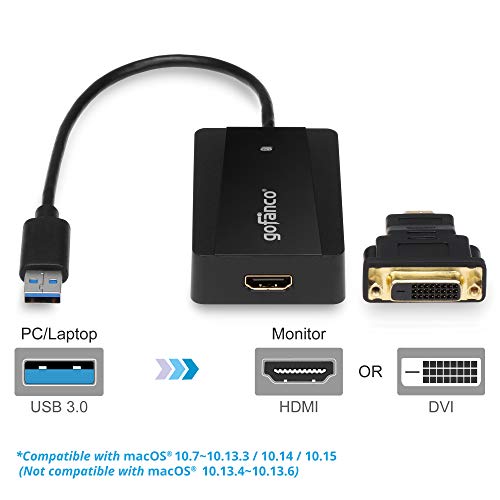

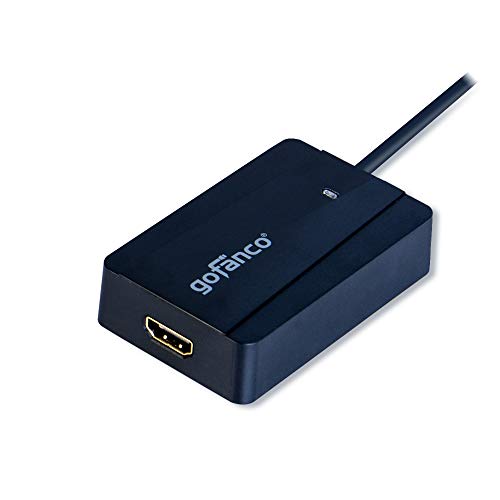
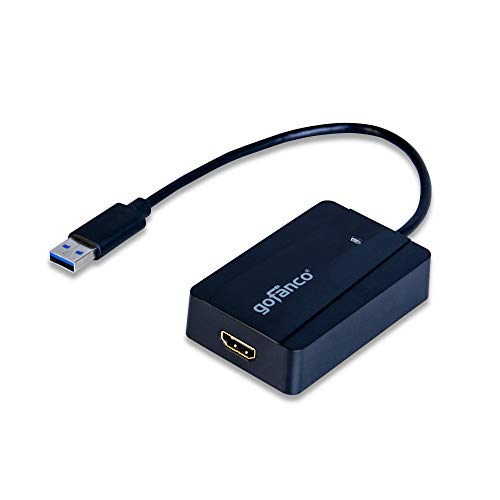

Key features
- •✔ SMOOTH EXPERIENCE WITH MINIMAL PERFORMANCE OVERHEAD: Built-in industrial leading USB docking chipset supports the highest mainstream desktop displays, providing an ultra low latency and highly interactive solution to connect multiple displays to any computing platform.
- •✔ SUPER SPEED & HIGH RESOLUTION: USB 3.0 adapter leverages SuperSpeed bandwidth up to 5 Gbps for the best performance; Supports HDMI displays up to 2560x1440 and 1920x1080; Supports DVI displays up to 2048x1152 when the HDMI-to-DVI adapter (included) is used; Backwards compatible with USB 2.0; An HDMI cable is required and sold separately
- •✔ EASY INSTALLATION & USER FRIENDLY DESIGN: User's guide and driver CD are included or available for download at gofanco website. Powered directly from USB bus with no power adapter required. 10 inches pigtail cable gives more flexibility to connect an HDTV, monitor, or projector to your USB-enabled devices; Green LED light indicates adapter is active and everything is connected.
- •✔ WIDE COMPATIBILITY: PC or Mac system with an available USB port (USB 3.0 recommended); Supports Windows 10 / 8.1 / 8 / 7 / Vista / XP and Mac OS X 10.11/10.10/10.9/10.8 (audio and video) 10.7/10.6/10.5 (video only). FCC, CE & RoHS compliant
- •✔ FIVE STAR CUSTOMER SUPPORT: We love our products and hope you will too. Our products are backed with a 1-year limited warranty and experienced tech support team in Silicon Valley.
gofanco USB 3.0 to HDMI Video Graphics Adapter for Multiple Monitors - Up to 2560x1440 for Windows and macOS, DisplayLink Chip, Includes HDMI-to-DVI Adapter, USB 3.0 Video Adapter (USB3HDMI)
List Price: $69.81$62.83DEALYou Save: $6.98 (10%)
Free shippingFree Returns – 30 daysFree Order CancellationSecure Payment2–3 Days DeliveryGet It October 25, 2026In Stock (2)No marketing spamNo account requiredFulfilment by FedEx / Amazon / UPS / ShipwirePayPal / Card Buyer Protection
Customer Reviews
Reviews sourced from verified Amazon purchasers4.5
out of 5
Based on 10 reviews
5★
60%
4★
40%
3★
0%
2★
0%
1★
0%
Works on MacBook Pro 13 inch Mid-2012 High Sierra 5 Plus Stars
E. Phillips✓ Verified Purchase•August 6, 2023
All you reviewers, please provide pertinent information as to what you are working with; I have a core intel i5 on my MacBook Pro 2016.
The goFanco has worked without much fuss. I dd not have to install software except the DisplayLink software downloaded from the web and quickly installed. I had to setup and fiddle a little bit, but got it within about 10-15 minutes or less. Once set, if I disconnected my laptop I would have to go and reset the resolution on the extended monitor. Be sure to set "Use As Separate Display" in the menu bar monitor icon for you extended display.
NOTE: in the preferences sound menu you can select that the icon appear in your menu by clicking in a box in the sound preferences. If you want sound from your Extended Display goFanco monitor then in the sound Icon set "USB Display Adapter." The goFanco monitor extender is higher resolution and less expensive than other display extender in same category and works.
KEY: When you connect, whether you connect and then disconnect or the first time connecting make sure you have your machine on and active (not in sleep mode) then FIRST connect the goFanco and make sure it is stable (5 secs or so) and then connect any other display, as in my case through through the DVI port., if you are hooking up two external screens like I have with my laptop. Took a while to figure this out.
Works great. Good Value for res on my Vizio TV 28". Very readable on my TV. Had to reset the TV settings a little for computer extended, but would do that for just viewing TV. There are higher resolution adapters, but works great for 28" TV and probably a little higher as I am not quite at highest res for this adapter. On DVI I am 1920 x 1080 (1080p) 60Hz Adapter can go to 2048 x 1152@50HZ. And with HDMI adapter in back of my monitor/TV can go to 2560 x 1440@60HZ. Very Happy! Great deal.
The goFanco has worked without much fuss. I dd not have to install software except the DisplayLink software downloaded from the web and quickly installed. I had to setup and fiddle a little bit, but got it within about 10-15 minutes or less. Once set, if I disconnected my laptop I would have to go and reset the resolution on the extended monitor. Be sure to set "Use As Separate Display" in the menu bar monitor icon for you extended display.
NOTE: in the preferences sound menu you can select that the icon appear in your menu by clicking in a box in the sound preferences. If you want sound from your Extended Display goFanco monitor then in the sound Icon set "USB Display Adapter." The goFanco monitor extender is higher resolution and less expensive than other display extender in same category and works.
KEY: When you connect, whether you connect and then disconnect or the first time connecting make sure you have your machine on and active (not in sleep mode) then FIRST connect the goFanco and make sure it is stable (5 secs or so) and then connect any other display, as in my case through through the DVI port., if you are hooking up two external screens like I have with my laptop. Took a while to figure this out.
Works great. Good Value for res on my Vizio TV 28". Very readable on my TV. Had to reset the TV settings a little for computer extended, but would do that for just viewing TV. There are higher resolution adapters, but works great for 28" TV and probably a little higher as I am not quite at highest res for this adapter. On DVI I am 1920 x 1080 (1080p) 60Hz Adapter can go to 2048 x 1152@50HZ. And with HDMI adapter in back of my monitor/TV can go to 2560 x 1440@60HZ. Very Happy! Great deal.
Works great so far
R. Currier Jr.✓ Verified Purchase•July 12, 2023
Since I'm using this on my laptop without a CDROM drive I had to download the latest driver from the Gofanco website. Hint, the product is USB3HDMI when asked. Once I figured out that their website doesn't support Firefox, only Windows Edge or Explorer the download was quick, installation is basically automatic (a couple of confirmation buttons), plugged in the USB cable and HDMI cable and, presto, the laptop screen was mirrored onto the external monitor. Windows 10 Display options have changed from what I expected, but once I clicked on "search for monitors" I selected "extended" and I had two monitors! Not sure if I had it plugged into a USB3 or USB2 port, but watching a Youtube video through the box was flawless. I still have to connect everything to my dual monitors but so far this is a great adapter for a reasonable price. Designed in the US, manufactured (like everything else is) in China. Well packaged, English instructions. Only possible con I can think of right now is I wish the USB cable was a bit longer so I could tuck the box behind my laptop, but that is primarily due to the fact my USB ports are towards the front of the computer. Highly recommended.
Can use to connect a Lenovo monitor to an hp laptop
Martha La Rue✓ Verified Purchase•June 30, 2023
I purchased this connector together with some others to try to find a connector that would let me connect a Lenovo monitor to an HP laptop for work. This was the connector that worked. At this point it's working wonderfully. I will try to remember to update this review later about the connector's durability over time.
It works...details below
Jimbo1234✓ Verified Purchase•June 17, 2023
Hi,
I hope this helps anyone looking to buy this. My details below:
1. I have a Dell tower with dual monitors at home.
2. I have a personal laptop that I don't use to terribly often.
3. I have a work laptop that I use frequently at home.
I was looking for a device that would let me use both monitors when I wanted. Particularly my work laptop. Sometimes I need to knock out some things at home and I need applications running on both my huge monitors instead of my small Lenovo laptop screen. I wanted my laptops to project to my large home monitors.
I still like to look around at brick and mortar stores, but nobody caries inventory anymore. I poked around on Amazon until I found a switch that supported two monitors. It works, but I have some notes below. I hope it helps you:
1. Shipping was great. I got it in time, in good shape, and this come with all (MOST) of the cables you need.
2. It is a low profile device and looks good.
3. The instructions are lacking a bit. There is a little bit of language barrier when reading them. Made in China, so the instructions can be a little confusing.
4. It comes with a driver disk, but I didn't need it for Windows 10. I'm running Windows 10 on all my devices.
5. Major things to note:
5A: You need to run HDMI from your monitors into the switch. If for some reason you have older monitors without HDMI, you will need a adapter that switches the output to HDMI.
5B: You only get ONE HDMI output to a shared PC/Laptop/Device.
5C: That means one of your devices needs a VGA connection.
5D: Neither my tower or laptops have a VGA input, so I had to buy this: gofanco USB 3.0 to DVI/VGA Video Card Adapter for Multiple Displays w/DVI-to-VGA Converter. This is the part that will plug into your laptop(s).
5E: Be sure you go into your Power Settings" in your laptop to change the setting to "do nothing" when you close the lid. My work laptop was fine, but this was messing me up on my personal laptop.
6. Cable management is atrocious. LOL. This thing has 12 cables going into it, plus the three loose ones sitting around waiting to go into your laptop. I will need to spend several hours on a day off to make this look good. No fault of the device, but just wasn't expecting that much of a mess of wires.
7. I added the picture, because navigating the switch can be confusing. This sequence is what makes the laptops gain access to both monitors. The lights on (1) and (1) work for the Dell tower.
This is what you need. I would buy it again. Just save a little patience when setting it up.
I hope this helps anyone looking to buy this. My details below:
1. I have a Dell tower with dual monitors at home.
2. I have a personal laptop that I don't use to terribly often.
3. I have a work laptop that I use frequently at home.
I was looking for a device that would let me use both monitors when I wanted. Particularly my work laptop. Sometimes I need to knock out some things at home and I need applications running on both my huge monitors instead of my small Lenovo laptop screen. I wanted my laptops to project to my large home monitors.
I still like to look around at brick and mortar stores, but nobody caries inventory anymore. I poked around on Amazon until I found a switch that supported two monitors. It works, but I have some notes below. I hope it helps you:
1. Shipping was great. I got it in time, in good shape, and this come with all (MOST) of the cables you need.
2. It is a low profile device and looks good.
3. The instructions are lacking a bit. There is a little bit of language barrier when reading them. Made in China, so the instructions can be a little confusing.
4. It comes with a driver disk, but I didn't need it for Windows 10. I'm running Windows 10 on all my devices.
5. Major things to note:
5A: You need to run HDMI from your monitors into the switch. If for some reason you have older monitors without HDMI, you will need a adapter that switches the output to HDMI.
5B: You only get ONE HDMI output to a shared PC/Laptop/Device.
5C: That means one of your devices needs a VGA connection.
5D: Neither my tower or laptops have a VGA input, so I had to buy this: gofanco USB 3.0 to DVI/VGA Video Card Adapter for Multiple Displays w/DVI-to-VGA Converter. This is the part that will plug into your laptop(s).
5E: Be sure you go into your Power Settings" in your laptop to change the setting to "do nothing" when you close the lid. My work laptop was fine, but this was messing me up on my personal laptop.
6. Cable management is atrocious. LOL. This thing has 12 cables going into it, plus the three loose ones sitting around waiting to go into your laptop. I will need to spend several hours on a day off to make this look good. No fault of the device, but just wasn't expecting that much of a mess of wires.
7. I added the picture, because navigating the switch can be confusing. This sequence is what makes the laptops gain access to both monitors. The lights on (1) and (1) work for the Dell tower.
This is what you need. I would buy it again. Just save a little patience when setting it up.
Still working 5 years later
Andrew M. Miller✓ Verified Purchase•May 27, 2023
i bought this 5 years ago for an original 12" MacBook (the super light one with only one USB-C port). After switching to a MacBook Pro I no longer needed it so put it away. Fast forward 4 years and I have a MacBook Air M2 which can only drive 1 external monitor. Pulled this out and works perfect with the latest DisplayLink driver (1.8 as of this review - fortunately updated for Ventura) to drive a 24" Acer 2K monitor (2560x1440 at 50 hz).
Very cool to have this still work so well.
Very cool to have this still work so well.
Page 1 of 2

![QGeeM USB C to HDMI Adapter 4K Cable, USB Type-C to HDMI Adapter [Thunderbolt 3/4] HDMI Adapter for Laptop MacBook Pro/Air, Galaxy S10/S9/S8, Dell XPS 13/15, Pixelbook, Surface Pro and More(Pink)](https://m.media-amazon.com/images/I/21V8dThK9rS._SL500_.jpg)


![WAVLINK USB 2.0 to VGA/DVI/HDMI Universal Video Graphics Card Adapter for Multiple Monitors Up to 1920x1080@60Hz for Windows, Mac OS & Chrome OS[Includes DVI-to-VGA,DVI-to-HDMI Converter]](https://m.media-amazon.com/images/I/41EpG2i9dhL._SL500_.jpg)