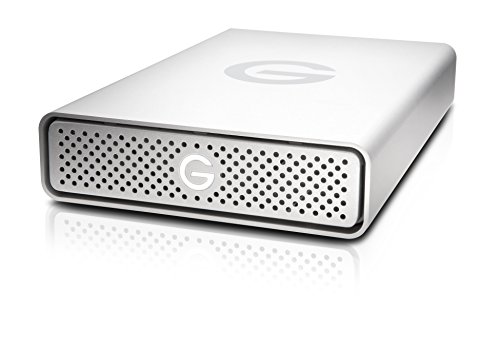
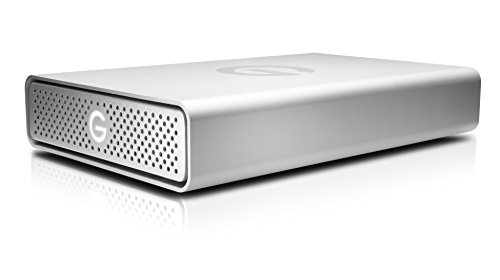
G-Technology G-DRIVE USB 3.0 10TB External Hard Drive (0G05016)


Key features
- •10TB Capacity
- •High speed USB 3.0 for universal, high-speed data transfer
- •Solid, stylish all-aluminum case for dur
- •Plug-and-play on Mac; easily reformatted on Windows
- •3-year limited warranty
G-Technology G-DRIVE USB 3.0 10TB External Hard Drive (0G05016)
List Price: $744.41$669.97DEALYou Save: $74.44 (10%)
Free shippingFree Returns – 30 daysFree Order CancellationSecure Payment2–3 Days DeliveryGet It October 24, 2026In Stock (1)No marketing spamNo account requiredFulfilment by FedEx / Amazon / UPS / ShipwirePayPal / Card Buyer Protection
Customer Reviews
Reviews sourced from verified Amazon purchasers4.5
out of 5
Based on 10 reviews
5★
70%
4★
30%
3★
0%
2★
0%
1★
0%
Calidad, Precio, Eficiencia!
Jean Acevedo✓ Verified Purchase•November 3, 2023
Producto con gran acabado, fácil de utilizar, con altas velocidades de transferencias de archivo o hacen un disco de trabajo ideal para el hogar en tu escritorio.
Easy backup tool, works with Apple Time Machine
Amazon Customer✓ Verified Purchase•October 18, 2023
Set up was easy, worked with Apple Time Machine right out of the box. I bought it to replace an Apple Sirport Express which had crashed. Airport is a router that also has an internal storage disk, and Time Machine backs up your device(s) to Airport automatically. The only feature about G-Technology 4TB G-Drive USB External hard drive is that it does not work (that is, I can't figure out how to make it work) through the network; that is, through the wireless router. You have to plug your device into the G-Technology 4TB G-Drive USB External hard drive to back up the device. Which it does quickly & easily, which is what I really wanted most of all.
G Drives Are Great; Might Need Self Powered Hubs
Jim✓ Verified Purchase•September 26, 2023
These new 4 TB G Drives come plug in ready for Macs. The set up fast and run quietly. But they were disappearing from my Mac Pro in the middle of backing up another drive when I had them going into my Mac Pro by way of a Belkin 4 port USB C hub. You won't have a problem if you plug your drive cable directly to your computer or might not even if using a Belkin hub but not backing up tons of data. So I took a chance and ran the G Drive cable directly into my Mac and voila, no more dropping out. So I purchased an Anker 10 port USB 3 data hub that runs by its own power cord -- that is the important difference here-- and I have had no more problems. The Anker comes with its own USB 3 cable and power cord, and all goes together smoothly. I am sending the unpowered Belkins back to the dealer for a refund. PS: Nobody I talked to, at G Drive or Belkin knew what to do about this problem.
Works perfectly for my use...just ordered a second drive for redundancy
Gadget67✓ Verified Purchase•September 13, 2023
I'm a long time G Drive fan and have been using them since 2007 (I still have two 500 gigabyte drives that I use for music and photos). My current 4tb G drive is exactly two years old and works perfectly as a time machine back up for my MacBook Pro. I toyed with purchasing a NAS but by purchasing a second 4tb G Drive for an alternating time machine back up I'll effectively have a RAID array. I already save important files (photos, music, ebooks, etc) separately on other back up drives so the additional second drive is an additional fail safe. I was initially a bit concerned about the large number of one star reviews but if I receive a faulty drive I'll simply return it or submit a warranty claim. These drives don't receive gentle handling from delivery companies. While they are durable drives some aren't going to survive unscathed when being tossed around during the delivery process. I'll update this review after I've used the second drive (arriving today). Hopefully I'll continue to have a good experience!
Update 10/19: my second unit arrived. After unpacking and letting it acclimate to room temperature I set it up as my second time machine drive. Everything works as expected with zero issues. Both drives function perfectly, aren't noisy, and just run smoothly in the background. If that changes, I'll update accordingly.
Update 10/19: my second unit arrived. After unpacking and letting it acclimate to room temperature I set it up as my second time machine drive. Everything works as expected with zero issues. Both drives function perfectly, aren't noisy, and just run smoothly in the background. If that changes, I'll update accordingly.
Great drive especially for the price
jim✓ Verified Purchase•September 4, 2023
The drive was recognized as soon as I plugged it into my Macbook Pro (mid-2009) (the quick start mentions the on/off power-button in case you didn't notice it), but I did First Aid and erased disk anyway. I was worried (based on other reviews) about noise and heat. I'm currently 10% into a TimeMachine backup of 500G and the case is only warm to the touch and much quieter than my older 7200rpm external drive (which has a fan). You do hear head servo seek noises but not loud nor unexpected for a mechanical drive. This is plugged into my older MBP (with USB) but I plan to use it with my soon-to-arrive new MBP (with Thunderbolt 3). I don't particularly care about speed since I plan to only do TimeMachine so I didn't benchmark it; TimeMachine estimated 21 hr for a full backup which converts into 6MB/s all in at the app layer, which is fine with me for incrementals. Will update if my experience changes using my new MBP or if problems arise later. Note that I selected a wall-powered 7200rpm because this is only for backups done from my desk and not portable use (I have cloud backup for on-the-go and I like using my big-screen monitor for working). If you need a truly portable option, the USB-powered 5400rpm, would be a better (but somewhat slower) option.
Page 1 of 2