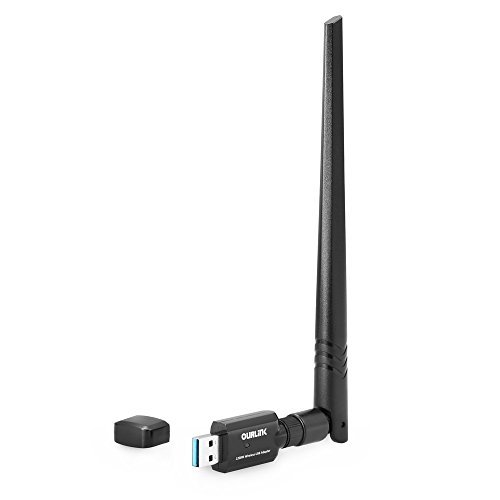
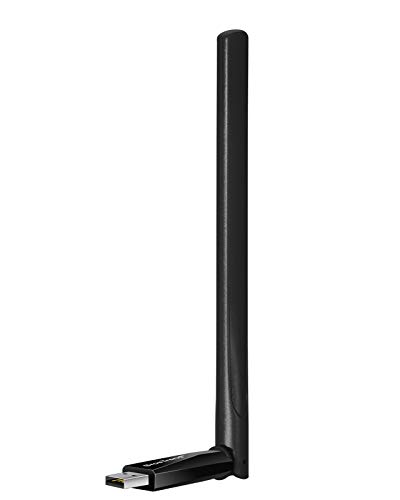
BrosTrend 650Mbps Long Range USB WiFi Adapter for Laptop, Desktop of Windows 10/8/7/XP & MAC OS X 10.14~10.9, 5dBi Antenna, 5G 433Mbps, 2.4G 200Mbps


Key features
- •MINI SIZE HIGH GAIN USB WIFI ADAPTER WITH POWERFUL EXTERNAL HIGH GAIN WIFI ANTENNA: Brings You Range Extended WiFi Connection of 433Mbps Speed on 5GHz Band or 150Mbps on 2.4GHz; And Save Space of Other USB Ports on your Computer, Excellent for Laptop, Desktop PC
- •ANGLE-ADJUSTABLE 3DBI DUAL BAND HIGH GAIN WIFI ANTENNA FOR BETTER SIGNAL RECEIVING: You Can Adjust Angle of the External Wi-Fi Antenna Horizontally and Vertically to Get Optimal WiFi Connection In Your Spot
- •EXCELLENT WIRELESS ADAPTER FOR PC COMPUTERS: 5GHz WiFi is Good for Lag-Free On-Line Gaming, High Quality Video and Music Streaming; 2.4GHz wi-fi is Good for On-Line Shopping, Web Browsing, Internet Calls, Email Checking, etc
- •PLUG AND PLAY WINDOWS WIRELESS ADAPTER: Plug to Any USB Port of your Computer, Install the Driver and Works with Windows 10, Windows 8.1, Windows 8, Windows 7, Windows Vista, Windows XP, Windows 2K, 32Bit and 64Bit OS Supported
- •DUAL BAND USB WIRELESS ADAPTER WORKS WITH ALL WIFI ROUTERS*: Works with the Latest Dual Band AC WiFi Router to Take Best Advantage of the Latest WiFi Technology, and Also Compatible with your Previous Wireless N /G/B/A Routers
BrosTrend 650Mbps Long Range USB WiFi Adapter for Laptop, Desktop of Windows 10/8/7/XP & MAC OS X 10.14~10.9, 5dBi Antenna, 5G 433Mbps, 2.4G 200Mbps
List Price: $34.90$31.41DEALYou Save: $3.49 (10%)
Free shippingFree Returns – 30 daysFree Order CancellationSecure Payment2–3 Days DeliveryGet It October 26, 2026In Stock (1)No marketing spamNo account requiredFulfilment by FedEx / Amazon / UPS / ShipwirePayPal / Card Buyer Protection
Customer Reviews
Reviews sourced from verified Amazon purchasers4.0
out of 5
Based on 10 reviews
5★
40%
4★
30%
3★
10%
2★
0%
1★
20%
High speed and tremendous range, but needs better instructions on how to prevent random disconnects
Chris R✓ Verified Purchase•November 5, 2017
Unit appears to be of a sturdy, high-quality, construction. Works great and the range is very good, am getting a high speed connection at the farthest point in the house from the router. On my Windows 7 machine I initially had problems with it randomly disconnecting and needing to periodically re-set the adapter, but figured out that by:
1. In Windows Power Options, under Power Saving Mode, set Wireless adapter to "Maximum Performance"
2. In Windows Power Options, under USB settings, set the USB Selective Suspend Setting to "Disabled"
3. In Device Manager, under Network Adapters, right click on the Realtek adapter, then properties, then Power Management and then UNCHECK the box that says "Allow the computer to turn off this device to save power."
With those three steps it will stay connected indefinitely - no problems. Not sure why the instructions provided with the unit don't give you these instructions; from other reviews it seems that many people are frustrated by the unit constantly disconnecting.
1. In Windows Power Options, under Power Saving Mode, set Wireless adapter to "Maximum Performance"
2. In Windows Power Options, under USB settings, set the USB Selective Suspend Setting to "Disabled"
3. In Device Manager, under Network Adapters, right click on the Realtek adapter, then properties, then Power Management and then UNCHECK the box that says "Allow the computer to turn off this device to save power."
With those three steps it will stay connected indefinitely - no problems. Not sure why the instructions provided with the unit don't give you these instructions; from other reviews it seems that many people are frustrated by the unit constantly disconnecting.
Nice unit - good price - good performance - very happy
Number Six✓ Verified Purchase•October 5, 2017
Running Windows 10 Home 64 bit, this worked fine for a couple of weeks - it just plugged in and worked. After I upgraded my system to Windows 10 Pro 64 bit it stopped working, no matter what I did - I downloaded and installed latest Win10 driver, and it immediately started working again - I am very happy with it (and my other BrosTrend purchase) and would recommend the product and the company behind it - certainly I would buy this brand again (I have two of these AC 3 adapters now)
I purchased this BrosTrend adapter after my 5-year-old 5db 300Mpbs stand-alone adapter fried itself when I stupidly unscrewed it's antenna while it was operating ($60 lesson learned - don't ever unscrew an antenna whilst your adapter is plugged in!) - I don't get any faster speed using my new adapter than my old adapter (my current router is a few years old) but I have acquired newer technology should I need to upgrade my router in the future for a very good price (I think the trick is to make sure your adapter can handle the fastest speed your router can provide - at the best price - and make sure you are not paying similar money for less impressive technology)
I think spending a bit extra for an adapter with high gain antennas is a worthwhile investment as I definitely see big speed gains (about 2x) over a standard 300-600 Mpbs USB dongle adapter without a protruding antenna on my system
I purchased this BrosTrend adapter after my 5-year-old 5db 300Mpbs stand-alone adapter fried itself when I stupidly unscrewed it's antenna while it was operating ($60 lesson learned - don't ever unscrew an antenna whilst your adapter is plugged in!) - I don't get any faster speed using my new adapter than my old adapter (my current router is a few years old) but I have acquired newer technology should I need to upgrade my router in the future for a very good price (I think the trick is to make sure your adapter can handle the fastest speed your router can provide - at the best price - and make sure you are not paying similar money for less impressive technology)
I think spending a bit extra for an adapter with high gain antennas is a worthwhile investment as I definitely see big speed gains (about 2x) over a standard 300-600 Mpbs USB dongle adapter without a protruding antenna on my system
Important Details
Derek✓ Verified Purchase•August 13, 2017
Alright, so at first the drivers on brostrend site were outdated, I found the latest drivers for the Realtek 8812au chip (which this adapter uses) on
Realtek's official website. After updating to latest drivers operation was smoother and less abnormal. I am using a 25ft USB extension cord.
At first I was frustrated it didn't seem I was getting any improved connection. After adjusting the "Beam" settings in the wireless adapter properties in
the windows device manager . I able to get 4 out of 5 bars at 325 Mega(bits). NOTE: The wireless source is unknown I'm using xfinitywifi.
Realtek's official website. After updating to latest drivers operation was smoother and less abnormal. I am using a 25ft USB extension cord.
At first I was frustrated it didn't seem I was getting any improved connection. After adjusting the "Beam" settings in the wireless adapter properties in
the windows device manager . I able to get 4 out of 5 bars at 325 Mega(bits). NOTE: The wireless source is unknown I'm using xfinitywifi.
Updated after issues arose. Still great, but has some problems.
Tyler Baker✓ Verified Purchase•August 10, 2017
This thing is amazing! Before now, my only option for internet was hoping that my aging laptop's onboard wireless could reach all the way across the house to get a decent signal. My download speeds were around 1-2 MB/s when all other devices got much, much better speeds. All I had to do was plug in this adapter and download the latest driver from the website. Now my download speeds are 8+ MB/s at this distance, and I have a steady connection while playing online games. I plan to update my review later if any of this changes, but for >$30, I can't really complain!
UPDATE: After using this for several days as a replacement for my laptop's onboard Wi-Fi card, I have begun to have several annoying issues. The biggest issue is the signal just dropping out at random. I've verified that the router itself isn't dropping the signals by using other devices and switching back to the onboard Wi-Fi receiver on my computer. The signal will be excellent (max bars) one second, then it will drop out entirely and the device will not pick up any other Wi-Fi signals for several minutes unless I go into Windows settings and reset it. Even then, it's started dropping the signal seconds after the reset. This is all on the latest driver on the BrosTrend/TrendTech website was installed. I've tried disabling my onboard adapter, leaving it on, and various other fixes, but nothing seems to help the problem anymore. If this keeps up, I'm going to return it.
UPDATE: After using this for several days as a replacement for my laptop's onboard Wi-Fi card, I have begun to have several annoying issues. The biggest issue is the signal just dropping out at random. I've verified that the router itself isn't dropping the signals by using other devices and switching back to the onboard Wi-Fi receiver on my computer. The signal will be excellent (max bars) one second, then it will drop out entirely and the device will not pick up any other Wi-Fi signals for several minutes unless I go into Windows settings and reset it. Even then, it's started dropping the signal seconds after the reset. This is all on the latest driver on the BrosTrend/TrendTech website was installed. I've tried disabling my onboard adapter, leaving it on, and various other fixes, but nothing seems to help the problem anymore. If this keeps up, I'm going to return it.
2 units tested - only the left connector works on both (2nd unit purchased 2 months after first)
TheComputerScientist✓ Verified Purchase•July 2, 2017
Something is legitimately wrong with this product. After many network monitoring tests, I have concluded that only one of these antenna adapters actually works. Both antennas are fine, but only one plug is active. This might not be that big of a deal if it wasn't for the fact that the single antenna port that works, has a horrible signal. It's about 3x worse than my laptops built in wifi card. Less than ten ft away from my router, yields a signal strength of 90db + (no matter what orientation of the 1 working antenna port). Switching over to my built in wifi card, shows a signal strength of 25db in same location. For reference, I did update the drivers on Windows 10. I've also tried this adapter on two Windows 10 computers with the exact same results. Maybe I got a lemon or something, but for this kind of product to pass quality control, should make anyone think twice about purchasing. My 10 year old (54mbps) adapter (no external antenna's) easily gets better signal strength and more networks. Returning promptly, it's a really horrible product..
Edit: I've run a few more tests. I'm within 3 feet of my router right now, and the signal strength is, at best, 74 db. I think this device is causing destructive interference wifi patterns on itself. It's the only thing that makes any sense. I'd love to open it up and see if I can fix it with a quick solder, but I want my 25 bucks back.
EDIT: Bought a second one 2 months after initial review and can say with 100% certainty that the right antenna connection on both units only SLIGHTLY enhances 5GHz signal (comparing to using w/ no antenna). The left antenna, increases both 2.4 and 5GHz bands, while the right antenna connector shows absolutely no 2.4GHz bands whatsoever (aside from being 3 feet away from a 2.4GHz router.. This must be a mass manufactured defect in either all, a particular batch, or (even worse) by design. It's hard to believe that 2 units purchased months apart would have been from the same batch... I suggest that if you do own this product, to test connection signal strength with only one antenna connected to the right side port and report in your reviews/comment here if you observe the same results. I'll attach images to show the data on signal strength with all combinations of possible antenna configurations (i.e. no antenna - left only - right only - both).
I've tested the individual antenna that came with this, separately on a a Panda wifi adapter. Surprisingly, they are very good antennas when used with another adapter. The main body is messed up in these and can't utilize the antennas power. I took apart on of the antenna and can verify that the actual antenna (internals) are build correctly and with good quality.
My suggestion from this though, is to just go with the Panda Wireless PAU09 N600 Dual Band. The Panda unit works really well. Plus it works with Kali Linux.
I took an hour combining tests for this review because I have come to hate this product and the company who makes them (I gave them a chance, but decided to keep the defective unit(s) and throw them a hard up middle-finger).. After contacting support to inform them of a dead-on-arrival product(purchase #1), they requested that I pay to ship it back to them, and then wait 2-4 weeks for a replacement to be sent from China. WTF is up with that??? Their idea of this situation is that a customer is supposed to pay for a problem the company should bear 100% responsibility for. Anyways screw this company and this product. Let the data speak for itself. Here's the product you should buy though:
https://www.amazon.com/dp/B01LY35HGO/ref=cm_cr_ryp_prd_ttl_sol_1
Edit: I've run a few more tests. I'm within 3 feet of my router right now, and the signal strength is, at best, 74 db. I think this device is causing destructive interference wifi patterns on itself. It's the only thing that makes any sense. I'd love to open it up and see if I can fix it with a quick solder, but I want my 25 bucks back.
EDIT: Bought a second one 2 months after initial review and can say with 100% certainty that the right antenna connection on both units only SLIGHTLY enhances 5GHz signal (comparing to using w/ no antenna). The left antenna, increases both 2.4 and 5GHz bands, while the right antenna connector shows absolutely no 2.4GHz bands whatsoever (aside from being 3 feet away from a 2.4GHz router.. This must be a mass manufactured defect in either all, a particular batch, or (even worse) by design. It's hard to believe that 2 units purchased months apart would have been from the same batch... I suggest that if you do own this product, to test connection signal strength with only one antenna connected to the right side port and report in your reviews/comment here if you observe the same results. I'll attach images to show the data on signal strength with all combinations of possible antenna configurations (i.e. no antenna - left only - right only - both).
I've tested the individual antenna that came with this, separately on a a Panda wifi adapter. Surprisingly, they are very good antennas when used with another adapter. The main body is messed up in these and can't utilize the antennas power. I took apart on of the antenna and can verify that the actual antenna (internals) are build correctly and with good quality.
My suggestion from this though, is to just go with the Panda Wireless PAU09 N600 Dual Band. The Panda unit works really well. Plus it works with Kali Linux.
I took an hour combining tests for this review because I have come to hate this product and the company who makes them (I gave them a chance, but decided to keep the defective unit(s) and throw them a hard up middle-finger).. After contacting support to inform them of a dead-on-arrival product(purchase #1), they requested that I pay to ship it back to them, and then wait 2-4 weeks for a replacement to be sent from China. WTF is up with that??? Their idea of this situation is that a customer is supposed to pay for a problem the company should bear 100% responsibility for. Anyways screw this company and this product. Let the data speak for itself. Here's the product you should buy though:
https://www.amazon.com/dp/B01LY35HGO/ref=cm_cr_ryp_prd_ttl_sol_1
Page 1 of 2